NoMachine vs RustDesk: Which Remote Desktop Software Is Right for You?
NoMachine offers a seamless remote desktop experience built for high speeds, extreme stability, and efficiency. It caters to those who appreciate a smooth, low-latency connection and reliable service. The company excels at fast video rendering, multimedia streaming, and remote workstation access through their NX protocol, which has been optimized for efficiency.
RustDesk is the opposite of NoMachine. It markets itself as a community-driven, open-source remote desktop alternative focused on the users’ freedom and privacy, as well as self-hosted control. It targets individuals, small development teams, and peer-to-peer-oriented users who appreciate having a lightweight client and complete transparency.
To conclude, the decision between NoMachine and RustDesk lies with the type of workflow you prefer. For high-performance streaming with an excellent user interface, NoMachine is the superior choice. For everyone else who values open-source software, data sovereignty, and cost savings, RustDesk is a much more flexible choice.
NoMachine vs RustDesk: Comparison Table
| Feature |
NoMachine |
RustDesk |
| Primary Use Case |
High-performance remote desktop for professionals |
Open-source remote access with self-hosting options |
| Target Audience |
Enterprises, engineers, and remote professionals |
Developers, privacy-focused users, small teams |
| Core Functionality |
Fast streaming, multimedia support, file transfer |
Self-hosted remote access, encryption, lightweight control |
| Customization |
Interface tweaks, session configurations |
Fully customizable with server hosting & configs |
| Pricing |
Free personal plan + enterprise editions |
Completely free and open source |
| Integration & API |
Enterprise tools, virtual desktop infrastructure |
Self-hosting API, community plugins |
| Ideal For |
Smooth performance and workplace productivity |
Privacy, transparency, and full data control |
Detailed Feature Comparison of NoMachine and RustDesk
- Performance & Remote Access Quality
NoMachine is built around its proprietary NX protocol, engineered for fast screen refresh rates and minimal latency. It is especially suited for graphics-heavy workflows, including design, engineering simulations, remote video editing, and multimedia playback.
RustDesk, in comparison, uses a Rust-based architecture that prioritizes lightweight communication and secure connectivity. While not as fast as NoMachine for high-performance graphics, RustDesk handles standard desktop sharing, troubleshooting, and administrative control with ease.
NoMachine offers a polished installer and user interface. Setting up a remote session is straightforward: install, log in, and connect. It automatically detects available devices and doesn’t require manual server configuration unless deploying in a corporate environment.
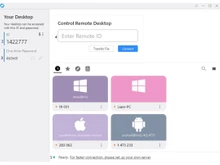
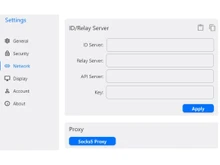
RustDesk, on the other hand, provides a simple plug-and-play experience for most users while also offering advanced server deployment for privacy. Setting up a self-hosted RustDesk server requires effort but gives users full control over data, identity management, and connection routing.
NoMachine uses SSH and NX encryption, ensuring secure communication. Enterprise users can integrate LDAP, Active Directory, and other identity systems. However, NoMachine is proprietary, so internal mechanisms cannot be inspected by the community.
RustDesk excels in this category because privacy is its core value. Being fully open source, it offers transparent end-to-end encryption and allows users to run their own RustDesk server, meaning no external cloud provider ever has access to traffic. This makes RustDesk ideal for data-sensitive work environments or users who want complete autonomy.
- File Transfer & Collaboration
NoMachine includes advanced file-transfer tools, clipboard synchronization, audio forwarding, webcam sharing, and multi-session interactions. It also allows recording remote sessions for training and compliance.
RustDesk provides basic file transfer, clipboard sharing, and standard session tools. It is functional but simpler compared to NoMachine’s refined collaboration features.
- Customization & Interface
NoMachine delivers UI flexibility based on certain practical parameters, including session quality, screen resolution, bandwidth, multi-monitor usage, etc. The interface is fully developed and consistent across all platforms.
RustDesk harnesses its open-source proprietary model to afford greater server-side flexibility. Users have the ability to manipulate backend elements, set up their own relay server deployments, or mesh with their current system. The client-side interface is simple, minimal, and clean.
NoMachine is accessible on Windows, macOS, Linux, Raspberry Pi, Android, and iOS. Its cross-platform support is particularly advantageous in heterogeneous OS setups, which makes it widely used in enterprises.
RustDesk is also multi-platform, providing support to Windows, macOS, Linux, Android, iOS, and even BSD. Its flexibility makes it a useful open-source alternative for cross-platform access.
NoMachine guarantees professional support and documentation, in addition to their proprietary enterprise service model. This is particularly useful for companies that have needs for fixed response times and reliability.
RustDesk is part of a fast-developing worldwide community. Assistance offered is community-based, encompassing GitHub discussion groups, open-source collaborations, and self-organized user documentation. Although willing, it does not have the organized support structure that enterprises would expect.
NoMachine integrates with enterprise systems, SSH, virtual desktops, and multimedia environments. It is ideal for corporate networks with complex infrastructure.
RustDesk integrates best with self-hosted systems, small teams, and developer workflows. It can be embedded into custom software setups, automated through scripts, and extended via source-code modifications.
When to Choose NoMachine or RustDesk?
| Factor |
Choose NoMachine if… |
Choose RustDesk if… |
| Primary Goal |
You want high-performance & multimedia remote control |
You want open-source freedom & full control |
| Experience Level |
You’re a professional needing reliability |
You’re a tech user comfortable with self-hosting |
| Customization Needs |
You want UI-level refinements |
You want deep backend/server customization |
| Security Priority |
You’re okay with proprietary encryption |
You need transparent, open-source encryption |
| Infrastructure |
You prefer plug-and-play ease |
You want full control of relay servers & routing |
| Cost |
You’re fine with enterprise pricing |
You want completely free software |
Installation & Setup Experience
NoMachine
- Simple, guided installation across Windows, macOS, Linux, Raspberry Pi & ARM devices.
- Automatically detects nearby devices and configures defaults without manual setup.
- Ideal for beginners or teams needing quick, plug-and-play remote access.
RustDesk
- Offers instant use with a public relay server but allows full self-hosting for privacy.
- Self-hosting setup requires deploying relay + rendezvous servers, often via Docker.
- Perfect for technical users who want backend control and customizable infrastructure.
Final Verdict: NoMachine or RustDesk?
NoMachine is a polished, high-performance remote desktop solution ideal for professionals who need smooth streaming, enterprise stability, and advanced collaboration tools. It shines when performance matters—especially in engineering, multimedia, design, or mixed-OS corporate environments.
RustDesk, however, stands out for users who value openness, affordability, and data privacy. It is the perfect tool for developers, privacy-conscious teams, and organizations looking to self-host their entire remote-access environment without depending on third-party servers.
In short:
- Choose NoMachine for performance, enterprise reliability, and refined remote-desktop features.
- Choose RustDesk for freedom, transparency, and full data control.
 UAE
UAE India
India


 Comparison


 7 Ratings & 1 Reviews


 Free Trial






 Get directly in your email inbox on your Whatsapp


