linkedin
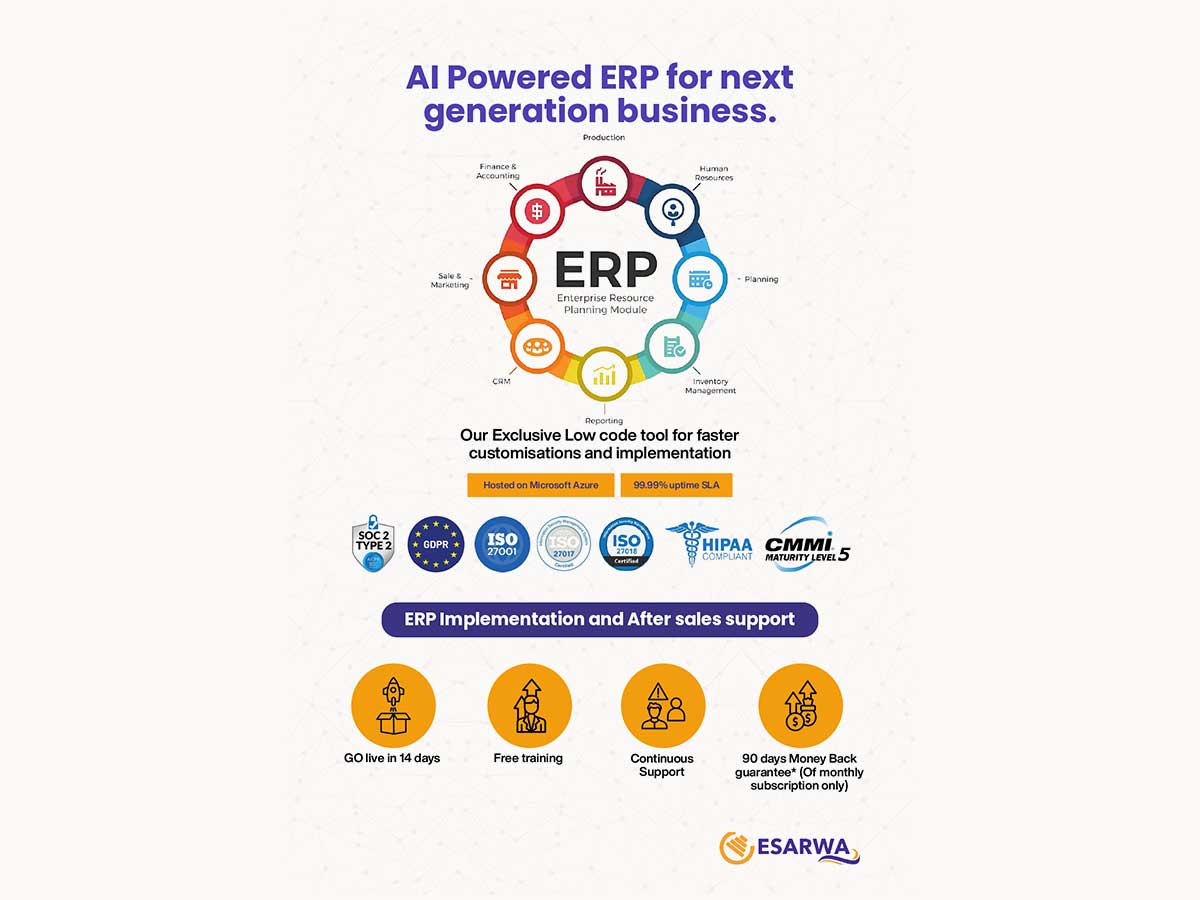
Esarwa Enterprise ERP logo
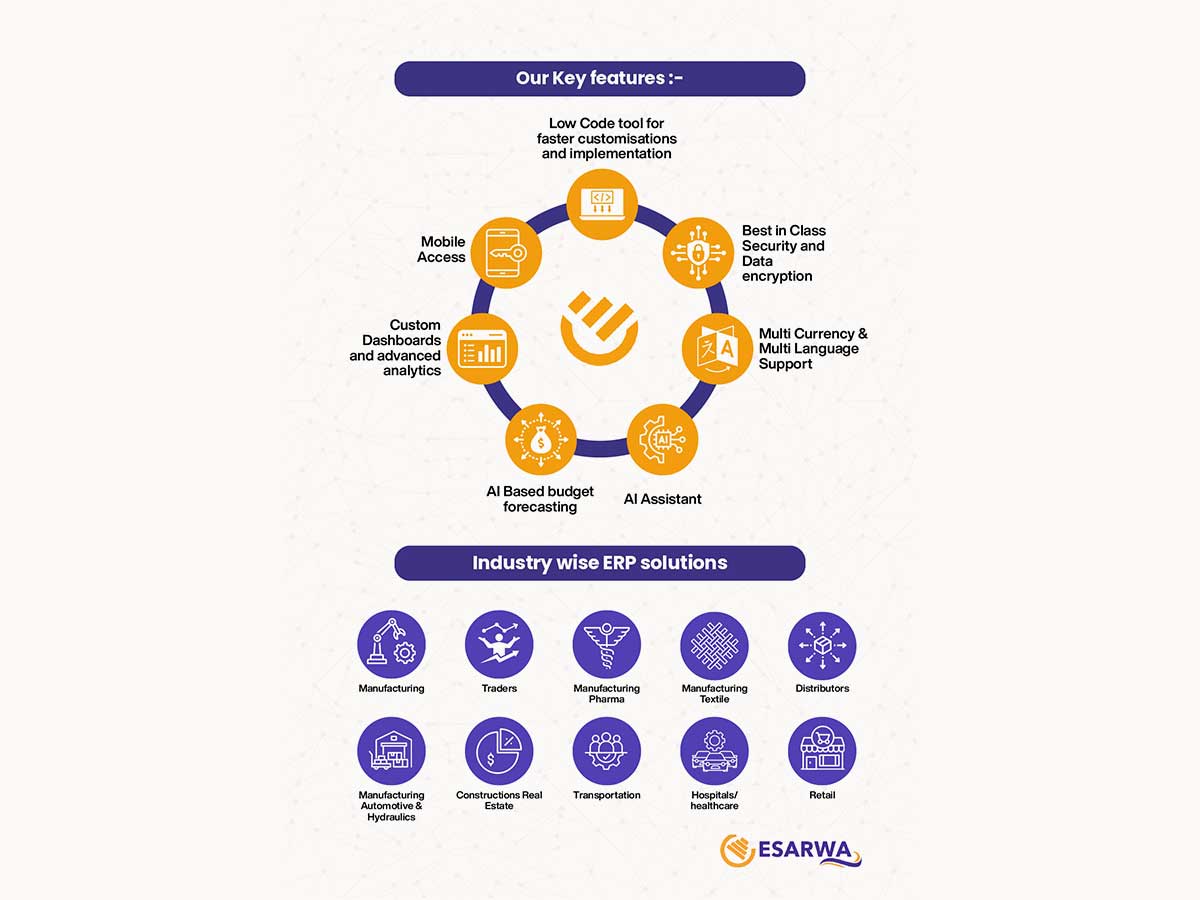
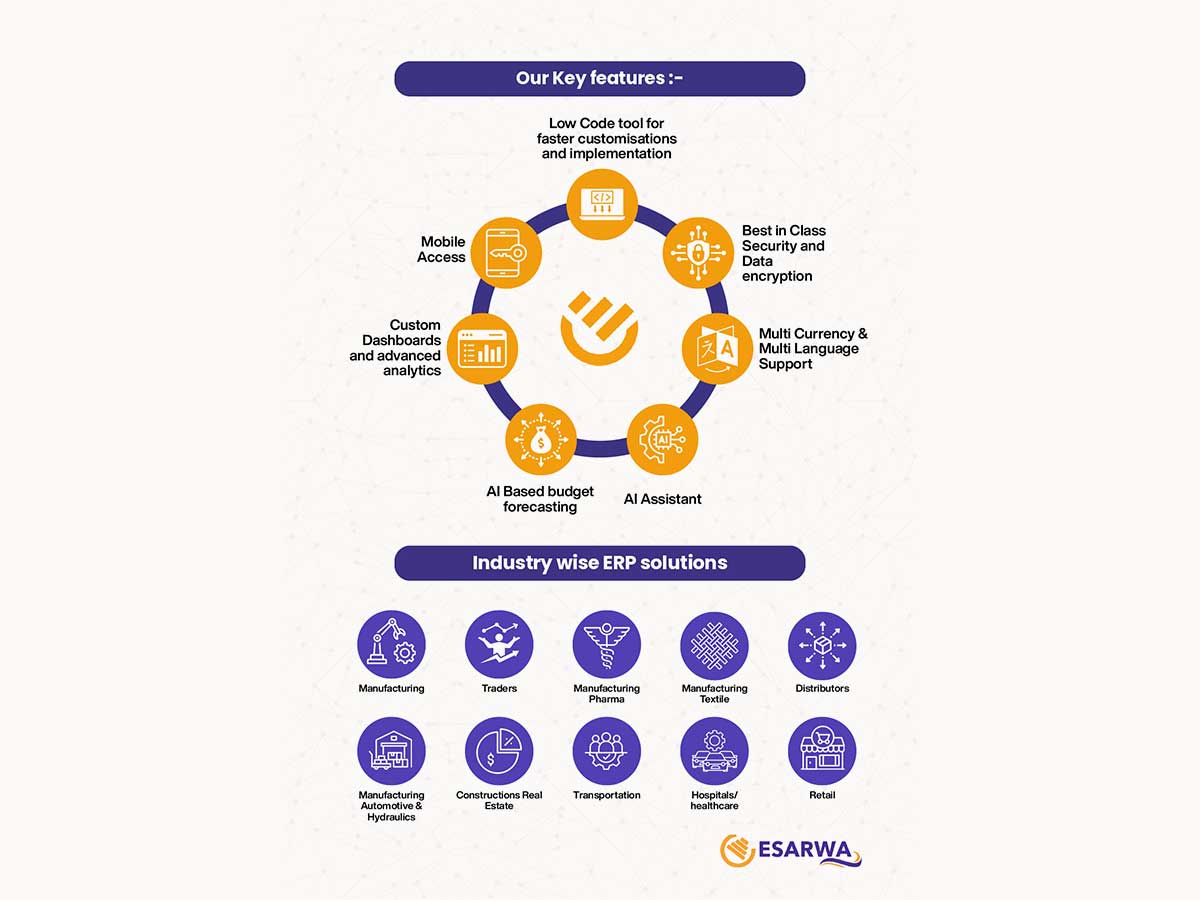
Esarwa-ERP features
Esarwa-ERP industry
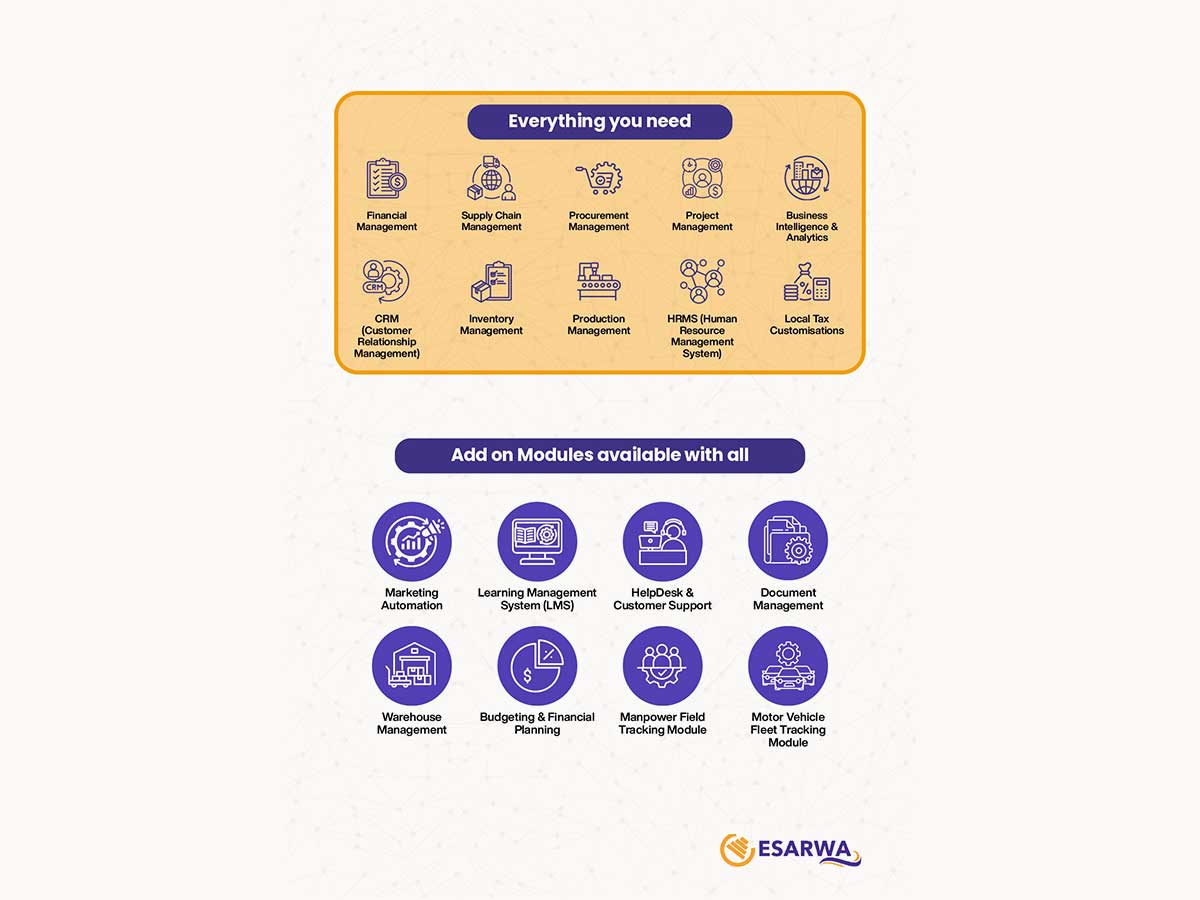
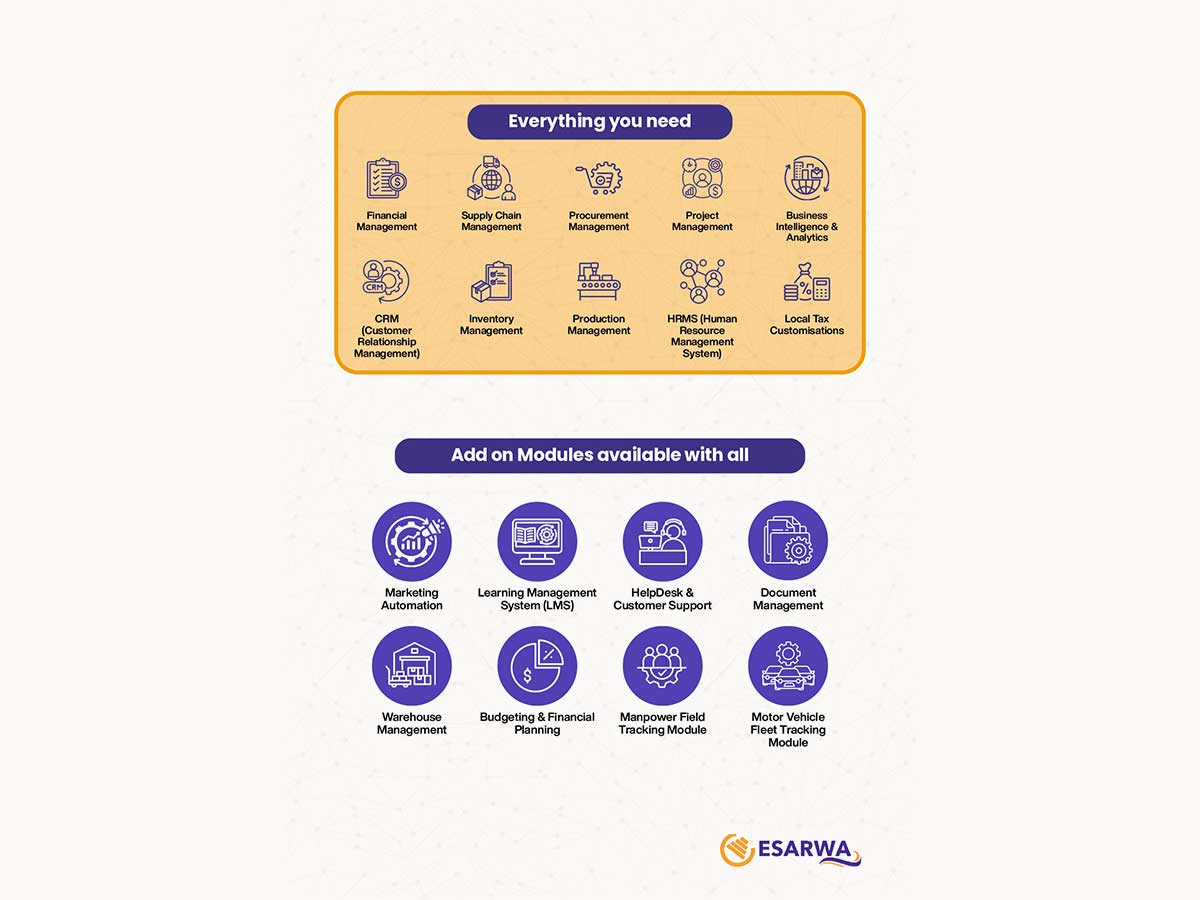
Esarwa-ERP modules

Esarwa Enterprise ERP

Brand: Esarwa

  • No Ratings & Reviews

Enterprise resource planning system for businesses managing finance, operations, and business processes.

See More

Have you used Esarwa Enterprise ERP before?

Share your insights for better experience

Add a Review

Price Available on Request

Questions about pricing or customization? We’re here to help, just a click away.

100% Genuine
Products
Best Price
Guaranteed
Safe & Secure
Payment
  • Description

  • Pricing

  • Features

  • Specification

  • Review

  • FAQ

Esarwa Enterprise ERP Software Overview

What is Esarwa Enterprise ERP?

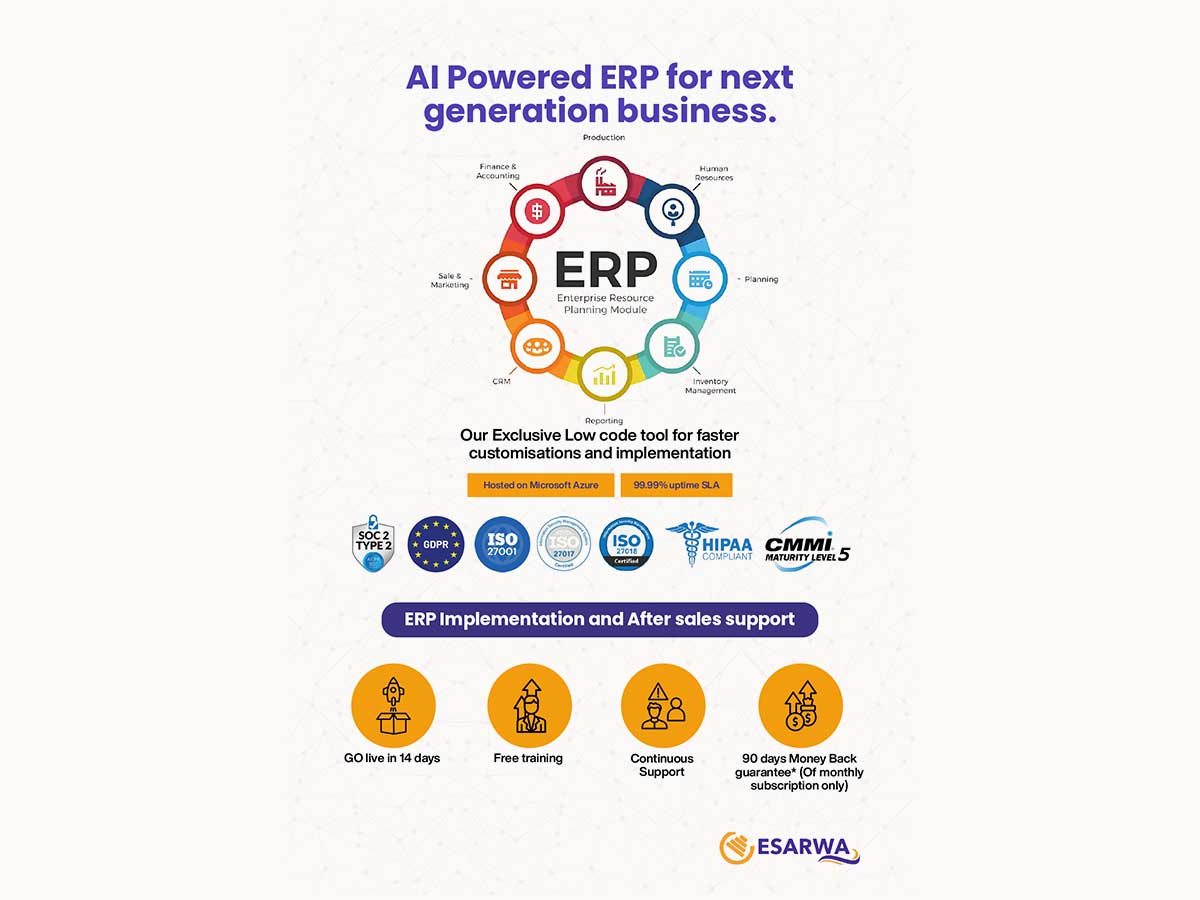
Esarwa Enterprise ERP is a cloud-based ERP software designed to help mid-sized and large businesses manage all their operations from a single, unified platform.

It integrates core business functions such as finance, inventory, sales, HR, CRM, manufacturing, and supply chain management into one system for seamless operational control.

Built on Microsoft Azure, Esarwa Enterprise ERP offers strong security, reliable performance, and robust data protection. Using low-code technology, the platform allows quick customization and faster implementation, often within a short timeframe.

The software supports multiple industries, including manufacturing, retail, healthcare, logistics, and construction. It also includes AI-powered tools, real-time dashboards, analytics, mobile access, and multi-currency and multi-language support for global operations.

Why Choose Esarwa Enterprise ERP Software?

  • Finance & Accounting Control: Manage accounting, budgeting, expenses, and financial reporting from a centralized system.
  • Supply Chain Operations: Improve supplier coordination, logistics flow, and overall supply chain efficiency.
  • Purchase & Procurement Control: Streamline purchase requests, approvals, vendor management, and procurement tracking.
  • Project Planning & Tracking: Plan, monitor, and control projects with improved timelines and visibility.
  • Business Intelligence & Reporting: Access real-time insights and analytics to support informed decision-making.
  • Customer Relationship Management (CRM): Organize customer data, sales activities, and client interactions efficiently.
  • Stock & Inventory Control: Monitor inventory levels, movement, and availability to avoid shortages or excess stock.
  • Production Planning & Control: Enhance production scheduling, monitoring, and manufacturing efficiency.
  • HR & Workforce Management (HRMS): Manage employee records, payroll, attendance, and HR operations smoothly.
  • Local Tax & Compliance Customisation: Ensure compliance with local tax regulations through region-specific configurations.

Benefits of Esarwa Enterprise ERP Software

  • Optimise Efficiency & Automation: Automates daily operations to save time and reduce manual errors.
  • Custom Dashboards & Reporting: Provides role-based dashboards with real-time analytics and business intelligence.
  • Cost-Effective Solutions: Improves resource utilization, lowers operational costs, and ensures better cost control.
  • Achieve Scalability & Growth: Supports business expansion with flexible systems that adapt to evolving needs.
  • Customer Satisfaction & Retention: Enhances customer experience through improved services and personalized interactions.
  • Compliance & Risk Management Assurance: Ensures regulatory compliance, reduces operational risks, and strengthens data security.

Esarwa Enterprise ERP Pricing

Esarwa Enterprise ERP price is available upon request at techjockey.

The pricing model is based on different parameters, including extra features, deployment type, and the total number of users. For further queries related to the product, you can contact our product team and learn more about the pricing and offers.

Read more

Esarwa Company Details

Founded Year:  2020

ESARWA aims to provide best-in-class services at affordable prices to everyone on their fingertips for their compliance needs with use of State of the Art technology.

Director/Founders AKSHAY MADNANI, ARVIND DESAI, ASHOK MADNANI, MISHITA MADNANI
Company Size 1-100 Employees

Esarwa Enterprise ERP Pricing & Plans

Looking for The Right Pricing?

Share your requirements and get a plan built around your business.

  • Define your business needs
  • Get customised pricing
  • Choose features that fit your workflow

Price Available on Request

Get personalised Esarwa Enterprise ERP pricing that fits your needs. Our team will connect with you.

Esarwa Enterprise ERP Features

Financial/Accounts Management

  • icon_check Tax Management
    Automates tax calculations, compliance, and reporting, ensuring accuracy and adherence to regulations.
  • icon_check Fixed Asset Management
    Track, manage, and depreciate assets.
  • icon_check General Ledger
    Unified accounting hub with real-time updates.
  • icon_check Bank Reconciliation
    Matches ERP records with bank statements to ensure financial accuracy and detect discrepancies.
  • icon_check Budgeting And Forecasting
    Planning financials based on historical and predictive data.
  • icon_check Accounts Payable & Accounts Receivable
    Invoice tracking and payment processing.
  • icon_check Multi-Currency Support
    Handling transactions in various currencies.
  • icon_check Revenue Recognition and Subscription Billing
    Automates revenue recognition and manages recurring billing in compliance with ASC 606.

Human Resource Management (HRM)

  • icon_check Payroll Management
    Automatic calculations for salaries, benefits, and deductions.
  • icon_check Learning Management
    Training programs and skill assessments.
  • icon_check Performance Management
    Employee appraisals, KPI tracking, and reviews.
  • icon_check Time and Attendance
    Tracking work hours and attendance schedules.
  • icon_check Employee Information Management
    Centralized database for employee data.
  • icon_check Recruitment and Onboarding
    Tools for hiring, job postings, and new hire integration.

Supply Chain Management

  • icon_check Demand Planning
    Forecasting tools to predict inventory needs.
  • icon_check Inventory Management
    Real-time tracking of stock levels and warehouse locations.
  • icon_check Transportation Management
    Manages logistics, shipment tracking, and carrier performance for efficient delivery.
  • icon_check Route Planning
    Optimizes delivery routes to minimize costs and ensure timely deliveries.
  • icon_check Supplier Relationship Management
    Monitoring supplier performance and communications.
  • icon_check Procurement and Purchasing
    Supplier management and purchase order automation.
  • icon_check Logistics and Distribution
    Shipment tracking and delivery scheduling.
  • icon_check Warehouse Management (WMS)
    Enables real-time inventory tracking with barcode, bin, and warehouse process automation.

Manufacturing

  • icon_check Bill Of Materials (BOM)
    Manage components and materials for product creation.
  • icon_check Production Planning and Scheduling
    Resource allocation and timeline planning.
  • icon_check Material Requirement Planning (MRP)
    Plans material needs based on demand, inventory, and lead times to prevent shortages.
  • icon_check Maintenance Management
    Tracks and schedules maintenance tasks to ensure equipment reliability and reduce downtime.
  • icon_check Work Order Management
    Scheduling and tracking production tasks.
  • icon_check Quality Control Management
    Tools for tracking and enforcing production standards.
  • icon_check Shop Floor Management
    Integration with IoT for real-time production data.
  • icon_check Field Service Management
    Schedules, tracks, and manages service teams and work orders in the field.
  • icon_check Production Lifecycle Management
    Manages product development from design to delivery with version and change control.

Customer Relationship Management (CRM)

  • icon_check Contact Management
    Centralized database for customer interactions.
  • icon_check Lead Management
    Captures, tracks, and nurtures leads to improve sales conversions and pipeline efficiency.
  • icon_check Marketing Automation
    Tools for email, SMS, and social media campaigns.
  • icon_check Sales Pipeline Management
    Tracking leads, opportunities, and deals.
  • icon_check Audience Segmentation
    Insights into customer behavior and preferences.

Project Management

  • icon_check Time Tracking
    Recording billable and non-billable hours.
  • icon_check Collaboration Tools
    Shared workspaces, chat, and document sharing.
  • icon_check Resource Management
    Allocation of team members and tools.
  • icon_check Task Scheduling
    Gantt charts and timelines for projects.
  • icon_check Cost Management
    Monitoring expenses and staying within budget.

Reporting and Analytics

  • icon_check Predictive Analytics
    Tools to forecast trends and outcomes.
  • icon_check Sales Reports
    Analyzes sales trends, revenue, and top performers to guide strategy.
  • icon_check Dashboards
    Real-time performance insights with KPIs.
  • icon_check Financial Reports
    Provides insights into financial health with balance sheets, income, and cash flow statements.
  • icon_check Business Intelligence
    Advanced analytics, dashboards, and KPIs for strategic insights and trend forecasting.
  • icon_check Custom Reports
    Tailored reports for various business needs.
  • icon_check Real Time Reports
    Delivers live data and metrics for faster, informed decision-making.
  • icon_check Regulatory Compliance Reports
    Ensure adherence to industry standards.

Integrations

  • icon_check Customer Support
    Integration with helpdesk and ticketing systems.
  • icon_check API Integration
    Connects ERP with third-party tools for seamless data exchange and process automation.
  • icon_check Third Party Integration
    Seamless integration with third-party applications.
  • icon_check Payment Gateway Integration
    Support for various payment methods.
  • icon_check Ecommerce Integration
    Syncs ERP with e-commerce platforms for real-time order, inventory, and customer data updates.

Security and Compliance

  • icon_check Disaster Recovery
    Backup and recovery options for business continuity.
  • icon_check Data Encryption
    Protect sensitive information.
  • icon_check Audit Management
    Plan, execute and track audits within organisation
  • icon_check Role-Based Access Control (RBAC)
    Granular permissions for users.
  • icon_check Regulatory Compliance Management
    Manages adherence to global and regional standards like GDPR, SOX, HIPAA, and industry-specific regulations.

Administrative Features

  • icon_check Workflow Automation
    Customizable triggers for repetitive tasks.
  • icon_check Data Import/Export
    Transfers data efficiently using standard formats like CSV and Excel.
  • icon_check Admin Panel
    Central hub for user, system, and workflow management with real-time control.
  • icon_check User Access Management
    Controls user permissions and access for enhanced security.
  • icon_check Workflow Approval
    Automates approval processes with role-based actions to streamline tasks.
  • icon_check Centralized Database
    Stores all business data in one system, eliminating silos and ensuring accuracy.

Alerts & Notifications

  • icon_check Security Alerts
    Notifies of suspicious activities like unauthorized logins to protect data.
  • icon_check Custom Event Alerts
    Triggers alerts for specific events like overdue payments or inventory shortages.
  • icon_check Non-Compliance Issues
    Flags and resolves regulatory or policy breaches for compliance adherence.
  • icon_check Email and SMS Notifications
    Automates alerts for approvals, reminders, and updates via email/SMS.

Esarwa Enterprise ERP Specifications

Supported Platforms
Ubuntu Ubuntu Windows Windows MacOS MacOS Linux Linux
Devices
Desktop Desktop
Deployment
Cloud-Based Cloud-Based
Suitable For
All Industries
Business Specific
All Businesses
Business Size
Small Business Medium Business Enterprises MSMBs MSMEs
Customer Support
Phone Email Forums
Language
English
Training Resources
Live Online Documentation Videos

Esarwa Enterprise ERP Review

Be the First to Review

This product has no reviews yet. Be the first to leave your feedback.

Add Review

How much does Esarwa Enterprise ERP Software cost?

Esarwa Enterprise ERP price is available upon request at techjockey UAE.

Is there a mobile app available for Esarwa Enterprise ERP Software?

No, Esarwa Enterprise ERP does not offer mobile applications.

Which operating systems are compatible with Esarwa Enterprise ERP Software?

Esarwa Enterprise ERP works on Ubuntu, Linux, Windows and MacOS.

Does Esarwa Enterprise ERP Software offer a free trial?

Esarwa Enterprise ERP does not offer a free trial.

How does Esarwa Enterprise ERP Software function?

Esarwa Enterprise ERP integrates key business processes like finance, inventory, HR, CRM, and operations into one cloud platform for automated management and real-time insights.

Who uses Esarwa Enterprise ERP Software?

Esarwa Enterprise ERP Software is used by a wide range of industries, including manufacturing, pharmaceutical manufacturing, textile manufacturing, automotive & hydraulics, distributors, construction & real estate, transportation, hospitals and healthcare, and retail sectors.

Is a free demo available for Esarwa Enterprise ERP Software?

Yes, Esarwa Enterprise ERP free demo is available.

Is Esarwa Enterprise ERP Software available for free?

No, Esarwa Enterprise ERP is not available for free.

How much does Esarwa Enterprise ERP Software cost?

Esarwa Enterprise ERP price is available upon request at techjockey.

Is there a mobile app available for Esarwa Enterprise ERP Software?

No, Esarwa Enterprise ERP does not offer mobile applications.

Which operating systems are compatible with Esarwa Enterprise ERP Software?

Esarwa Enterprise ERP works on Ubuntu, Linux, Windows and MacOS.

Does Esarwa Enterprise ERP Software offer a free trial?

Esarwa Enterprise ERP does not offer a free trial.

How does Esarwa Enterprise ERP Software function?

Esarwa Enterprise ERP integrates key business processes like finance, inventory, HR, CRM, and operations into one cloud platform for automated management and real-time insights.

Who uses Esarwa Enterprise ERP Software?

Esarwa Enterprise ERP Software is used by a wide range of industries, including manufacturing, pharmaceutical manufacturing, textile manufacturing, automotive & hydraulics, distributors, construction & real estate, transportation, hospitals and healthcare, and retail sectors.

Is a free demo available for Esarwa Enterprise ERP Software?

Yes, Esarwa Enterprise ERP free demo is available.

Is Esarwa Enterprise ERP Software available for free?

No, Esarwa Enterprise ERP is not available for free.

Terms and Condtions

close

Users with registered businesses can purchase goods from merchants on the platform to satisfy their business needs. Users are not permitted to utilize any products acquired through the platform for resale, advertising, business, or further distribution.

For each purchase made, users will receive a Tax Invoice (or 'GST invoice') that includes specific details such as:

  • the GSTIN of the user associated with their registered business, and

  • the specified Entity Name for their business.

It should be noted that not all products are eligible for GST Invoice. Only the products displayed by participating sellers with the 'GST-based Invoice Available' callout on the product description page would qualify.

Certain goods and services are not eligible to get a GST Invoice, including items with VAS, i.e., Value Added Services (e.g., Total Mobile Protection/Assured Buyback) and those involving an exchange offer at the time of purchase.

Users must ensure the accuracy of the GSTIN, and business entity name provided for the GST Invoice. Requests for corrections into GST Invoice would not be accommodated by Techjockey.com or any Seller, and any issues arising from user-provided information are the sole responsibility of users.

Techjockey.com is not liable for the GST Invoice or any associated input tax credit. To efficiently claim an input tax credit, users should select the registered place of business address as per the GST authority's data and follow the provisions of the GST Act and rules.

To claim an input tax credit, the delivery and billing addresses must match. Furthermore, input tax credits will not be granted if the delivery address and GSTIN on the invoice are from different states. In case of incorrect GST details provided during the order placement, the order will be canceled automatically.

20,000+ Software Listed 20,000+ Software Listed

Best Price Guaranteed Unbiased Comparison

Free Expert Consultation Read Authentic Reviews

2M+ Happy Customers 500,000+ Monthly Users