linkedin
Invoiced logo
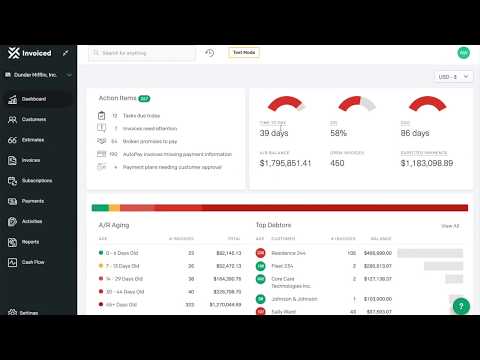
play Invoiced Demo
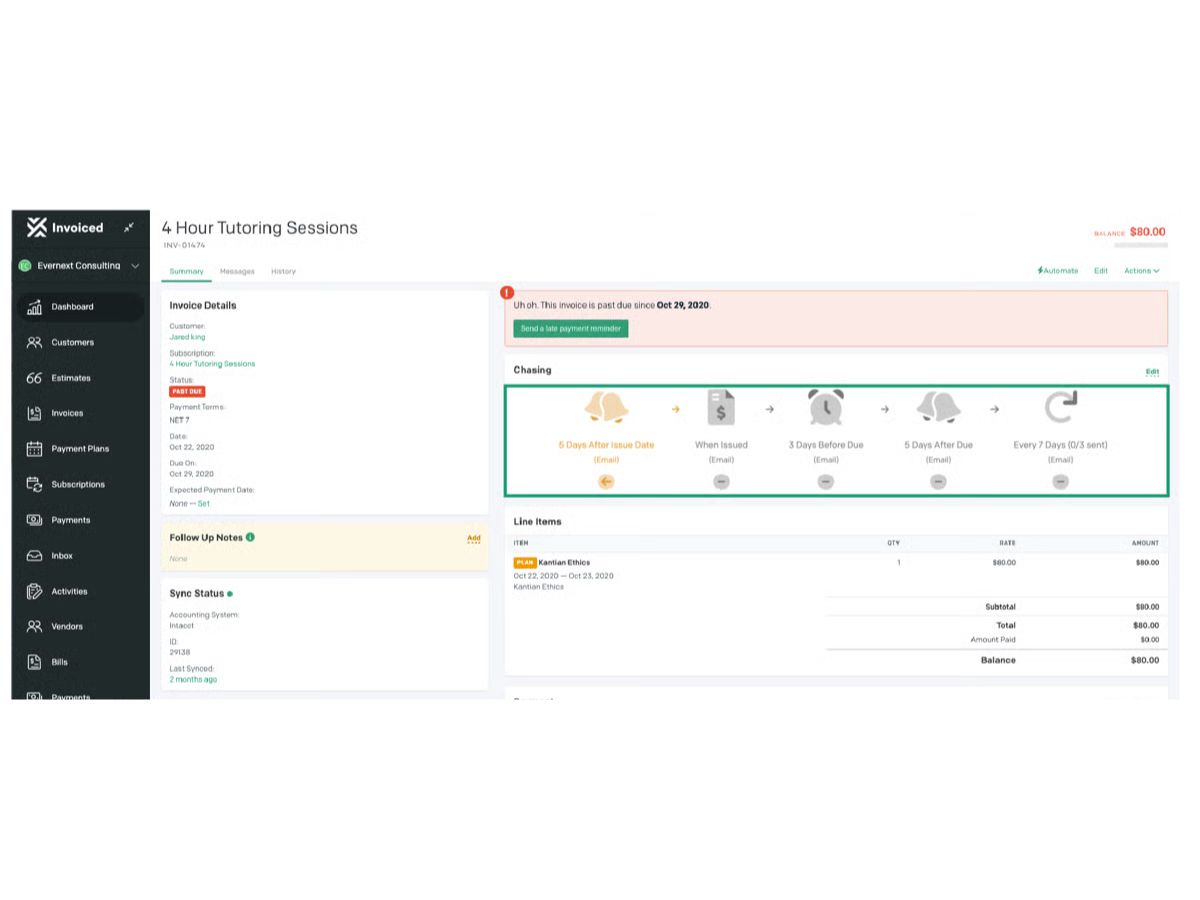
invoiced-console
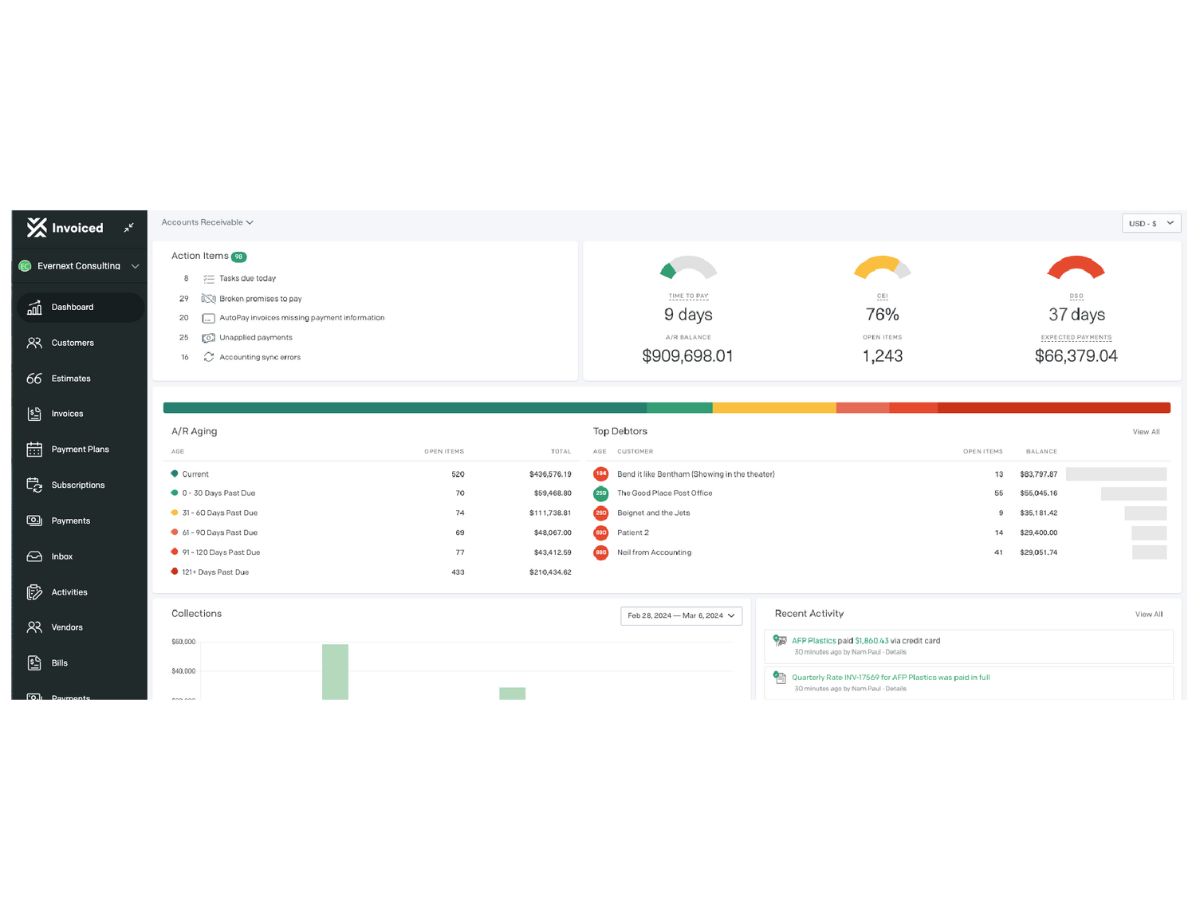
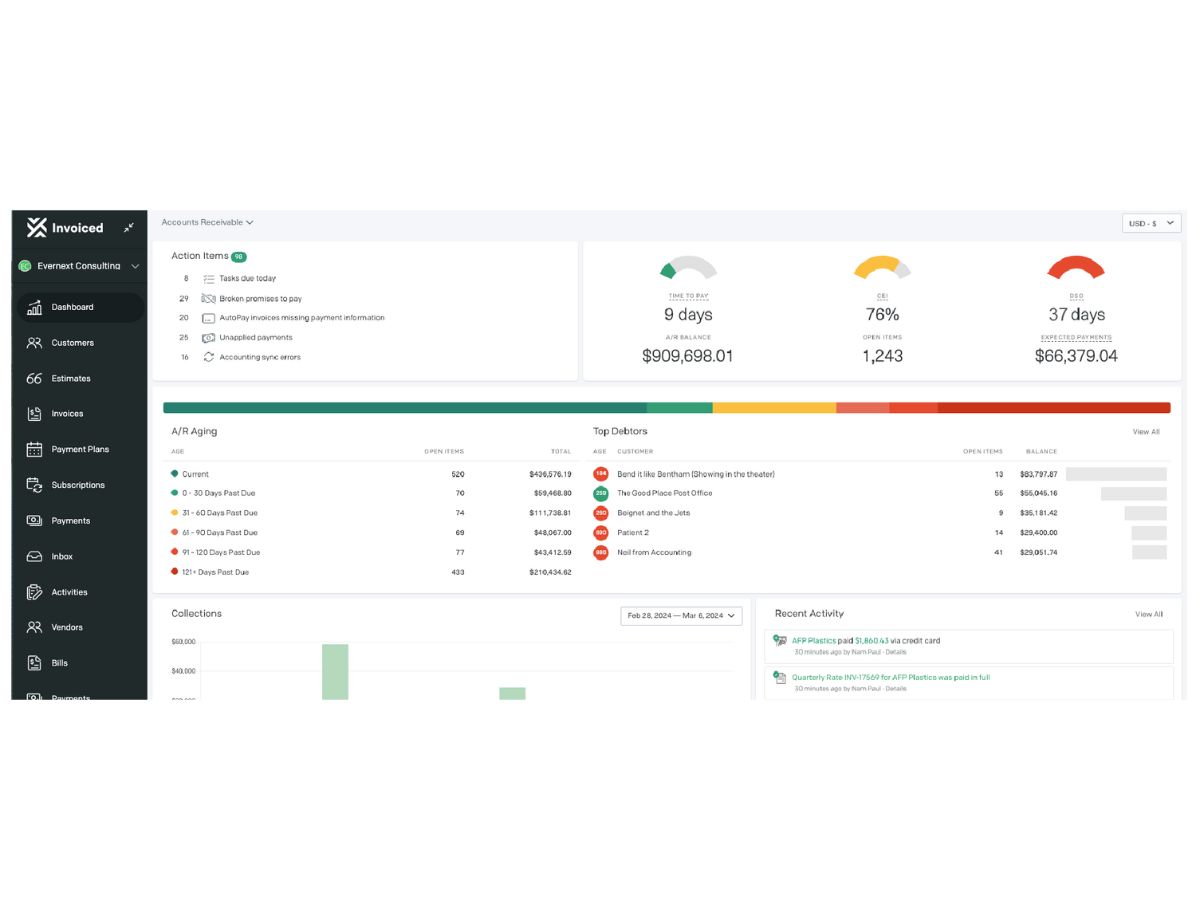
invoiced-dashboard

Invoiced

Brand: Flywire

  • 4.5

  • 3 Ratings

Invoiced is an accounting software that helps businesses manage their finances.

See More

Have you used Invoiced before?

Share your insights for better experience

Add a Review

Price Available on Request

Questions about pricing or customization? We’re here to help, just a click away.

100% Genuine
Products
Best Price
Guaranteed
Safe & Secure
Payment
  • Description

  • Pricing

  • Features

  • Specification

  • Review

  • Compare

  • Alternatives

  • FAQ

Invoiced Software Overview

What is Invoiced?

Invoiced is a cloud-based accounting software that allows users to accept customer payments through diverse channels, including credit cards, ACH, and various payment merchants. It presents a comprehensive suite of modules featuring Invoice-to-Cash, Recurring Billing, Payment Plans, and Customer Portals.

Clients can leverage the system to implement recurring billing, choose from tailored payment plans, and set up autopay for streamlined transactions. In addition, the software seamlessly integrates with popular third-party payment gateways such as PayPal, Stripe, and Authorize.Net. It empowers businesses to configure volume-based pricing, establish discounts and promotion codes, and set rollover rates, enhancing flexibility in pricing strategies.

Why Choose Invoiced?

  • The accounting software offers an A/R inbox to detect, extract, and process virtual card payments automatically.
  • It matches incoming wire, ACH, and EFT payments to invoices or balances, integrates with the bank feed, and intelligently handles short payments, overpayments, and more.
  • The platform automatically collects payments, including ACH, direct debit, and credit card payments, when an invoice is issued.

Functionalities of Invoiced

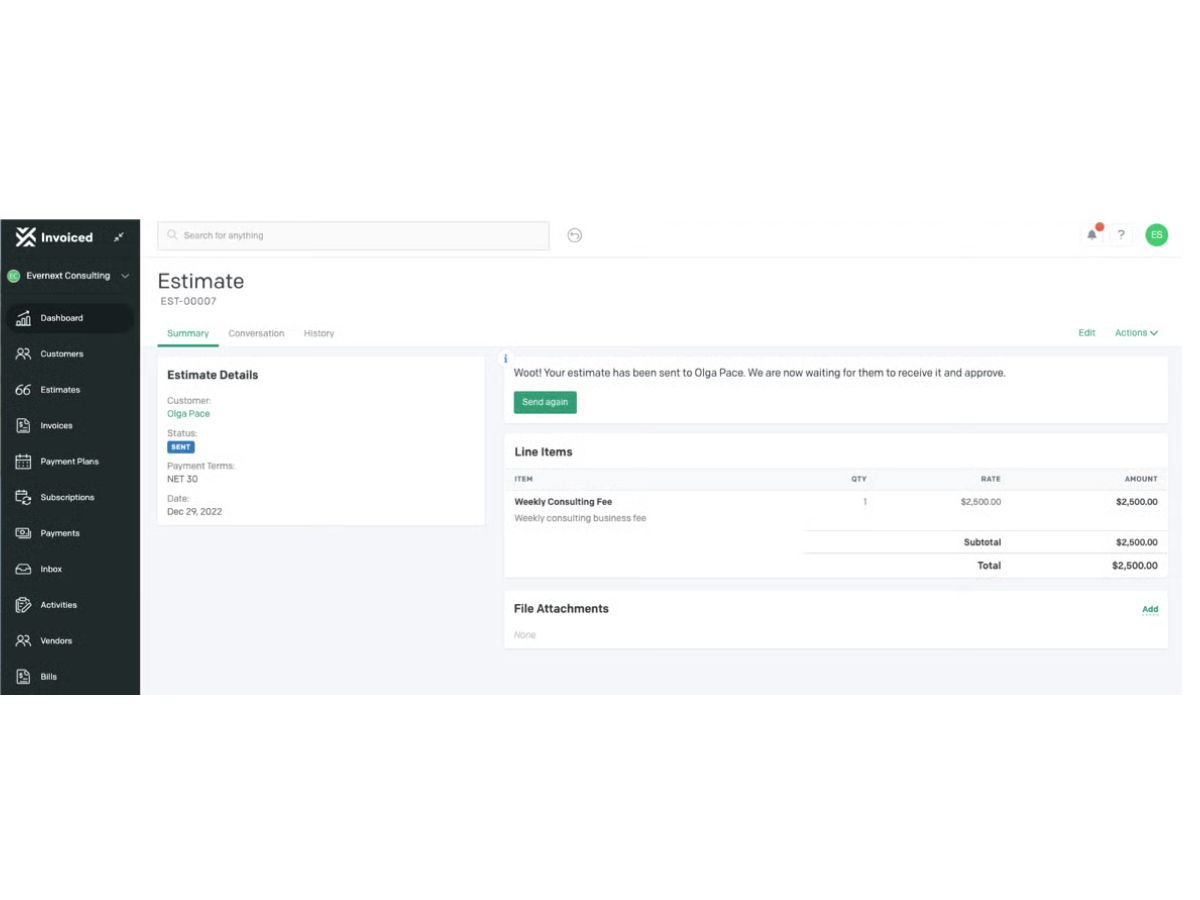
  • The accounting software allows users to create detailed estimates and quotes, capture approvals, and convert the remaining balance with one click.
  • Users can set up recurring billing to improve cash flow and reduce manual invoicing efforts.
  • Businesses can configure pricing rules based on volume, create discounts, implement promotion codes, set rollover rates, and more.
  • It adheres to compliance with the Payment Card Industry Data Security Standard (PCI DSS).

Benefits of Invoiced

  • The accounting software provides an integrated Invoice-to-Cash module, streamlining the entire process from invoice creation to cash collection.
  • It provides a centralized space for customers to view invoices, make payments, and access relevant account information.
  • It follows guidelines outlined by the Health Insurance Portability and Accountability Act (HIPAA) for online data storage and payment transactions.

Pricing of Invoiced

Invoiced pricing are on request in  UAE at techjockey.

Read more

Flywire Company Details

Founded Year:  2009

Flywire Corporation (Nasdaq: FLYW) is a global payments enablement and software company. We combine our proprietary global payments network, next-gen payments platform and vertical-specific software to deliver the most important and complex payments for our clients and their customers.

Director/Founders Iker Marcaide
Company Size 1000+ Employees

Invoiced Pricing & Plans

Looking for The Right Pricing?

Share your requirements and get a plan built around your business.

  • Define your business needs
  • Get customised pricing
  • Choose features that fit your workflow

Price Available on Request

Get personalised Invoiced pricing that fits your needs. Our team will connect with you.

Invoiced Features

  • icon_check Invoice Generation
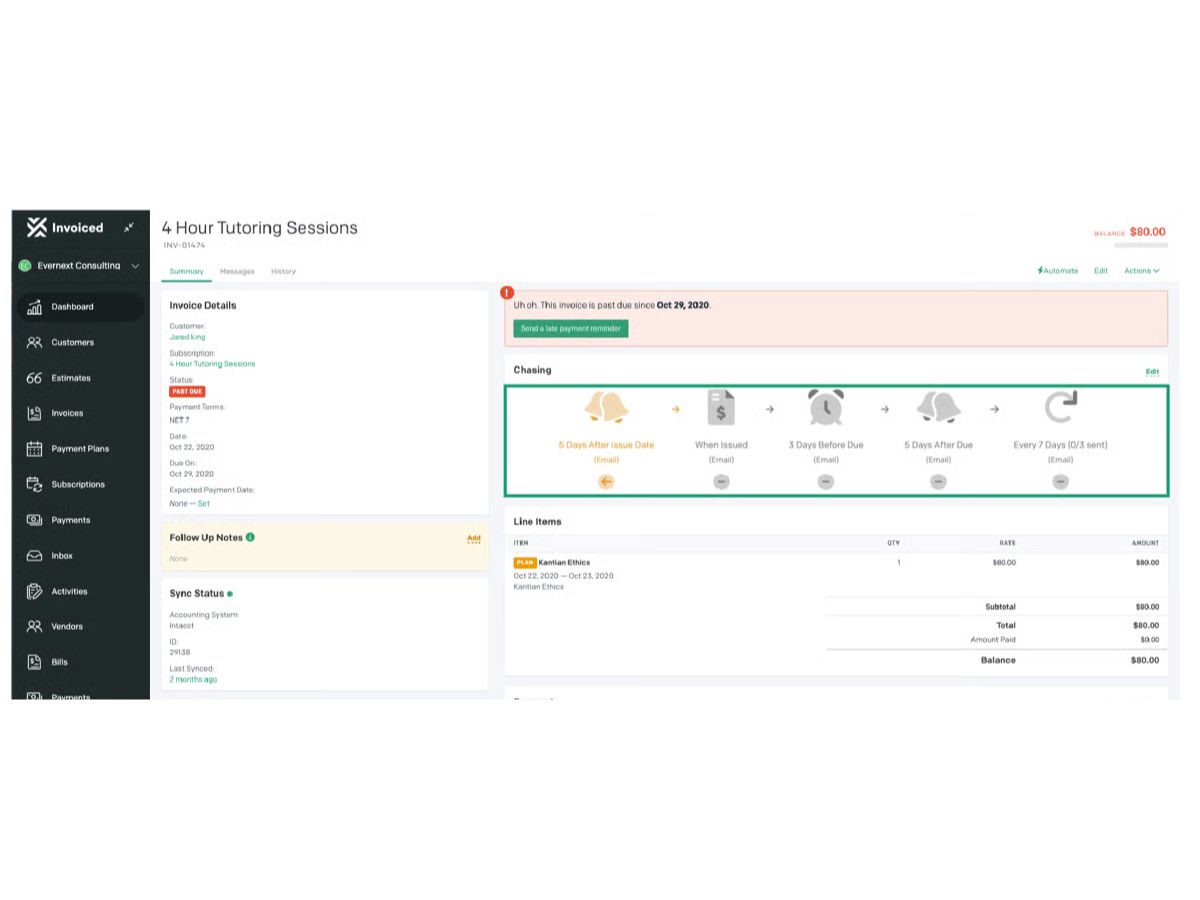
    Automatically generate invoices on a schedule or trigger, reducing manual billing effort.
  • icon_check Customer Portal
    Customers can view invoices, pay, manage subscriptions, download statements in a branded portal.
  • icon_check Threaded A/R Inbox
    A built-in inbox to manage communications per customer or invoice, logging conversations centrally.
  • icon_check Automation Builder
    Create custom workflows with event- or schedule-based triggers and actions to streamline A/R tasks.
  • icon_check Multi-Currency Support
    Automatically calculate taxes and support multi-currency billing for international operations.
  • icon_check Quotes/Estimates
    Create estimates/quotes, send to customers, and convert them into invoices when approved.
  • icon_check Recurring Billing
    Manage recurring billing, trials, proration, and custom billing cycles for subscriptions.
  • icon_check Virtual Lockbox Processing
    Receive paper checks, scan them automatically, and match them to open invoices.
  • icon_check Automated Remittance Advice Detection
    Detect remittance advice (payment proof) automatically and process it for reconciliation.
  • icon_check Confidence Scoring
    Each payment match is scored (0-100%) for confidence, highlighting which ones need review.
  • icon_check Multi Entity Reporting
    Aggregate A/R data across multiple business units or legal entities for consolidated insights.
  • icon_check Cash Collection Forecasting
    Predict when customers will pay using invoice data, payment plans, promises-to-pay, and history.
  • icon_check Custom Reports
    Use dozens of dashboard templates or build custom reports based on many fields and objects.
Invoiced Demo Video play icon

Get Invoiced Demo

Watch the demo video to explore key features, real workflows, and how the software fits your business needs.

Understand
Key Features
Personal
Demo Insights
Interactive
Demo Support

Invoiced Specifications

Supported Platforms
Ubuntu Ubuntu Windows Windows MacOS MacOS Linux Linux
Devices
Desktop Desktop
Deployment
Cloud-Based Cloud-Based
Suitable For
All Industries
Business Specific
All Businesses
Business Size
Small Business Startups Medium Business SMBs SMEs MSMBs MSMEs
Customer Support
Email Communities
Language
English
Integration
API Integration
Training Resources
Videos

Explore the Best Alternative Solutions Similar to Your Business Size and Needs

Enterprises

Designed for complex and large-scale business needs

See More

Invoiced Review

4.5

Out of 5

img

Overall Rating

Based on
3 Verified Ratings

Rating Breakdown

  • Features 4.8
  • Value for Money 4
  • Ease of Use 4.6
  • Customer Support 4.5

86% Recommend this Product

Add Review

Be the First to Review

This product has no reviews yet. Be the first to leave your feedback.

Add Review
Compare Invoiced With other Accounts Receivable Software

Products
Ratings
Pricing
Device Supported
Deployment
Supported Platforms
  • img

    Invoiced

  • 4.5

  • Price On Request

  • Desktop

    Mobile

  • Web based

    On Premises

  • Windows

    Mac OS

  • img

    Quadient AR

  • Price On Request

  • Desktop

    Mobile

  • Web based

    On Premises

  • Windows

    Mac OS

  • img

    Plooto

  • Price On Request

  • Desktop

    Mobile

  • Web based

    On Premises

  • Windows

    Mac OS

  • img

    Billtrust

  • Price On Request

  • Desktop

    Mobile

  • Web based

    On Premises

  • Windows

    Mac OS

  • img

    Kolleno

  • Price On Request

  • Desktop

    Mobile

  • Web based

    On Premises

  • Windows

    Mac OS

  • img

    Peakflo

  • Price On Request

  • Desktop

    Mobile

  • Web based

    On Premises

  • Windows

    Mac OS

  • img

    Apruve

  • Price On Request

  • Desktop

    Mobile

  • Web based

    On Premises

  • Windows

    Mac OS

  • img

    Bill

  • Price On Request

  • Desktop

    Mobile

  • Web based

    On Premises

  • Windows

    Mac OS

  • img

    Upflow

  • Price On Request

  • Desktop

    Mobile

  • Web based

    On Premises

  • Windows

    Mac OS

  • img

    ApprovalMax

  • Price On Request

  • Desktop

    Mobile

  • Web based

    On Premises

  • Windows

    Mac OS

  • img

    Maxyfi

  • Price On Request

  • Desktop

    Mobile

  • Web based

    On Premises

  • Windows

    Mac OS

(2) Product(s) selected

Invoiced Alternatives

See All Invoiced Alternatives

Available

Price on Request

Available

Price on Request

Which operating system does Invoiced support?

Invoiced is compatible with the Windows operating system.

Is there any Invoiced app?

Invoiced is available for android and iOS app users.

What is the deployment type of Invoiced software?

Invoiced supports web-based deployment.

How much does Invoiced cost?

Invoiced pricing are on request in  UAE at techjockey.

Who are the potential users of Invoiced?

Invoiced is suitable for businesses looking to create invoices and manage their finances.

Is there any free trial or demo for Invoiced?

Invoiced free trial is available at techjockey.com.

Is Invoiced free?

Invoiced is free.

How can you download Invoiced software?

Invoiced software is a web-based platform. So, installation is not required. Just open the Setup Wizard to get started.

How does Invoiced work?

The accounting software program allows users to track business expenses, create invoices, and receive assistance with tax preparation and filing.

Terms and Condtions

close

Users with registered businesses can purchase goods from merchants on the platform to satisfy their business needs. Users are not permitted to utilize any products acquired through the platform for resale, advertising, business, or further distribution.

For each purchase made, users will receive a Tax Invoice (or 'GST invoice') that includes specific details such as:

  • the GSTIN of the user associated with their registered business, and

  • the specified Entity Name for their business.

It should be noted that not all products are eligible for GST Invoice. Only the products displayed by participating sellers with the 'GST-based Invoice Available' callout on the product description page would qualify.

Certain goods and services are not eligible to get a GST Invoice, including items with VAS, i.e., Value Added Services (e.g., Total Mobile Protection/Assured Buyback) and those involving an exchange offer at the time of purchase.

Users must ensure the accuracy of the GSTIN, and business entity name provided for the GST Invoice. Requests for corrections into GST Invoice would not be accommodated by Techjockey.com or any Seller, and any issues arising from user-provided information are the sole responsibility of users.

Techjockey.com is not liable for the GST Invoice or any associated input tax credit. To efficiently claim an input tax credit, users should select the registered place of business address as per the GST authority's data and follow the provisions of the GST Act and rules.

To claim an input tax credit, the delivery and billing addresses must match. Furthermore, input tax credits will not be granted if the delivery address and GSTIN on the invoice are from different states. In case of incorrect GST details provided during the order placement, the order will be canceled automatically.

20,000+ Software Listed 20,000+ Software Listed

Best Price Guaranteed Unbiased Comparison

Free Expert Consultation Read Authentic Reviews

2M+ Happy Customers 500,000+ Monthly Users