USA
USA India
IndiaSmall Business
Designed for startups and growing businesses


See More




Brand: Jenni
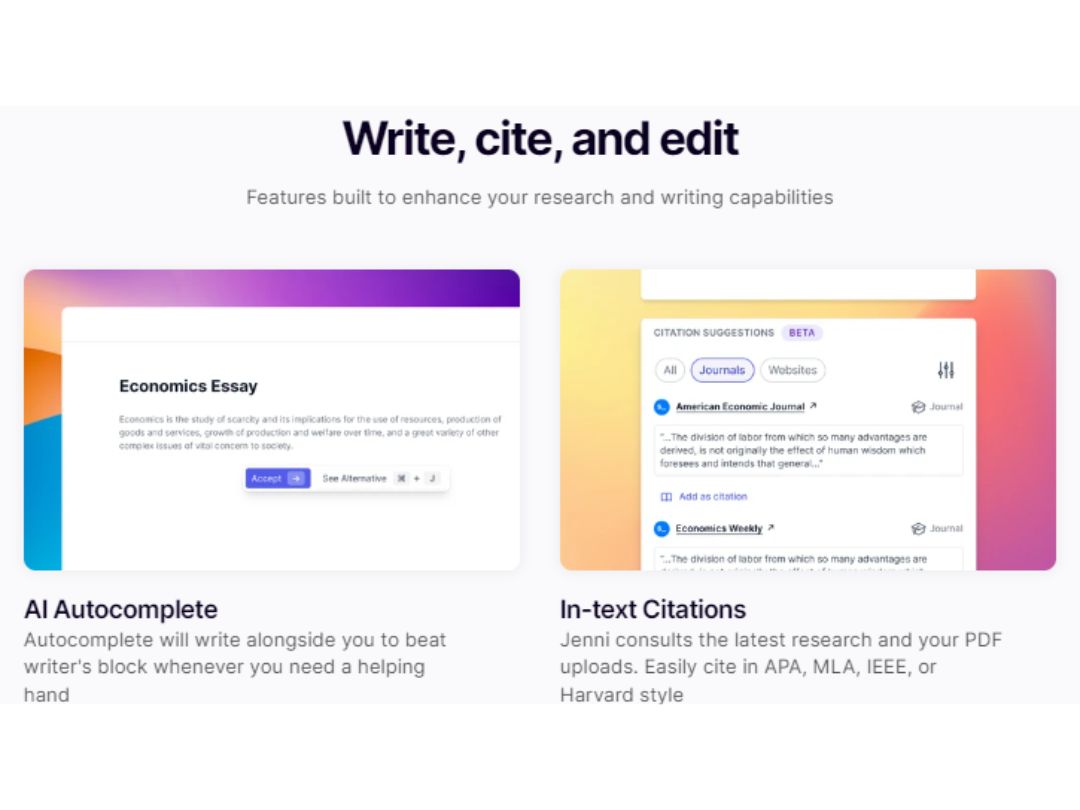
Jenni AI is an AI-powered chatbot development company offering advanced chatbot and AI writing assistance solutions to improve customer engagement and streamline customer support services.
See MoreHave you used Jenni AI before?
Share your insights for better experience
Brand: Jenni
Founded Year: 2015
Jenni Ai is an AI-assisted content writing software that boosts SEO.
Core Writing & Editing Tools
 File Upload Vocabulary Enhancement Paraphrasing Content Formatting Tone & Style Adjustment Audience Targeting Plagiarism Detection Multi-Model Support Version History Grammar & Punctuation Check Readability Score Content Scoring Spelling & Proofing
 Content Generation
Blog Post Creation Marketing Copy Headlines & Taglines SEO-Optimized Content Automated Outlining Social Media Posts Content Ideas Topic Clustering Custom Templates Video Script Generation Collaboration
Team Collaboration Export & Sharing Options API Access Security and Compliance
Data Encryption SOC 2 Compliance GDPR Compliance AI Act Compliance Regulatory Compliance Audit Logs Integrations
API Integration Google Workspace Integration Browser Extension Microsoft Office Integration Learning Management System (LMS) Integration CMS Integration Third Party Integration Language Support
Multilingual Writing Translation Assistance Localization Suggestions Analytics & Reporting
Content Optimization Suggestions Predictive Analysis Performance Analytics AI Capabilities
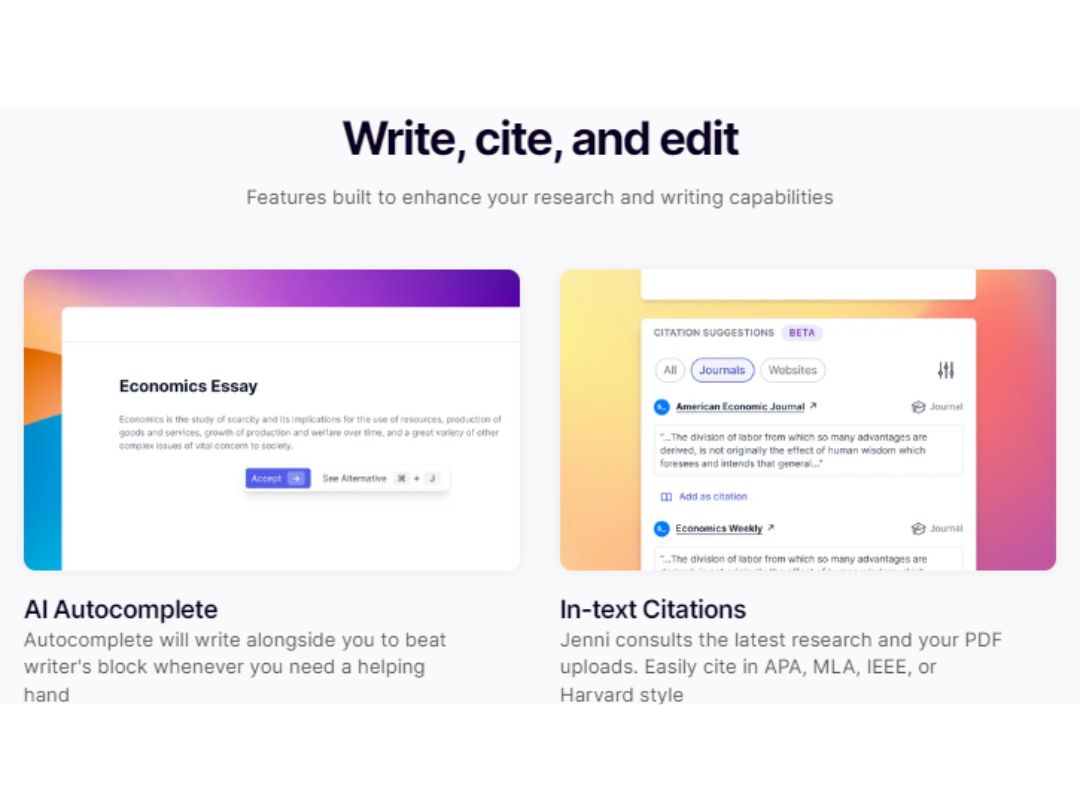
Citation Generation Summarization AI Detection Custom Prompts Citation Suggestions AI Content Generation Administrative Features
Team Management User Access Management API Access Role-Based Access Control (RBAC) Data Loss Prevention Others
AI Autocomplete Source based generation Reference management Real-Time Feedback 

Watch the demo video to explore key features, real workflows, and how the software fits your business needs.
 Ubuntu
  Windows
  MacOS
MacOS  Linux
Linux  Desktop
  Cloud-Based

Small Business
Designed for startups and growing businesses
Medium Business
Built for business growth and flexibility
Enterprises
Designed for complex and large-scale business needs
4.3
Out of 5

Overall Rating
Based on
12 Verified Reviews
Rating Breakdown
87% Recommend this Product
Add ReviewUsers generally appreciate Jenni AI for its ability to enhance productivity by providing quick suggestions and helping overcome writer's block. Many find it particularly useful for drafting emails, articles, and personal writing, often highlighting its ease of use and time-saving capabilities. However, some common limitations include repetitive suggestions, challenges with maintaining tone, and occasional issues with grammar and flow. Overall, it serves as a valuable tool for a variety of writing tasks, though some users feel it requires further refinement.
Pros
"Jenni helps me write faster, especially when I’m stuck. It’s good at giving suggestions that make sense."
Cons
"Sometimes the grammar in the suggestions is not perfect, and I have to edit things a lot."



Apr 12, 2025
Techjockey Verified
“Great for Editing and Expanding My Ideas”
One of the things I love about Jenni is how I can highlight a sentence and ask it to expand. It helps me take my short thoughts and turn them into better paragraphs. That really helps with essays or even work emails. It does repeat sometimes, but overall, I’ve been happy with it.
Pros
I can highlight text and get smart suggestions to expand it.
Cons
Sometimes it repeats ideas.
Reason to switch
AI Writer was too robotic for my taste. Jenni gave me more natural and human-like suggestions.
Mar 31, 2025
Techjockey Verified
“Excellent Tool for Beginners Like Me”
QuillBot was more of a paraphrasing tool. I wanted something that could help me from the start of a sentence, and Jenni did that better. QuillBot was more of a paraphrasing tool. I wanted something that could help me from the start of a sentence, and Jenni did that better.
Pros
The free version is limited.
Cons
The free version is limited.
Reason to switch
QuillBot was more of a paraphrasing tool. I wanted something that could help me from the start of a sentence, and Jenni did that better. QuillBot was more of a paraphrasing tool. I wanted something that could help me from the start of a sentence, and Jenni did that better.
Apr 22, 2025
Techjockey Verified
“Makes Me More Productive Without Overthinking”
I’m someone who overthinks every sentence. Jenni AI has helped me just get the words out. I can always edit later, but having something to start with makes a huge difference. It’s made me way more productive with my writing tasks.
Pros
Helps avoid writer’s block. Simple to use.
Cons
The output isn’t always unique.
Reason to switch
GrammarlyGO was more for grammar checks. I needed something that would write with me. Jenni was a better match for that.

Jenni AI
$ 30.00 excl. GST
Desktop
Mobile
Web based
On Premises
Windows
Mac OS

Writefull
Price On Request
Desktop
Mobile
Web based
On Premises
Windows
Mac OS

Junia AI
Price On Request
Desktop
Mobile
Web based
On Premises
Windows
Mac OS

Typli AI
Price On Request
Desktop
Mobile
Web based
On Premises
Windows
Mac OS

Autoblogging AI
Price On Request
Desktop
Mobile
Web based
On Premises
Windows
Mac OS

Writesonic
Price On Request
Desktop
Mobile
Web based
On Premises
Windows
Mac OS

SEO AI
Price On Request
Desktop
Mobile
Web based
On Premises
Windows
Mac OS

Easy Peasy AI
Price On Request
Desktop
Mobile
Web based
On Premises
Windows
Mac OS

Frase
Price On Request
Desktop
Mobile
Web based
On Premises
Windows
Mac OS

Hypotenuse AI
Price On Request
Desktop
Mobile
Web based
On Premises
Windows
Mac OS

Text Cortex
Price On Request
Desktop
Mobile
Web based
On Premises
Windows
Mac OS
(0) Product(s) selected
Starting Price:
$19.00 /Month
Starting Price:
$49.00 /Month
Starting Price:
$16.00 /Month
Starting Price:
$45.00 /Month
Starting Price:
$6.99 /Month

Starting Price:
$29.00 /Month
Starting Price:
$39.00 /Seat/Month

Starting Price:
$19.99 /Month

Starting Price:
$29.00 /Month

Starting Price:
$24.99 /Month
Starting Price:
$8.00 /Month
Jenni AI is compatible with Windows, Ubuntu, MacOS and Linux.
Jenni AI app is not available for Android and iOS app users.
Jenni AI system supports web-based deployment.
Jenni price starts at $30 at techjockey.com.
Jenni AI is typically used in all Industries for improving customer engagement and streamline customer support services.
Jenni AI free demo is available at techjockey.com.
Jenni AI offers a free demo. However, the premium plan with advanced features is available at techjockey.com with exciting deals.
Jenni AI installation is not required, as it is web-based. Just open the Setup Wizard to get started.
Jenni AI works by leveraging advanced algorithms to analyze user input, providing intelligent suggestions, enhancing writing, and ensuring plagiarism-free content creation.
Terms and Condtions

Users with registered businesses can purchase goods from merchants on the platform to satisfy their business needs. Users are not permitted to utilize any products acquired through the platform for resale, advertising, business, or further distribution.
For each purchase made, users will receive a Tax Invoice (or 'GST invoice') that includes specific details such as:
the GSTIN of the user associated with their registered business, and
the specified Entity Name for their business.
It should be noted that not all products are eligible for GST Invoice. Only the products displayed by participating sellers with the 'GST-based Invoice Available' callout on the product description page would qualify.
Certain goods and services are not eligible to get a GST Invoice, including items with VAS, i.e., Value Added Services (e.g., Total Mobile Protection/Assured Buyback) and those involving an exchange offer at the time of purchase.
Users must ensure the accuracy of the GSTIN, and business entity name provided for the GST Invoice. Requests for corrections into GST Invoice would not be accommodated by Techjockey.com or any Seller, and any issues arising from user-provided information are the sole responsibility of users.
Techjockey.com is not liable for the GST Invoice or any associated input tax credit. To efficiently claim an input tax credit, users should select the registered place of business address as per the GST authority's data and follow the provisions of the GST Act and rules.
To claim an input tax credit, the delivery and billing addresses must match. Furthermore, input tax credits will not be granted if the delivery address and GSTIN on the invoice are from different states. In case of incorrect GST details provided during the order placement, the order will be canceled automatically.
 20,000+ Software Listed
 Unbiased Comparison
 Read Authentic Reviews
 500,000+ Monthly Users