linkedin
background
Microsoft Power Apps logo

Microsoft Power Apps

Brand: Microsoft Corporation

4.2

5 Ratings

Have Questions?

Low-code application development platform by Microsoft for creating custom business apps without extensive coding. ...Read more

img

Get Free Expert Consultation

Let us know your business needs clearly

Advice

Verified & Trusted
Vendors

Payment

Safe & Secure
Payment

Guaranteed

Personalized
Experts Support

Starting at

$ 240.00 /User/Year

Features

  • check_icon Visual App Builder
  • check_icon Reusable Components
  • check_icon Templates
  • check_icon Workflow Automation
  • check_icon Data Integration
  • See all img

Microsoft Power Apps Software Pricing, Features & Reviews

What is Microsoft Power Apps?

Microsoft Power Apps is a low-code no-code software development platform by Microsoft that helps users create custom business apps easily without needing advanced coding skills.

It uses simple drag-and-drop tools to build apps for mobile, web, and tablet that connect with services like Excel, SharePoint, Microsoft Teams, and Dynamics 365.

Power Apps helps automate tasks, streamline workflows, and manage data more efficiently, saving time and reducing manual work. It is widely used by businesses to improve productivity, simplify processes, and create tailored solutions for specific operational needs.

Why Choose Microsoft Power Apps Software?

  • Low-Code Development: Power Apps enables users to build functional applications with minimal coding. It empowers non-technical users to contribute to app development efficiently.
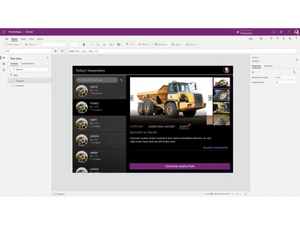
  • Fast App Creation: Its drag-and-drop interface speeds up designing layouts, forms, and workflows. This significantly reduces development time for businesses.
  • Seamless Microsoft Integration: Power Apps connects easily with Microsoft 365, Dynamics 365, Teams, and Azure. This ensures smooth data flow and consistency across Microsoft tools.
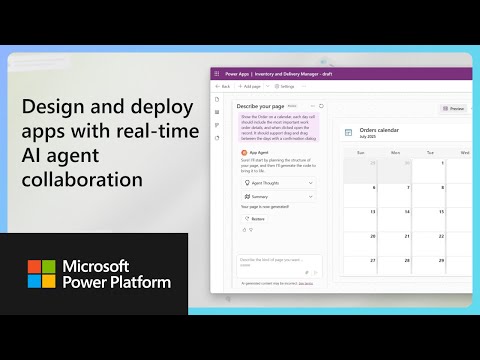
  • AI-Powered Features: With Copilot and AI tools, users can describe requirements in natural language. The platform automatically generates app components and logic, saving effort.
  • Cross-Platform Support: Apps built with Power Apps work on web browsers, mobile devices, and tablets. This enhances accessibility and usability across diverse platforms.
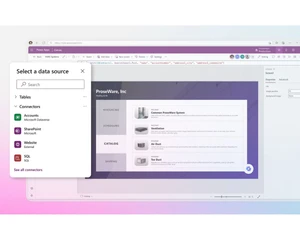
  • Easy Data Connectivity: It supports connections to over 100 data sources including SharePoint, SQL, Excel, and Dataverse. This allows businesses to centralize and utilize data effectively.
  • Customizable Solutions: Power Apps offers flexibility to tailor apps to specific business processes. Users can modify forms, logic, and UI to meet unique organizational needs.
  • Cost-Effective: The platform reduces the need for extensive coding resources and development teams. This makes app creation more affordable for small and large organizations.
  • Scalability: Power Apps supports growth from small teams to enterprise-level deployment. It handles increasing users, data, and workflows without performance issues.

Benefits of Microsoft Power Apps Software

  • Enterprise-Grade Security: Built-in compliance, encryption, and access controls ensure data safety. Organizations can define permissions and maintain strict security standards.
  • Automation Capabilities: When integrated with Power Automate, users can automate repetitive tasks. This boosts efficiency and reduces manual effort.
  • Faster Innovation: Its flexible tools encourage experimentation and rapid deployment. Teams can quickly test new ideas and make improvements.
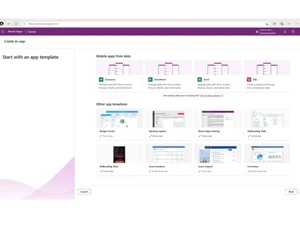
  • Reusable Templates: Power Apps includes several ready-to-use templates for common scenarios. These templates accelerate app creation and reduce setup time.
  • Improves Productivity: By converting manual tasks into automated digital workflows, productivity increases. Employees can focus on high-value work instead of routine activities.
  • Citizen Developer Friendly: It empowers non-developers to create apps independently. This reduces dependency on IT teams and increases overall output.
  • Centralized Data Management: Microsoft Dataverse offers a structured and secure data layer. It helps maintain consistency and simplifies managing organizational data.
  • Mobile-Friendly UI: Power Apps ensures apps are responsive and optimized for mobile use. This improves user experience for teams working on the go.

Microsoft Power Apps Pricing

Microsoft Power Apps price starts at USD 240 at Techjockey. The pricing model is based on different parameters, including extra features, deployment type, and the total number of users. For further queries related to the product, you can contact our product team and learn more about the pricing and offers.

Microsoft Power Apps Pricing & Plans

Power Apps Premium
  • Build custom apps
  • Run custom websites
  • Connect to your data
  • Store and manage data
  • Use Microsoft Dataverse-250 MB database capacity
  • Execute workflows
  • Managed environments
  • AI Builder service credits-500
    • Users
    • Yearly
Starting at $ 240.00

Get Microsoft Power Apps Demo

We make it happen! Get your hands on the best solution based on your needs.
Interacted

Microsoft Power Apps Features

  • icon_check Visual App Builder Build apps using a drag-and-drop interface with minimal coding, making development faster.
  • icon_check Reusable Components Create and reuse UI components across multiple apps to reduce repetitive development.
  • icon_check Templates Start projects with ready-made templates designed for common business workflows.
  • icon_check Workflow Automation Automate processes with Power Automate integration, minimizing manual intervention.
  • icon_check Data Integration Connect seamlessly with Microsoft 365, SQL, SharePoint, and over 700 external connectors.
  • icon_check Custom Connectors Extend integration by building connectors for external APIs without complex coding.
  • icon_check Cross Platform Access Build once and run apps on web, desktop, mobile, or Microsoft Teams without changes.
  • icon_check No-Code Portals Design external websites with drag-and-drop and secure Dataverse integration.
  • icon_check Collaboration Tools Multiple makers can co-author apps in real time to speed up delivery.
  • icon_check Data Modeling Define tables, columns, and relationships visually with simple clicks.
  • icon_check Offline Access Enable apps to run offline and auto-sync data when internet becomes available.
  • icon_check Application Lifecycle Manage app versions, testing, and deployments using automated pipelines.
  • icon_check Rapid Prototyping Quickly design, test, and refine app ideas with minimal effort before production.

Microsoft Power Apps Specifications

  • Supported Platforms :
  • Device:
  • Deployment :
  • Suitable For :
  • Business Specific:
  • Business Size:
  • Customer Support:
  • Integration:
  • Training:
  • Language:
  • AI Features:
  • Windows MacOS
  • Desktop
  • Web-Based
  • All Industries
  • All Businesses
  • Small Business, Startups, Medium Business, Enterprises
  • Email, Communities
  • API Integration
  • Webinars, Videos
  • English
  • AI Integrated

Microsoft Power Apps Reviews and Ratings

banner

Would you like to review this product?

Submit Reviews

Microsoft Corporation Company Details

Brand Name Microsoft Corporation
Information Microsoft Corporation is an American multinational technology company with headquarters in Redmond, Washington.
Founded Year 1975
Director/Founders Paul Allen , Bill Gates
Company Size 1000+ Employees
Other Products Microsoft Project, Microsoft Dynamics Crm , Clipchamp, Microsoft Bookings, Microsoft OneNote

Microsoft Power Apps FAQ

A Microsoft Power Apps price starts at USD 240 on Techjockey.
A No, Power Apps does not offer a mobile app for both Android and iOS devices.
A Power Apps works on macOS and Windows.
A Yes, Microsoft provides a 30-day free trial for Power Apps.
A Power Apps enables users to build custom apps using low-code tools, data connectors, and AI-powered features.
A Power Apps is used by businesses, enterprises, and teams across various industries to create customized applications.
A Yes, Microsoft offers a guided demo and 'try for free' option.
A Microsoft Power Apps free developer plan is available for learning, building, and testing apps.

Microsoft Power Apps Alternatives

See All

20,000+ Software Listed 20,000+ Software Listed

Best Price Guaranteed Unbiased Comparison

Free Expert Consultation Read Authentic Reviews

2M+ Happy Customers 500,000+ Monthly Users