
Description
Pricing
Features
Specification
Review
Compare
FAQs
Alternatives


 View Gallery
Brand: TP-Link
VIGI VMS is a video management software that lets businesses centrally monitor, control, and manage security cameras and footage easily from one platform. ...Read more

Get Free Expert Consultation
Let us know your business needs clearly

Verified & Trusted
Vendors

Safe & Secure
Payment

Personalized
Experts Support
Price On Request
Features
 Video Capture & Recording Storage & Retention Video Playback & Retrieval Video Analytics Integrations
 See all 
We make it happen! Get your hands on the best solution based on your needs.


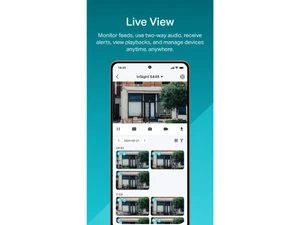
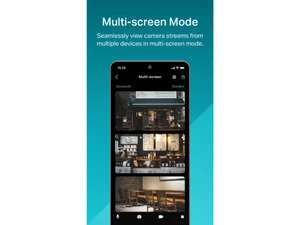
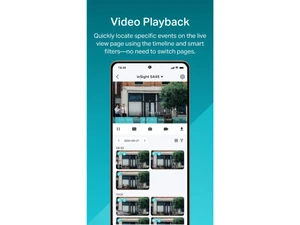
Video Capture & Recording
 Recording Modes Continuous, event-based, scheduled, alarm-triggered recording. Camera Compatibility Supports IP, analog, hybrid systems. ONVIF ensures interoperability. Video Compression & Quality Supports H.264, H.265, MPEG-4, MJPEG; adjustable bitrate. Multicast & Multi-Stream Bandwidth-efficient adaptive streaming support. Anomaly Detection AI-based recognition of unusual activities. PTZ Control Remote Pan-Tilt-Zoom (PTZ) with presets and automated patrol. Edge Storage & Failover SD card recording with auto-sync on connection restore. Hardware-Accelerated Detection Supports NVIDIA & QuickSync acceleration. Multi-Live Streaming Simultaneous resolution streams to optimize bandwidth. Tamper Detection Detects camera obstruction, redirection, video loss.
 Storage & Retention
Storage Options Local (HDD/SSD), NAS/SAN, cloud (AWS, Azure, Google), hybrid. Retention & Data Management Configurable retention, automated deletion, overwrite. Evidence Locking & Retention Secure critical video data for legal compliance. Media Database Encryption Prevents tampering with stored video data. Redundancy & Failover RAID (RAID 0, 1, 5, 10), failover mechanisms, scheduled backups. Hot & Cold Failover Recording Ensures uninterrupted recording. Video Playback & Retrieval
Playback Features Multi-camera sync playback, timeline navigation, speed control. Export & Sharing MP4, AVI, encrypted formats, watermarking, password protection. Evidence Chain of Custody Tracks video access/modifications for compliance. Smart Search & Retrieval Motion, object, metadata, AI-powered facial, LPR search. Incident Manager & Bookmarks Categorization, bookmarking of critical incidents. Video Analytics
Behavioral Analysis Crowd detection, intrusion, slip & fall recognition. Motion & Object Detection AI-based detection of people, vehicles, objects. Facial & License Plate Recognition Real-time alerts, whitelist/blacklist management. Customizable Smart Dashboard Live monitoring with event-based camera views. Integrations
Multi-Site Federated Management Centralized and remote site connectivity. Firmware Upgrades Single & bulk updates for security patching and feature enhancements. Smart Map Integration Real-time tracking of incidents and objects across mapped areas. Third Party Integrations Access control, alarm systems, IoT sensors, fire safety systems. Interconnected Video Feeds Cross-site video integration for enterprise applications. Open API & Protocols RESTful API, ONVIF, RTSP, HTTP, WebSocket's, MQTT. LDAP/Active Directory Integration LDAP/Active Directory for centralized user management Automated Device Discovery Auto-detects and registers new cameras. Alerts & Notifications
Customizable dashboards Role-based live monitoring configurations. Event-Based Alerts Motion, tampering, object detection, AI-driven event notifications. Alarm Manager Centralized event and alert processing. Notification Channels Email, SMS, push notifications, webhook-based alerts. Security & Compliance
Audit Logs Keep detailed logs of system activity for security and accountability. Data Security AES-256 encryption, HTTPS/SSL communication, secure user authentication. Data Encryption Protection against tampering and unauthorized access. Regulatory Compliance GDPR, ISO 27001, NIST cybersecurity framework adherence. Secure Remote Access Web-based browser access, VPN, cloud relay for secure remote viewing. Role-Based Access Control (RBAC) Assign specific roles and permissions to ensure proper access control Audit Trails Track changes and updates within the system for enhanced security and transparency. Authentication & Authorization Multi-Factor Authentication (MFA), Single Sign-On (SSO) via OIDC. Device Password Management Secure camera and system access management. ONVIF Compliance ONVIF compliance ensures interoperability. Incident Reporting Automated event logging for compliance. | Brand Name | TP-Link |
| Information | A leading provider of consumer and business networking products, TP-Link. |
| Founded Year | 1996 |
| Director/Founders | Zhao Jianjun, Zhao Jiaxing |
| Company Size | 1000+ Employees |

 20,000+ Software Listed
 Unbiased Comparison
 Read Authentic Reviews
 500,000+ Monthly Users
 USA
USA India
India
 Write a Review
