
Description
Pricing
Features
Specification
Review
Compare
Alternatives


 View Gallery
Brand: ZoomShift

Get Free Expert Consultation
Let us know your business needs clearly

Verified & Trusted
Vendors

Safe & Secure
Payment

Personalized
Experts Support
$ 2.50 /Month
Features
 Employee Scheduling Time & Attendance Tracking Workforce Management Shift Swapping Time-Off Management
 See all 
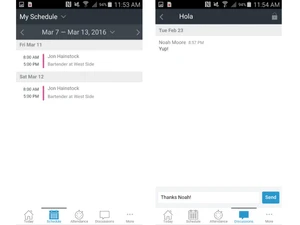
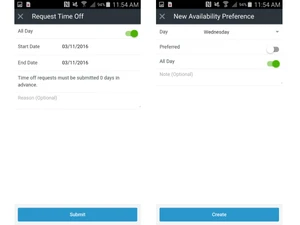
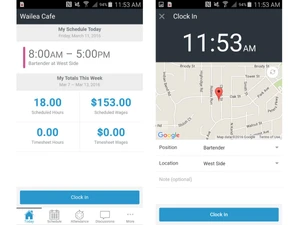
 Employee Scheduling Create, edit, and publish staff schedules quickly using drag-and-drop tools and reusable shift templates. Time & Attendance Tracking Track employee clock-ins and clock-outs accurately using web and mobile time clock functionality. Workforce Management Employees can view schedules, request changes, and clock in or out using iOS and Android apps. Shift Swapping Allow employees to request shift swaps while managers retain approval control to avoid coverage gaps. Time-Off Management Employees submit leave requests digitally, and managers approve or decline within the system. Availability Management Staff can set availability preferences, helping managers avoid scheduling conflicts or overlaps. Labor Cost Management Monitor labor costs in real time and control overtime with alerts and scheduling safeguards. Overtime Alerts Receive automatic warnings when shifts may cause employees to exceed overtime thresholds. Schedule Notifications Notify employees instantly of new schedules or changes via email, SMS, or push notifications. Team Messaging Built-in messaging allows managers and employees to communicate without external tools. Payroll Reports Export timesheets and payroll-ready reports to simplify wage calculation and payroll processing. Compliance Controls Enforce labor rules such as break requirements and clock-in restrictions to stay compliant. Role-Based Access Control (RBAC) Assign permissions by role so managers and employees only access relevant data and features. Templates Save commonly used shift patterns to reduce scheduling time and ensure consistency. Multi-Location Support Manage schedules, staff, and labor data across multiple business locations in one system. GPS & IP Clock-In Controls Restrict clock-ins by location using GPS or approved IP addresses to prevent time theft.
 | Brand Name | ZoomShift |
| Information | ZoomShift provides scheduling and time tracking software to teams that treasure time, value simplicity, and foster communication. |
| Founded Year | 2013 |
| Director/Founders | Ben Bartling, Jon Hainstock |
| Company Size | 1-100 Employees |
 20,000+ Software Listed
 Unbiased Comparison
 Read Authentic Reviews
 500,000+ Monthly Users
 USA
USA India
India

 Write a Review
