Top 5 Classroom Management Software for Teachers: Compare Features, Pricing & Use Cases

March 29, 2026

Top 5 Classroom Management Software for Teachers: Compare Features, Pricing & Use Cases-feature image

Key Takeaways

Classroom management software helps teachers organize assignments, monitor student devices, and improve classroom engagement.

Many of them offer features like behavior tracking, assignment management, and real-time device monitoring.

Key categories:

  • Behavior Management – ClassDojo
  • Learning Management – Google Classroom
  • Device Monitoring & Classroom Control – GoGuardian Teacher, LanSchool, Dyknow

Managing a modern classroom goes beyond keeping students organized. It includes handling digital assignments, monitoring devices, and engaging learners.

Classroom management software and classroom management apps simplify these tasks. They help teachers in tracking behavior, assigning work, and communicating with parents.

To make teaching more efficient, classroom management software is a must.

In this blog post, we explore top classroom management software examples, including Google Classroom and other solutions for teachers.

Let’s move forward…

Side-by-Side Comparison of Classroom Management Software

Review and compare top tools based on real-time monitoring, assignments, and student engagement capabilities.

SoftwareKey UseFeatures & Free Plan
ClassDojoBehavior tracking & parent communicationRewards system, parent messaging (Free Plan: Yes)
Google ClassroomAssignment and coursework managementGoogle Workspace integration (Free Plan: Yes)
GoGuardian TeacherMonitoring student devicesReal-time screen view, tab control (Free Plan: No)
LanSchool AirManaging classroom devicesScreen monitoring, broadcasting (Free Plan: No)
DyknowTracking student activityEngagement analytics, website blocking (Free Plan: No)

Top 7 Classroom Management Software in 2026

Let’s break down the best classroom management tools with their features, pros, and ideal use cases.

We have categorized classroom management software into 3 main types as listed below:

Behavior Management & Classroom Communication

These tools focus on improving student behavior, engagement, and communication with parents.
1. ClassDojo

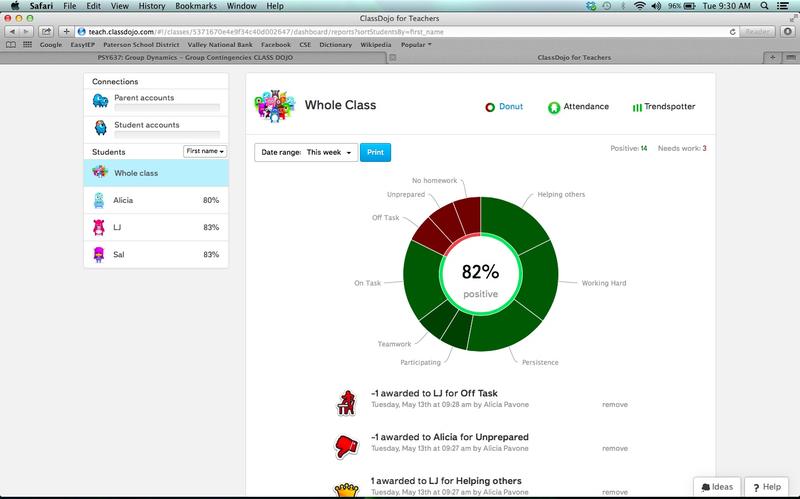
ClassDojo classroom management software dashboard showing student behavior tracking and performance analytics

ClassDojo is considered to be one of the most popular classroom management software in K-12 schools. It operates to enhance classroom behavior as well as maintain the connection between teachers, students, and parents.

You can promote good habits in your classroom through this platform and also maintain families engaged in observing the daily learning of students. The tool also provides students with a platform to discuss their work and progress with teachers and parents.

All in all, using this tool, you will be able to create a more interactive and positive classroom environment.

Key Features of ClassDojo:

  • Reward students with behavior points for teamwork, effort, and helpful actions. You can customize skills to match programs like PBIS.
  • The Teacher Toolkit includes helpful tools like a timer, random student picker, group maker, noise meter, and focus music.
  • Class Story lets you share photos, videos, and updates with parents through a private classroom feed.
  • Messaging allows you to communicate with parents easily, with automatic translation for different languages.
  • The classroom calendar helps you share events, reminders, and assignments with parents.
  • Students can upload projects and work in digital portfolios to track their progress.
  • Dojo Islands provides a safe virtual space where students interact and collaborate using avatars.
  • You can also record and track student attendance directly on the platform.

Best for: K-12 teachers

Pro and cons of ClassDojo:

Pros

  • It helps you easily reinforce positive behavior and motivate students through a simple points system.
  • Communication with parents becomes much easier through messages, updates, and shared classroom stories.
  • The built-in Teacher Toolkit saves time by providing useful classroom tools in one place.
  • It generates reports that can be helpful during parent conferences or progress discussions.

Cons

  • Adding existing students to the platform can sometimes feel slow and a bit cumbersome.
  • Customer support responses may take time, according to some users.
  • Managing the platform daily can take extra time for teachers who already have busy schedules.

ClassDojo Pricing and Plans: ClassDojo offers a free plan for teachers.

Learning Management & Assignment Management

These platforms are used to manage assignments, classroom communication, and digital coursework.
2. Google Classroom

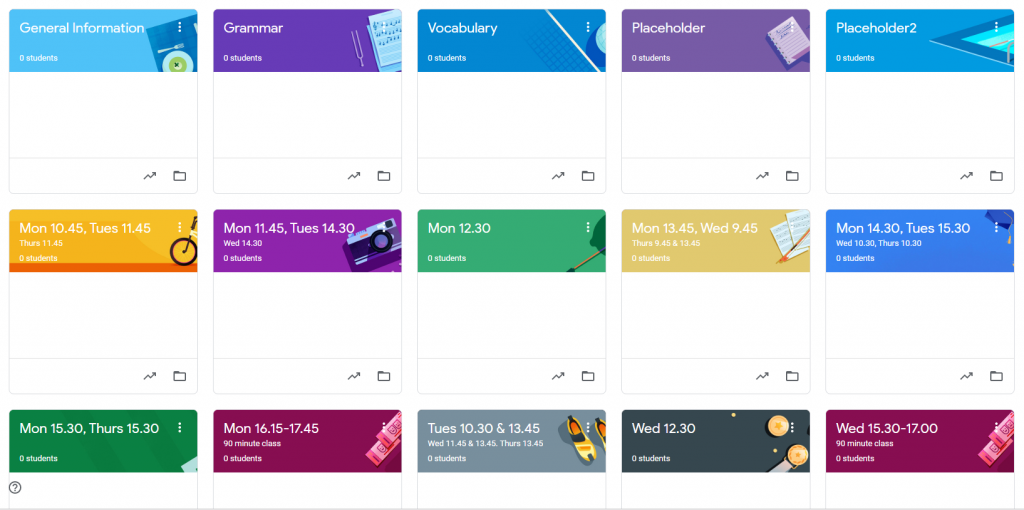
Google Classroom dashboard displaying class assignments, course cards, and student management interface

Another learning platform and classroom manager on the list is Google Classroom. It allows instructors to create lessons, assignments, and communication in a single platform. As part of Google Workspace, it integrates seamlessly with widely used tools in schools.

Educators can build virtual classrooms, share resources, and track student progress without relying on paper-based processes. This platform also connects students, teachers, and parents within a unified learning environment.

Key Features of Google Classroom:

  • Create and share assignments quickly. Students can submit work online, and you can review and grade it in one place.
  • It integrates with tools like Google Docs, Google Drive, and Google Meet for easy file sharing and online classes.
  • Gemini AI helps you create lessons, assignments, and learning materials faster.
  • Add interactive questions to YouTube videos to keep students engaged during lessons.
  • The Read Along feature gives students real-time feedback to improve reading skills.
  • You can integrate third-party EdTech tools and manage everything from one platform.
  • Plagiarism detection and originality reports help ensure proper citations.
  • You can sync class lists and course data with systems like PowerSchool or Infinite Campus.

Pro and cons of Google Classroom:

Pros

  • The platform is easy to set up and simple for both teachers and students to use.
  • It integrates smoothly with other Google tools, which makes managing files and assignments much easier.
  • The basic version is free for schools, making it a cost-effective classroom solution.

Cons

  • It does not offer some advanced features that full learning management systems provide.
  • Customization options for classroom layout and assignment structure are limited.
  • Students may get distracted online or open unrelated websites during lessons.

Best for: Teachers and schools already using the Google ecosystem

Google Classroom Pricing and Plans:

PlanPricing
Education FundamentalsFree
Education Plus$6 per user/year

Classroom Device Monitoring & Screen Control

These tools are designed to monitor student devices and reduce distractions during lessons.
3. GoGuardian Teacher

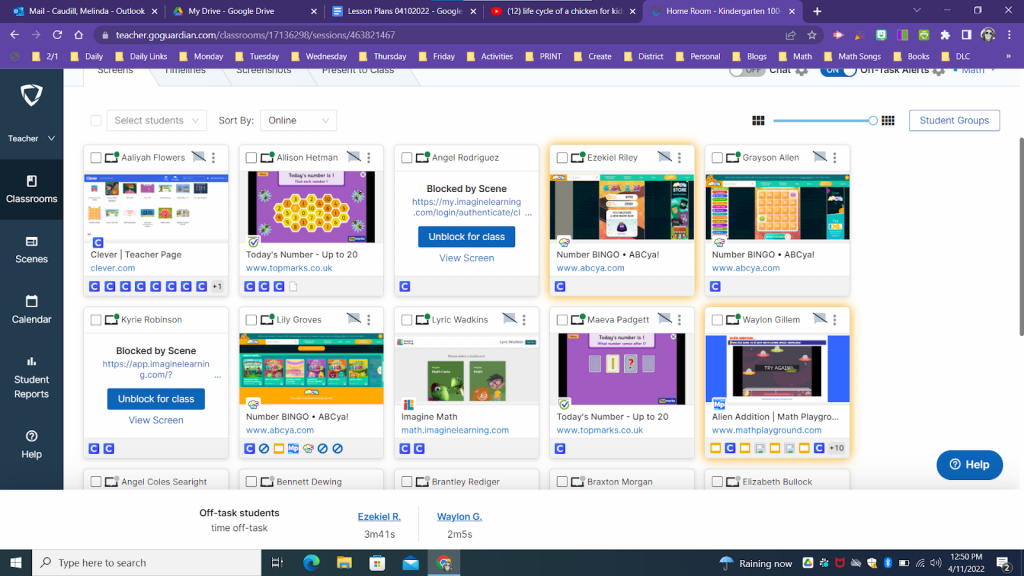
GoGuardian Teacher classroom management software showing student screen monitoring and activity control features

GoGuardian Teacher is another classroom management software that is especially useful in classrooms where every student uses a laptop or Chromebook during lessons.

With this tool, you can keep students focused, manage their screens, and quickly guide them to the right learning resources. The platform also helps schools maintain better digital oversight while giving teachers simple controls during class.

Key Features of GoGuardian Teacher:

  • You can view student screens in real time to quickly see if students are focused or browsing unrelated websites.
  • The tool lets you manage browser tabs remotely. You can close distracting tabs, open learning resources, or lock students into specific websites.
  • With Focus Tabs, you can push important tabs directly to student devices, so they open the right webpage instantly.
  • You can block or allow specific websites during class to reduce distractions and control device usage.
  • The platform supports two-way chat, allowing students to ask questions privately without interrupting the class.
  • You can broadcast your screen to guide students step by step when explaining a concept or task.
  • Teachers can send announcements to the whole class instantly for quick instructions or reminders.
  • The system supports flexible scheduling and co-teaching, so multiple teachers can monitor the same class.
  • Admins can apply district policies while still allowing teachers to override filters when needed for learning.

Pro and cons of GoGuardian Teacher:

Pros

  • The platform gives you strong visibility into what students are doing on their devices during class.
  • Tab management and website controls make it easier to keep students focused on learning tasks.
  • Teachers appreciate the tutorials and guides that help them quickly learn how to use the platform.
  • Automation features help reduce time spent on routine classroom management tasks.

Cons

  • Some teachers report occasional slowdowns or temporary freezing during lessons.
  • The tool may not always provide a constant live snapshot of student Chromebook screens.
  • If the platform experiences downtime, it can interrupt the flow of a lesson.
  • The system depends heavily on stable device and network performance.

Best for: Schools with 1:1 device programs that want real-time monitoring and control of student devices during lessons.

GoGuardian Teacher Pricing and Plans: Pricing for GoGuardian Teacher is not publicly listed. You can contact the Techjockey team for pricing.
4. LanSchool Air

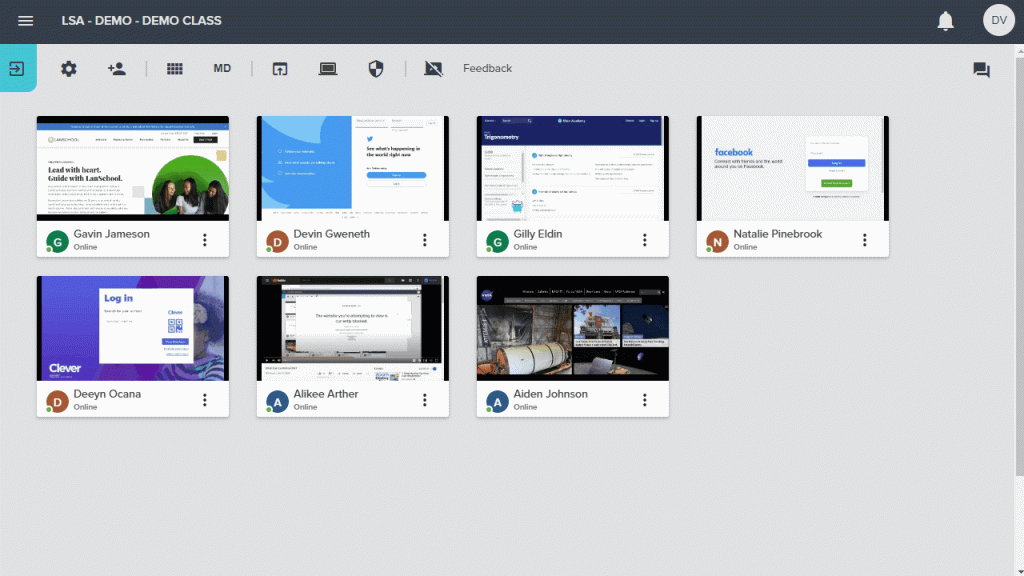
LanSchool classroom management software interface showing student screens and real-time classroom monitoring tools

LanSchool Air is a cloud-based classroom management platform. It works across multiple OS, like Mac, Windows, and Chromebooks.

With this tool, you can monitor student screens, communicate with your class, and reduce online distractions. Since it runs in the cloud, schools don’t need to maintain on-site servers, and updates happen automatically.

Key Features of LanSchool Air:

  • You can monitor all student screens in real time using a thumbnail view. This way, you can see what each student is doing and who may need help.
  • You can switch to full-screen monitoring for any device to check work more closely without moving around the classroom.
  • The platform lets you limit access to specific websites during class, helping students stay focused.
  • You can blank student screens or lock devices instantly when you need everyone’s attention.
  • With the push website feature, you can open the same website on all student devices at once to save time.
  • The messaging system lets you communicate with the whole class or individual students, and students can ask questions privately.
  • Students can raise their hand digitally to ask for help or show they have finished a task.
  • You can broadcast your screen to guide students step by step during explanations or demonstrations.
  • The tool also shows device battery status so you can quickly spot devices that may shut down.
  • With co-teaching access, multiple educators can monitor and support the same classroom.

Pro and cons of LanSchool Air:

Pros

  • Remote device controls like locking screens and launching websites make classroom management easier.
  • Screen sharing and messaging features support interactive and collaborative learning.
  • Customer support has been appreciated by many users.

Cons

  • Some users report occasional lag or performance issues when many devices are connected at the same time.
  • Initial setup and configuration may require some technical assistance.
  • The platform may feel expensive for smaller schools with limited budgets.

Best for: Schools with mixed-device classrooms and need a cloud-based tool

LanSchool Air Pricing and Plans: LanSchool Air pricing is not listed. You can request a quote from the Techjockey team.
5. Dyknow Classroom Management

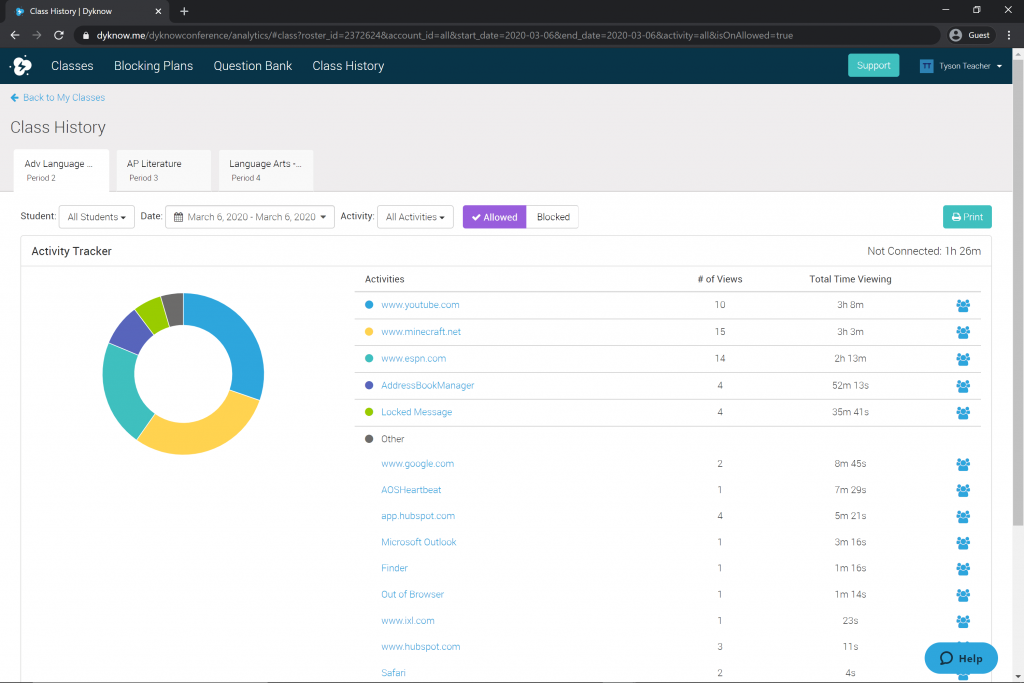
Dyknow classroom management tool displaying student activity tracking and real-time device monitoring dashboard

Dyknow Classroom Management gives you real-time visibility into what students are doing on their devices, whether the class is happening in person or remotely. The platform focuses on improving student engagement and helping teachers manage technology more confidently during lessons.

With its monitoring and analytics features, you can also review how devices were used after class.

Key Features of Dyknow Classroom Management:

  • You can view all student screens in real time from one dashboard, which will help you quickly spot when someone is off task and redirect them.
  • You can control online access during lessons by blocking websites or allowing only approved sites.
  • You can engage with students by sending messages, asking quick questions, or checking their understanding during class.
  • After class, you can review activity analytics to see which websites and apps students used and identify distractions.
  • Dyknow works across Chromebooks, Windows PCs, and Mac devices, making it suitable for mixed-device classrooms.
  • It also integrates with student information systems (SIS) to automatically sync class lists and student data.

Pro and cons of of Dyknow Classroom Management:

Pros

  • Website blocking and filtering tools make it easier to control internet access during class.
  • Engagement tools help teachers keep students focused during digital lessons.
  • The interface is generally simple and easy for teachers to learn.

Cons

  • Some users report that the software can be processor-heavy, which may cause occasional lag or crashes.
  • The tool may not fully monitor activities that happen outside the browser, such as certain desktop apps.
  • Teachers cannot directly control or take over a student’s screen in some situations.

Best for: Teachers who want real-time screen monitoring and activity analytics

Dyknow Classroom Management Pricing and Plans: Pricing for Dyknow is not available publicly. You can reach out to the Techjockey team for exact pricing.

Conclusion

As we have discussed every tool’s features, the final choice of classroom management software is all yours.

ClassDojo helps with behavior and parent communication, Google Classroom handles assignments and collaboration, and GoGuardian Teacher, LanSchool, and Dyknow monitor student devices to reduce distractions.

Choose wisely, as the right classroom management software will make teaching more organized and engaging.

Consult with Our Techjockey Expert

Connect for fast and scalable software delivery, corporation plans, advanced security, and much more.

Talk To Tech Expert