linkedin

Opus Clip VS Vizard AI

Let’s have a side-by-side comparison of Opus Clip vs Vizard AI to find out which one is better. This software comparison between Opus Clip and Vizard AI is based on genuine user reviews. Compare software prices, features, support, ease of use, and user reviews to make the best choice between these, and decide whether Opus Clip or Vizard AI fits your business.

Quick View

  • Rating & Review
  • Platforms
  • Recommended
  • img 14 Ratings & 14 Reviews
  • icon_ubuntu icon_desktop icon_mac icon_linux
  • img 4 Ratings & 0 Reviews
  • icon_ubuntu icon_desktop icon_mac icon_linux
  • Not Available

Key Differences Between Opus Clip and Vizard AI for Video Repurposing

  • Core Functionality: Opus Clip is an AI-driven video repurposing tool that analyzes long-form videos and automatically generates short, viral-ready clips. Vizard AI also focuses on video repurposing but allows users to manually refine AI-detected highlights using an intuitive text-based editor.
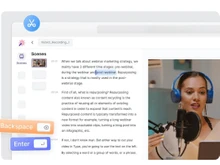
  • Editing and Control: Opus Clip automates most of the process, offering quick edits, captions, and transitions with minimal manual input. Vizard AI provides greater control through its transcript-based editing, enabling users to select and trim specific video portions directly from the text.
  • Captions and Subtitles: Both platforms generate captions automatically. Opus Clip emphasizes dynamic caption styles, highlighted keywords, and visual effects, while Vizard AI supports multi-language subtitle generation with customization options for style and placement.
  • Aspect Ratios and Platform Optimization: Opus Clip automatically resizes and formats videos for various social platforms, such as YouTube Shorts, TikTok, and Instagram Reels. Vizard AI similarly supports aspect ratio adjustments and cropping to optimize content for different social media channels.
  • Workflow and Collaboration: Opus Clip offers a streamlined, automated process designed for rapid turnaround and bulk video generation. Vizard AI focuses on flexibility, supporting collaborative edits and fine-tuning for marketing or educational teams that require manual precision.
  • Accessibility and Integration: Opus Clip operates entirely online and supports integration with major video sources like YouTube and Google Drive. Vizard AI is also web-based and offers direct video uploads, editing within the browser, and project sharing capabilities for team workflows.

Pricing

img

Price Plans

$ 15.00

Starter

$ 29.00

Pro

View Details img

$ 29.00

Creator

$ 39.00

Pro

View Details img

  • Free Trial
  • Lifetime Plan
  • img
  • img Free Trial
  • img

Ratings

img

Overall ratings

4.2

14 Ratings & 14 Reviews

88% Likelihood to Recommend

4.4

4 Ratings & 0 Reviews

Pros & Cons

img

Pros

img

It was fine a few months ago and widely used on social media, which is great for...Read more - Nidhi Shah Jul 04, 2024

img

OpusClip finds the content you need in minutes, saving hours of searching. The e...Read more - Neeraj Guglani Jul 03, 2024

Not Available

Currently no pros are available. Please check back later

Cons

img

Customer service is non-existent. I've wasted credits trying to troubleshoot iss...Read more - Nidhi Shah Jul 04, 2024

img

Some features need polishing, but improvements are already happening. - Neeraj Guglani Jul 03, 2024

Not Available

Currently no cons are available. Please check back later

Reviews

img

Verified customer reviews

Non-Existent Customer Service and Many AI Glitches

Nidhi Shah Jul 04, 2024

Perfect Tool to Save You Tons of Time!

Neeraj Guglani Jul 03, 2024

Rating

Jeremiah . Feb 22, 2024

Rating

manjunath AR Feb 22, 2024

Best Use for

img

Business Size:

  • img Individual
  • img 2-50 Employees
  • img 51-250 Employees
  • img 250-500 Employees
  • img 500-1000 Employees
  • img More than 1000+ Employees
  • img Individual
  • img 2-50 Employees
  • img 51-250 Employees
  • img 250-500 Employees
  • img 500-1000 Employees
  • img More than 1000+ Employees

Business Type:

  • img Small Business
  • img Startups
  • img Medium Business
  • img Enterprise
  • img SMBs
  • img SMEs
  • img MSMBs
  • img MSMEs
  • img Freelancers
  • img Individual
  • img Small Business
  • img Startups
  • img Medium Business
  • img Enterprise
  • img SMBs
  • img SMEs
  • img MSMBs
  • img MSMEs
  • img Freelancers
  • img Individual

Industries:

  • imgAll Industries
  • imgAll Industries

We provide the best software solution for your business needs

img
img

Features

img

Basic Editing Tools / Timeline Editing

  • img Non-Linear Editing (NLE)
  • img Split & Merge
  • img Trim, Crop & Resize
  • img Drag and Drop Functionality
  • img Transition Effects
  • img Video Masking
  • img Video Overlays
  • img Scene Cut Detection
  • img Preview Functionality
  • img Speed Ramping and Speed Changing
  • img Non-Linear Editing (NLE)
  • img Split & Merge
  • img Trim, Crop & Resize
  • img Drag and Drop Functionality
  • img Transition Effects
  • img Video Masking
  • img Video Overlays
  • img Scene Cut Detection
  • img Preview Functionality
  • img Speed Ramping and Speed Changing

Color Correction & Enhancement

  • img Color Grading and Correction
  • img Color Blending and Filters
  • img Color LUTs
  • img Video Enhancer
  • img Color Grading and Correction
  • img Color Blending and Filters
  • img Color LUTs
  • img Video Enhancer

Advanced Editing Tools

  • img Auto Reframe
  • img Key Frames and Animations
  • img Object Motion Tracking
  • img 3D Animations
  • img Background Removal
  • img Video Stabilization
  • img Screen / Camera Recording
  • img Proxy Tools
  • img Duplicate Detection
  • img Auto Reframe
  • img Key Frames and Animations
  • img Object Motion Tracking
  • img 3D Animations
  • img Background Removal
  • img Video Stabilization
  • img Screen / Camera Recording
  • img Proxy Tools
  • img Duplicate Detection

Visual Effects & Motion Graphics

  • img Content Library and Elements
  • img Green Screen and Chroma Key / Luma Key
  • img VFX
  • img SFX
  • img Content Library and Elements
  • img Green Screen and Chroma Key / Luma Key
  • img VFX
  • img SFX

Audio Editing Tools

  • img Voiceovers, Subtitles and Transcripts
  • img Audio Waveforms
  • img Silence Remover
  • img Audio Denoise
  • img Audio Stretching
  • img Auto Synchronization
  • img Audio Mixing
  • img Beat Synchronization
  • img Voiceovers, Subtitles and Transcripts
  • img Audio Waveforms
  • img Silence Remover
  • img Audio Denoise
  • img Audio Stretching
  • img Auto Synchronization
  • img Audio Mixing
  • img Beat Synchronization

Image Editing Tools

  • img Image Stabilization
  • img Noise Removal
  • img Image Stabilization
  • img Noise Removal

File Storage and Management

  • img File Rendering
  • img Automatic Project Backup
  • img 4K and HD Export
  • img Audio / Video Conversion
  • img File Rendering
  • img Automatic Project Backup
  • img 4K and HD Export
  • img Audio / Video Conversion

AI Video Creator / Editor

  • img AI Co-Pilot Editing
  • img AI Text to Speech
  • img AI Voice Changer
  • img AI Auto Face Blur
  • img AI Speech / Dialogue Enhancer
  • img AI Text-To-Video
  • img AI Text-Based Editing
  • img AI Co-Pilot Editing
  • img AI Text to Speech
  • img AI Voice Changer
  • img AI Auto Face Blur
  • img AI Speech / Dialogue Enhancer
  • img AI Text-To-Video
  • img AI Text-Based Editing

Collaboration & Sharing

  • img Real Time Collaboration
  • img Social Media Integration
  • img Multi Device Compatibility
  • img Multi Format Compatibility
  • img Video Brand Kit
  • img Third-Party Integrations
  • img Real Time Collaboration
  • img Social Media Integration
  • img Multi Device Compatibility
  • img Multi Format Compatibility
  • img Video Brand Kit
  • img Third-Party Integrations

Specifications

img

Deployment

  • img Web based
  • img On Premises
  • img Web based
  • img On Premises

Device Supported

  • img Desktop
  • img Mobile
  • img iPad
  • img Tablet
  • img Desktop
  • img Mobile
  • img iPad
  • img Tablet

Supported Platforms

  • img Windows
  • img Mac OS
  • img Android
  • img iOS
  • img Linux
  • img Ubuntu
  • img Windows
  • img Mac OS
  • img Android
  • img iOS
  • img Linux
  • img Ubuntu

Languages support

  • imgEnglish
  • imgEnglish

Compliance Regulations:

  • img COPPA
  • img HIPAA
  • img CCPA
  • img CPRA
  • img ECPA
  • img COPPA
  • img HIPAA
  • img CCPA
  • img CPRA
  • img ECPA

Alternatives

img

Top Alternative Products

Adobe Premiere Pro

Adobe Premiere Pro


Final Cut Pro

Final Cut Pro


DaVinci Resolve

DaVinci Resolve


Avid Media Composer

Avid Media Composer


See all Opus Clip alternatives img
Adobe Premiere Pro

Adobe Premiere Pro


Final Cut Pro

Final Cut Pro


DaVinci Resolve

DaVinci Resolve


Avid Media Composer

Avid Media Composer


See all Vizard AI alternatives img

Send this comparison to my inbox

img Get directly in your email inbox on your Whatsapp

Similar Comparison

Opus Clip vs Vizard AI Comparison FAQs

Software questions,
answered

Opus Clip focuses on fast automated clip creation with very little manual editing. Vizard AI provides both automation and precise transcript-based editing, which makes it more flexible for users who want to control over the final output.

Vizard AI offers stronger multi language support with editable subtitles, making it better for global audiences. Opus Clip supports auto captions but does not provide the same level of language customization or control.

Vizard AI is better suited for teams because it supports shared workspaces, collaboration tools, and brand kits. Opus Clip is designed more for individual creators who want quick and automated clip generation.

Both tools export in vertical formats suitable for TikTok, Shorts, and Reels. Opus Clip focuses on speed and automation, while Vizard AI provides more control for creators who want cleaner and more polished clips.

Opus Clip is easier for beginners because it handles most of the editing automatically. Users can upload a video and receive ready-made clips without needing editing skills or workflow knowledge.

Vizard AI usually creates cleaner clips for podcasts and interviews. Its transcript-based editing, scene detection, and speaker tracking offer more accuracy compared to fully automated moment detection.

Yes. Both Opus Clip and Vizard AI offer free plans but with usage limits. Their paid plans unlock higher processing limits, advanced editing tools, branding features, and team capabilities.

Vizard AI is the better choice for branded content because it includes brand kits, logos, color themes, and consistent styling controls. Opus Clip provides basic templates but does not offer the same level of branding customization.

Yes. Many creators use Opus Clip for fast clip generation and then refine or brand selected clips in Vizard AI. This workflow combines the speed of Opus Clip with the precision and styling tools of Vizard AI.

A Quick Comparison Between Opus Clip vs Vizard AI

Choosing any software for your organisation is a crucial decision. As a decision maker, you must ensure that the software you choose addresses the pain points of your teams and reaps maximum benefit for you.

  • Which AI Video Editor is Best for Creators: Opus Clip or Vizard AI?
  • Quick Comparison Between Opus Clip and Wizard Ai
  • Opus Clip vs Vizard AI: Comparison Table
  • Opus Clip vs Vizard AI: AI Accuracy and Clip Quality
  • Vizard AI vs Opus Clip: Content Type Suitability
  • Opus Clip versus Vizard AI: Learning Curve and Ease of Use
  • Vizard AI versus Opus Clip: Rendering Speed and Performance
  • Opus Clip or Vizard AI? Social Platform Optimization
  • Opus Clip vs Vizard AI: Audio Enhancement and Cleanup
  • Opus CLip vs Vizard AI: Long Form Content Handling
  • When to Choose Opus Clip or Vizard AI?
  • Final Verdict: Opus Clip or Vizard AI?

Which AI Video Editor is Best for Creators: Opus Clip or Vizard AI?

Opus Clip and Vizard AI are two of the most popular AI video editing tools in the United States. Both apps assist creators in creating long videos into short, social ready videos on Tik Tok, YouTube Shorts, Instagram Reel, and others. They use AI to detect highlights, generate captions, and format videos automatically.

Opus Clip is concerned with rapid automation. It finds viral content, captioning, re-capturing videos, and creates viral clips with nearly no editing. Vizard AI also creates short clips automatically but offers more control through transcript-based editing, collaboration features, and branding tools. But which one is better?

In this comparison, we will explore their key differences, features, pricing approach, and best use cases so you can choose the tool that fits your content workflow.

Quick Comparison Between Opus Clip and Wizard Ai

  • Opus clips is designed to be quick and aim at generating viral clips in a fully automatic manner requiring close to no manual action. Vizard AI also offers automated clipping and allows users manually to refine clips with transcripts for more control and accuracy.
  • Opus Clip uses a virality score to select video parts that can become viral on social media. Whereas Vizard AI breaks down scenes, speakers, transitions in more detail, and gives much clearer boundaries of the clip and can detect highlights better. This is great with podcasts and interviews.
  • Vizard AI provides brand kits, regular caption style, placement of logos, and customizable layouts to ensure a professional appearance of multiple clips. Opus Clip focuses more on short cut designs and fast output, yet less control over branding.
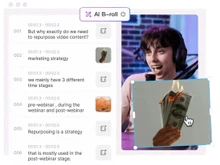
  • Opus Clip has AI B Roll, AI voice generation, AI audio enhancement, silence removal and automatic reframing to accelerate editing. Vizard AI focuses on editing accuracy of smart subtitles, scene identification, speaker tracking, and supports multi language captions.

Opus Clip vs Vizard AI: Comparison Table

Feature Opus Clip Vizard AI
Primary Function Automatic AI video clipping and repurposing AI video clipping with manual refinement and transcript editing
Pricing Starts at $15 USD/month Starts at $29/month
AI Editing Tools AI highlight detection, auto captioning, auto reframe, AI B-Roll, AI audio enhances, AI voice-over included AI highlight detection, transcript-based editing, smart subtitles, scene detection
Captions & Subtitles Automatic captions and animated text Automatic captions with multi-language support and detailed subtitle editing
Customization Basic layout and style templates Brand kits, logos, color themes, and styling options
Output Optimization Auto-generated clips optimized for TikTok, YouTube Shorts, Reels Optimized exports with preview and layout options
Free Plan Yes, with monthly processing time limits Yes, with usage limits and paid tiers available
Best For Quick automated clip generation for social platforms Controlled, precise editing, branding, and team workflows

Opus Clip vs Vizard AI: AI Accuracy and Clip Quality

Opus Clip focuses on fast virality scoring to pick attention-grabbing moments, which works well for motivational, commentary, or reaction-style content. Vizard AI has an upper hand as it uses deeper scene detection, speaker tracking, and transcript cues, resulting in cleaner clip boundaries and more accurate storytelling.

Vizard AI vs Opus Clip: Content Type Suitability

Opus Clip works best for dynamic conversational videos, podcasts, and talking head content where viral moments can be identified quickly. Vizard AI works better for structured content such as tutorials, presentations, webinars, and interviews that require accurate trimming and context preservation. So, it is a tie, because each is better for different types of content.

Opus Clip versus Vizard AI: Learning Curve and Ease of Use

Opus Clip is a clear winner because it is extremely beginner friendly. You upload a video, and AI does almost all the work, making it perfect for creators with no editing background. Vizard AI provides more controls, so learning it takes slightly longer compared to Opus Clip.

Vizard AI versus Opus Clip: Rendering Speed and Performance

Opus Clip delivers clips very quickly due to its automation of heavy workflow. Users often receive ready clips faster than on platforms with manual editing steps. Vizard AI can take slightly longer because users may refine transcripts or adjust scenes before exporting. So, Opus Clip is a winner because its automated process produces clips faster.

Opus Clip or Vizard AI? Social Platform Optimization

Both tools support TikTok, YouTube Shorts, and Instagram Reels formats. Opus Clip automatically optimizes clips for vertical content with captions and layout adjustments. Vizard AI offers similar output but gives more control for brand consistency and previewing platform layouts.

Opus Clip vs Vizard AI: Audio Enhancement and Cleanup

Opus Clip offers AI Audio Enhance that removes background noise and improves clarity automatically. Vizard AI includes caption accuracy enhancements but does not match Opus Clip’s auto audio clean up capabilities.

Opus CLip vs Vizard AI: Long Form Content Handling

Vizard AI handles long form videos, webinars, and hour-long podcasts with high accuracy because its transcript editing allows precise control. Opus Clip handles long videos also, but accuracy may vary depending on the content structure or speaker's clarity. So, Vizard AI wins this round because its transcript-based editing ensures better results for long videos.

When to Choose Opus Clip or Vizard AI?

Choose Opus Clip if… Choose Vizard AI if…
You want clips generated automatically You want control and precision
You want scroll-ready clips quickly You want branded or polished clips
Basic auto captions are enough You need multi language captions
You want quick highlights You need accurate handling for long content
You use basic templates You need full brand kits and styling

Final Verdict: Opus Clip or Vizard AI?

Opus Clip is perfect for creators who want a fast, automated way to turn long videos into short clips. It requires very little effort and generates multiple social ready clips instantly. It is excellent for busy creators, coaches, and influencers who prioritize speed.

Vizard AI is ideal for users who want precision, customization, branding, collaboration, and clean editing for long form of content. It is especially useful for agencies, marketing teams, podcasters, and creators who want polished results.

If you are still confused, then get in touch with our software experts or the Techjockey Team for assistance in picking the right AI video editor that fits your needs.

Add Software to Compare

close

Recommended Products

20,000+ Software Listed 20,000+ Software Listed

Best Price Guaranteed Unbiased Comparison

Free Expert
                        Consultation Read Authentic Reviews

2M+ Happy Customers 500,000+ Monthly Users