linkedin

RustDesk VS Splashtop

Let’s have a side-by-side comparison of RustDesk vs Splashtop to find out which one is better. This software comparison between RustDesk and Splashtop is based on genuine user reviews. Compare software prices, features, support, ease of use, and user reviews to make the best choice between these, and decide whether RustDesk or Splashtop fits your business.

Quick View

  • Rating & Review
  • Platforms
  • Recommended
  • img 5 Ratings & 1 Reviews
  • icon_desktop icon_ios icon_Android icon_mac icon_linux
  • img 5 Ratings & 0 Reviews
  • icon_desktop icon_ios icon_Android icon_mac icon_linux

Key Differences Between RustDesk and Splashtop for Remote Access and Remote Desktop

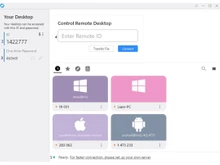
  • Primary Focus and Use Cases: RustDesk is an open-source remote access tool offering peer-to-peer connections and optional self-hosting, suited for users or teams that want control over their infrastructure. Splashtop is a commercial remote desktop solution focused on providing reliable remote access, remote support, and business-grade remote desktop services with easy setup and managed infrastructure.
  • User Experience and Learning Curve: RustDesk provides a straightforward interface and can be set up relatively quickly, especially in peer-to-peer mode, but may require technical know-how if self-hosting or managing servers. Splashtop offers a polished, user-friendly interface designed for minimal configuration, making it easier for average users or enterprises to deploy without deep technical involvement.
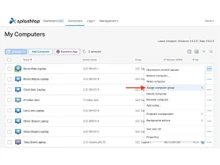
  • Features and Functionality: RustDesk supports remote control, file transfer, clipboard sync, and multi-platform clients (Windows, macOS, Linux, iOS, Android). Splashtop provides remote desktop access, screen sharing, remote support tools, file transfer, multi-monitor support, and enterprise-friendly features like device management, user permissions, and session logging.
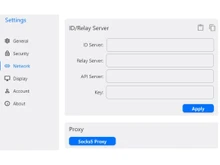
  • Customization and Flexibility: RustDesk’s open-source nature allows users to self-host and control data routing, privacy, and server setup—offering flexibility and potentially enhanced security. Splashtop offers less flexibility in backend configuration but provides stability, ease of use, and a structured, managed service suited for businesses that prefer reliability over custom setup.
  • Platform Coverage and Compatibility: Both RustDesk and Splashtop support multiple platforms including desktop and mobile operating systems. Splashtop adds enterprise-grade compatibility with remote support workflows, easier deployment across teams, and managed user access controls. RustDesk works across platforms but may require additional setup when used in complex or large-scale environments.
  • Ideal Audience and Application: RustDesk is ideal for individuals, small teams, or privacy-conscious users who want open-source, self-hosted remote access, control over data, and flexible deployment. Splashtop is best suited for businesses, support teams, and enterprises that need a robust, stable remote desktop and remote support solution with minimal setup and ongoing management.

Pricing

img

Price Plans

$ 118.80

Individual ($9.90 /month)

$ 238.80

Basic($19.90 /month)

View Details img

$ 60.00

Remote Work & Access-Solo

$ 99.00

Remote Work & Access-Pro

$ 149.00

Remote Work & Access-Performance

View Details img

  • Free Trial
  • Lifetime Plan
  • img Free Trial
  • img
  • img

Ratings

img

Overall ratings

4.3

5 Ratings & 1 Reviews

86% Likelihood to Recommend

4.2

5 Ratings & 0 Reviews

92% Likelihood to Recommend

Pros & Cons

img

Pros

img

Open-source, private server hosting, fast performance, no subscription fees. - Aman Jha Mar 24, 2025

Not Available

Currently no pros are available. Please check back later

Cons

img

Lacks built-in mobile support and some advanced enterprise features. - Aman Jha Mar 24, 2025

Not Available

Currently no cons are available. Please check back later

Reviews

img

Verified customer reviews

Best Open-Source Remote Desktop with Full Privacy Control

Aman Jha Mar 24, 2025

Rating

Altafrahil Oct 21, 2024

Rating

ATC Associates Jan 17, 2025

Rating

Venu NarayanPabba Sep 20, 2024

Best Use for

img

Business Size:

  • img Individual
  • img 2-50 Employees
  • img 51-250 Employees
  • img 250-500 Employees
  • img 500-1000 Employees
  • img More than 1000+ Employees
  • img Individual
  • img 2-50 Employees
  • img 51-250 Employees
  • img 250-500 Employees
  • img 500-1000 Employees
  • img More than 1000+ Employees

Business Type:

  • img Small Business
  • img Startups
  • img Medium Business
  • img Enterprise
  • img SMBs
  • img SMEs
  • img MSMBs
  • img MSMEs
  • img Freelancers
  • img Individual
  • img Small Business
  • img Startups
  • img Medium Business
  • img Enterprise
  • img SMBs
  • img SMEs
  • img MSMBs
  • img MSMEs
  • img Freelancers
  • img Individual

Industries:

  • imgAll Industries
  • imgAll Industries

We provide the best software solution for your business needs

img
img

Features

img

Connection & Accessibility

  • img Remote printing
  • img Unattended Access
  • img Cross-Platform Compatibility
  • img Browser-Based Access
  • img Mobile Access Support
  • img Multi-Window Control
  • img Persistent Session
  • img Clipboard Syncing
  • img Multi-Monitor Navigation
  • img Remote printing
  • img Unattended Access
  • img Cross-Platform Compatibility
  • img Browser-Based Access
  • img Mobile Access Support
  • img Multi-Window Control
  • img Persistent Session
  • img Clipboard Syncing
  • img Multi-Monitor Navigation

Session Management & Control

  • img Multi Session Support
  • img Session Handover
  • img Queue & Schedule Sessions
  • img Session Timeout & Auto-Lock
  • img Real-Time Control Customization
  • img Remote Reboot Options
  • img Blank Screen Mode
  • img Session Recording & Playback
  • img Multi Session Support
  • img Session Handover
  • img Queue & Schedule Sessions
  • img Session Timeout & Auto-Lock
  • img Real-Time Control Customization
  • img Remote Reboot Options
  • img Blank Screen Mode
  • img Session Recording & Playback

System Management & Support

  • img Remote Task Manager
  • img Two-Way File Transfer
  • img Bulk File Transfer
  • img System Health Monitoring
  • img Automated System Diagnostics
  • img Remote Command Prompt Access
  • img Session Note Taking
  • img Direct File Access Permissions
  • img File Sync & Auto Update
  • img Remote Task Manager
  • img Two-Way File Transfer
  • img Bulk File Transfer
  • img System Health Monitoring
  • img Automated System Diagnostics
  • img Remote Command Prompt Access
  • img Session Note Taking
  • img Direct File Access Permissions
  • img File Sync & Auto Update

Collaboration & Communication

  • img In-Session Chat
  • img Video Conferencing
  • img Annotation & Drawing Tools
  • img Screen Sharing with Control
  • img Multiple Technician Access
  • img User Grouping & Management
  • img Shared Toolbox
  • img Two-Way Desktop Sharing
  • img In-Session Chat
  • img Video Conferencing
  • img Annotation & Drawing Tools
  • img Screen Sharing with Control
  • img Multiple Technician Access
  • img User Grouping & Management
  • img Shared Toolbox
  • img Two-Way Desktop Sharing

Security & Compliance

  • img Audit Logs
  • img Multi-Factor Authentication (MFA)
  • img HIPAA Compliance
  • img End-to-End Encryption
  • img Role-Based Access Control (RBAC)
  • img Dynamic IP Whitelisting
  • img GDPR/CCPA Compliance
  • img Audit Logs
  • img Multi-Factor Authentication (MFA)
  • img HIPAA Compliance
  • img End-to-End Encryption
  • img Role-Based Access Control (RBAC)
  • img Dynamic IP Whitelisting
  • img GDPR/CCPA Compliance

Customization & Personalization

  • img Customizable Branding
  • img Customizable Toolbars
  • img Flexible UI Layout
  • img Session Scripting
  • img Custom Keyboard Mapping
  • img Language Localization
  • img Customizable Branding
  • img Customizable Toolbars
  • img Flexible UI Layout
  • img Session Scripting
  • img Custom Keyboard Mapping
  • img Language Localization

Automation & Workflow

  • img Workflow Automation
  • img Task Automation 
  • img Scheduled Tasks
  • img Remote Wake-on-LAN
  • img Workflow Automation
  • img Task Automation 
  • img Scheduled Tasks
  • img Remote Wake-on-LAN

Analytics & Reporting

  • img Performance Metrics
  • img Customizable dashboards
  • img Detailed Session Reports
  • img User Activity Reports
  • img Error Logs
  • img Performance Metrics
  • img Customizable dashboards
  • img Detailed Session Reports
  • img User Activity Reports
  • img Error Logs

Integrations

  • img Ticket Management
  • img API Integration
  • img Patch Management
  • img Third Party Integration
  • img Ticket Management
  • img API Integration
  • img Patch Management
  • img Third Party Integration

Administrative Features

  • img Device Management
  • img Patch Management
  • img Access Logs
  • img Admin Console
  • img Centralized Connection Management
  • img User Access Management
  • img Device Management
  • img Patch Management
  • img Access Logs
  • img Admin Console
  • img Centralized Connection Management
  • img User Access Management

Specifications

img

Deployment

  • img Web based
  • img On Premises
  • img Web based
  • img On Premises

Device Supported

  • img Desktop
  • img Mobile
  • img iPad
  • img Tablet
  • img Desktop
  • img Mobile
  • img iPad
  • img Tablet

Supported Platforms

  • img Windows
  • img Mac OS
  • img Android
  • img iOS
  • img Linux
  • img Ubuntu
  • img Windows
  • img Mac OS
  • img Android
  • img iOS
  • img Linux
  • img Ubuntu

Languages support

  • imgEnglish
  • imgEnglish

Compliance Regulations:

  • img COPPA
  • img HIPAA
  • img CCPA
  • img CPRA
  • img ECPA
  • img COPPA
  • img HIPAA
  • img CCPA
  • img CPRA
  • img ECPA

Alternatives

img

Top Alternative Products

Duet Display

Duet Display


TSPlus

TSPlus


Apple Remote Desktop

Apple Remote Desktop


AnyDesk

AnyDesk


See all RustDesk alternatives img
Duet Display

Duet Display


TSPlus

TSPlus


Apple Remote Desktop

Apple Remote Desktop


AnyDesk

AnyDesk


See all Splashtop alternatives img

Send this comparison to my inbox

img Get directly in your email inbox on your Whatsapp

Similar Comparison

RustDesk vs Splashtop Comparison FAQs

Software questions,
answered

RustDesk is open-source and self-hosted, while Splashtop is a commercial, managed remote desktop solution.

Splashtop is better suited for businesses due to its performance, support, and management features.

RustDesk offers better privacy because users can self-host servers and control all data.

Yes, RustDesk is free for personal use, with optional paid plans for enterprise features.

Yes, Splashtop offers full-featured mobile apps for Android and iOS.

Yes. Some users use RustDesk for internal access and Splashtop for external or client-facing support.

Splashtop is easier to set up, while RustDesk may require technical configuration.

A Quick Comparison Between RustDesk vs Splashtop

Choosing any software for your organisation is a crucial decision. As a decision maker, you must ensure that the software you choose addresses the pain points of your teams and reaps maximum benefit for you.

  • RustDesk vs Splashtop: Which Remote Desktop Software Is Right for You?
  • RustDesk and Splashtop: Comparison Table
  • Detailed Feature Comparison of RustDesk and Splashtop
  • Key Strengths of RustDesk vs Splashtop
  • When to Choose RustDesk or Splashtop?
  • Final Verdict: RustDesk or Splashtop?

RustDesk vs Splashtop: Which Remote Desktop Software Is Right for You?

RustDesk is an open-source remote desktop software that provides remote desktop access with self-hosting, privacy, and core access features. RustDesk is particularly favored by developers and IT and other privacy concerned professionals and remote access organizations that do not want to use remote access third party servers. RustDesk offers features and core access flexibility remote remote desktop access and customization.

Splashtop is a remote access and remote support platform that aims to provide professionals. Its teams in business environments high performing remote desktop access and device management with support security and customer enterprise grade. Splashtop is a pioneer in reliability and ease of use, providing a seamless experience for different device, polished and remote desktop access support.

RustDesk is on the other side, privacy concerned and advanced users in tech field, whereas Splashtop is adequately suited for professionals and businesses who need reliable remote desktop solution that is being managed or offered remote access service.

RustDesk and Splashtop: Comparison Table

Feature RustDesk Splashtop
Primary Use Case Secure self-hosted remote desktop Business remote access & support
Target Audience Developers, IT teams, privacy-focused users Businesses, IT teams, professionals
Core Functionality Remote access, self-hosting, file transfer Remote access, support, device management
Customization High (open source & self-hosted) Limited (managed environment)
Pricing Free (paid enterprise plans available) Paid plans (subscription-based)
Security End-to-end encryption, self-hosted servers Enterprise-grade security & compliance
Device Management Basic Advanced management tools
Ideal For Cost-sensitive & privacy-driven setups Professional & enterprise environments

Detailed Feature Comparison of RustDesk and Splashtop

  • Remote Access & Connectivity

RustDesk: RustDesk offers you the option of fully self-hosting a server, using public servers or peer to peer remote desktop access. This attribute of RustDesk provides excellent control over data flow and infrastructures, therefore making able to provide secure remote access internally.

Splashtop: Splashtop provides remote access that is optimized to business environments in an efficient, stabilized and high and speedy manner. It relies on managed cloud infrastructure, ensuring consistent performance without requiring technical setup from the user.

  • Security & Privacy

RustDesk: One of RustDesk's most notable feature is security related to end to end encryption and full ownership of the sever during self hosting. This is particularly helpful for self-hosted clients belonging to sectors like banking that have strict data privacy policies.

Splashtop: On the other hand, Splashtop has learned to provide enterprise class secutiry features such as authentication of devices, encryption and control over access to the data, as well as collapse able compliance certificates to meet the microscale security standards of the enterprise.

  • Performance & User Experience

RustDesk: In general RustDesk does perform well for most remote access use cases. However, there are some edge cases depending on the specific available configuration such as the network, hardware, and the server.

Splashtop: Splashtop also has good use cases for remote working, supporting IT, as well as for sessions that are heavy multimedia. User feedback is the product is that is it high performance and has low latency.

  • File Transfer & Collaboration

RustDesk: One of the core remote access features of RustDesk is that it supports simple transfer of files and sharing of clipboard. However, other features that are used for informal collaboration around remote access are minimal.

Splashtop: On the other hand, Splashtop has session recording, professional collaboration tools, chat support for real time communication, advanced file transfer and support for multiple monitors.

  • Setup & Ease of Use

RustDesk: Most users are split between their experience and technical knowledge when it comes to RustDesk self-hosting. This is a factor that will determine how seamless your experience will be.

Splashtop: In the end, Splashtop is a remote desktop software that a user can sign up to easily and getting it working as quickly as possible. This is for the users who are not very technical.

  • Mobile App Experience

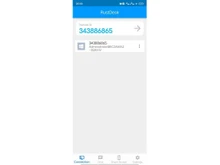
RustDesk: RustDesk offers mobile apps for Android and iOS, but the experience is more basic and best suited for quick access rather than full remote workflows.

Splashtop: Splashtop provides a polished and reliable mobile experience, allowing users to access and control devices easily from smartphones and tablets.

  • Platform & Accessibility

RustDesk: Available on Windows, macOS, Linux, Android, and iOS, with the flexibility to self-host or use public servers.

Splashtop: Works across Windows, macOS, Linux, Android, iOS, and web, with centralized account management and enterprise controls.

Key Strengths of RustDesk vs Splashtop

Why Users Choose RustDesk?

  • Open-source and self-hosted optionStrong privacy and full data control
  • Free for personal and small-scale use
  • Cross-platform support
  • Ideal for technical users and internal networks

Why Users Prefer Splashtop?

  • High-performance remote access
  • Easy setup and polished interface
  • Enterprise-grade security and compliance
  • Advanced IT management tools
  • Reliable customer support

When to Choose RustDesk or Splashtop?

Factor Choose RustDesk if… Choose Splashtop if…
Experience Level You are technical or IT-focused You want a plug-and-play solution
Use Case Privacy-first or internal access Business remote work or support
Security Preference You want full server control You want managed enterprise security
Budget Focus You prefer a free or low-cost solution You can pay for reliability & support
Setup Preference You don’t mind configuration You want minimal setup
Team Size Small teams or internal use Growing teams & enterprises

Final Verdict: RustDesk or Splashtop?

RustDesk is best suited for privacy-focused users, developers, and IT teams who want full control over their remote desktop infrastructure. Its open-source nature and self-hosting capabilities make it a cost-effective and secure option for technical environments.

Splashtop, on the other hand, is ideal for businesses and professionals who need fast, reliable, and easy-to-manage remote access. It offers better performance, support, and enterprise-ready features with minimal setup.

In short, choose RustDesk if you value control, privacy, and open-source flexibility. Whereas, choose Splashtop if you want a polished, business-ready remote desktop solution.

Add Software to Compare

close

Recommended Products

20,000+ Software Listed 20,000+ Software Listed

Best Price Guaranteed Unbiased Comparison

Free Expert
                        Consultation Read Authentic Reviews

2M+ Happy Customers 500,000+ Monthly Users