Description
Pricing
Features
Specification
Review
Compare
FAQs
Alternatives


 View Gallery
Brand: Bambu Lab
A free 3D design software that helps users prepare and optimize 3D models into print-ready files for accurate and efficient 3D printing. ...Read more

Get Free Expert Consultation
Let us know your business needs clearly

Verified & Trusted
Vendors

Safe & Secure
Payment

Personalized
Experts Support
FREE
Features
 Project Based Workflow Multi Plate Management Assembly and Part View Arch Move Toolpath Smart Cooling Controls
 See all 
We make it happen! Get your hands on the best solution based on your needs.


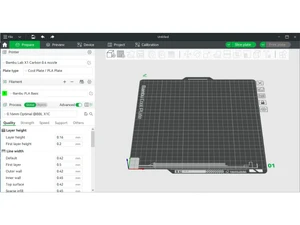
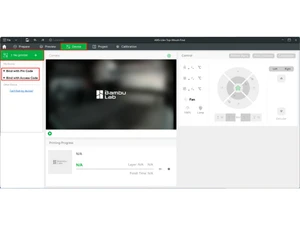
 Project Based Workflow Organizes multiple models and resources in 3MF projects for efficient slicing and print management. Multi Plate Management Supports concurrent handling of up to 36 build plates for staging multiple print jobs. Assembly and Part View Visualizes individual parts and entire assemblies, restoring relationships in STEP files. Arch Move Toolpath Generates smooth toolhead movements to reduce printer vibration and enhance print quality. Smart Cooling Controls Adjusts fan speed and cooling dynamically based on filament-specific parameters. Multi Color Model Painting Enables colorizing and painting models with up to 32 filament colors per project. Filament Slot Mapping Automatically maps filaments to slots in the AMS for seamless multi-material printing. Remote Support Sends print jobs over LAN/WAN and monitors print status remotely for single or multiple printers. Multi Printer Device Switching Allows easy switching and monitoring of multiple connected printers within one interface. Part Level Slicing Parameters Sets unique slicing parameters globally, per object, or per part for detailed control. Hybrid and Tree Supports Customizes support structures including normal, tree, and hybrid types for print stability. Toolhead Movement Optimization Reduces vibration and deformation via optimized arc path generation (G2/G3 commands). Preview Functionality Visualizes filament use, layer details, print cost, and time estimates with step-through.
 | Brand Name | Bambu Lab |
| Information | Bambu Lab is a consumer tech company focusing on desktop 3D printers. Its state-of-the-art 3D printers offer a feature-rich first-class experience for a global community of 3D printing makers, aiming to break the barriers between the digital and physical worlds and bring creativity. |
| Founded Year | 2020 |
| Director/Founders | Ye Tao |
| Company Size | 101-500 Employees |

 UAE
UAE India
India