linkedin
background
Browsee logo

Browsee

Brand: Browsee

Be the first to Reviews

Write a Review

Have Questions?

Browsee is a user behavior analytics software with session recordings, heatmaps, and feedback tools for optimizing website interactions. ...Read more

img

Get Free Expert Consultation

Let us know your business needs clearly

Advice

Verified & Trusted
Vendors

Payment

Safe & Secure
Payment

Guaranteed

Personalized
Experts Support

Starting at

$ 24.00 /Month

Features

  • check_icon Dashboards
  • check_icon Heatmaps
  • check_icon Screen Activity Recording
  • check_icon Behavioral Analytics
  • check_icon Website Analytics
  • See all img

Browsee Software Pricing, Features & Reviews

What is Browsee?

Browsee is a user behavior analytics software that helps to understand how the user interacts with websites and applications. It helps to understand user experience (UX), and behavior, identifies interaction hurdles, and provides recommendations to make the website user-friendly to boost conversions. The software records user sessions and tracks user interaction with website elements, scrolling, tagging behaviors such as rage clicks or confusion, navigation, etc. It then generates visual insights like heat maps and gives details on user interactions. These insights help in improvising website navigation and user interactive features for better interactions.

Browsee interface comes with tools, and easy navigation, and a dashboard centralizing all user experience tests carried out. It allows users to review session recordings, analyze engagement patterns, and identify pain points to optimize the web application. It generates visual user interactions, such as clicks and scrolls, and heatmaps to help in understanding the areas that receive the most attention. It enables segmentation of users based on behavior, location, and other parameters, for better user experiences. The platform integrates feedback tools to gather user opinions and suggestions. It ensures GDPR compliance and privacy settings to protect sensitive user data.

Why choose Browsee Customer Feedback Management Software?

  • Track Dynamic Content: Helps to monitor user interactions with popups, dropdowns, and modals for a complete understanding of dynamic elements' performance.
  • Session Recordings: Analyze detailed user sessions to identify behavioral patterns and issues impacting the user experience and navigation.
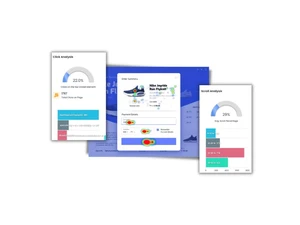
  • Heatmaps: Visualize clicks and scrolls to understand user engagement and optimize webpage layout for better user interaction.
  • Feedback Collection: Gather direct user feedback to understand needs, preferences, and suggestions, enhancing overall user experience and satisfaction.
  • User Experience: Identify pain points through session recordings and behavior tags to enhance site usability and customer satisfaction.

Benefits of Browsee Customer Feedback Management Software

  • Better User Insights: It helps in providing detailed user behavior analysis, using session recording, heatmaps, feedback, etc. allowing for informed improvements in user experience.
  • Increased Conversions: Helps to optimize site design and content to improve user engagement and boost sales.
  • Better Debugging: Quickly identify and resolve usability issues, reducing bounce rates and customer frustration.
  • Better Decision-Making: It provides detailed data insights to help website improvements that align with user needs for better user experience.
  • Privacy Compliance: Ensure data protection with GDPR compliance and customizable recording settings for sensitive fields.
  • Feedback Integration: Collects user opinions and suggestions, driving improvements based on real user needs and preferences.

Pricing of Browsee Customer Feedback Management Software

Browsee price in the USA starts at $24. Browsee comes with multiple pricing plans and caters to the diverse customer base.

For subscription-related details and offers on premium packages, please request a call back from our product experts.

Browsee Pricing & Plans

Starter
  • 4,000 Recordings Per Month
  • 3 Continous Heatmaps
  • Unlimited Snapshot Heatmaps
  • 400,000 Page Views Per Month
    • Licenses
    • Monthly
Starting at $ 24.00
Plus
  • 10,000 Recordings Per Month
  • 5 Continous Heatmaps
  • Unlimited Snapshot Heatmaps
  • 800,000 Page Views Per Month
    • Licenses
    • Monthly
Starting at $ 57.00
Pro
  • 30,000 Recordings Per Month
  • 10 Continous Heatmaps
  • Unlimited Snapshot Heatmaps
  • 10,00,000 Page Views Per Month
    • Licenses
    • Monthly
Starting at $ 129.00
Executive
  • 100,000 Recordings Per Month
  • Unlimited Continous Heatmaps
  • Unlimited Snapshot Heatmaps
  • 20,00,000 Page Views Per Month
    • Licenses
    • Monthly
Starting at $ 299.00

Get Browsee Demo

We make it happen! Get your hands on the best solution based on your needs.

Interacted

Browsee Features

  • icon_check Dashboards Centralize all insights in one place, enabling easy monitoring of key metrics and performance trends.
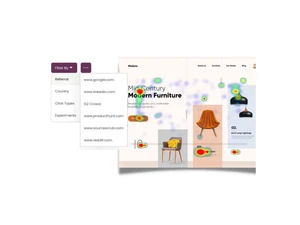
  • icon_check Heatmaps Visualize user interactions, including clicks and scrolls, to identify engagement hotspots and areas for improvement.
  • icon_check Screen Activity Recording Replay user sessions to uncover navigation challenges and gain actionable insights into user behavior.
  • icon_check Behavioral Analytics Detect patterns like rage clicks or confusion to address specific pain points and enhance usability.
  • icon_check Website Analytics Track overall website performance metrics, including traffic, bounce rates, and conversions, for comprehensive analysis.
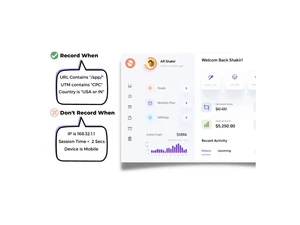
  • icon_check Segmentation Categorize users by geography, source, or behavior to tailor improvements for specific audience groups effectively.
  • icon_check AI-Generated Session Tags Automatically tag sessions (e.g., rage, confusion, errors) to surface the most relevant recordings.
  • icon_check Attention Maps Identify page areas that grab users’ attention to improve UX and content placement.
  • icon_check Funnels & Conversion Paths Build funnels to spot where users drop off in conversion flows and identify pain points.
  • icon_check Segmented Analytics Slice data by sources, channels, events, or user attributes for targeted insights.
  • icon_check No-Code Integration Install a simple JS snippet and start tracking without manual event or tag manager setup.
  • icon_check Summary Emails Subscribe segments or funnels to get daily metrics and key insights in your inbox.
  • icon_check UTM & Referral Tracking Track UTM and referral source metrics to understand traffic origins and performance.
  • icon_check Conversion Attribution Attribute key user actions to conversion events to understand what drives success.

Browsee Specifications

  • Supported Platforms :
  • Device:
  • Deployment :
  • Suitable For :
  • Business Specific:
  • Business Size:
  • Language:
  • Ubuntu Windows iOS Android MacOS Windows(Phone)
  • DesktopMobile
  • Web-Based
  • Education, E-Commerce, Finance
  • Automobile, e-retailers, e-commerce, Loan
  • Startups, Medium Business, SMBs, SMEs, MSMBs
  • English

Browsee Reviews and Ratings

banner

Would you like to review this product?

Submit Reviews

Browsee Company Details

Brand Name Browsee
Information We launched Browsee to help you make the most of your visitor session recordings.
Founded Year 2016
Director/Founders Saurabh Mathur and Shraddha Srivastava
Company Size 1-100 Employees

Browsee FAQ

A Browsee is a user behavior analytics tool with features of session recordings, heatmaps, and advanced user engagement insights.
A Browsee is used by UX designers, product managers, marketers, and developers to improve website performance and usability.
A Yes, Browsee offers a free trial and live demo to explore its features and functionalities.
A Browsee works on web-based platforms, and is accessible via any OS with browsers like Chrome or Firefox.
A Browsee uses JavaScript-based tracking scripts to record user actions like clicks, scrolls, and navigation paths.
A Yes, Browsee provides real-time analytics to monitor user behavior and interactions as they happen.
A Yes, Browsee supports SPAs with an NPM template for frameworks like React, Vue, and Angular.
A Browsee provides click heatmaps, scroll heatmaps, and attention heatmaps to visualize user interactions on websites.
A Yes, Browsee supports analytics for both web and mobile applications, providing comprehensive insights into user behavior.
A Yes, Browsee generates detailed reports on user behavior, heatmaps, and session recordings for actionable insights.
A Browsee pricing starts at $24 at Techjockey US.