Description
Pricing
Features
Specification
Review
Compare
FAQs
Alternatives


 View Gallery
Brand: FastStone
A user-friendly photo editing software for viewing, editing, and managing images that supports many image formats, too. ...Read more

Get Free Expert Consultation
Let us know your business needs clearly

Verified & Trusted
Vendors

Safe & Secure
Payment

Personalized
Experts Support
$ 34.95 /Lifetime
Features
 Multi Format Support Full Screen Viewer Image Magnifier Batch Converter Image Comparison
 See all 
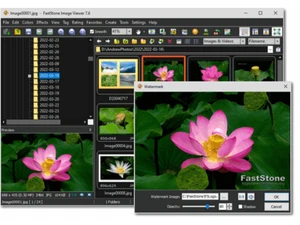
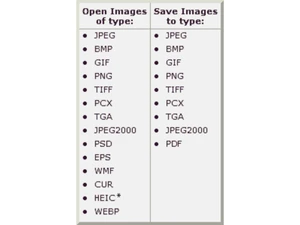
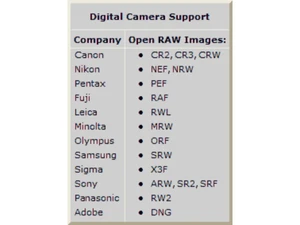
 Multi Format Support Provides native compatibility for major graphic formats like BMP, JPEG, PNG, and GIF along with digital camera RAW file types. Full Screen Viewer Features a distraction-free viewing mode with fly-out panels for quick access to EXIF data, thumbnails, and editing toolbars. Image Magnifier Includes a high-quality, customizable one-click magnifier that allows for close-up inspection of fine details within photos. Batch Converter Enables users to rename and convert large groups of images simultaneously while applying various transformations and filters. Image Comparison Allows side-by-side comparison of up to four images at once to help users identify and cull lower-quality or duplicate shots. Draw Board Provides a dedicated interface to add text, lines, highlights, callout objects, and geometric shapes directly onto any image. Image Resize Includes eleven different resampling algorithms to choose from when changing the pixel dimensions or resolution of an image. Color Adjustment Provides tools for modifying lighting, levels, curves, and color balance to enhance the visual quality of various photograph Metadata Support Displays comprehensive EXIF metadata for digital photos and supports the editing of descriptive comments for JPEG image files. Musical Slideshow Creates dynamic presentations with over 150 transitional effects and background music support for MP3, WMA, and WAV formats. Contact Sheet Allows for the creation of fully configurable contact sheets to organize and print multiple thumbnail images on a single page. Screen Capture Features a versatile screen capture utility that can grab windows, rectangular regions, or freehand areas of the computer screen. Scanner Interface Facilitates the acquisition of images from scanners with support for batch scanning directly into PDF, TIFF, or JPEG formats. File Management Includes file tagging, rating, and drag-and-drop capabilities to efficiently copy, move, and re-arrange large image collections.
 UAE
UAE India
India