linkedin
background
Hatch Embroidery logo

Hatch Embroidery

Brand: Wilcom

4.2

6 Ratings

Have Questions?

An easy-to-use embroidery software that helps you create, edit, and customize embroidery designs for embroidery machines. ...Read more

img

Get Free Expert Consultation

Let us know your business needs clearly

Advice

Verified & Trusted
Vendors

Payment

Safe & Secure
Payment

Guaranteed

Personalized
Experts Support

Starting at

$ 149.00 /Month

Features

  • check_icon Design Creation & Editing
  • check_icon Stitch Functions
  • check_icon Lettering and Typography
  • check_icon File Handling and Compatibility
  • check_icon Layout and Composition Tools
  • See all img

Hatch Embroidery Software Pricing, Features & Reviews

What is Hatch Embroidery?

Hatch Embroidery is an embroidery software used to create and edit embroidery designs for embroidery machines. It is designed mainly for beginners, hobby users, and small businesses who want to make custom embroidery work easily.

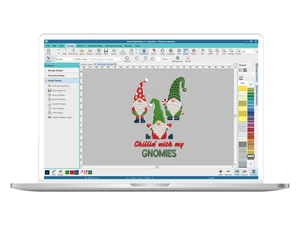
It helps users design patterns from scratch or edit ready-made designs with simple tools. You can convert images or photos into embroidery designs using its auto-digitizing feature.

The software also allows you to add text, lettering, and monograms to designs for personalization. It includes many creative stitch effects and styles to make designs more attractive.

Hatch Embroidery supports different embroidery machine formats, so designs can be used on various machines. It also lets you resize, recolor, and adjust stitch patterns easily.

There are different levels of the software, from basic tools to advanced digitizing features, depending on user needs.

Why Choose Hatch Embroidery Software?

  • User-Friendly Interface: Intuitive layout suitable for beginners and professionals.
  • Advanced Digitizing Tools: Create embroidery designs from scratch with precision.
  • Design Editing: Easily modify existing embroidery designs.
  • Resize Without Quality Loss: Scale designs while maintaining stitch quality.
  • Color Management: Recolor designs to match your project needs.
  • Lettering & Monograms: Built-in tools for stylish text and monograms.
  • Over 35 Machine Formats: Compatible with most embroidery machines.
  • Library of Designs: Access to a wide range of pre-made designs.
  • Automatic Stitch Optimization: Software calculates the best stitch paths.
  • Customizable Stitches: Adjust stitch types and densities for perfect results.
  • Applique Tools: Create intricate applique designs easily.
  • Photo-Stitch Feature: Convert images and photos into embroidery patterns.

Benefits of Hatch Embroidery Software

  • Support for Multi-Hooping: Work on large designs across multiple hoops.
  • Simulation & Preview: View your design in 3D before stitching.
  • Easy Import/Export: Import various formats and export to your machine.
  • Cross-Stitch Tools: Convert designs into cross-stitch patterns.
  • Patch Design Features: Create custom patches with ease.
  • Automatic Lettering Adjustment: Optimize spacing and alignment automatically.
  • Learning Resources: Tutorials and guides to help beginners.
  • Trusted by Professionals: Developed by experts in embroidery software for high-quality results.

Hatch Embroidery Pricing

Hatch Embroidery price starts at USD 149 at techjockey.com. The pricing model is based on different parameters, including extra features, deployment type, and the total number of users. For further queries related to the product, you can contact our product team and learn more about the pricing and offers.

Hatch Embroidery Pricing & Plans

Organizer
  • View and manage designs easily
  • Change design color blocks
  • 522 Hoop presets or create your own
  • Resize designs accurately
  • Output SVG files for closed objects
    • Licenses (Lifetime)
Starting at $ 149.00
Personalizer
  • Everything in Organizer, plus
  • 63 Professionally digitized fonts for lettering
  • 95 Professionally designed monogram templates
  • 406 Ornaments and 80 Borders included
  • 376 Stitch Motifs
    • Licenses (Lifetime)
Starting at $ 249.00
Composer
  • Everything in Personalizer, plus
  • Auto-digitize your artwork into creative embroider
  • State-of-the-art creativity and layout tools
  • Powerful object editing
  • Break apart lettering and monograms
    • Licenses (Lifetime)
Starting at $ 599.00

Get Hatch Embroidery Demo

We make it happen! Get your hands on the best solution based on your needs.

Interacted

Hatch Embroidery Features

Design Creation & Editing

  • icon_check Editing Tools Resize, rotate, mirror, and reshape designs with ease.
  • icon_check Drawing Tools Create and edit lines, shapes, and text directly within the software.
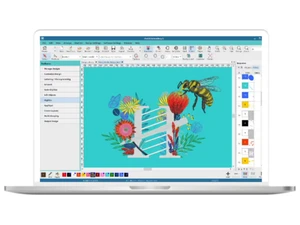
  • icon_check Manual & Auto-Digitizing Convert raster images (e.g., JPG, PNG) into stitch files either manually for precision or automatically for speed.
  • icon_check Vector Support Import and manipulate vector graphics (e.g., SVG, EPS) for scalable designs.

Stitch Functions

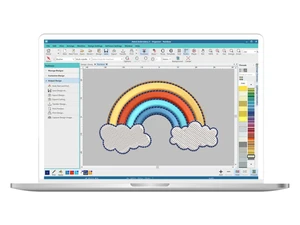
  • icon_check Stitch Types Support for various stitch types including satin, fill (tatami), running, and motif stitches.
  • icon_check AppliquĂ© Support Facilitate layering of fabric pieces onto a base fabric.
  • icon_check 3D Puff Embroidery Create raised embroidery designs for added texture.

Lettering and Typography

  • icon_check Built-in Embroidery Fonts Access a library of fonts specifically designed for embroidery.
  • icon_check TrueType Font Conversion Convert system fonts into embroidery stitches.
  • icon_check Monogramming Tools Easily create monograms with 1–3 letters.

File Handling and Compatibility

  • icon_check Import/Export Formats Handle a wide range of embroidery file formats including DST, PES, JEF, EXP, XXX, VP3, and more.
  • icon_check Image Import Import common image formats (PNG, JPG, BMP) for digitizing.
  • icon_check Multi-Brand Support Compatible with major embroidery machine brands such as Brother, Janome, Bernina, Tajima, and others.
  • icon_check Hoop Size Management Select from standard and custom hoop sizes to fit your machine.

Layout and Composition Tools

  • icon_check Multi-Hooping Support Split large designs into multiple hoop areas for larger projects.
  • icon_check Templates and Guidelines Utilize cantering and alignment tools for precise placement.
  • icon_check Background Image Placement Preview designs on fabric images to visualize the final product.

Stitch Simulation and Preview

  • icon_check 3D Simulation Realistic preview of how stitches will appear on the fabric.
  • icon_check Stitch-by-Stitch Preview Step through the design to inspect each stitch.
  • icon_check Thread Color Management Manage thread colors using libraries from brands like Madeira and Isacord.

Automation Features

  • icon_check Auto-Density Management Adjust stitch density based on fabric type.
  • icon_check Branching and Pathing Optimization Optimize stitching paths for efficiency.
  • icon_check Auto-Underlay Generation Automatically add underlay stitches for stability.

Color and Material Management

  • icon_check Thread Charts Access built-in thread brand libraries for accurate color matching.
  • icon_check Color Matching Tools Match colors between different thread brands.
  • icon_check Fabric Type Settings Adjust design parameters based on the selected fabric.
  • icon_check Auto Color Reduction Minimize color changes to streamline the embroidery process.
  • icon_check Stabilizer Recommendations Receive suggestions for appropriate stabilizers.

Output and Printing

  • icon_check Print Design Sheets Generate printouts with stitch counts and color changes.
  • icon_check Production Worksheets Create detailed worksheets for commercial production.

Analytics & Reporting

  • icon_check Stitch count reports Total number of stitches calculated for the entire design.
  • icon_check Color change reports Lists all thread color changes needed during the design
  • icon_check Thread usage reports Estimates the length of thread required for each color.
  • icon_check Time to complete estimation Predicted time to finish stitching based on machine speed.

Hatch Embroidery Specifications

  • Supported Platforms :
  • Device:
  • Deployment :
  • Suitable For :
  • Business Specific:
  • Business Size:
  • Customer Support:
  • Training:
  • Language:
  • Ubuntu Windows MacOS Linux
  • Desktop
  • Web-Based
  • Fashion, Apparel, Designers, Garment Industry
  • All Businesses
  • Small Business, Startups, Medium Business, Enterprises
  • Email, Communities
  • Videos
  • English

Hatch Embroidery Reviews and Ratings

banner

Would you like to review this product?

Submit Reviews

Wilcom Company Details

Brand Name Wilcom
Information Wilcom started developing world-class machine embroidery and multi-decorating software in 1979 and has continued since then to be the software solution of choice.
Founded Year 1979
Director/Founders Bill Wilson
Company Size 101-500 Employees
Other Products Wilcom EmbroideryStudio Designing, Wilcom EmbroideryStudio Decorating, Wilcom EmbroideryStudio Editing, Wilcom EmbroideryStudio Lettering

Hatch Embroidery FAQ

A Hatch Embroidery is available starting at USD 149 on techjockey.com.
A No, Hatch Embroidery is desktop software and does not have a mobile app.
A Hatch Embroidery is compatible with Ubuntu, Linux, Windows and macOS operating systems.
A Yes, a free trial version is available on the official website.
A Hatch Embroidery allows users to create, edit, digitize, and export embroidery designs for machines.
A Hobbyists, home embroiderers, small businesses, and professional designers use Hatch Embroidery.
A Yes, a free demo can be downloaded from the official Hatch Embroidery website.
A No, the full version is paid, though a trial/demo is free.

Hatch Embroidery Alternatives

See All