Description
Pricing
Features
Specification
Review
Compare
FAQs
Alternatives


 View Gallery
Brand: IrfanView
IrfanView is a lightweight image viewer and converter software for Windows, supporting multiple formats with fast performance. ...Read more

Get Free Expert Consultation
Let us know your business needs clearly

Verified & Trusted
Vendors

Safe & Secure
Payment

Personalized
Experts Support
$ 12.00 /License
Features
 Batch Conversion Preview Functionality Import/Export Management Screen Capture Metadata Handling
 See all 
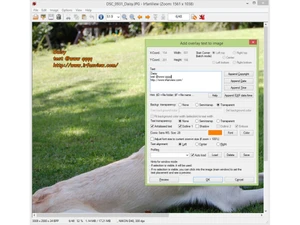
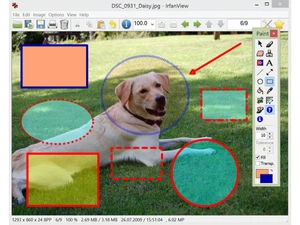
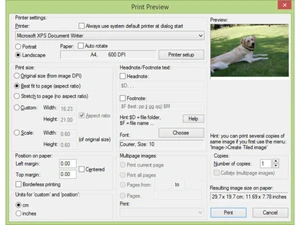
 Batch Conversion Process multiple files simultaneously to convert formats or rename images using advanced renaming patterns and subfolders. Preview Functionality Display a dedicated window of small image previews for a directory, allowing for quick visual navigation and file sorting. Import/Export Management Create automated image presentations and save them as standalone EXE or SCR files, or export the sequence to MP4 video format. Screen Capture Capture the desktop, active windows, or specific regions with options to include the cursor or set timed delay intervals. Metadata Handling View and edit detailed information embedded in image files, including EXIF camera data, IPTC tags, and user-added comments. Multimedia Player Includes a built-in player to open and playback various audio and video formats like MP3, AVI, and many other media types. Watermark Overlay Add text or secondary images as overlays to multiple files at once, useful for branding or protecting digital photographs. Unicode Support Enables the software to correctly read and display file names or paths containing characters from various global languages. Data Extraction Scan through EXE, DLL, or ICL files to extract and save embedded icons as individual graphic files for further software use. File Search Locate specific images across local directories using criteria like filename, file size, or specific date characteristics. Panorama Creation Combine multiple images horizontally or vertically to create a single seamless panoramic view from individual photo files. Effect Browser Access a library of visual filters including sharpen, blur, and emboss to adjust the aesthetic properties of any photograph.
 UAE
UAE India
India