Description
Pricing
Features
Specification
Review
Compare
FAQs
Alternatives


 View Gallery
Brand: Visual Computing Lab
A free and open-source 3D design software used to view, edit, clean, and process 3D meshes and models created from 3D scanning or modeling tools. ...Read more

Get Free Expert Consultation
Let us know your business needs clearly

Verified & Trusted
Vendors

Safe & Secure
Payment

Personalized
Experts Support
FREE
Features
 Mesh Cleaning Mesh Simplification Surface Reconstruction Mesh Alignment Mesh Merging
 See all 
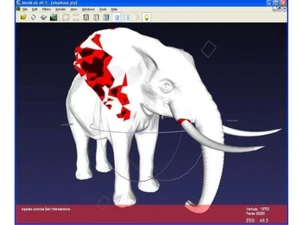
 Mesh Cleaning Removes duplicated vertices, null faces, and non-manifold edges to repair and optimize complex 3D meshes efficiently. Mesh Simplification Reduces polygon count using quadric edge collapse decimation while retaining visual and structural accuracy. Surface Reconstruction Converts raw point clouds into watertight 3D meshes using Poisson or Ball-Pivoting reconstruction methods. Mesh Alignment Aligns multiple mesh datasets with Iterative Closest Point (ICP) or manual transformation registration techniques. Mesh Merging Combines multiple 3D meshes into a single unified model while preserving topology and geometry consistency. Texture Mapping Generates UV coordinates and applies image textures or vertex colors for enhanced visual realism. QUALITY ANALYSIS Evaluates mesh element quality, curvature, and topology to identify and correct irregular mesh regions. Geometric Transformation Enables translation, rotation, scaling, and mirroring of 3D meshes through global transformation tools. Point Cloud Processing Imports, filters, and resamples point clouds for meshing and visualization of real-world scanned data. Normal Computation Computes and re-orients vertex or face normals to ensure consistent lighting and accurate shading effects. Rendering and Visualization Provides real-time lighting, shading, and transparency control for 3D mesh inspection and display. Data Import/Export Offers extensive file format compatibility including OBJ, STL, PLY, OFF, 3DS, VRML, and X3D formats.
 UAE
UAE India
India