Description
Pricing
Features
Specification
Review
Compare
FAQs
Alternatives


 View Gallery
Brand: CGSecurity
A free data recovery software that helps restore lost photos, videos, and documents from damaged or formatted storage devices by scanning raw data....Read more

Get Free Expert Consultation
Let us know your business needs clearly

Verified & Trusted
Vendors

Safe & Secure
Payment

Personalized
Experts Support
FREE
Features
 Core Data Recovery Backup & Restore Capabilities Security Recovery for Different Devices and Platforms File and Media Recovery
 See all 
We make it happen! Get your hands on the best solution based on your needs.

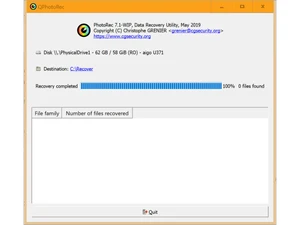
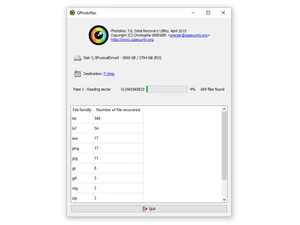
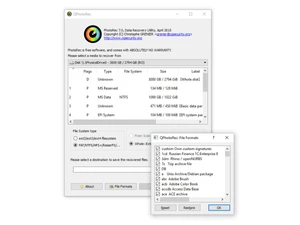
Core Data Recovery
 Formatted Drive Recovery Restores data from drives or partitions that were accidentally formatted. Accidental File Recovery Recovers files accidentally deleted, including those from Recycle Bin or Trash. Corrupted or Damaged File Recovery Recovers files from damaged or corrupted storage media (e.g., system crashes, file corruption). RAW Partition Data Recovery Recover data from drives or partitions that show as RAW or unformatted due to damage. Deleted File Recovery Recovers lost files, even after permanent deletion or emptying of the Recycle Bin. Recovery from External Devices Support for USB drives, SD cards, external hard drives, digital cameras, and other portable devices. Partition Recovery Restores data from lost or deleted partitions. Cloud Data Recovery Includes iCloud, Google Drive, OneDrive, and other cloud storage recovery.
 Backup & Restore Capabilities
Data Replication Ensure seamless data duplication across devices or systems for backup, recovery, and disaster management. Cloud Native Backups Seamless integration for cloud storage backup and recovery. Full System Backup and Restore Perform complete system backups and restore them in case of failure. Incremental Backup and Restore Ability to back up only changed data to save space and time. Mobile App Data Backup and Recovery Restore specific app data, including WhatsApp, WeChat, and SMS messages. Email Backup and Recovery Back up and restore emails, email attachments, calendar events, and contacts. Factory Recovery Partition Backup Ability to back up and restore the system recovery partition. Security
Encrypted Data Recovery Recover encrypted files, including those protected with BitLocker or other encryption software. Ransomware Protection Detects and protects against ransomware and other malware that can affect data integrity. Secure Data Wiping Permanently delete files with no chance of recovery, ensuring sensitive data is erased securely. Password Recovery Recover lost or forgotten passwords for encrypted files, email accounts, or system logins. Data Compliance and Governance Ensure that recovered data meets compliance standards for specific industries (e.g., GDPR, HIPAA). Advanced Threat Detection Safeguards recovery processes from ransomware, malware, and other security threats. Recovery for Different Devices and Platforms
Windows and macOS Compatibility Full compatibility with Windows and macOS systems for cross-platform recovery. Cross-Platform Data Recovery Recover data across platforms (e.g., recover NTFS drives on Mac, or recover Mac drives on Windows). Mobile Device Data Recovery Support for Android and iOS devices, including SMS, contacts, photos, and app data (WhatsApp, WeChat). Virtual Machine Recovery Recover data from virtual machines (VMware, Hyper-V, etc.). Rooting Error Recovery Recover data or fix issues caused by failed rooting attempts on Android or similar devices. File and Media Recovery
Media File Recovery Specialized recovery for media files (photos, videos, music). Document and Email Recovery Recover documents, emails, and email attachments. SD Card and USB Recovery Support for SD card recovery and recovery from USB drives. Automatic Device Detection Automatically detects connected devices for recovery (e.g., USB, external drives). Batch Recovery Recover multiple files at once with batch processing for convenience. Multimedia File Repair Repair corrupted photos, videos, or audio files during recovery. Photo Recovery with Editing Tools Basic photo editing features such as color correction, red-eye removal, cropping, and more, for recovered images. Preview Files Before Recovery See a preview of files before performing the recovery to ensure correctness. Data Protection and Compliance
Data Loss Prevention Prevent data loss by maintaining up-to-date backups and secure recovery methods. Data Migration Transfer data securely from one platform or device to another without loss. Hierarchy & Access Management Manage user roles, permissions, and access for secure data recovery and protection. Comprehensive Backup and Protection Regular data backups to prevent future data loss. Disaster Recovery Plans Create and manage disaster recovery plans for system-wide data protection and restoration. Legal and Compliance-Based Data Recovery Ensure that data recovery meets compliance standards such as GDPR, HIPAA, or eDiscovery requirements. Data Residency Enforcement Maintain data within specified geographic locations to meet compliance and legal requirements. Advanced Features
Deep Scan A thorough scan that deeply analyzes the storage device to recover lost or hidden files that are not visible during a quick scan. Advanced Scan Algorithms Powerfully detects and recovers hidden or deeply buried files, using complex scanning methods. Selective Recovery Choose specific files or folders to recover based on your preferences (e.g., recover only photos or documents). Filter by File Type Filter files by type (photos, videos, emails, etc.) for more targeted recovery. Smart Scanning Intelligent scanning algorithms that adapt to different file systems and improve scan accuracy and recovery speed. Quick Scan A faster scan for recently deleted files and recoverable data. Secure OST Converter Convert OST files to multiple formats like PST securely while preserving data integrity. 
 UAE
UAE India
India