Description
Pricing
Features
Specification
Review
Compare
FAQs
Alternatives


 View Gallery
Brand: PicMonkey
An easy-to-use online photo editing software for creating professional images, social media posts, and designs. ...Read more

Get Free Expert Consultation
Let us know your business needs clearly

Verified & Trusted
Vendors

Safe & Secure
Payment

Personalized
Experts Support
$ 7.99 /Month
Features
 Background Removal Layer Management Animation Tools Integration Brand Kit Integration Template Library
 See all 
We make it happen! Get your hands on the best solution based on your needs.


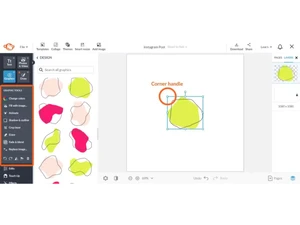


 Background Removal Instantly remove image backgrounds with one click, keeping your subject crisp and clean for any layout. Layer Management Control, lock, group, or reorder layers to organize design elements and simplify editing workflows. Animation Tools Integration Add motion to text, graphics, or images with adjustable animation effects for dynamic visual impact. Brand Kit Integration Store and apply brand logos, fonts, and color palettes to maintain consistent identity across all projects. Template Library Access thousands of ready-made templates optimized for social media, print, and digital campaigns. Photo Effects Apply professional-grade filters and effects like vignette, HDR, and cross-process to enhance imagery. Color Adjustment Fine-tune brightness, contrast, saturation, and temperature to achieve perfect color balance. Text Editor Add, style, and customize typography with shadows, outlines, spacing, and curve controls for precision. Multi Page Design Create multi-page layouts for brochures, presentations, or reports within a single project file. Data Import/Export Export projects in multiple formats such as PNG, JPG, PDF, GIF, or MP4 for flexible sharing. Content Organization Manage, tag, and store projects efficiently in the PicMonkey Hub with folder organization. Collaboration Tools Collaborate with team members in real time, share designs, and collect feedback seamlessly. Design Alignment Snap and align elements precisely with smart gridlines and auto-spacing visual guides. Crop and Rotate Refine image composition using crop, rotate, and flip tools for optimal framing and perspective.
 | Brand Name | PicMonkey |
| Information | PicMonkey helps people create standout visuals that make a point, express a view, and leave a lasting impression. |
| Founded Year | 2012 |
| Director/Founders | Brian Terry, Charlie Whiton, Lisa Conquergood, and Justin Huff |
| Company Size | 1-100 Employees |

 UAE
UAE India
India