
Description
Pricing
Features
Specification
Review
Compare
FAQs
Alternatives


 View Gallery
Brand: Screencastify
A screen recording software that lets users record their screen, webcam, and voice to create and share videos easily for learning, teaching, and presentations. ...Read more

Get Free Expert Consultation
Let us know your business needs clearly

Verified & Trusted
Vendors

Safe & Secure
Payment

Personalized
Experts Support
$ 19.00 /Month
Features
 Screen Recording Webcam Recording Audio Recording Browser Extension Video Editing
 See all 
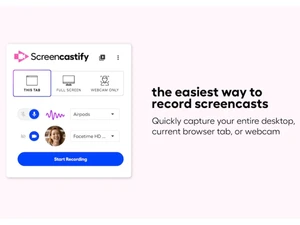

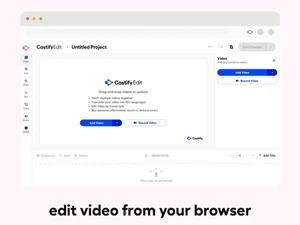
 Screen Recording Record full screen, application windows, or browser tabs with smooth playback and minimal performance impact. Webcam Recording Capture high-quality webcam video alone or alongside screen content for personal, instructor-led videos. Audio Recording Record microphone and system audio together or separately to ensure clear narration and sound capture. Browser Extension Chrome-based extension enables one-click recording directly from the browser without software installs. Video Editing Trim, cut, and merge clips using a simple web editor designed for fast post-recording edits. Annotations Add text, arrows, highlights, and drawings to emphasize key points during or after recording. Automatic Captions Generate captions automatically to improve accessibility and help viewers follow content easily. Export Options Download videos as MP4, GIF, or audio files for flexible reuse across platforms and devices. Cloud Storage Store recordings securely online with quick access links and organized video management. Sharing Links Share videos instantly via secure links without requiring viewers to create accounts. Google Drive Integration Save recordings directly to Google Drive for easy access, collaboration, and backup. Viewer Analytics Track views and engagement to understand how audiences interact with your video content. Interactive Questions Embed questions inside videos to assess understanding and increase viewer engagement. Privacy Control Manage video visibility with public, private, or restricted access settings for secure sharing.
 | Brand Name | Screencastify |
| Information | Screencastify is a simple video screen capture software for Chrome. |
| Founded Year | 2013 |
| Director/Founders | Jason Hu, Manuel Braun |
| Company Size | 1-100 Employees |

 UAE
UAE India
India

 Write a Review
