
Description
Pricing
Features
Specification
Review
Compare
Alternatives


 View Gallery
Brand: ByteDance

Get Free Expert Consultation
Let us know your business needs clearly

Verified & Trusted
Vendors

Safe & Secure
Payment

Personalized
Experts Support
$ 6.99 /Month
50% Off
Features
 Image Generation and Processing Editing and Customization Tools Prompt Control and Enhancements Model and AI Capabilities Collaboration and Sharing
 See all 
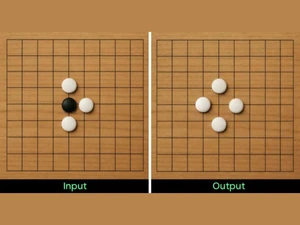
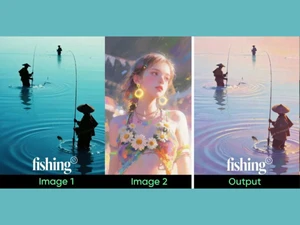
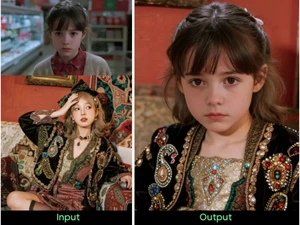
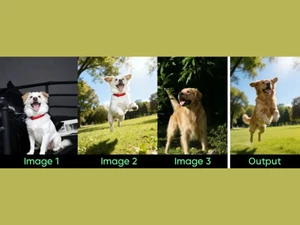
Image Generation and Processing
 Real-time Preview Optimized for fast 15-second generation per 4K image, allowing for rapid creative iteration. Text-to-Image Generation Generates cinematic 2K/4K visuals from complex natural language prompts with high prompt adherence. Image-to-Image Transformation Deep context preservation for transforming sketches or existing photos into realistic renders. Real-Time Rendering Features near-instant latency for standard 1K/2K images in live creative environments. High-Resolution Output Native support for up to 4K (4096×4096) resolution with rich, sharp texture details. Batch Generation Efficiently generates 6 to 15 images per request while maintaining unified style and lighting. Multi-Layer Image Processing Builds pictures layer by layer adjusting various components to produce more precise and detailed images Preset Styles Provides in-built styles and templates Drag and Drop Providing drag and drop functionality and an easy-to-use interface
 Editing and Customization Tools
3D Effects Advanced spatial understanding for high-fidelity 3D renders, miniatures, and architectural depth. Style Transfer Reference up to 14 images to copy specific lighting, textures, or artistic styles onto new creations. Background Removal Unified architecture allows natural language editing (e.g., 'replace background') without manual masking. AI Editor Integrated editing: change outfits, lighting, or objects using simple text instructions on an existing image. Realistic Object Generation Specialized VAE training preserves high-frequency details like skin pores, fabric weaves, and small text. Image Upscaling Built-in 4K HD enhancement that preserves detail fidelity when increasing resolution from 2K. Object Removal Precise semantic removal-just describe what to delete and the model intelligently fills the gap. Text Overlay Core Strength: Superior typography rendering for legible small text, logos, and multi-line posters. Style Adaptation Cross-Image Consistency Module ensures styles remain stable across a whole series of generations. Adjustable Parameters Controling the aspects like size, resl.,color scheme,etc Content Filters Users can add filters to photos, regulating content production, such as allowing or prohibiting NSFW content. Layer Control Allows users to manipulate layers, background, objects, shadows, etc. Resolution Control Lets users choose the resolution at that they want created images to be Image Tiling Allows the user to create seamless patterns and repeating patterns Denoising Reducing noise from the image and thereby providing clarity Image Weights Gives options for varying the proportion of text prompts to picture prompts Prompt Control and Enhancements
Negative Prompt Full support for excluding unwanted elements (e.g., 'no blur,' 'no distorted limbs') for cleaner results. Seed Provides deterministic control through seed values to recreate exact variations of an image. Prompt Sensitivity Adjust the accuracy of the generated image and ensures that it matches the input Prompt Flexibility Facilitates the users with ability to adjust and modify their text prompts and get desired results Prompt Editing Allows the user modify the entered prompt Prompt Enhancer Reads your prompt, analyzes it and then make changes in it automatically so that you get an upgraded image. Prompt Matrix Modifies settings to create multiple versions of a single prompt Real-Time Generation Generates images as users enters the prompts thereby reducing wait time Model and AI Capabilities
Multi-Model Support Operates within a broader ecosystem, allowing for fine-tuning via ComfyUI nodes or custom LoRA-like paths. Fine Tuning The process of training a pre-trained model that fits the requirements of the user Model Merging Combines features from several AI models to produce image generating tools that are more effective and versatile Collaboration and Sharing
Prompt Libraries Provides users with a set of pre-written text suggestions Collaboration Tools Feature that allows multiple users to work in collaboration Image Sharing Easily share your artwork with other via links on social media Custom Templates Allows the user create and save new templates Branding and Commercial Use
Commercial Rights Typically granted via enterprise partner agreements (e.g., fal.ai or BytePlus) for commercial use. Brand Kit Enables users to brand created photos, guaranteeing uniformity across material Data Privacy Ensures user data and generated content are securely handled Integration Supported
API Integration Enterprise-ready REST API via BytePlus Volcano Engine; compatible with OpenAI Image API formats. Content Management Systems (CMS) Integration Can be integrated via API into Shopify, WordPress, or custom SaaS marketing tools. Video Editing Tools Integration High spatial coherence makes it ideal for generating consistent character sprites and concept art. Design and Editing Software Integration Connectiing the design other editing tools for further image refinement Cloud Storage and Collaboration Tools Integration Allows users to save and share images directly onto the cloud storage E-Commerce Platforms Integration Provides the ability to generate product images directly for use on platforms 3D Modeling Software Integration Allow the user to create and modify 3D components inside the images using 3D applications Game Engines Integration Allows created pictures to be seamlessly integrated with gaming engines Animation Tools Integration Enables the mixing of AI-generated images with animation software NFT Marketplaces Supports direct export of AI-generated images as NFTs allowing users to mint and sell their creations on platforms Plugin & Extensions Extending functionality by adding add-ons and plugins  UAE
UAE India
India

 Write a Review
