linkedin
background
WorkTime logo

WorkTime

Brand: NesterSoft

4.7

15 Ratings & 15 Reviews

Have Questions?

WorkTime is a time and attendance tracking software designed for businesses of all sizes. It offers features like overtime monitoring, login/logout monitoring, and employee productivity monitoring. The software is web-based and easy to use. ...Read more

img

Get Free Expert Consultation

Let us know your business needs clearly

Advice

Verified & Trusted
Vendors

Payment

Safe & Secure
Payment

Guaranteed

Personalized
Experts Support

Starting at

$ 6.99 /Month

Features

  • check_icon Time & Attendance Tracking
  • check_icon Overtime Monitoring
  • check_icon Login/Logout Monitoring
  • check_icon Remote & In-Office Monitoring
  • check_icon Internet Usage Monitoring
  • See all img

WorkTime Software Pricing, Features & Reviews

What is WorkTime?

WorkTime is an employee monitoring software that helps businesses track employee work hours, monitor productivity, and improve efficiency. It provides real-time insights into employee activity, allowing managers to identify and address productivity issues. The software allows for accurate time tracking, overtime calculations, and efficient payroll processing.

This web-based solution is designed to be user-friendly and accessible from any device with an internet connection. Its intuitive interface and comprehensive reporting features make it a valuable tool for businesses looking to optimize workforce management. WorkTime is suitable for businesses of all sizes across various industries.

Why Choose WorkTime Employee Monitoring Software?

Imagine having a crystal-clear view of your team's workday, down to the minute. That's the power of WorkTime. Here's why you should consider making it your go-to time management tool:

  • Real-Time Monitoring: Don't wait until the end of the week to understand your team's progress. Track employee activity in real-time and stay informed about ongoing projects. This 'live' view allows for immediate adjustments and keeps everyone on the same page.
  • Accurate Time Tracking: Say goodbye to manual timesheets and hello to precision. Ensure accurate calculation of work hours, eliminating discrepancies and streamlining payroll. Think of it as your personal timekeeping guru, ensuring every minute is accounted for.
  • Boost Productivity: Identify and address productivity bottlenecks with detailed insights into employee activity. Discover where time is being spent and implement strategies for improvement. It's like having a magnifying glass for your workflow, revealing hidden inefficiencies.
  • Simplified Payroll: Streamline payroll processing with accurate data, eliminating manual calculations and potential errors. Make payday a breeze with automated reports and precise timekeeping.
  • Easy to Use: You don't need a PhD in software to use WorkTime. Its user-friendly interface allows for easy setup and navigation, even for the less tech-savvy among us.
  • Accessibility: Access your data from anywhere with a web-based platform. Whether you're at the office, at home, or on the go, WorkTime keeps you connected to your team's progress.

Benefits of WorkTime Employee Monitoring Software

Choosing the right tools can transform your business. WorkTime offers a range of benefits that can significantly impact your bottom line and boost overall performance. Here's how it can revolutionize your workplace:

  • Improved Efficiency: Optimize workforce management for better results. By understanding where time is being spent, you can allocate resources more effectively and streamline workflows.
  • Reduced Costs: Minimize wasted time and resources by identifying and eliminating unproductive activities. Think of it as plugging the leaks in your budget, saving you money in the long run.
  • Increased Productivity: Enhance employee performance and output by providing clear expectations and tracking progress. When employees know their time is being tracked, they're more likely to stay focused and productive.
  • Data-Driven Insights: Gain valuable insights into employee activity, allowing you to make informed decisions about resource allocation and project management. It's like having a backstage pass to your team's performance, revealing valuable data you can use to drive success.
  • Simplified Administration: Automate time tracking and attendance tasks, freeing up valuable time for other important responsibilities. Less paperwork, more productivity.
  • Scalability: Whether you have a small team or a large corporation, WorkTime is designed to grow with your business. It's a flexible solution that adapts to your changing needs.

Pricing of WorkTime

WorkTime pricing starts at $6.99 at Techjockey USA.

The pricing model is based on different parameters, including the amount of bandwidth you need, the number of servers you need, and the features you need. For further queries related to the product, you can contact our product team and learn more about the pricing and offers.

WorkTime Pricing & Plans

Basic
  • Two-factor authentication
  • Unlimited data
  • Basic reports
  • One working hours set
  • Employee Productivity Monitoring
  • Two-factor authentication
    • Employees
    • Monthly
Starting at $ 6.99
Premium
  • Online meetings monitoring
  • Unlimited data
  • Premium reports
  • Screen productivity report
  • One office (office/remote by IP)
  • Online meetings monitoring
    • Employees
    • Monthly
Starting at $ 8.99
Enterprise
  • Departments reports
  • Unlimited data
  • Premium reports
  • Screen productivity report
  • Offices report
  • Departments reports
    • Employees
    • Monthly
Starting at $ 10.99

Get WorkTime Demo

We make it happen! Get your hands on the best solution based on your needs.

Interacted

WorkTime Features

  • icon_check Time & Attendance Tracking Accurately record employee work hours, including breaks and overtime.
  • icon_check Overtime Monitoring Identify and report on all overtime hours worked, ensuring compliance with labor laws.
  • icon_check Login/Logout Monitoring Track employee login and logout times to monitor work hours and productivity.
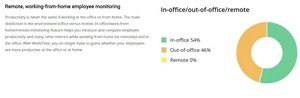
  • icon_check Remote & In-Office Monitoring Monitor employee activity and work hours, regardless of location or work style.
  • icon_check Internet Usage Monitoring Keep track of employee internet activity and usage, ensuring optimal productivity.
  • icon_check Employee Productivity Monitoring Monitor workplace productivity without invading employee privacy.
  • icon_check Keystroke Logging Record all keystrokes made by employees across applications and sessions to review activity.
  • icon_check Application Usage Monitoring Log and analyze applications used and the duration for productivity insights.
  • icon_check Chat & IM Monitoring Record instant messages and chats from popular platforms such as Skype and Google Talk.
  • icon_check Comprehensive Reporting Tools Generate daily, weekly, and monthly reports with charts for productivity and activity analysis.
  • icon_check Asset & System Event Monitoring Track hardware/software inventory and system events like log-ins/log-outs.

WorkTime Specifications

  • Supported Platforms :
  • Device:
  • Deployment :
  • Suitable For :
  • Business Specific:
  • Business Size:
  • Customer Support:
  • Training:
  • Language:
  • Compliance Regulation:
  • Windows MacOS Linux
  • DesktopTablet
  • Web-Based, Perpetual
  • All Industries
  • All Businesses
  • Small Business, Medium Business, SMBs
  • Phone, Email, Live Chat
  • Webinars, Documentation, Videos
  • English
  • HIPAA

WorkTime Reviews

96%

Have recommended this product

Overall Score

4.7/5
Based on 15 Reviews

Review this product

Your valuable feedback helps others like you make a better decision.

Pros

pros_icon “Powerful analytics. Meets monitoring regulations in different countries, ensuring legally secure use.” Kamran Hussain Mehar - Oct 17, 2025

pros_icon “WorkTime gently reflects how you use your day. It doesn’t judge or pressure you — just shows where you’re doing well or slipping” Laurent - Jun 2, 2025

pros_icon “Amazing and fast customer service. Easy to use. Everything is simple to set up. Tons of features and options” Keymark - Feb 17, 2025

Cons

cons_icon “None. Installation was quick, no lag. Works smoothly, and the data is accurate.” Kamran Hussain Mehar - Oct 17, 2025

cons_icon “It took a bit to figure out how to mark productive vs. unproductive sites for different roles.” Shoumya - Jul 16, 2025

cons_icon “There’s no way to avoid the truth — it’s objective. You need to accept it and be willing to improve your own habits” Laurent - Jun 2, 2025

KH

Kamran Hussain Mehar

Verified reviewer:linkedin_verify

Founder, Accounting

Individual

Reviewed on: Oct 17, 2025

5/5

“Powerful analytics with privacy in mind”

The tool respects privacy and doesn’t collect personal data. It just logs system actions and never captures document text, messages, or emails.

Pros :

Cons :

Features

5/5

Value for Money

5/5

Customer Support

5/5

Ease of Use

5/5

Likely to Recommend

10/10
S

Shoumya

Verified reviewer:twitter_verify

Human Resources, Human Resources

2-100 Employees

Reviewed on: Jul 16, 2025

5/5

“I caught my new hire wasting valuable work hours watching YouTube videos instead of doing their job!”

Pros :

Cons :

Features

5/5

Value for Money

5/5

Customer Support

5/5

Ease of Use

5/5

Likely to Recommend

9/10
L

laurent

Verified reviewer:twitter_verify

Freelancer, Design

Individual

Reviewed on: Jun 2, 2025

4/5

“The most polite productivity coach I’ve ever had”

This tool doesn’t yell or micromanage. It quietly guides you toward better habits. I actually want to do better every day now

Pros :

Cons :

Features

4/5

Value for Money

4/5

Customer Support

4/5

Ease of Use

4/5

Likely to Recommend

9/10

NesterSoft Company Details

Brand Name NesterSoft
Information NesterSoft offers custom software design and development solutions.
Founded Year 1998
Director/Founders NesterSoft
Company Size 1-100 Employees

WorkTime FAQ

A WorkTime software pricing starts at $6.99 at Techjockey USA.
A WorkTime is a web-based application accessible through desktop browsers. It is not available as a dedicated mobile app for Android and iOS users.
A WorkTime monitors employee activity by tracking login/logout times, internet usage, and application usage. This data provides insights into productivity and helps optimize workflows. The software facilitates efficient time management and resource allocation for businesses.
A WorkTime software supports the Windows operating system.
A WorkTime offers features like time and attendance tracking, overtime monitoring, remote and in-office monitoring, internet usage monitoring, and employee productivity monitoring. You can contact our product experts for more information.
A Contact Techjockey USA to explore trial options for WorkTime. They can provide information about available testing periods. You can contact our product experts for more information.
A Yes, WorkTime is suitable for small businesses. It helps them monitor employee productivity, track work hours, and manage projects effectively, even with limited resources.
A WorkTime is designed for employers and managers in various industries who need to monitor employee activity, track time, and assess productivity for better workforce management. It caters specifically to the needs of those seeking detailed insights into employee work patterns.
A WorkTime being a web-based application likely leverages standard security protocols for data transmission and storage. Contact Techjockey USA for detailed information on WorkTime's security measures.