Top 2D Animation Software in 2026: Free & Professional Tools Compared

February 27, 2026

Top 2D Animation Software in 2026: Free & Professional Tools Compared-feature image

Today, anyone can create animations with the help of 2D animation software, not just big studios. A 2D animation software gives you wings to turn your ideas into moving visuals using drawing, motion, and effects. You can easily create cartoons, videos, ads, and digital content with the help of different user manuals available on each tool’s website.

There are many options available, from free software for 2D animation for beginners to professional tools used in films and TV.

In this guide, we have discussed a complete 2D animation software list so that you can go for the right tool based on your needs, skills, and budget.

Let’s begin…

Compare Top 2D Animation Software in 2026: Features & Pricing

2D Animation SoftwareBest ForKey Strength & Pricing
Toon Boom HarmonyProfessional studiosAdvanced rigging + high-end animation tools | Paid (from $30/month)
Adobe AnimateDesigners & web animationVector animation + multi-format export | Paid ($22.99/month)
Blender2D + 3D creatorsGrease Pencil for 2D in 3D space | Free & open source
Pencil2DBeginners & studentsSimple hand-drawn animation | Free
Synfig StudioBudget animatorsAuto tweening + bone animation | Free
OpenToonzIndie creatorsProfessional tools for free | Free
AnimakerContent creators & marketersDrag-and-drop + AI tools | Free + Paid plans

Top 2D Animation Software in 2026 for Every Skill Level

Discover the top 2D animation software in 2026, selected for performance, ease of use, pricing, and advanced features.

Professional 2D Animation Software

If you want highly advanced features and high-quality results, these tools are for you! These are perfect for studios and experienced animators.
1. Toon Boom Harmony

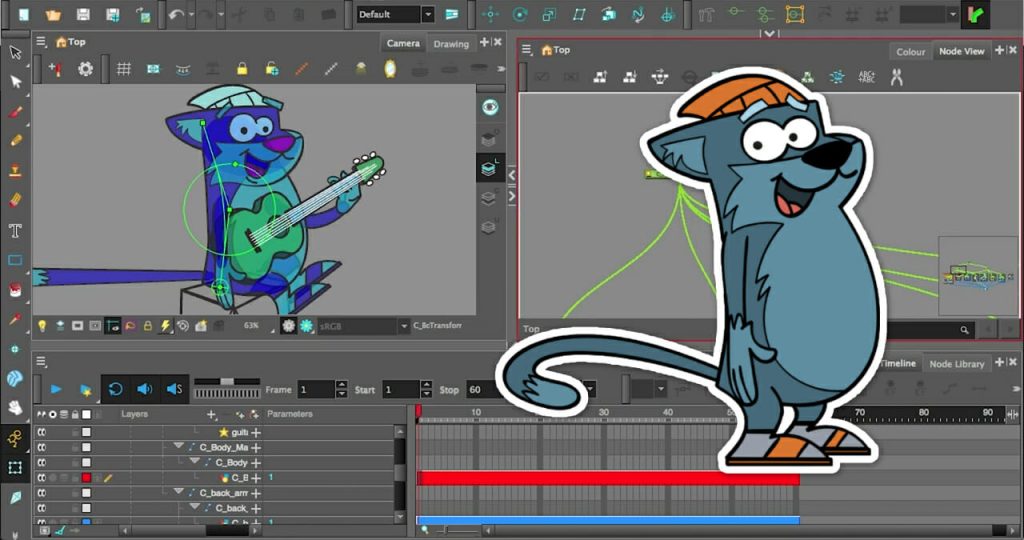
Toon Boom Harmony 2D animation software interface displaying character rig controls, layers, and timeline editor.

Toon Boom Harmony is a professional standard for 2D animation used in TV shows, feature films, and game cinematics. Its full suite of tools supports traditional frame-by-frame animation, rigging, cut-out workflows, and high-end effects.

ToonBoomHarmonylogo

Toon Boom Harmony

Starting Price

$ 30.00      

Key features Toon Boom Harmony:

  • Full support for frame-by-frame hand-drawn animation and rigged cut-out characters.
  • Advanced rigging system with bones, deformers, and motion paths.
  • Node-based compositing and particle effects to enrich scenes.
  • Import and export options for high-resolution animation up to 8K.
  • Team collaboration and project sharing tools for studios.
  • Supports both vector and bitmap drawing with custom brushes and textures.
  • Automatically matches character mouth movements with voice or dialogue.
  • Adds zoom, pan, and depth effects for cinematic animation scenes.
  • Import and combine 3D models with 2D animation workflows.

Pro and cons of Toon Boom Harmony:

Pros

  • Highly versatile, handling everything from simple cutouts to advanced character animation.
  • Excellent drawing tools and brush options for professional artists.
  • Strong community support and professional help documentation.
  • Rated very highly for meeting feature needs and ongoing support compared to alternatives.

Cons

  • Beginners may feel overwhelmed at first because of its high learning curve.
  • UI can feel cluttered and complex in day-to-day use, according to users.
  • Some advanced users find certain compositing and workflow parts less intuitive than expected.

Best for: Studios, experienced animators, and long-form animation production.

Supported platforms: Windows and macOS.

Toon Boom Harmony Pricing and Plans:

PlanMonthly PricingAnnual Billing
Harmony EssentialsUSD 30/monthUSD 252/year
Harmony AdvancedUSD 77/monthUSD 588/year
Harmony PremiumUSD 139/monthUSD 1,128/year

2. Adobe Animate

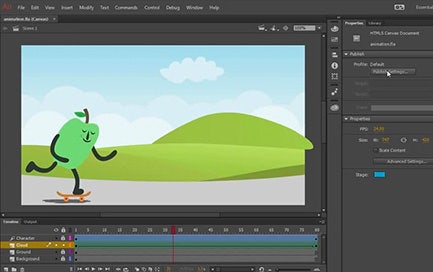
Adobe Animate 2D animation software interface with timeline, layers, and character animation workspace.

Adobe Animate is a classic 2D animation tool from Adobe. Animators from around the world use this software to create vector-based animations for cartoons, web banners, games, and mobile content. It’s part of Adobe Creative Cloud and integrates well with Photoshop and Illustrator, which makes animating and publishing on multiple platforms easy.
AdobeAnimateFlashProCCforteams

Adobe Animate

Starting Price

$ 34.49      

Key features:

  • Create interactive animations for cartoons, ads, games, and web content.
  • Powerful vector brushes and puppeting tools to design animated characters and articulate limbs using bones.
  • Frame-by-frame animation and classic tweening for smooth motion.
  • Export to multiple formats like HTML5 Canvas, WebGL, GIF, SVG, and video.
  • Add interactivity with code snippets and action scripting for games or web apps.
  • Integrated with other Adobe tools, so you can import artwork quickly from Illustrator or Photoshop.

Pro and Cons of Adobe Animate:

Pros

  • A familiar interface for Adobe users, which shortens the learning curve.
  • Great for vector animation and interactive content.
  • Strong ecosystem with tutorials, support docs, and Creative Cloud integration.
  • Capable of both simple animations and moderately complex projects.

Cons

  • Now in maintenance mode, meaning new features may not be added moving forward.
  • Subscription cost can add up for individual creators.
  • Not as advanced for high-end character rigging or traditional hand-drawn workflows.
  • Performance and brush tools sometimes feel less refined.

Best for: Animators and designers who want flexible vector animation with strong publishing options.

Supported platforms: Windows and macOS.

Adobe Animate Plans and Pricing: Adobe Animate costs USD 22.99 per month under an annual plan billed monthly.
3. Blender

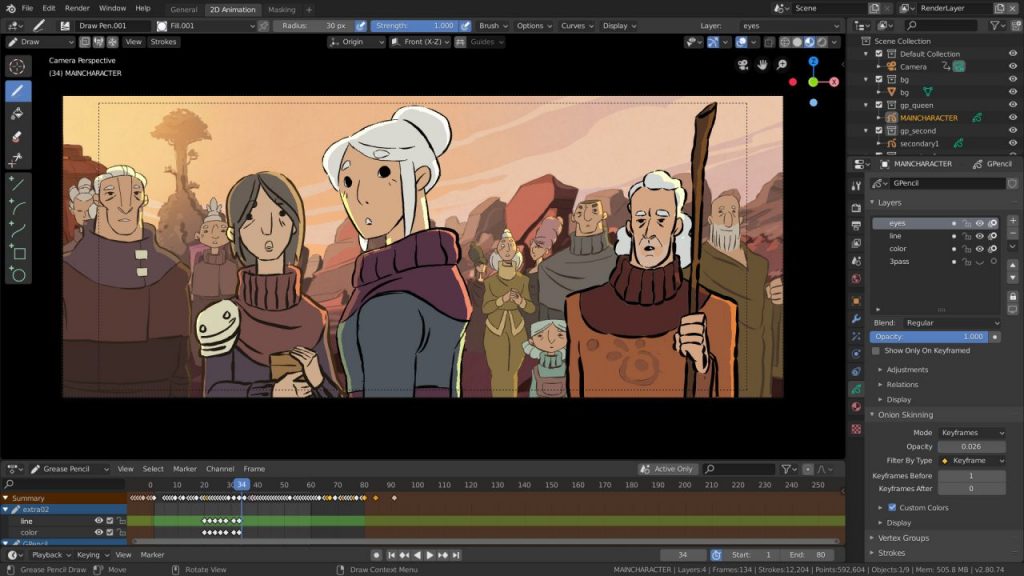
Blender 2D animation workspace using Grease Pencil tool with character scene and timeline editor.

Blender is a completely free 3D creation software that also offers 2D animation tools via Grease Pencil. It’s a unique system allowing traditional 2D drawing and animation inside a full 3D environment.

Key features:

  • Grease Pencil lets you draw and animate 2D shapes in 3D space, blending traditional animation with modern workflows.
  • Frame-by-frame and cut-out 2D animation capabilities.
  • Full support for rigging, keyframes, modifiers, and nonlinear animation.
  • Integrated pipeline: modeling, animation, VFX, and video editing all in one program.
  • Has different editing modes- Draw, edit, sculpt
  • Custom frame rates while exporting to video formats
  • Active community with tons of tutorials and free resources.

Pro and cons of Blender:

Pros

  • Completely free with no subscription or cost barriers.
  • Combines 2D and 3D workflows for unique creative possibilities.
  • Strong community support and frequent updates.

Cons

  • Blender’s interface can be intimidating for beginners with no prior animation software experience.
  • Documentation isn’t always beginner-friendly.
  • Less commercial support compared to paid tools.
  • Rendering can be slow on older machines.

Best for: Beginners, indie creators, and artists who want both 2D and 3D tools.

Supported platforms: Windows, macOS, and Linux.

Blender Plans and Pricing: Blender is a free 2D animation software for free, which you can easily download and use.

Free & Open-Source 2D Animation Software

These tools are free to use and great for learning, experimenting, and creating animations without any cost.
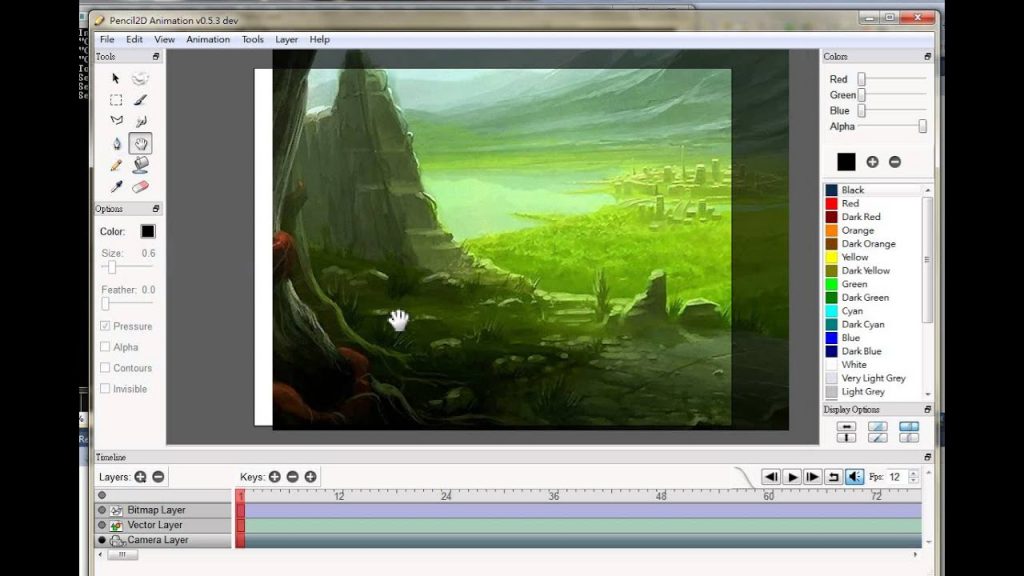
4. Pencil2D

Pencil2D open-source 2D animation software interface with drawing tools, layers panel, and timeline.

Pencil2D is a 2D animation program that is free and open source and is intended to make traditional, hand-drawn animation easy and affordable. It is easy to use and lightweight, and allows you to concentrate on the animation itself rather than on complicated menus and workflows.
Pencil2Dlogo

Pencil2D

Starting Price

Price on Request

Key features:

  • Frame-by-frame animation with onion skinning to view the last and next frame as you draw.
  • Raster and vector workflows, allowing you to draw and ink with bitmap tools or go to scalable vector graphics.
  • Layered editing to arrange characters and backgrounds with ease.
  • Export animations in MP4, GIF, PNG sequences, SVG, and others.
  • Windows, macOS, Linux, and FreeBSD cross-platform support.
  • 100% open-source and free to use for any project.

Pro and cons of Pencil2D:

Pros

  • Completely open and free, thus no subscription costs or licensing costs.
  • Simple, user-friendly interface that can be mastered in the shortest amount of time.
  • Can run on modest hardware – no expensive computers are required.
  • Focused on classic animation goals without unnecessary extras, so you can start animating right away.

Cons

  • Lacks advanced tools like rigging, motion graphics, and complex effects.
  • Not ideal for professional studio workflows that require compositing or camera moves.
  • Documentation and tutorials can be less comprehensive than some paid tools. (community feedback)
  • Some users report interface quirks or missing features for more technical animation workflows.

Best for: Beginners, hobbyists, and students learning classic 2D hand-drawn animation.

Supported platforms: Windows, macOS, Linux, FreeBSD.

Pencil2D Plans and Pricing: Pencil2D is free and open-source software with no licensing or subscription costs.
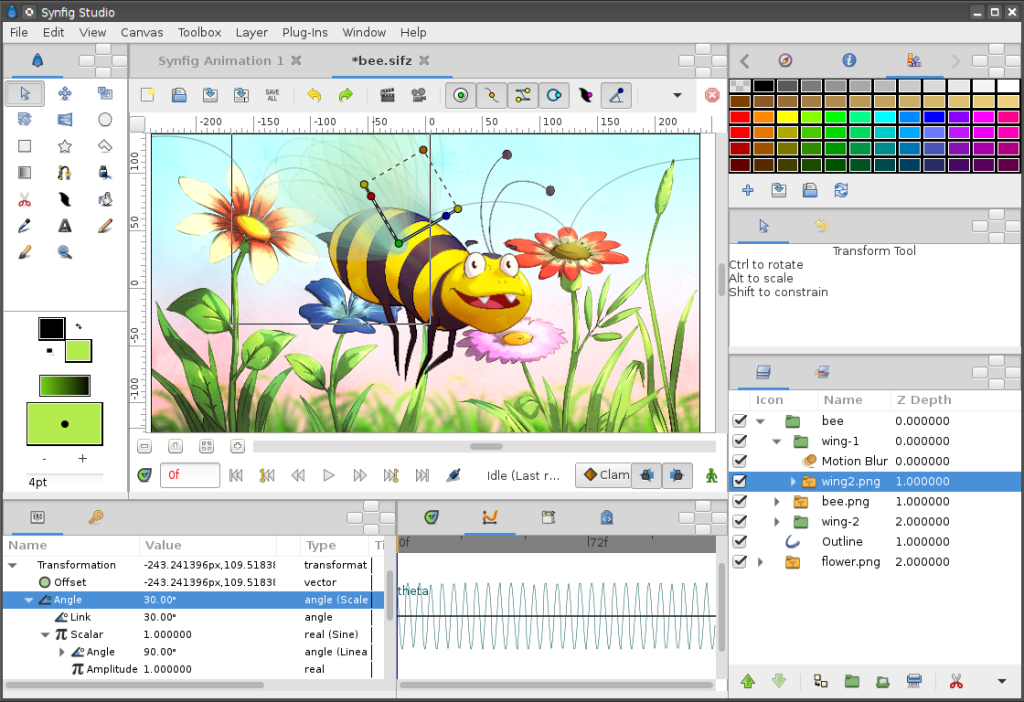
5. Synfig Studio

Synfig Studio 2D animation software workspace featuring vector character rigging and keyframe timeline.

Synfig Studio is a powerful opensource 2D animation application built to help creators produce higherquality animations without manually drawing every frame. Its vector tweening and automation tools make it attractive for animators on a budget.

SynfigStudiologo

Synfig Studio

Starting Price

Price on Request

Key features:

  • Vector tweening automatically generates intermediate frames between keyframes to speed up animation production.
  • Bitmap and vector support for flexible artwork styles.
  • Skeletal animation and bone tools for smoother character motion.
  • Supports import/export of animation formats and sprite sheets useful in game development.
  • Cross-platform on Windows, macOS, and Linux.
  • Free and opensource under GNU GPL v3.

Pro and cons of Synfig Studio:

Pros

  • Completely free to download and use for personal or commercial projects.
  • Offers rigging and bone systems similar to higherend animation tools.
  • Users praise the overall feature potential and ability to do complex character animation.
  • Community tutorials and plugins expand what you can do.

Cons

  • Beginners often find the interface and workflow confusing at first.
  • It has stability issues. Occasional crashes and bugs can happen, especially in complex projects.
  • Less polished documentation and support compared to commercial animation software.
  • Limited advanced effects and compositing when compared to professional alternatives.
  • Performance can lag on larger or more detailed scenes.

Best for: Animators who want free, advanced vector-based animation with automated motion workflows.

Supported platforms: Windows, macOS, Linux.

Synfig Studio Plans and Pricing: Synfig Studio is free and open-source software. It offers both stable and development (experimental) versions for download at no cost.
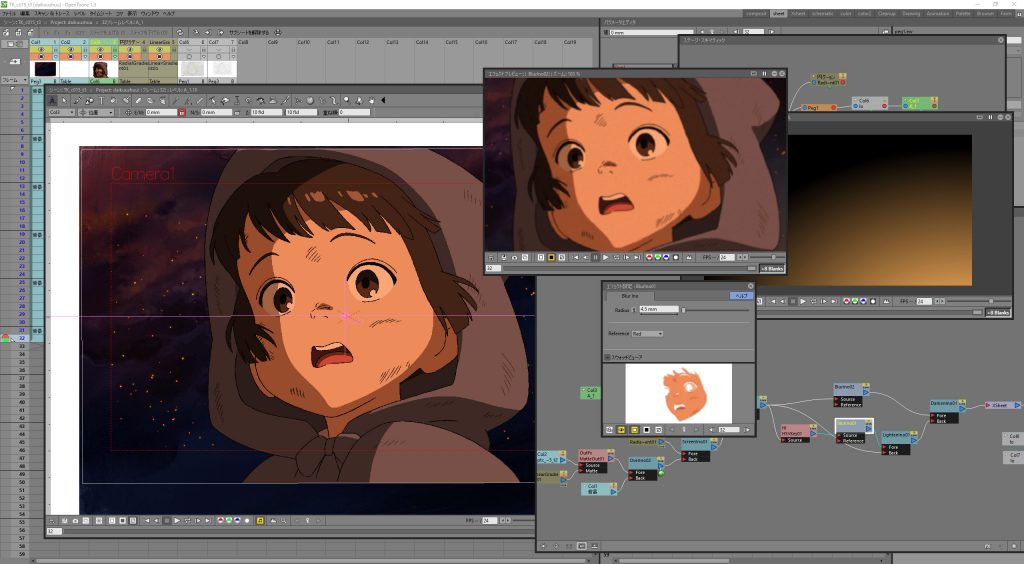
6. OpenToonz

OpenToonz 2D animation software interface showing node-based compositing and animated character preview.

OpenToonz The powerful, open-source, and free 2D animation program, OpenToonz, was initially created with Studio Ghibli’s input. It offers a free professional-level animation toolkit of professional level, and none of it is licensed, which makes it one of the richest free animation solutions.
OpenToonzlogo

OpenToonz

Starting Price

Price on Request

Key features:

  • Frame-by-frame and hand-drawn animations are possible, with onion skinning and motion tweening.
  • Raster and vector supported, to allow dynamic artwork development.
  • Built-in rigging and bone tools assist in moving characters in a smooth motion.
  • Importing traditional drawings can be easily accomplished with GTS scanning and cleanup tools.
  • Palette and colour management keep colours consistent across frames.
  • Extensive effects, plugins, and custom brushes extend animation possibilities.
  • Node-based compositing and multiplane camera features for depth effects.
  • Free and fully opensource, with community-led updates.

Best for: Independent animators, hobbyists, and enthusiasts who want professional grade 2D animation tools without paying for software.

Pro and cons of OpenToonz:

Pros

  • Totally free and opensource, with no subscriptions or licensing fees.
  • Professional-grade tools comparable to commercial software.
  • Flexible workflows that support both traditional hand-drawn and digital animation.
  • Large community support and plugins that enhance functionality.

Cons

  • Performance issues and occasional glitches reported by users.
  • Some reviewers note instability or crashes that can risk lost work.

Supported platforms: Windows, macOS, Linux.

OpenToonz Plans and Pricing: OpenToonz is completely free and open-source with no subscription fees.

Best 2D Animation Software for Beginners

These tools are easy to use and help beginners create animations quickly without technical skills.
7. Animaker

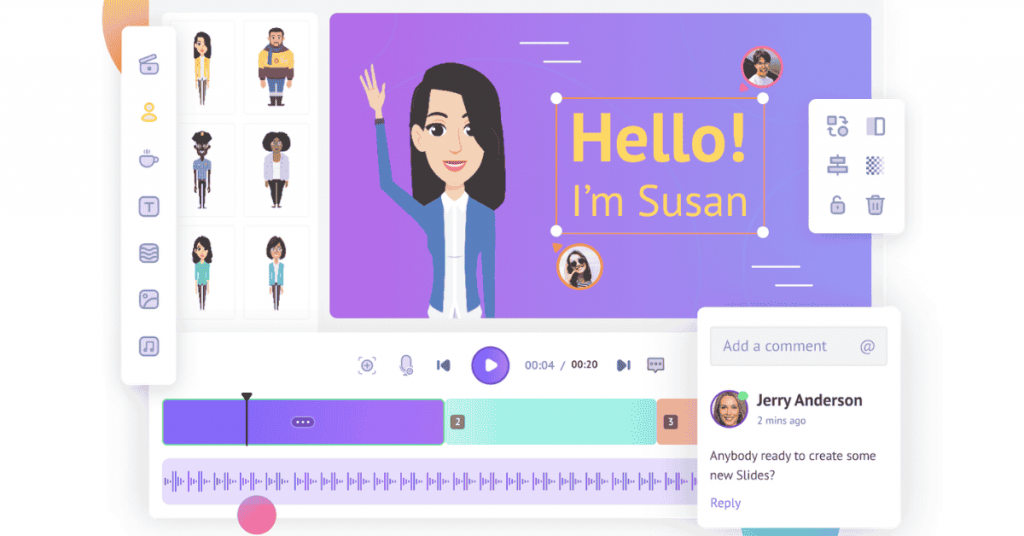
Animaker online 2D animation software dashboard with drag-and-drop character editor and timeline controls.

Animaker is a cloud-based, easy animation and video creation platform designed for anyone – beginners, educators, marketers, and teams. You can create animated videos and 2D content. It combines a drag-and-drop editor with AI-powered tools and a massive asset library.
Animakerlogo

Animaker

4.4

Starting Price

$ 45.00      

Key features of Animaker:

  • Easy draganddrop interface for quick video and animation creation.
  • Build custom characters with a character builder and a vast asset library.
  • AI-powered tools for text-to-video, image, and asset generation.
  • Auto lipsync, voice recording, and text-to-speech with subtitles in 100+ languages.
  • 1000+ templates and over 100 million stock assets (props, backgrounds, icons).
  • Real-time collaboration and brand kit for teams (on paid plans).
  • Export videos up to 4K quality.

Pro and cons of Animaker:

Pros

  • Very intuitive and beginner-friendly, even for non-designers.
  • Powerful AI features speed up video creation.
  • Large template and asset collection reduces time to start projects.
  • Good customer support and onboarding resources.
  • Free plan available with basic tools.

Cons

  • Free plan has limitations like watermarks or export caps.
  • Can feel laggy or slow, especially on complex projects.
  • Online only – requires a stable internet connection.
  • Not suited for traditional frame-by-frame animation workflows like classic animation software.
  • Some advanced features and higher quality exports require paid plans.

Best for: Content creators, social media marketers, educators, and small teams who want quick, template-based animated videos without deep technical skills.

Supported platforms: Web-based (works via browser), mobile app for iOS.

Animaker Plans and Pricing:

PlanMonthly PricingAnnual Billing
StarterUSD 25/monthUSD 300/year
ProUSD 43/monthUSD 516/year
EnterpriseCustom pricingContact sales

Conclusion

The most appropriate animation tool will be based on what you want to achieve and your level of experience. Advanced features may be required by professionals, and simple tools and free ones might be essential for beginners and students. Content creators may prefer easy platforms that help them create animations quickly.

As animation becomes more important in digital content, choosing the right 2D animation software for beginners or professionals can help you work faster and create better results.

Explore Topics

Consult with Our Techjockey Expert

Connect for fast and scalable software delivery, corporation plans, advanced security, and much more.

Talk To Tech Expert