Description
Pricing
Features
Specification
Review
Compare
Alternatives

 View Gallery
Brand: Avaza Limited

Get Free Expert Consultation
Let us know your business needs clearly

Verified & Trusted
Vendors

Safe & Secure
Payment

Personalized
Experts Support
$ 11.95 /Month
Features
 Core Functionalities Task & Workflow Management Task Views Progress & Performance Tracking Resource & Budget Management
 See all 
We make it happen! Get your hands on the best solution based on your needs.

Core Functionalities
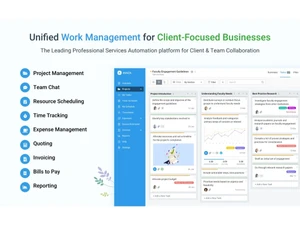
 Workforce Management Manage team members, roles, workloads, and availability across multiple projects from one dashboard. Issue Management Supports issue-like tasks but lacks a dedicated issue tracking lifecycle system. Workflow Management Manage task flows, statuses, and approvals within structured project workflows. Resource Management Allocate resources, track utilization, and balance workloads across projects. Risk Management Risks can be tracked manually, but no formal risk register or mitigation framework. Task Management Create, assign, track, and organize tasks with priorities, deadlines, and statuses. Backlog Management Manage the product and sprint backlogs with prioritized tasks Pipeline Management Tracks the flow of tasks, processes, or projects through various stages to ensure smooth progression. Sprint Management Plan, track, and manage sprints (short, time-boxed iterations) Incident Management Manages unforeseen incidents or disruptions within a project, often found in industries requiring high reliability, such as IT or
 Task & Workflow Management
Workflow Automation Basic workflow automation using rules, but not advanced multi-step automation flows. Recurring Tasks Schedule recurring tasks for repetitive project or operational activities. Task Creation & Assignment Quickly create tasks and assign them to team members with deadlines. Task Prioritization Set priorities to ensure critical tasks receive attention first. Sub-Task Creation Break tasks into smaller sub-tasks for better tracking and execution. Task Dependencies Define dependencies to control task sequencing and scheduling. Notifications/Reminders Automated alerts and reminders for task updates, deadlines, and changes. Automated Task Assignment Automatically assigns tasks to team members based on workload, availability, and skill sets, helping to distribute work evenly as Task Views
Gantt Chart Interactive Gantt charts to visualize timelines, dependencies, and project progress. Kanban Boards Visual Kanban boards for managing task flow and tracking work stages. Task List Organize work using simple and structured task lists per project. Calendar View View tasks and milestones in a calendar-based layout. Timeline View Timeline view to visualize task durations and project phases. Spreadsheet View Exportable data supported, but no native spreadsheet-style task editing. Mind Map Visual representation of tasks and ideas branching out from a central concept. Progress & Performance Tracking
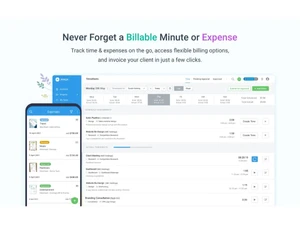
Time Tracking Record the time spent on tasks for better project budgeting. Milestone Tracking Track project milestones to monitor progress toward key deliverables. Team Capacity Tracking Monitor team capacity to avoid overload and improve planning accuracy. Resource & Budget Management
Budget Planning Plan and manage project budgets with cost tracking and estimates. Dynamic Budgeting Budgets can be adjusted, but without automated dynamic forecasting. Workload Distribution Visual workload views to evenly distribute tasks across team members. Automated Resource Allocation Automatically adjusts resource allocation, such as server capacity, storage, or bandwidth, based on current project needs during Risk Scoring System Quantify and score potential project risks based on severity. Auto Scaling Dynamically scale resources (e.g., team size, server resources) based on project requirements. Reporting & Analytics
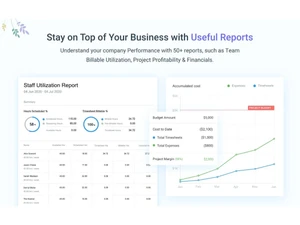
Dashboards Customizable dashboards displaying project status, time, financials, and performance metrics. Automated Reports Automatically generated reports for time, billing, and project performance insights. Project Progress Reports Reports showing task completion, timelines, and overall project health. Resource Reports Analyze resource usage, availability, and utilization across projects. Workload Reports Reports highlighting individual and team workloads. Timesheet Reports Detailed timesheet reports for billing, payroll, and analysis. Bottleneck Reports Bottlenecks identified indirectly through workload and task delay reports. Real-Time Reporting Live data reporting with up-to-date project and time tracking metrics. Report Customization Customize reports by filters, date ranges, and project parameters. Benchmarking Compare project performance against industry standards or internal benchmarks. Risk Reports Identify, assess, and propose mitigation strategies for potential project risks. Sprint Reports Track progress within development sprints. Burndown & Burnup Charts Track progress towards sprint goals to manage progress and respond accordingly. Predictive Analytics Forecasting tools to predict future project outcomes based on historical data. Collaboration & Communication
Real-Time Collaboration Real-time updates for tasks, comments, and project activity across teams. Integrated Chat & Messaging Comments and discussions supported, but no full chat system. File Sharing & Document Collaboration Share files and collaborate on documents within projects. Version control Track changes made to documents and files. Customization
Templates Reusable project and task templates to quickly start projects with predefined structures and settings. Custom Fields Create custom fields to capture project-specific data and tailor task information. Task Customization Customize task fields, statuses, and workflows. Custom Views Create personalized views for tasks, projects, and reports. Custom Layouts Design the software interface to fit your workflow. Integrations
CRM Integration Integrates with CRM tools to link contacts, clients, and project-related billing data. API Integration REST API available for integrating Avaza with third-party tools and custom applications. Communication and Collaboration Tools Comments, mentions, notifications, and file sharing for teamwork. File Storage and Sharing Centralized file storage linked to tasks and projects. Time Tracking Tools Manual and timer-based tracking for accurate work logging. Issue Tracking Tools Issues handled as tasks, without advanced issue workflows. Automation Tools Basic automation via rules and integrations, not AI-driven. Third Paty Integration Integrates with accounting, payment, and productivity tools. ERP Intergration Connect ERP systems to unify project management with broader business operations, including finance, HR, and procurement. AI-Based Integrations Use AI for predictive analysis and workflow suggestions. Access Control & Security
User Access Management Role-based permissions to control user access and feature visibility. Multi-Factor Authentication (MFA) Supports MFA to enhance account security and user authentication. Activity Logs Detailed activity logs for tracking user and system actions. Data Backup and Disaster Recovery Regular data backups and disaster recovery handled by Avaza cloud infrastructure. Compliance Tracking Ensure adherence to relevant data and security compliance (e.g., GDPR, CCPA). | Brand Name | Avaza Limited |
| Information | All-in-one, client-focused project management for teams. |
| Founded Year | 2014 |
| Director/Founders | Behram Khan, Tim Kremer |
| Company Size | 1-100 Employees |
 UAE
UAE India
India
 Write a Review