linkedin
background
Click Maint CMMS logo

Click Maint CMMS

Brand: Click Maint Inc.

Be the first to Reviews

Write a Review

Have Questions?

Click Maint CMMS helps businesses track assets, schedule preventive maintenance, manage work orders, and reduce equipment downtime. ...Read more

img

Get Free Expert Consultation

Let us know your business needs clearly

Advice

Verified & Trusted
Vendors

Payment

Safe & Secure
Payment

Guaranteed

Personalized
Experts Support

Starting at

$ 42.00 /User/Month

Features

  • check_icon Work Order Management
  • check_icon Inventory Management
  • check_icon Vendor Management
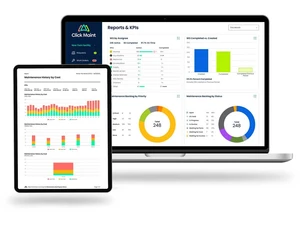
  • check_icon Reports & Dashboard
  • check_icon Asset Management
  • See all img

Click Maint CMMS Software Pricing, Features & Reviews

What is Click Maint CMMS?

Click Maint CMMS is a computerized maintenance management software that helps businesses manage maintenance processes easily. It allows teams to track and manage work orders, PMs, assets, and inventory in one central place. The software helps create, assign, and follow up on maintenance work orders.

It also supports preventive maintenance so problems are fixed before breakdowns happen. Click Maint CMMS helps manage spare parts and inventory to avoid shortages. Maintenance schedules can be planned to reduce downtime and improve productivity.

The system provides reports and insights on maintenance costs and asset performance. It is easy to use, affordable, and suitable for many industries.

Why Choose Click Maint CMMS Software?

  • Work Order Management: Create, assign, filter, and track work orders efficiently.
  • Preventive Maintenance Scheduling: Plan routine maintenance to avoid breakdowns and downtime.
  • Maintenance Planning & Scheduling: Organize tasks to extend equipment life and reduce repair costs.
  • Asset Tracking: Monitor asset location, condition, and service history in one place.
  • Inventory Control: Manage spare parts and supplies to prevent delays and shortages.
  • Interactive Floor Plans: View and manage work orders, requests, and assets straight from interactive floor plans.
  • Job Costing: Track labor, parts, and maintenance costs accurately.
  • Dispatch Management: Assign and dispatch maintenance teams faster and more efficiently.
  • Facility Management: Manage maintenance for commercial and residential properties.
  • Job Management: Oversee maintenance jobs from assignment to completion.
  • Maintenance Analytics & Reporting: Generate reports to identify trends and improve decisions.
  • Service History Tracking: Maintain complete maintenance records for audits and planning.
  • Technician Management: Schedule technicians, track skills, performance, and labor usage.
  • Recurring Maintenance Automation: Automatically schedule repeated maintenance tasks.
  • To-Do Lists & Reminders: Ensure tasks are completed on time with automated reminders.
  • Vendor Management: Manage external vendors, contracts, and service timelines.
  • User Permissions & Security: Control system access with role-based permissions.
  • Customizable Dashboards: View KPIs and maintenance metrics at a glance.
  • Customer Support & Training: Access knowledge base resources and training materials. Live support agents are responsive and readily available.
  • Improved Equipment Reliability: Reduces breakdowns and extends asset lifespan.
  • Reduced Downtime: Keeps operations running smoothly with proactive maintenance.
  • Data-Driven Decisions: Uses real-time data for smarter maintenance planning.
  • All-in-One CMMS Platform: Combines maintenance, assets, inventory, and reporting in one system.

Benefits of Click Maint CMMS Software

  • Centralized Visibility: Improves maintenance operations by providing a clear, centralized view of assets, work orders, and workflows.
  • Process Automation: Automates manual maintenance tasks to save time, reduce errors, and boost productivity.
  • Operational Consistency: Ensures consistent maintenance practices through cloud-based procedures and knowledge sharing.
  • Data-Driven Decisions: Uses real-time data and reports to improve maintenance planning and equipment reliability.
  • Maintenance Cost Reduction: Lowers repair and downtime costs through preventive maintenance and timely actions.
  • Simplified Compliance: Makes audits easier by generating accurate, audit-ready reports and documentation.
  • Higher Productivity: Reduces breakdowns and maintenance delays, keeping teams focused and productive.
  • Improved Operational Efficiency: Streamlines workflows and optimizes the use of materials, labor, and resources.
  • Affordable and Easy to Use: Click Maint costs 20-50% less than other leading providers and is easy to use and implement.

Click Maint CMMS Pricing

Click Maint CMMS price is available for USD 35 on Techjockey.

Click Maint is priced 20-50% less than other leading providers. Customers can subscribe for 1 year and pay USD 35/month per user or opt to go on a month-to-month term at USD 42/month without having to commit to a 1-year term.

Click Maint CMMS Pricing & Plans

PROFESSIONAL PLAN
  • Vendors & Suppliers
  • Work Order Requests
  • Inventory & Parts
  • Reports & Analytics
    • Users
    • Monthly
Starting at $ 42.00

Click Maint CMMS Features

  • icon_check Work Order Management Create, assign, track, and close work orders from one centralised system.
  • icon_check Inventory Management Manage spare parts, stock levels, and parts usage across work orders.
  • icon_check Vendor Management Assign vendors and track external maintenance work.
  • icon_check Reports & Dashboard View KPIs, maintenance history, and performance reports.
  • icon_check Asset Management Track asset details, location, history, and performance in one place.
  • icon_check Preventive Maintenance Schedule recurring maintenance to reduce breakdowns and extend asset life.
  • icon_check Real-Time Notifications Get instant alerts for work order updates and maintenance requests.
  • icon_check QR Code Scanning Scan QR codes for quick access to assets, parts, and work orders.
  • icon_check Maintenance Scheduling Plan and organise maintenance tasks with flexible scheduling options.
  • icon_check Document Attachments Attach photos, videos, and files to work orders and assets.
  • icon_check Audit Trails Keep audit-ready records for inspections and regulations.
  • icon_check Asset History Tracking Maintain complete maintenance and repair history for assets.
  • icon_check Labor & Cost Tracking Track labor hours, parts costs, and total maintenance expenses.
  • icon_check Work Request Management Submit and manage maintenance requests from staff or teams.
  • icon_check Asset Hierarchy Organize assets using parent-child relationships.

Click Maint CMMS Specifications

  • Supported Platforms :
  • Device:
  • Deployment :
  • Suitable For :
  • Business Specific:
  • Business Size:
  • Customer Support:
  • Integration:
  • Training:
  • Language:
  • Windows iOS Android MacOS
  • DesktopMobileTabletiPad
  • Web-Based
  • All Industries
  • All Businesses
  • Small Business, Startups, Medium Business, Enterprises, SMBs, SMEs, MSMBs, MSMEs
  • Email, Communities, Forums
  • API Integration
  • In Person, Documentation
  • English

Click Maint CMMS Reviews and Ratings

banner

Would you like to review this product?

Submit Reviews

Click Maint Inc. Company Details

Brand Name Click Maint Inc.
Information Click Maint is a CMMS (Computerized Maintenance Management Software). It's our mission to provide businesses across a variety of industries with a maintenance software that easy to use and implement and affordable.
Founded Year 2023
Director/Founders Click Maint
Company Size 1-100 Employees

Click Maint CMMS FAQ

A Click Maint CMMS is priced at USD 35 on Techjockey. This is priced per user and requires a 1-year commitment. Businesses can opt for a month-to-month term at USD 42/month without committing to a 1-year term.
A Yes, Click Maint CMMS offers an Android and iOS mobile app.
A Click Maint CMMS is compatible with Windows and macOS.
A Yes, Click Maint CMMS offers a free trial. The free trial gives access to all functionality and comes with unlimited users. Trials last 30 days.
A Click Maint CMMS helps organizations streamline and automate managing work orders, requests, preventive maintenance, assets, and inventory.
A Click Maint is used by maintenance and facilities professionals, including facility managers, maintenance managers, and technicians. Click Maint is used by organizations in manufacturing, food processing, education, healthcare, public works, non-profits, religious institutions, retail, municipalities, and more.
A Yes, Click Maint offers a free demo so you can see how the software works.
A No, Click Maint is paid software and not available for free. However, you can sign up for a 30-day free trial at no risk to see if Click Maint is a good fit. A credit card is not required.