linkedin
background
GoldWave logo

GoldWave

Brand: GoldWave

4.4

10 Ratings & 10 Reviews

Have Questions?

GoldWave is a professional digital audio editor that is highly rated across the world. The software has an inbuilt capability to transform your smartphone or desktop into a recording studio. GoldWave allows an individual to perform all types of music operations, starting from simple song recording and editing to the most complex ones like audio processing, enhancements, restoration, and conversions. It is one of the most widely used, dependable and trusted programs and has seen...Read more

img

Get Free Expert Consultation

Let us know your business needs clearly

Advice

Verified & Trusted
Vendors

Payment

Safe & Secure
Payment

Guaranteed

Personalized
Experts Support

Starting at

$ 19.00

Features

  • check_icon Vocal Removal
  • check_icon Batch Conversion
  • check_icon Sound Editor
  • check_icon Presets
  • check_icon Audio Mixing
  • See all img

GoldWave Software Pricing, Features & Reviews

What is GoldWave?

GoldWave is a professional digital audio editor that is highly rated across the world. The software has an inbuilt capability to transform your smartphone or desktop into a recording studio. GoldWave allows an individual to perform all types of music operations, starting from simple song recording and editing to the most complex ones like audio processing, enhancements, restoration, and conversions. It is one of the most widely used, dependable and trusted programs and has seen over millions of downloads globally.

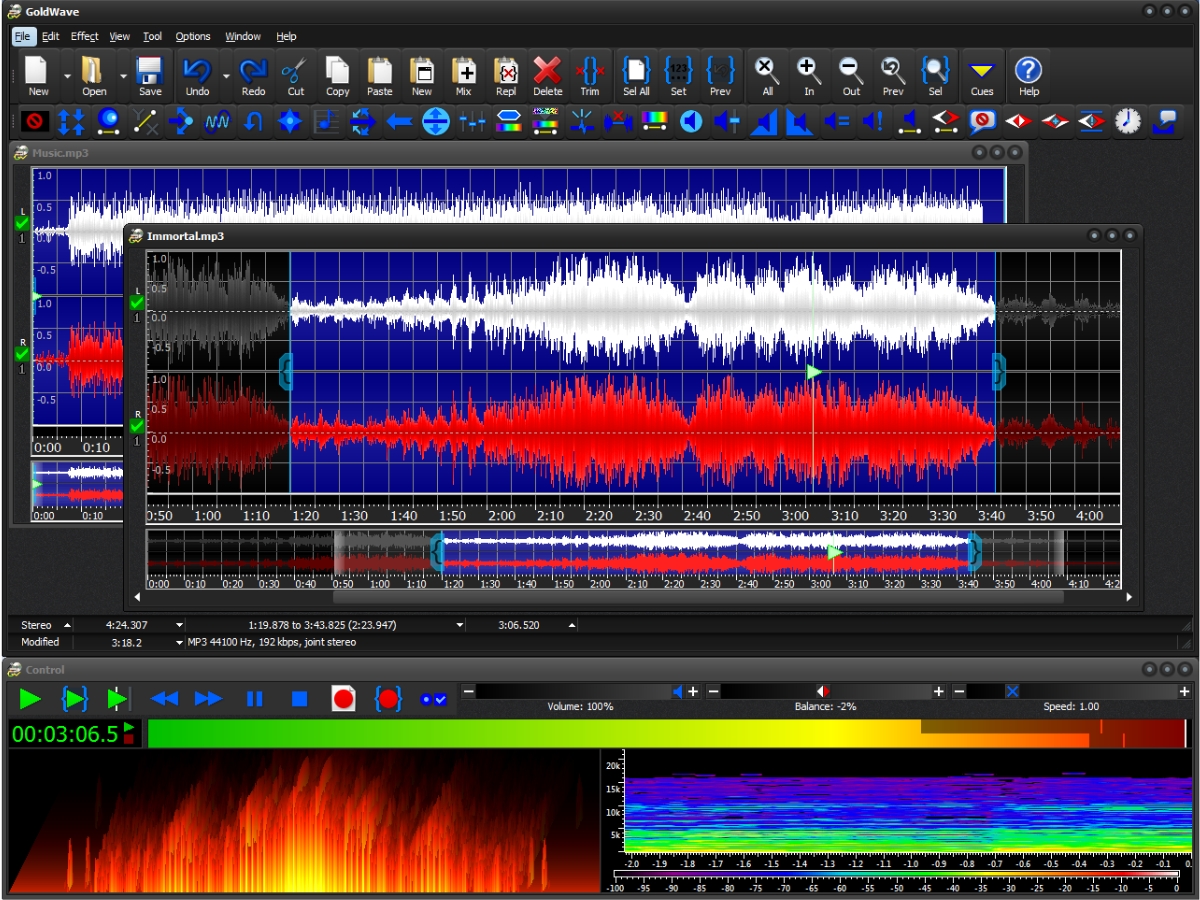
GoldWave supports a range of languages like Spanish, German, French, Chinese and others. The software provides multiple document interface, audible rewind, and fast forward mode, 40+ audio effects, DirectX effects, sound mixing, speech recognition and a lot of other functionalities.

Why Choose GoldWave Audio Editing Software?

GoldWave sets itself apart as a robust and versatile solution for all audio editing needs. Here’s why you should choose GoldWave audio editing software:

  • Complete Audio Control: From basic editing like cutting, copying, and pasting to more complex features such as mixing, crossfading, and applying effects, GoldWave gives you full control over your audio files.
  • Professional Features: Another benefit of using GoldWave audio editor is that it offers high-quality tools for audio restoration, noise reduction, and precise tone control, making it ideal for remastering old vinyl records, tapes, or any audio with background noise.
  • Multi-Platform Support: Available for Windows, macOS, Linux, Android, and iOS, GoldWave ensures compatibility across all devices. Whether you're using a computer or mobile device, GoldWave delivers seamless performance.
  • Batch Processing: With GoldWave, you can save time by processing hundreds of audio files in a single click. Convert, edit, and enhance entire folders of files, making it ideal for users with large audio libraries.
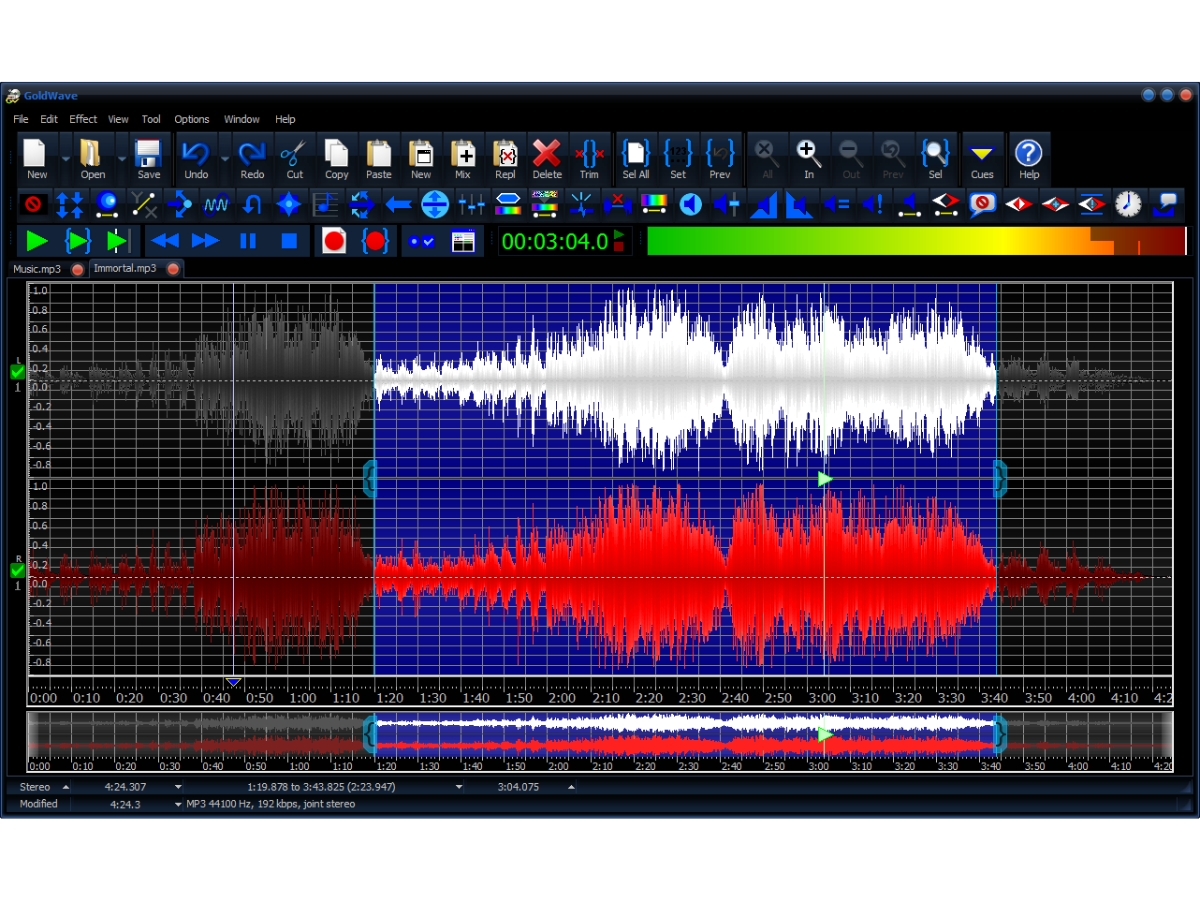
  • Real-Time Effects & Analysis: GoldWave lets you apply over 40 different audio effects in real-time and preview them before processing. GoldWave’s detailed analysis tools, including spectrograms and waveforms, make it easy to spot potential issues during recording and playback.

Additional Features of GoldWave

GoldWave is packed with a wide range of features that make it stand out as a top choice for audio editing:

  • Record Anything: This feature of GoldWave audio editing software use built-in inputs to record audio from microphones, streaming services, or even old tapes and vinyl records. Set timers or use level-activated recording to automatically pause and resume recordings based on audio levels.
  • Advanced Editing Tools: GoldWave’s editing tools allow you to slice, dice, and merge large audio files within seconds. Familiar commands like Cut, Copy, Paste, and Trim ensure that even beginners can start editing without a steep learning curve.
  • Audio Effects: With over 40 audio effects, including equalizers, reverb, flangers, and more, you can enhance your audio projects with ease. Use the preset options to quickly apply commonly used settings or experiment with the effects for unique sound creations.
  • Karaoke Fun: With the Karaoke fun GoldWave feature, users can easily remove vocals from music tracks, record their own vocals, and apply effects for a personalized karaoke experience. Whether you’re creating ringtones or sounds for video games, GoldWave makes it simple to customize.
  • Audio Restoration: Audio restoration feature in GoldWave clean up audio from old recordings by removing buzz, hiss, crackles, and clicks using noise reduction and pop filters. GoldWave’s Spectrum Filter provides precise control for remastering audio.
  • Comprehensive File Support: GoldWave supports a wide variety of file formats, including MP3, WAV, FLAC, Ogg, and even raw binary data. The software also allows for extracting audio from video files.
  • Highly Customizable Interface: Adjust the layout, assign keystrokes for fast actions, and create custom presets for effects. The interface can be configured to suit your editing style, making GoldWave adaptable to your workflow.

How can a user play all his favorite songs, record any source and edit audio by using GoldWave?

Out of the many purposes that the software serves, is recording and editing audios. You can also play all your favorite songs in real-time using this software. 

  1. Play Your Favorite Songs - GoldWave allows you to watch real-time visuals of your favorite songs. Users can listen to the audio by simply fast-forwarding or rewinding them. In order to hear your created music in transcribe dictation, you just need to change the playback speed of the song(s). In this way, you can also learn a new song by just listening to it.
  2. Edit Audio - The tools included in editing particular audio copies, cut, paste, replace, trim and overwrite. The fast virtual editing system of GoldWave ensures that you can dice, slice or merge large audios in a few seconds. One can combine audios for podcasts, figure skating, gymnastics, dance programs, etc. You can also mix and crossfade songs in just a few clicks with GoldWave.
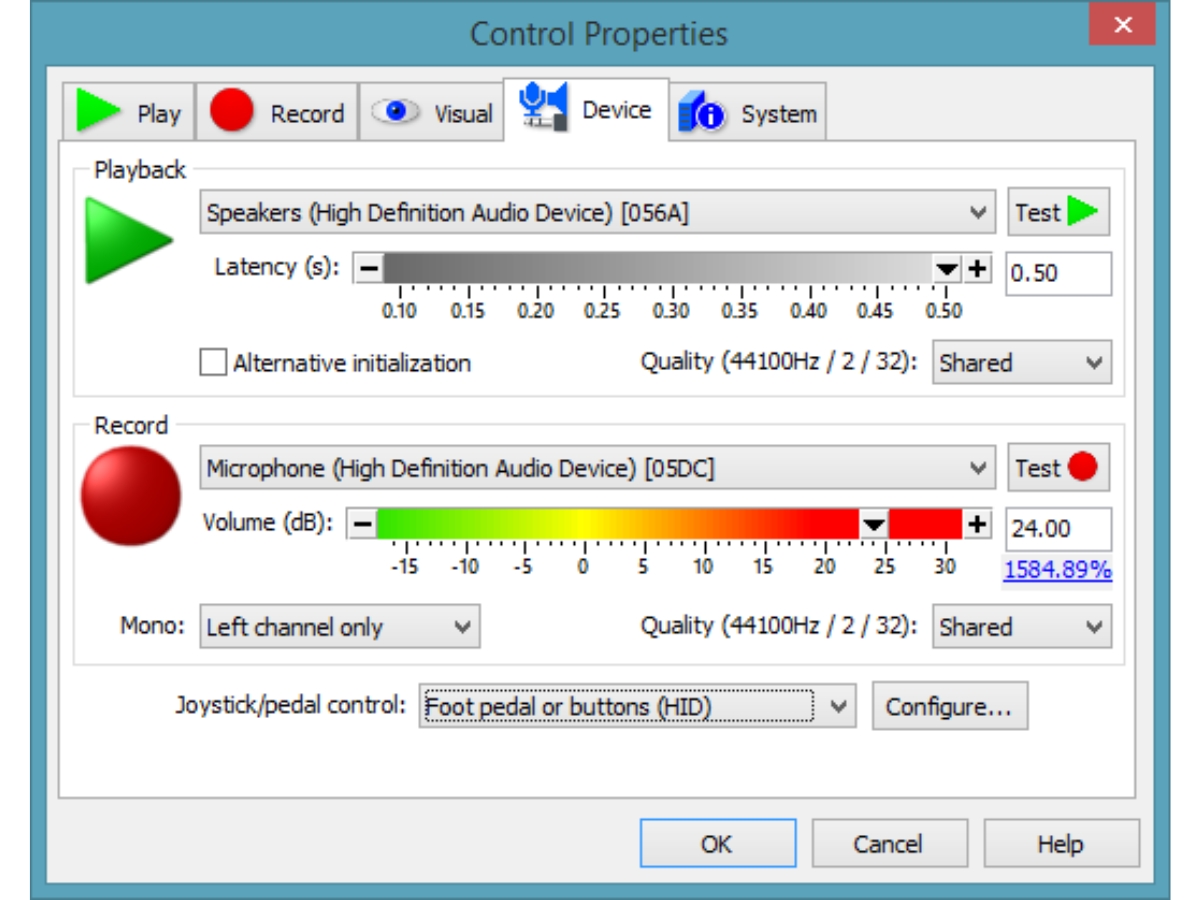
  3. Record Any Source - Select the line-in, microphone or streaming audio to hear through the built-in inputs of the software. If you wish to record your own music, speeches or reports, you can use a high-end USB microphone. You can connect a turntable to record LPs, a receiver to record radio or a cassette deck to record tapes. One just needs to set a timer to start recording at any given time of the day. You may use level activated recording whenever the signal is above or below any given level to pause or continue with your recording automatically.

Pricing of GoldWave

The price of GoldWave is based on the users’ requirements. You can “request a callback” to get in touch with our product experts.

What are the powerful tools in GoldWave and how can you process hundreds of files at once and configure it?

The software is totally customizable and provides a range of functionalities. It is equipped with many powerful tools that serve a range of purposes. Here are some of them:

Powerful Tools

  1. CD Reader - It enables a user to copy audio from an audio CD directly.
  2. File Merger tool - This tool allows a user to join multiple files together.
  3. Expression Evaluator - This helps you to generate your own sounds and effects.
  4. Effect Chain Editor - This tool allows one to create new effects or chain different effects together for faster processing.
  5. Cue Points - You can bookmark places within a file or split a long file into pieces with this tool.
  6. Speech Converter - If you wish to listen to songs while doing other stuff, you may avail of the Speech Converter tool that enables you to create audio versions of websites or any document(s).

File Processing

You can use Batch Processing to process and convert your songs like matching volume levels, boosting the bass, trim leading and trailing silences or converting your song into an MP3 version. The software supports all file formats such as iTunes, WAV, WMA, OGG, AIFF, etc. Users can take advantage of the command line processing that provides power and flexibility.

Configuration

You can assign your own keystrokes and it is perfect for anyone who has fast fingers or is visually impaired. Users can arrange the windows, toolbars and controls and also change colors of the waveform and visuals. One can set presets for different effects or add plug-ins for other functionalities.

Platforms Supported by GoldWave

The software runs on Windows OS. It also supports the Android Beta version and the Beta version of the iPhone.

GoldWave Pricing & Plans

One Year GoldWave License
  • License expires one year after purchase date.
  • Software returns to evaluation mode after one year
  • Upgrades are free for one year.
  • Includes Infinity
    • Licenses
    • Yearly
Starting at $ 19.00

Get GoldWave Demo

We make it happen! Get your hands on the best solution based on your needs.
Interacted

GoldWave Features

  • icon_check Vocal Removal Remove vocals from music tracks to create instrumental versions for karaoke, practice, remixing, or other uses.
  • icon_check Batch Conversion Convert multiple audio files between supported formats while applying processing settings to an entire collection.
  • icon_check Sound Editor Users can join multiple files together using the File Merger tool or generate their own sound by using the Expression Evaluator
  • icon_check Presets Save and reuse effect settings to quickly apply commonly used processing configurations to audio recordings.
  • icon_check Audio Mixing Mix multiple audio sources together to create podcasts, music, presentations, radio spots, and other projects.
  • icon_check Audio Effects Apply effects including echo, reverb, flanger, pitch changes, distortion, fades, and other sound processing tools.
  • icon_check Equalizer Adjust bass, treble, and frequency ranges to shape the tonal balance and improve the overall sound quality.
  • icon_check Batch Processing Process and convert large groups of audio files automatically while applying selected edits, effects, or settings.
  • icon_check File Merger Combine multiple audio files into a single continuous file for music collections, recordings, podcasts, or other projects.
  • icon_check Speech Recognition Convert spoken audio into text for transcription, dictation, proofreading, and other speech-to-text workflows.
  • icon_check Audio Recording Record vocals, instruments, microphones, streaming audio, line-in sources, and other supported audio inputs.
  • icon_check Audio Analysis Analyze audio using waveforms, spectrograms, bar graphs, level meters, and other real-time visual analysis tools.

GoldWave Specifications

  • Supported Platforms :
  • Device:
  • Deployment :
  • Suitable For :
  • Business Specific:
  • Language:
  • Windows iOS Android
  • DesktopMobile
  • Cloud-Based
  • Media House
  • Media
  • English

GoldWave Reviews

91%

Have recommended this product

Overall Score

4.4/5
Based on 10 Reviews

Review this product

Your valuable feedback helps others like you make a better decision.

Pros

pros_icon “I like how GoldWave has a wide range of editing features which include cut, copy, paste, and even advanced functions like crossfade and noise reduction.” Innoventry Software - Nov 25, 2024

pros_icon “In my line of work where I must deal with detailed audio work, GoldWave provides high-accuracy editing down to the sample level.” Hemanta Nial - Nov 24, 2024

pros_icon “Being a music video editor, I really appreciate real-time visual tools such as waveforms, spectrograms, and level meters.” SUMIT DAS - Nov 22, 2024

Cons

cons_icon “The Interface is not the best it feels a bit outdated compared to new audio editing software.” Innoventry Software - Nov 25, 2024

cons_icon “I own a Mac and I must use emulation software to run it since it is primarily designed for Windows.” Hemanta Nial - Nov 24, 2024

cons_icon “It’s not meant for full-scale music production since it is mostly designed more for audio and video editing.” SUMIT DAS - Nov 22, 2024

A

Abhinav

Verified reviewer:linkedin_verify

IT Manager, IT

101-500 Employees

Software user since: 1-2 years

Reviewed on: Nov 19, 2024

4.6/5

“easily accessible”

I have been using GoldWave for 10 years, and I like that it hasn’t changed all that much. Even after a hiatus, it is simple to resume audio editing because of this constancy.

Pros :

Cons :

Switched from : HeyGen

Reason to switch : I moved from HeyGen, which lacked the depth and hands-on approach I desired, to GoldWave because I needed a tool that felt comfortable and dependable for my editing needs.

Features

4.5/5

Value for Money

4.5/5

Customer Support

4.5/5

Ease of Use

5/5

Likely to Recommend

9/10
A

Ankit

Verified reviewer:linkedin_verify

IT Manager, SAAS

2-100 Employees

Software user since: < 6 months

Reviewed on: Nov 17, 2024

5/5

“Great for Beginners but Limited Free Version”

I like that GoldWave is more affordable than other high-end audio editors because I am new to audio editing. Although it is simple to get started, I felt that the free version was quite restrictive, so I decided to subscribe to for full access.

Pros :

Cons :

Switched from : Murf ai

Reason to switch : I needed more interactive editing tools than Murf AI could provide, so I moved to GoldWave. It was a suitable starting point because of its cost and basic features.

Features

5/5

Value for Money

5/5

Customer Support

5/5

Ease of Use

5/5

Likely to Recommend

10/10
VA

vijay ahluwalia

Verified reviewer:linkedin_verify

Human Resources, Hr

2-100 Employees

Software user since: < 6 months

Reviewed on: Nov 20, 2024

4.3/5

“Noise Reduction is Good but Basic”

My audio recordings have benefited greatly from GoldWaves noise reduction feature. It is quite effective and gives my tracks a polished tone. However, due to its simple modifications, it is not the greatest option if you want extremely configurable editing tools

Pros :

Cons :

Switched from : Riverside

Reason to switch : Riverside fm software would frequently freeze, which disrupts the flow of the conversation and was not a perfect match for me. This caused me to switch to GoldWave.

Features

4.5/5

Value for Money

4.5/5

Customer Support

4/5

Ease of Use

4.5/5

Likely to Recommend

9/10

GoldWave FAQ

A Users can easily get a live demo of the latest version of the software, that’s GoldWave v6.51. Our support team will contact you based on your chosen date and time.
A GoldWave has mobile app versions for both iOS and Android.
A Batch Processing enables you to manage your audio files from a wide range of formats and also adds effects and editing commands in the software.
A You can use the Spectrum Filter of GoldWave to precisely achieve control over the tone and frequency of your song. It is also used to remove long silences and offsets from songs.
A OS - 1. Windows - Windows 7 or later. We also have older versions for Windows XP/Vista users. 2. Android - Android 6 or higher. 3. iOS - iOS 11 or later. Processor - 1. 64-bit for Windows 7 or higher desktop versions. 2. 32-bit for older versions like Windows XP or Vista.