Description
Pricing
Features
Specification
Review
Compare
FAQs
Alternatives


 View Gallery
Brand: Google
An experimental generative AI tool that turns your web browsing into smart, interactive apps to help you complete tasks faster. ...Read more

Get Free Expert Consultation
Let us know your business needs clearly

Verified & Trusted
Vendors

Safe & Secure
Payment

Personalized
Experts Support
Price On Request
Features
 AI-Powered Browsing GenTab Generation Prompt-Based Interface Contextual Tab Analysis Task Automation
 See all 
We make it happen! Get your hands on the best solution based on your needs.
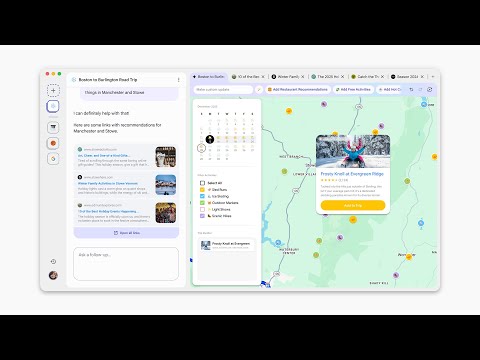

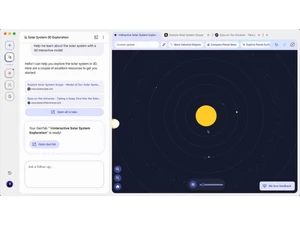
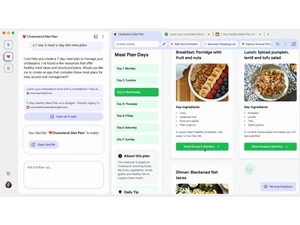
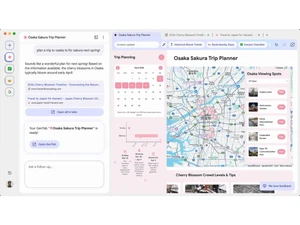
 AI-Powered Browsing Disco uses advanced AI to understand context, assist navigation, and transform browsing into an intelligent, goal-driven workflow. GenTab Generation Automatically converts your open tabs and prompts into interactive mini-apps that simplify tasks like planning or research. Prompt-Based Interface Replaces the traditional URL bar with a conversational input field for guiding the browser using natural language prompts. Contextual Tab Analysis Analyzes groups of tabs to understand your task and produce structured outputs, summaries, or interactive tools. Task Automation Automates repetitive tasks like organizing research, generating itineraries, or compiling notes from online content. AI Summaries Provides concise, high-quality summaries of webpages to help you quickly extract key points without manual reading. Content Linking Maintains links to original sources inside GenTabs to ensure transparency and allow easy trace-back to web content. Interactive Tool Builder Creates planning boards, checklists, schedules, and other interactive widgets from your browsing data without coding. Multi-Tab Workflow Organizer Automatically groups, organizes, and manages large numbers of tabs to reduce clutter and keep workflows streamlined. Cross-Site Knowledge Extraction Pulls relevant information from multiple websites to build cohesive outputs tailored to your current browsing goal. AI-Enhanced Research Mode Helps researchers and students compile insights, compare sources, and generate structured study guides from open tabs. User Intent Detection Understands your browsing intent through prompts and content patterns to deliver personalized results and tools. Smart Recommendations Suggests next steps, missing information, or helpful additions for tasks like travel planning, learning, or cooking. Adaptive UI Generation Creates custom interfaces dynamically such as planners, dashboards, or comparison charts based on user-provided data. Seamless MacOS Integration Optimized for macOS with early access support to deliver smooth performance and native-feeling browsing interactions.
 | Brand Name | |
| Information | Google is a multinational corporation that specializes in Internet-related services and products. |
| Founded Year | 1998 |
| Director/Founders | Easir Arafat, Larry Page, Masudur Rahman, Mohammad Faruk, Sergey Brin |
| Company Size | 1000+ Employees |
| Other Products | Google Meet, ImageFX, Google Keep, Google Gemini, Google Cloud Platform (GCP) |

 UAE
UAE India
India