
Description
Pricing
Features
Specification
Review
Compare
FAQs
Alternatives


 View Gallery
Brand: Imagen
An AI-powered photo editing software that automatically enhances images to a professional look, saving photographers time and effort. ...Read more

Get Free Expert Consultation
Let us know your business needs clearly

Verified & Trusted
Vendors

Safe & Secure
Payment

Personalized
Experts Support
$ 810.00 /Year
Features
 AI-Powered Photo Editing Personal AI Profile Culling Automation Style Replication Batch Processing
 See all 
We make it happen! Get your hands on the best solution based on your needs.


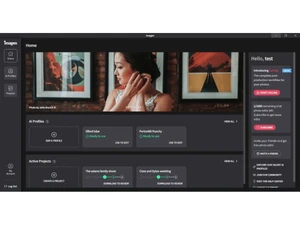


 AI-Powered Photo Editing Automates photo edits using AI trained on your style, ensuring consistent results across all projects. Personal AI Profile Learns your unique editing preferences and creates a personalized AI profile for future photo edits. Culling Automation Automatically selects the best photos from a shoot by evaluating sharpness, exposure, and subject focus. Style Replication Recreates your distinct color tones, lighting, and contrast to match your past editing style perfectly. Batch Processing Processes thousands of photos in seconds, reducing manual editing time and boosting productivity. Lightroom Integration Seamlessly integrates with Adobe Lightroom Classic, syncing your AI edits directly into your workflow. Masking Tools Automatically detects subjects and applies localized edits such as skin smoothing or background adjustment. Crop & Straighten Automatically crops and aligns images using AI to improve composition and visual balance. Exposure & Color Correction Corrects lighting, color balance, and white tones using intelligent AI-based enhancement algorithms. Cloud Storage Integration Offers secure cloud storage for uploading, processing, and backing up edited photo collections. Consistency Control Ensures uniform edits across an entire collection, maintaining visual consistency for client delivery. Custom Profile Adjustments Fine-tune your AI profile anytime by adjusting parameters like brightness, warmth, or tone curves. Fast Rendering Speed Edits photos in under 0.5 seconds each, providing lightning-fast AI processing for large image sets.
 | Brand Name | Imagen |
| Information | The fastest, most accurate AI editing, culling, & cloud storage desktop app for professional photographers & videographers. |
| Founded Year | 2020 |
| Director/Founders | Ron Oren, Yoav Chai, Yotam Gil |
| Company Size | 1-100 Employees |


 UAE
UAE India
India

