linkedin
Imagen AI logo
play How to shoot couple portraits in any city
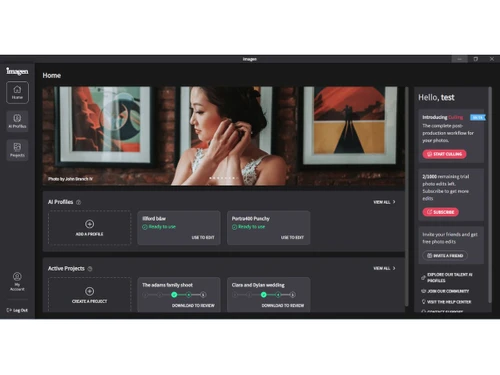
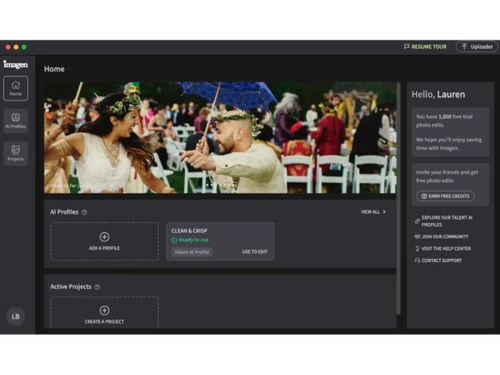
Imagen AI-dashboard
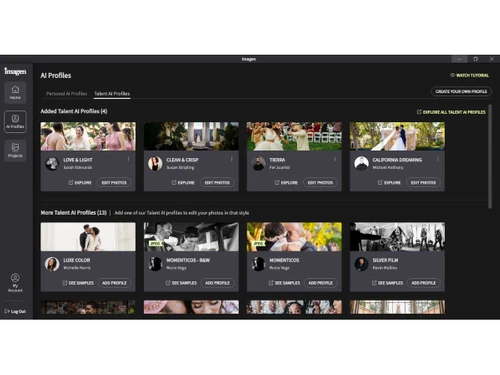
Imagen AI-profiles

Imagen AI

Brand: Imagen

  • 4.0

  • 4 Ratings

Imagen AI is an AI-powered photo editing tool that automates tasks like color correction, culling, and batch editing while maintaining your unique style.

See More

Have you used Imagen AI before?

Share your insights for better experience

Add a Review
Starting Price
$810

View plans

100% Genuine
Products
Best Price
Guaranteed
Safe & Secure
Payment
  • Description

  • Pricing

  • Features

  • Specification

  • Review

  • FAQ

Starting at $810

Imagen AI Software Overview

What is Imagen AI?

Imagen AI is an AI powered photo editing software designed mainly for professional photographers and videographers that uses artificial intelligence to learn your unique editing style and speed up repetitive tasks like color correction, culling (selecting best photos), batch editing, and organizing photos so you spend far less time in post production while keeping your personal creative look.

It works by building a Personal AI Profile from previously edited photos or choosing from pre made profiles, then applying those styles automatically and consistently across large photo collections, giving you quick and accurate results in a tiny fraction of the time of manual editing.

Why Choose Imagen AI Software?

  • Saves Time: Reduces hours spent on post-production work.
  • AI Culling: Automatically selects the best photos from a shoot.
  • Personalized Editing: Learns and apply your unique style.
  • Consistent Results: Maintains uniform color and tone across images.
  • Secure Cloud Backup: Keeps projects safely stored online.
  • Professional Workflow: Designed for photographers and studios.
  • Reduces Manual Tasks: Cuts repetitive editing and sorting work.
  • AI Profiles: Creates intelligent profiles from past edits.
  • Industry Styles: Quickly use standard professional editing styles.
  • Handles Large Volumes: Ideal for weddings, events, and sports shoots.
  • Subject Recognition: Detects faces and groups similar photos.
  • Blur Detection: Flags blurry or low-quality images automatically.
  • Closed Eye Detection: Identifies images with closed eyes.
  • Cull to Target Number: AI selects a fixed number of keepers.
  • Integrated Editing: Move from culling to editing seamlessly.

Benefits of Imagen AI Software

  • Cloud Storage Options: Choose optimized or original resolution backup.
  • Brand Consistency: Keeps the same look across all client projects.
  • Seamless App Integration: Works with Lightroom and Adobe tools.
  • Minimizes Errors: Reduces mistakes in photo selection and editing.
  • Faster Delivery: Helps photographers deliver final galleries quicker.
  • Editable Results: Final edits can be refined manually.
  • Supports RAW Files: Compatible with professional camera formats.
  • Trusted by Pros: Used by professional photography studios.
  • Batch Processing: Edits multiple images at once automatically.
  • Adaptive Style: AI improves as you use it more.
  • Team Standardization: Share a single profile across editors.
  • Quality-Focused: Balances technical and creative selection.
  • Easy Review: Quickly check AI selections before finalizing.
  • Scales with Business: Handles more clients without extra staff.
  • All-in-One Platform: Combines culling, editing, backup, and delivery in one.

Imagen AI Pricing

Imagen AI price starts at USD 810 at techjockey.com.

The pricing model is based on different parameters, including extra features, deployment type, and the total number of users. For further queries related to the product, you can contact our product team and learn more about the pricing and offers.

Read more

Imagen Company Details

Founded Year:  2020

The fastest, most accurate AI editing, culling, & cloud storage desktop app for professional photographers & videographers.

Director/Founders Ron Oren, Yoav Chai, Yotam Gil
Company Size 1-100 Employees

Imagen AI Pricing & Plans

Annual ($67.5/month)
Key Features
  • Discounted price per photo
  • Unlimited Personal AI Profiles
  • Access All Talent AI Profiles
  • 24/7 Support
  • Cloud Storage-100GB free for 3 months
Starting at $810
    • Licenses

      Licenses
      Licenses
    • Yearly

      Yearly
      Yearly

Key Features

  • Discounted price per photo

  • Unlimited Personal AI Profiles

  • Access All Talent AI Profiles

  • 24/7 Support

  • Cloud Storage-100GB free for 3 months

Imagen AI Features

  • icon_check AI-Powered Photo Editing
    Automates photo edits using AI trained on your style, ensuring consistent results across all projects.
  • icon_check Personal AI Profile
    Learns your unique editing preferences and creates a personalized AI profile for future photo edits.
  • icon_check Culling Automation
    Automatically selects the best photos from a shoot by evaluating sharpness, exposure, and subject focus.
  • icon_check Style Replication
    Recreates your distinct color tones, lighting, and contrast to match your past editing style perfectly.
  • icon_check Batch Processing
    Processes thousands of photos in seconds, reducing manual editing time and boosting productivity.
  • icon_check Lightroom Integration
    Seamlessly integrates with Adobe Lightroom Classic, syncing your AI edits directly into your workflow.
  • icon_check Masking Tools
    Automatically detects subjects and applies localized edits such as skin smoothing or background adjustment.
  • icon_check Crop & Straighten
    Automatically crops and aligns images using AI to improve composition and visual balance.
  • icon_check Exposure & Color Correction
    Corrects lighting, color balance, and white tones using intelligent AI-based enhancement algorithms.
  • icon_check Cloud Storage Integration
    Offers secure cloud storage for uploading, processing, and backing up edited photo collections.
  • icon_check Consistency Control
    Ensures uniform edits across an entire collection, maintaining visual consistency for client delivery.
  • icon_check Custom Profile Adjustments
    Fine-tune your AI profile anytime by adjusting parameters like brightness, warmth, or tone curves.
  • icon_check Fast Rendering Speed
    Edits photos in under 0.5 seconds each, providing lightning-fast AI processing for large image sets.
Imagen AI Demo Video play icon

Get Imagen AI Demo

Watch the demo video to explore key features, real workflows, and how the software fits your business needs.

Understand
Key Features
Personal
Demo Insights
Interactive
Demo Support

Imagen AI Specifications

Supported Platforms
Windows Windows MacOS MacOS
Devices
Desktop Desktop
Deployment
Perpetual Perpetual
Suitable For
All Industries
Business Specific
All Businesses
Business Size
Small Business Startups Medium Business Enterprises
Customer Support
Email Communities
Language
English
Training Resources
Videos
AI Features
AI Integrated

Imagen AI Review

4.0

Out of 5

img

Overall Rating

Based on
4 Verified Ratings

Rating Breakdown

  • Features 3.8
  • Value for Money 4
  • Ease of Use 4.2
  • Customer Support 4

80% Recommend this Product

Add Review

Techjockey Trusted Reviews from Verified Users

No reviews are currently available for Imagen AI. Discover similar Photo Editing Software reviews

  • Canva

    4.3

    Whats great - I enjoy how quickly and simply one can choose the template and begin tweaking. read more
  • Adobe Photoshop

    4.6

    Whats great - What I love most about Adobe Photoshop is its amazing editing capabilities. It's versatile, not just for photos but also for ... read more

  • Luminar Neo

    4.9

    Whats great - The interface is clean and easy to get around, so I’m not wasting time looking for tools. Sky AI, Relight AI, and portrait to... read more


Articles for Imagen AI

See All Related Articles

How much does Imagen AI Software cost?

Imagen AI pricing starts at USD 810, as listed on techjockey.com.

Is there a mobile app available for Imagen AI Software?

No, Imagen AI does not offer a mobile app for iOS and Android.

Which operating systems are compatible with Imagen AI Software?

Imagen AI works on Windows and MacOS.

Does Imagen AI Software offer a free trial?

Yes, Imagen AI provides a free trial for new users.

How does Imagen AI Software function?

Imagen AI uses AI to automatically cull, edit, and organize photos while applying your unique style consistently.

Who uses Imagen AI Software?

Professional photographers, studios, and content creators use Imagen AI.

Is a free demo available for Imagen AI Software?

Yes, Imagen AI offers a free trial for new users.

Is Imagen AI Software available for free?

Imagen AI is not fully free, paid plans are required after the trial.

20,000+ Software Listed

Best Price Guranteed

Free Expert Consultation

2M+ Happy Customers

Terms and Condtions

close

Users with registered businesses can purchase goods from merchants on the platform to satisfy their business needs. Users are not permitted to utilize any products acquired through the platform for resale, advertising, business, or further distribution.

For each purchase made, users will receive a Tax Invoice (or 'GST invoice') that includes specific details such as:

  • the GSTIN of the user associated with their registered business, and

  • the specified Entity Name for their business.

It should be noted that not all products are eligible for GST Invoice. Only the products displayed by participating sellers with the 'GST-based Invoice Available' callout on the product description page would qualify.

Certain goods and services are not eligible to get a GST Invoice, including items with VAS, i.e., Value Added Services (e.g., Total Mobile Protection/Assured Buyback) and those involving an exchange offer at the time of purchase.

Users must ensure the accuracy of the GSTIN, and business entity name provided for the GST Invoice. Requests for corrections into GST Invoice would not be accommodated by Techjockey.com or any Seller, and any issues arising from user-provided information are the sole responsibility of users.

Techjockey.com is not liable for the GST Invoice or any associated input tax credit. To efficiently claim an input tax credit, users should select the registered place of business address as per the GST authority's data and follow the provisions of the GST Act and rules.

To claim an input tax credit, the delivery and billing addresses must match. Furthermore, input tax credits will not be granted if the delivery address and GSTIN on the invoice are from different states. In case of incorrect GST details provided during the order placement, the order will be canceled automatically.