 USA
USA UAE
UAESmall Business
Designed for startups and growing businesses


See More





Brand: Canva
An easy designing solution to create posters, social media posts, and designs using templates, photos, and simple editing features.
See MoreHave you used Canva before?
Share your insights for better experience
View plans
 Save upto 18%, Get GST Invoice on your business purchase T&C Buy Now & Pay Later, Check offer on payment page.
 Brand: Canva
Founded Year: 2012
Canva is an online design and publishing platform that provides user friendly design tools for non-designers.
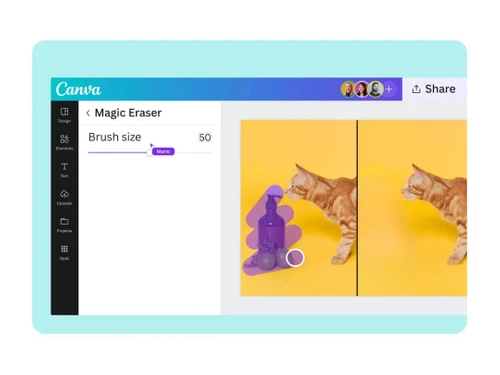
 Photo Editing Background Remover Crop Image Customization Design Templates Photo Enhancement Filters Magic Edit Transformation Background Remover Magic Eraser Tool Smart Face Retouching Magic Grab Technology Magic Expand Feature Auto-Enhance Assistant Advanced Photo Framing

Watch the demo video to explore key features, real workflows, and how the software fits your business needs.
 Ubuntu
  Windows
  iOS
iOS  Android MacOS
  Linux
Linux  Desktop
  Mobile
  Tablet
  iPad
iPad  Cloud-Based
  Perpetual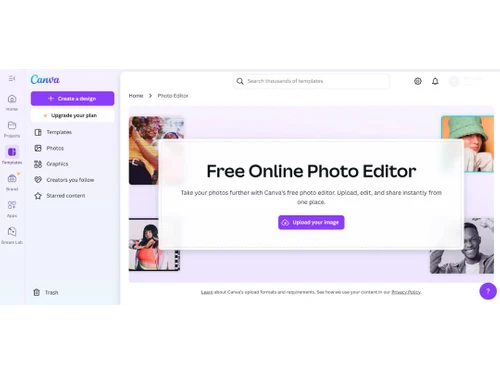
Small Business
Designed for startups and growing businesses
Medium Business
Built for business growth and flexibility
Enterprises
Designed for complex and large-scale business needs
4.2
Out of 5

Overall Rating
Based on
26 Verified Reviews
Rating Breakdown
89% Recommend this Product
Add ReviewOverall, users appreciate Canva for its user-friendly interface, extensive template library, and accessibility, making it a favored choice for both beginners and experienced designers. Many highlight its effectiveness for creating social media graphics and presentations quickly. However, some users express concerns about the limitations of advanced editing features, particularly in the free version, and the need for a premium subscription to access the best templates. Additionally, issues with font options and export settings are noted as areas for improvement.
Pros
"Canva offers a user-friendly interface and a wide range of design tools, making it accessible for both beginners and professionals."
"Drag and drop feature is not like Adobe Photoshop where you should know the technicalities, just drag and drop and your creatives or videos are ready."
"I adore it since it offers so many design templates. For more than a year, my company utilised Canva's pro edition, and we found it to be of great value."
Cons
"Pro-Only Good Templates: The downside is that the best templates are often for Pro users. While Canva is marvelous, the premium cost can be a bit steep."
"I wish it had more editing options and preset cards for easy customization."
"Some advanced design features are restricted to the paid version, limiting full creative potential for free users."


Jan 27, 2023
Techjockey Verified
“the most recommended photo editing software”
Pros
I enjoy how quickly and simply one can choose the template and begin tweaking.
Cons
I sincerely miss the SVG support that they removed from the free option.
Jan 27, 2023
Techjockey Verified
“Best software for marketing post”
Pros
It's beneficial to me that it's a web-based tool because it isn't as sluggish as Miro or Figma, which can lag because to their large file sizes.
Cons
When we hit the space bar in the video production tool Colum to start the film, the canvas interface overlays a new video on top of the previous one.
Jan 27, 2023
Techjockey Verified
“Easy and pocket friendly”
Pros
I adore it since it offers so many design templates. For more than a year, my company utilised Canva's pro edition, and we found it to be of great value.
Cons
The only thing that gives me a little anxiety is when I open a file halfway through working on it after making a duplicate of it. I worry whether the changes were saved because they are not visible when I view that file as a thumbnail. The modifications are always saved, but the front end takes a while to reflect them.

Canva
₹ 500.00 excl. GST
Desktop
Mobile
Web based
On Premises
Windows
Mac OS

Adobe Photoshop
Price On Request
Desktop
Mobile
Web based
On Premises
Windows
Mac OS

Karizma Album
₹ 3500
Desktop
Mobile
Web based
On Premises
Windows
Mac OS

Affinity Photo
₹ 619
Desktop
Mobile
Web based
On Premises
Windows
Mac OS

Luminar Neo
₹ 4999
Desktop
Mobile
Web based
On Premises
Windows
Mac OS

Cutout Pro
₹ 247
Desktop
Mobile
Web based
On Premises
Windows
Mac OS

darktable
Price On Request
Desktop
Mobile
Web based
On Premises
Windows
Mac OS

AfterShot Pro 3
₹ 5966
Desktop
Mobile
Web based
On Premises
Windows
Mac OS

Lensa AI
Price On Request
Desktop
Mobile
Web based
On Premises
Windows
Mac OS

Adobe Photoshop Elements
Price On Request
Desktop
Mobile
Web based
On Premises
Windows
Mac OS

Evoto AI
Price On Request
Desktop
Mobile
Web based
On Premises
Windows
Mac OS
(0) Product(s) selected
Available
Price on Request
Starting Price:
$36 /Year
Starting Price:
$100 /Year
Starting Price:
$80 /year

Starting Price:
$10 /Month

Starting Price:
$35 /Lifetime

Starting Price:
$8 /Month

Starting Price:
$15 /Month

Starting Price:
$810 /Year

Starting Price:
$12 /month








Canva is a tool where you can create drag and drop, design templates and elements without experience in design and software.
No, Canva is less complicated than Photoshop. It is a fast template design tool rather than a complicated photo editing or retouching tool.
Yes, Canva has a free version that has a lot of features. The paid subscription will allow you to access highly valued tools and templates as well as brand options.
Canva can save a lot of time because it comes with the ready-made templates, simple editing, collaboration, and a user-friendly interface for non-designers.
Canva pricing starts at INR 500 per month per user at techjockey.com.
Canva works best with creation of posters, social media posts, presentations, resumes among other visual content within a few minutes.
Canva is mostly used by students, marketers, small businesses, influencers, and teachers to create visual content easily and fast.
Yes, Canva does not share your designs with anyone unless you do so. You control whoever views or edits your work.
Canva Photo Editing Software is a powerful tool that helps users edit images and make them to the highest level. It also enables users to effortlessly create images by utilizing various built-in models.
Canva crashes while editing large designs because of too many elements, high-resolution media, and browser memory overload.
0 0
Canva reduces image quality after download to optimize file size for faster web loading and to keep storage requirements low.
0 0
The background remover in Canva is not working properly due to low resolution, complex image detailing, app or browser glitch, and files over 9MB.
0 0
The Canva watermark appears on your design because of using premium content in a free account, licensing issues, or unpaid elements.
0 0
Canva is slow or lagging in your browser due to resource heavy design, and too many tabs or accumulated cache.
0 0
20,000+ Software Listed
Best Price Guranteed
Free Expert Consultation
2M+ Happy Customers
Terms and Condtions

Users with registered businesses can purchase goods from merchants on the platform to satisfy their business needs. Users are not permitted to utilize any products acquired through the platform for resale, advertising, business, or further distribution.
For each purchase made, users will receive a Tax Invoice (or 'GST invoice') that includes specific details such as:
the GSTIN of the user associated with their registered business, and
the specified Entity Name for their business.
It should be noted that not all products are eligible for GST Invoice. Only the products displayed by participating sellers with the 'GST-based Invoice Available' callout on the product description page would qualify.
Certain goods and services are not eligible to get a GST Invoice, including items with VAS, i.e., Value Added Services (e.g., Total Mobile Protection/Assured Buyback) and those involving an exchange offer at the time of purchase.
Users must ensure the accuracy of the GSTIN, and business entity name provided for the GST Invoice. Requests for corrections into GST Invoice would not be accommodated by Techjockey.com or any Seller, and any issues arising from user-provided information are the sole responsibility of users.
Techjockey.com is not liable for the GST Invoice or any associated input tax credit. To efficiently claim an input tax credit, users should select the registered place of business address as per the GST authority's data and follow the provisions of the GST Act and rules.
To claim an input tax credit, the delivery and billing addresses must match. Furthermore, input tax credits will not be granted if the delivery address and GSTIN on the invoice are from different states. In case of incorrect GST details provided during the order placement, the order will be canceled automatically.



