linkedin
Befunky logo
play BeFunky
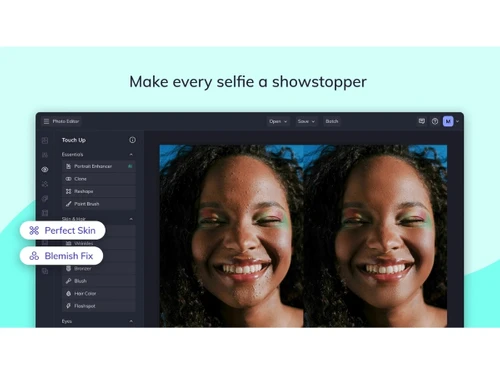
Befunky-selfie
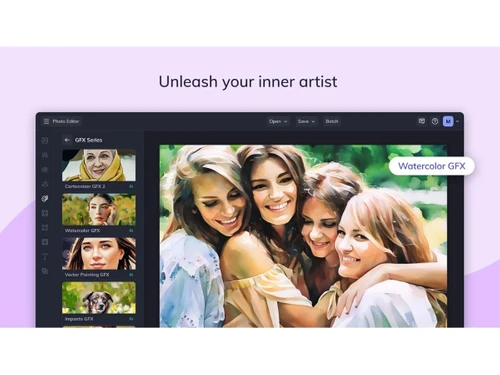
Befunky-GFX

Befunky

Brand: BeFunky

  • 4.1

  • 6 Ratings

BeFunky software is a photo editing and graphic designing tool that enables the users to express themselves creatively without the need to have advanced technical expertise. With a user-friendly interface, BeFunky photo editor caters to various sectors like media, packaging and manufacturing, advertising, ecommerce, and many more. BeFunky digital art software is web-based and can work on desktop...

See More

Have you used Befunky before?

Share your insights for better experience

Add a Review
Starting Price
$15

View plans

100% Genuine
Products
Best Price
Guaranteed
Safe & Secure
Payment
  • Description

  • Pricing

  • Features

  • Specification

  • Review

  • Compare

  • Alternatives

  • FAQ

Starting at $15

BefunkySoftware Overview

What is BeFunky Software? 

BeFunky software is a photo editing and graphic designing tool that enables the users to express themselves creatively without the need to have advanced technical expertise. With a user-friendly interface, BeFunky photo editor caters to various sectors like media, packaging and manufacturing, advertising, ecommerce, and many more. BeFunky digital art software is web-based and can work on desktop and mobile devices.  

With a simple image editing and collage making capabilities, BeFunky collage maker and photo editor can help create professional-grade images. It is possible to add bookmark to favorite items, titles, and descriptions. There are hundreds of digital effects and graphics to choose from. Users can save their projects in the Photo Library and share their projects on sites like Pinterest, Twitter, Dropbox, and Facebook. BeFunky photo editing software has support for 13 languages including French and Spanish. 

Why Use BeFunky Photo Editor & Collage Maker 

  1. BeFunky has numerous tools and features for photo editing, collage making, and graphic design. With the help of BeFunky, you can resize images, blur certain parts, add effects and frames.  
  2. It provides crop tools, phot framing options, lens flares and enhancer.  

  3. BeFunky users also get customizable photo collage layouts for photo grid, Facebook cover and Pinterest Pins. 

  4. This photo editing software includes business card templates, social media templates and stock photos library.  

  5. You can use light trails, bokeh, scratches and light leaks, and more to give texture to background. 

  6. Batch editing & Collage Wizard functionalities 

  7. Pattern collection for collages including geometric designs, stripes, and seasonal favorites. 

  8. Huge library of fonts, color schemes and styles.  

  9. Upload your watermark and edit settings to add it to any image in any way you want. 

How Does BeFunky Software Help Professional Graphic Designers & Beginners 

  • Customizable graphics 

Change the size, blend mode, shape, color of vector graphics, icons, and stickers before adding to collage 

  • Drag and Drop Functionality 

Create graphic designs by simply dragging and adding the template that you like 

  • Design Elements 

Hundreds of vector graphics, stickers, and icons for design projects 

  • Art Effects 

Art effects to convert photos to cartoons, paintings, sketches, and other art forms in a single click. 

  • Cartoonizer 

It helps change any photo to a suitable cartoon in one click. 

  • Etsy Layout 

Choose an Etsy layout you like and modify it by adding your listing photos, naming your shop, and more. 

  • Batch Edits 

You can crop, edit and modify multiple images at the same time.  

Unique Features of BeFunky App 

BeFunky app is available for iOS and Android devices. It enables users to edit photos and make collages without any watermark. Some of the features of BeFunky app are: 

  1. Several choices for fonts, colors, backgrounds 

  2. Editing options like crop, beautify, sharpen, fill light, exposure, saturation 

  3. Touch up options including red eye reduction, flashspot removal, teeth whitening, blemish fix, and more  

  4. Choose from numerous shapes and patterns for photo overlays 

  5. Add backgrounds, text, stickers, and more 

  6. Photo effects such as Vintage, Pop Art, Instant, Old Photo, Cross Process, Summer, Viewfinder, Sketch, Gritty HDR, and so on 

  7. Photo frame options including Instant, Filmstrip, Classic frames, Halftone, Grunge, and more 

  8. Create Collages with up to nine photos  

  9. Share photos to camera roll and social media platforms like Facebook, Twitter, Instagram, Flickr, and Tumblr 

BeFunky Software Pricing 

BeFunky subscription plans provide access to several amazing image editing features.  For more details about BeFunky pricing, please contact our sales team. 

Read more

BeFunky Company Details

Founded Year:  2007

BeFunky is a photo editing application enabling users to edit, save and share photos in social networks.

Director/Founders Kemal Ozisikcilar, Tekin Tatar, Tolga Birdal
Company Size 1-100 Employees

Befunky Pricing & Plans

Plus
Key Features
  • Background Removal
  • Photo Enhancement
  • Image Deblurring
  • Noise Reduction
  • Templates
Starting at $15
    • Licenses

      Licenses
      Licenses
    • Monthly

      Monthly
      Monthly

Key Features

  • Background Removal

  • Photo Enhancement

  • Image Deblurring

  • Noise Reduction

  • Templates

Befunky Features

  • icon_check Photo Editing
    Edit and enhance photos using tools for cropping, resizing, colors, effects, retouching, and image adjustments.
  • icon_check Background Removal
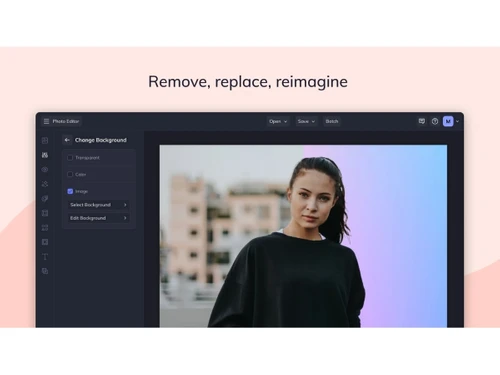
    Automatically remove image backgrounds to isolate subjects and create transparent or customized backgrounds.
  • icon_check Object Removal
    Remove unwanted people, objects, and distractions from photos using AI-powered object erasing tools.
  • icon_check Image Upscaling
    Increase image size up to 4x while enhancing fine details and maintaining improved visual quality.
  • icon_check Photo Enhancement
    Automatically improve exposure, highlights, shadows, colors, sharpness, and overall photo appearance.
  • icon_check Image Expansion
    Extend image dimensions and generate additional content to create new aspect ratios without unwanted cropping.
  • icon_check Photo Retouching
    Enhance portraits by smoothing skin, removing blemishes, whitening teeth, and improving facial appearance.
  • icon_check Image Deblurring
    Reduce different types of photo blur, including motion and lens blur, to create sharper and clearer images.
  • icon_check Noise Reduction
    Remove grain and unwanted image noise to produce cleaner and smoother photographs with improved details.
  • icon_check Photo Restoration
    Restore old photographs by removing scratches, reducing grain, enhancing clarity, and recovering facial details.
  • icon_check Sky Replacement
    Replace the sky in photographs with alternative scenes while allowing adjustments to the foreground and new sky.
  • icon_check Photo Resizing
    Resize images while maintaining quality for websites, printing, social media, and other digital applications.
  • icon_check Watermarking
    Add customized watermarks to photos with consistent placement and settings across multiple images.
  • icon_check Templates
    Create collages using ready-made layouts that can be customized with photos, text, graphics, colors, and patterns.
  • icon_check Graphic Design
    Create social graphics, invitations, business cards, postcards, infographics, banners, and other visual designs.
Befunky Demo Video play icon

Get Befunky Demo

Watch the demo video to explore key features, real workflows, and how the software fits your business needs.

Understand
Key Features
Personal
Demo Insights
Interactive
Demo Support

Befunky Specification

Supported Platforms
Windows Windows iOS iOS Android Android
Devices
Desktop Desktop Mobile Mobile
Deployment
Web-Based Web-Based
Suitable For
Designers
Business Specific
All Businesses
Language
English

Explore the Best Alternative Solutions Similar to Your Business Size and Needs

Befunky Review

4.1

Out of 5

img

Overall Rating

Based on
6 Verified Ratings

Rating Breakdown

  • Features 4.1
  • Value for Money 4.2
  • Ease of Use 4
  • Customer Support 4.2

86% Recommend this Product

Add Review

Techjockey Trusted Reviews from Verified Users

No reviews are currently available for Befunky. Discover similar Photo Editing Software reviews

  • Canva

    4.3

    Whats great - I enjoy how quickly and simply one can choose the template and begin tweaking. read more

  • Adobe Photoshop

    4.6

    Whats great - What I love most about Adobe Photoshop is its amazing editing capabilities. It's versatile, not just for photos but also for ... read more

  • Luminar Neo

    4.9

    Whats great - The interface is clean and easy to get around, so I’m not wasting time looking for tools. Sky AI, Relight AI, and portrait to... read more

Compare Befunky With other Photo Editing Software

Products
Ratings
Pricing
Device Supported
Deployment
Supported Platforms
  • img

    Befunky

  • 4.1

  • Price On Request

  • Desktop

    Mobile

  • Web based

    On Premises

  • Windows

    Mac OS

  • img

    Karizma Album

  • 4.4

  • ₹ 3500

  • Desktop

    Mobile

  • Web based

    On Premises

  • Windows

    Mac OS

  • img

    Luminar Neo

  • 4.7

  • ₹ 4999

  • Desktop

    Mobile

  • Web based

    On Premises

  • Windows

    Mac OS

  • img

    Affinity Photo

  • 4.2

  • ₹ 619

  • Desktop

    Mobile

  • Web based

    On Premises

  • Windows

    Mac OS

  • img

    darktable

  • 4.0

  • Price On Request

  • Desktop

    Mobile

  • Web based

    On Premises

  • Windows

    Mac OS

  • img

    PhotoRoom

  • 4.3

  • ₹ 299

  • Desktop

    Mobile

  • Web based

    On Premises

  • Windows

    Mac OS

  • img

    Cutout Pro

  • 4.8

  • ₹ 247

  • Desktop

    Mobile

  • Web based

    On Premises

  • Windows

    Mac OS

  • img

    Lensa AI

  • 4.1

  • Price On Request

  • Desktop

    Mobile

  • Web based

    On Premises

  • Windows

    Mac OS

  • img

    AfterShot Pro 3

  • 4.5

  • ₹ 5966

  • Desktop

    Mobile

  • Web based

    On Premises

  • Windows

    Mac OS

  • img

    FastStone

  • 4.3

  • Price On Request

  • Desktop

    Mobile

  • Web based

    On Premises

  • Windows

    Mac OS

  • img

    PicMonkey

  • 4.2

  • Price On Request

  • Desktop

    Mobile

  • Web based

    On Premises

  • Windows

    Mac OS

(2) Product(s) selected

Befunky Alternatives

See All Befunky Alternatives

Available

Price on Request

Starting Price:

$36 /Year

Starting Price:

$35 /Lifetime

Starting Price:

$8 /Month

Starting Price:

$810 /Year
Starting Price:

$80 /year

Articles for Befunky

See All Related Articles

Which operating system does BeFunky support?

BeFunky software is web-based and works with updated versions of Google Chrome, Firefox, Safari, Opera, and Microsoft Edge. For mobiles, it is compatible with both Android and iOS operating systems.

Is there any BeFunky app?

BeFunky app is available for both Android and iOS mobile devices.

What is the deployment type of BeFunky software?

BeFunky software supports web-based deployment.

How much does BeFunky software cost?

BeFunky software pricing is available on request. Please contact our product experts.

Who are the potential users of BeFunky software?

BeFunky is typically used in industries that require photo editing and graphic designing services like media, advertising, ecommerce, real estate, and numerous others.

Is there any free trial or demo for BeFunky software?

BeFunky software demo is available for free with techjockey.com.

Is BeFunky software free?

BeFunky software offers annual and monthly subscription plans. For more plans, please contact our sales team.

How can you download BeFunky software?

For BeFunky software, you can use it online if you have an updated version of a compatible web browser. Go to the official website. Click on Sign In and select Register Here option if you are a new user. Enter your credentials (email ID and password) or sign up via Facebook/ Gmail. Select Create Your Account” option. Verify your email. The Android and iOS apps can be downloaded from Play Store.

How does Befunky photo editor work?

Once a user uploads an image, Befunky provides the option to choose various effects that the user wants to apply for photo editing. When the user clicks on an effect, he/ she will be shown the preview of the new image. If a user wants to keep an effect, he/ she simply can click on the blue checkmark and save the image. For graphic designing, users can select from the gallery of customizable templates what suits best for their uploaded image.

20,000+ Software Listed

Best Price Guranteed

Free Expert Consultation

2M+ Happy Customers

Terms and Condtions

close

Users with registered businesses can purchase goods from merchants on the platform to satisfy their business needs. Users are not permitted to utilize any products acquired through the platform for resale, advertising, business, or further distribution.

For each purchase made, users will receive a Tax Invoice (or 'GST invoice') that includes specific details such as:

  • the GSTIN of the user associated with their registered business, and

  • the specified Entity Name for their business.

It should be noted that not all products are eligible for GST Invoice. Only the products displayed by participating sellers with the 'GST-based Invoice Available' callout on the product description page would qualify.

Certain goods and services are not eligible to get a GST Invoice, including items with VAS, i.e., Value Added Services (e.g., Total Mobile Protection/Assured Buyback) and those involving an exchange offer at the time of purchase.

Users must ensure the accuracy of the GSTIN, and business entity name provided for the GST Invoice. Requests for corrections into GST Invoice would not be accommodated by Techjockey.com or any Seller, and any issues arising from user-provided information are the sole responsibility of users.

Techjockey.com is not liable for the GST Invoice or any associated input tax credit. To efficiently claim an input tax credit, users should select the registered place of business address as per the GST authority's data and follow the provisions of the GST Act and rules.

To claim an input tax credit, the delivery and billing addresses must match. Furthermore, input tax credits will not be granted if the delivery address and GSTIN on the invoice are from different states. In case of incorrect GST details provided during the order placement, the order will be canceled automatically.