linkedin
AfterShot Pro 3 logo
play Introducing Aftershot Pro 3 - the world's fastest RAW photo editor
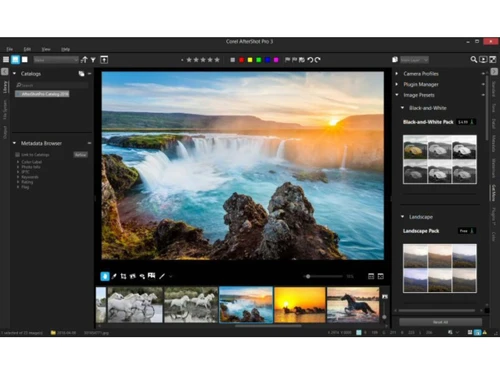
AfterShot Pro 3 dashboard
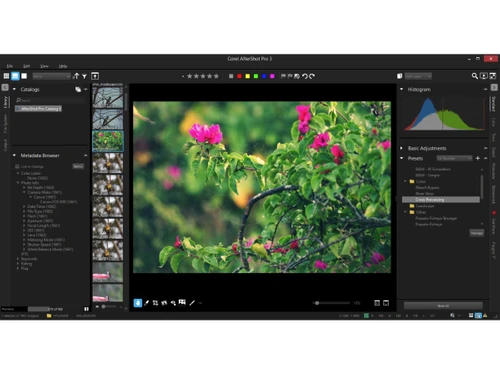
AfterShot Pro 3 library

AfterShot Pro 3

Brand: Corel Corporation

  • 4.5

  • 4 Ratings

AfterShot Pro 3 is a powerful photo editing software supporting non-destructive RAW editing for professional photographers.

See More

Have you used AfterShot Pro 3 before?

Share your insights for better experience

Add a Review
Starting Price 46% OFF
₹5,966 excl.GST  ₹10,990
₹ 7,040 incl. GST

View plans

offer Save upto 18%, Get GST Invoice on your business purchase T&C
offer Buy Now & Pay Later, Check offer on payment page.
Buy Now
100% Genuine
Products
Best Price
Guaranteed
Safe & Secure
Payment
  • Description

  • Pricing

  • Features

  • Specification

  • Review

  • FAQ

Starting at ₹5,966
Buy Now

AfterShot Pro 3 Software Overview

What is AfterShot Pro 3?

AfterShot Pro 3 is a professional RAW photo editing software. It provides tools and features that enable fast and high-quality photo editing. The software imports RAW files, upon which various editing adjustments and enhancements can be done.

The enhanced and edited image can be exported as high-quality images. The interface is customizable and comes with tabbed panels, preview windows, and batch editing tools, making it a powerful tool for image corrections and editing.

Moreover, AfterShot Pro 3 supports non-destructive processing. It provides features for lens correction to correct distortion due to different lenses, highlight recovery for better quality, blemish removal for touchups, and portrait editing. It also supports noise reduction and customizable presets.

Why Choose AfterShot Pro 3?

  • RAW Image Enhancement: Enhances exposure, contrast, and colour in RAW files with precision, preserving original image data for professional results.
  • Batch Photo Editing: Applies edits to thousands of images simultaneously using presets, streamlining workflows for event, wedding, or product photographers.
  • Lens Correction: Automatically fixes distortion, chromatic aberration, and vignetting using built-in lens profiles for cleaner, more accurate photos.
  • Non-Destructive Workflow: Creates multiple editing versions without altering originals, allowing flexible experimentation while maintaining image integrity.
  • Metadata Management: Organizes photos with tags, keywords, and ratings, which helps in fast search and efficient handling of large image libraries.

Benefits of AfterShot Pro 3

  • Quality Editing: Helps to give precise adjustments and editing to RAW files, enhancing image clarity, tone, and overall visual impact.
  • Friendly Interface: It offers an intuitive layout with customizable panels, making navigation and editing smooth for all users.
  • Rich Toolset: Includes advanced features like highlight recovery, noise reduction, and lens correction for getting professional editing results.
  • Fast Performance: Helps to process large batches quickly, reducing editing time and improving productivity for high-volume workflows.
  • Flexible Workflow: Supports non-destructive editing and multi-version management to support creative freedom without losing original image data.
  • Plugin Support: It helps to expand functionality with third-party plugins, allowing customized tools for specialized editing needs.

Pricing of AfterShot Pro 3

AfterShot Pro 3 Price starts at INR 5,966 at techjockey.com.

AfterShot Pro 3 comes with multiple pricing plans and caters to a diverse customer base. For subscription-related details and offers on premium packages, please request a call back from our product experts.

Read more

Corel Corporation Company Details

Founded Year:  1985

Corel is a Canadian company that develops and delivers graphics, productivity, and digital media software.

Director/Founders Michael Cowpland
Company Size 501-1000 Employees

AfterShot Pro 3 Pricing & Plans

AfterShot Pro 3
Key Features
  • RAW Processing
  • Non-Destructive Editing
  • Batch Processing
  • Lens Correction
  • Plugin Support
  • Watermarking
  • Multi-Platform Support

Calculated Price

₹ 5966 ₹10990
SAVE UPTO 46%
Exclusive of all taxes
    • Quantity

      Quantity
      Quantity

Key Features

  • RAW Processing

  • Non-Destructive Editing

  • Batch Processing

  • Lens Correction

  • Plugin Support

  • Watermarking

  • Multi-Platform Support

AfterShot Pro 3 Features

  • icon_check RAW Processing
    Enables accurate adjustments to uncompressed image data for maximum quality and flexibility in RAW files.
  • icon_check Non-Destructive Editing
    Preserves original files while allowing multiple editable versions for safe experimentation and creative control.
  • icon_check Batch Processing
    Applies edits and presets to thousands of images at once, saving time and increasing productivity for professionals.
  • icon_check Lens Correction
    Automatically fixes distortion, chromatic aberration, and vignetting using built-in lens profile data for quality results.
  • icon_check Plugin Support
    Extends functionality with third-party plugins for creative effects, filters, and advanced editing enhancements.
  • icon_check Watermarking
    Adds custom watermarks to images for branding, copyright protection, and professional presentation across platforms.
  • icon_check Multi-Platform Support
    Runs smoothly on Windows, macOS, and Linux, providing flexibility and consistent performance.
  • icon_check No Subscription
    One-time purchase for a perpetual license with no ongoing fees.
  • icon_check Layer-Based Editing
    Composite and edit using multiple adjustable layers for precision.
  • icon_check Spot Removal
    Quickly eliminate sensor dust spots or small imperfections.
  • icon_check Advanced Noise Reduction
    Reduce digital noise while preserving critical image detail.
  • icon_check Highlight & Shadow Recovery
    Recover details from overexposed highlights and dark shadows.
  • icon_check Customizable Workspace
    Arrange panels and tools to fit your personal workflow.
  • icon_check HDR Merge
    Combine multiple exposures into a single high dynamic range image.
AfterShot Pro 3 Demo Video play icon

Get AfterShot Pro 3 Demo

Watch the demo video to explore key features, real workflows, and how the software fits your business needs.

Understand
Key Features
Personal
Demo Insights
Interactive
Demo Support

AfterShot Pro 3 Specifications

Supported Platforms
Windows Windows MacOS MacOS Linux Linux
Devices
Desktop Desktop
Deployment
Cloud-Based Cloud-Based
Suitable For
All Industries
Business Specific
All Businesses
Business Size
Small Business Startups Medium Business Enterprises
Customer Support
Email Communities
Language
English
Training Resources
Videos

AfterShot Pro 3 Review

4.5

Out of 5

img

Overall Rating

Based on
4 Verified Ratings

Rating Breakdown

  • Features 4.8
  • Value for Money 4.7
  • Ease of Use 4.1
  • Customer Support 4.2

80% Recommend this Product

Add Review

Techjockey Trusted Reviews from Verified Users

No reviews are currently available for AfterShot Pro 3. Discover similar Photo Editing Software reviews

  • Canva

    4.3

    Whats great - I enjoy how quickly and simply one can choose the template and begin tweaking. read more

  • Adobe Photoshop

    4.6

    Whats great - What I love most about Adobe Photoshop is its amazing editing capabilities. It's versatile, not just for photos but also for ... read more

  • Luminar Neo

    4.9

    Whats great - The interface is clean and easy to get around, so I’m not wasting time looking for tools. Sky AI, Relight AI, and portrait to... read more


Articles for AfterShot Pro 3

See All Related Articles

How much does AfterShot Pro 3 cost?

The pricing of AfterShot Pro 3 starts from INR 5,966 at Techjockey.com

Who uses AfterShot Pro 3?

AfterShot Pro 3 is widely used by Photographers, Linux Users, Privacy-Conscious users, and more.

How does AfterShot Pro 3 work?

AfterShot Pro 3 works by allowing you to browse folders directly to edit RAW photos non-destructively, saving all changes to sidecar files while using a resource-efficient engine for speed.

Is AfterShot Pro 3 free?

No, AfterShot Pro 3 is not available for free.

Is AfterShot Pro 3 safe to use?

Yes, AfterShot Pro 3 is generally safe to use from a security and software stability perspective.

Is plugin support available in AfterShot Pro 3?

Yes, AfterShot Pro 3 supports third-party plugins for creative filters, effects, and extended editing capabilities.

Which operating systems are compatible with AfterShot Pro 3 Software?

AfterShot Pro 3 runs smoothly on Windows, macOS, and Linux platforms.

Is a free demo available for the AfterShot Pro 3 software?

Yes, a free demo of AfterShot Pro 3 is available at Techjockey's official product page.

Does AfterShot Pro 3 support batch editing?

Yes, AfterShot Pro 3 allows users to apply presets and edits to thousands of images simultaneously for better workflows.

Can AfterShot Pro 3 recover highlights in photos?

Yes, AfterShot Pro 3 includes advanced highlight recovery tools to restore detail in overexposed areas of RAW images.

20,000+ Software Listed

Best Price Guranteed

Free Expert Consultation

2M+ Happy Customers

Terms and Condtions

close

Users with registered businesses can purchase goods from merchants on the platform to satisfy their business needs. Users are not permitted to utilize any products acquired through the platform for resale, advertising, business, or further distribution.

For each purchase made, users will receive a Tax Invoice (or 'GST invoice') that includes specific details such as:

  • the GSTIN of the user associated with their registered business, and

  • the specified Entity Name for their business.

It should be noted that not all products are eligible for GST Invoice. Only the products displayed by participating sellers with the 'GST-based Invoice Available' callout on the product description page would qualify.

Certain goods and services are not eligible to get a GST Invoice, including items with VAS, i.e., Value Added Services (e.g., Total Mobile Protection/Assured Buyback) and those involving an exchange offer at the time of purchase.

Users must ensure the accuracy of the GSTIN, and business entity name provided for the GST Invoice. Requests for corrections into GST Invoice would not be accommodated by Techjockey.com or any Seller, and any issues arising from user-provided information are the sole responsibility of users.

Techjockey.com is not liable for the GST Invoice or any associated input tax credit. To efficiently claim an input tax credit, users should select the registered place of business address as per the GST authority's data and follow the provisions of the GST Act and rules.

To claim an input tax credit, the delivery and billing addresses must match. Furthermore, input tax credits will not be granted if the delivery address and GSTIN on the invoice are from different states. In case of incorrect GST details provided during the order placement, the order will be canceled automatically.