linkedin
Cutout Pro logo
play How to remove background of photos using Cutout.pro?
Cutout Pro Diffusion
Cutout Pro Art Generator

Cutout Pro

Brand: Cutout Pro

  • 4.8

  • 5 Ratings & 2 Reviews

An AI-powered designing solution that helps you edit, enhance, and create images easily and professionally.

See More

Have you used Cutout Pro before?

Share your insights for better experience

Add a Review
Starting Price
₹247 excl.GST
₹ 291 incl. GST

View plans

offer Save upto 18%, Get GST Invoice on your business purchase T&C
offer Buy Now & Pay Later, Check offer on payment page.
Buy Now
100% Genuine
Products
Best Price
Guaranteed
Safe & Secure
Payment
  • Description

  • Pricing

  • Features

  • Specification

  • Review

  • Compare

  • Alternatives

  • FAQ

  • Questions

Starting at ₹247
Buy Now

Cutout Pro Software Overview

What is Cutout.Pro Software?

Cutout.Pro is an AI photo editing software that enables the user to create and update a photo quickly. It has smart applications to erase backgrounds, correct photo quality, and even make your pictures into works of art. You do not require advanced editing knowledge to create professional-looking results.

Cutout.Pro helps you edit old images, create an ID photo, or create a catchy image to promote an online shop. It also gives you the opportunity to animate photos and produce eye-catching content using AI art generation tools.

You can even find free images and apply your own style with the artistic features of the application such as changing the background. Its interface is open to anyone and is also easily adapted to other platforms with its API.

As an individual consumer or a businessman, Cutout.Pro presents an efficient and convenient approach to the various image-editing tasks. It makes designing fast, precise, and enjoyable to all.

Why Choose Cutout.Pro?

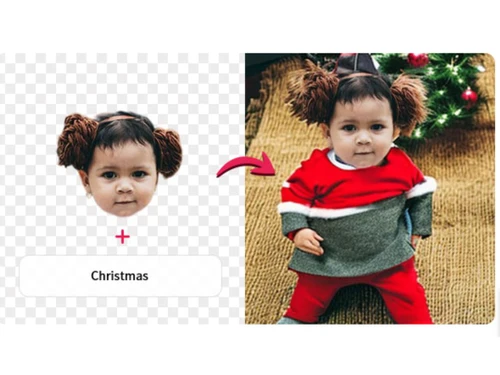
  • Background Diffusion: Convert a plain picture to an artistic one with text and effects by means of AI, and it is an ideal tool for creativity and to produce professional-looking products.
  • Face Cutout: Remove faces and hair in detail to provide you with a clean professional portrait or creative design effects.
  • Free Images Search Engine: Find millions of royalty-free images fast through a smart reverse image search of Pixabay, Pexels, Unsplash and other leading sources.
  • E-commerce Solutions: With quick background elimination and neater presentation, you can create sharp and attractive pictures of your products to increase views and purchases.
  • ID Photo Maker: Create a passport, visa or ID photo quickly to the right size and format with pre-selected customization features.
  • Customized Printing: Insert pictures to mugs and shirts among others with clutter-free cuts and previews to ensure that individuals get the precise results on personal printing.
  • AI Video Tools: Turn photos into videos, apply virtual backgrounds and delete objects with powerful AI video editing tools.
  • Batch Editing: Edit hundreds of photos at once using intelligent tools and save hours of manual work and reduce the inconsistency.
  • Unlimited Animation Styles: Convert your photos into animated avatars in unlimited styles such as 2D anime, 3D cartoon, sketch and others just by a click.

Cutout.Pro Pricing

Cutout.Pro price starts from INR 247 for 80 credits per month at Techjockey.com.

The pricing model is based on different parameters, including extra features, deployment type, and total users. For further queries related to the product, you can contact Techjockey.com and learn more about the pricing and offers.

Read more

Cutout Pro Company Details

Founded Year:  2018

Cutout.pro leverages the power of artificial intelligence and computer vision to deliver a wide range of products that make your life much easier and your work more productive.

Director/Founders Jeff Tang
Company Size 1-100 Employees

Cutout Pro Pricing & Plans

Subscription Plan(80 credits)(Rs.3.081/credit)
Key Features
  • Risk free: 14 Days Money Back Guarantee
  • Flexible: Downgrade, upgrade or cancel any time
  • Fair: Unused credits roll over

Calculated Price

247 Exclusive of all taxes
    • Credits

      Credits
      Credits
    • Monthly

      Monthly
      Monthly

Key Features

  • Risk free: 14 Days Money Back Guarantee

  • Flexible: Downgrade, upgrade or cancel any time

  • Fair: Unused credits roll over

Cutout Pro Features

  • icon_check Dynamic Photo Animer
    Adds lifelike motion to static portraits, making faces blink, smile, or move to create engaging and fun digital experiences.
  • icon_check Blur Background
    Simulates a professional DSLR "bokeh" effect by intelligently blurring the background to make the main subject stand out more.
  • icon_check Photo Editing
    Easily edit photos using smart tools to fix, adjust, or change anything you want.
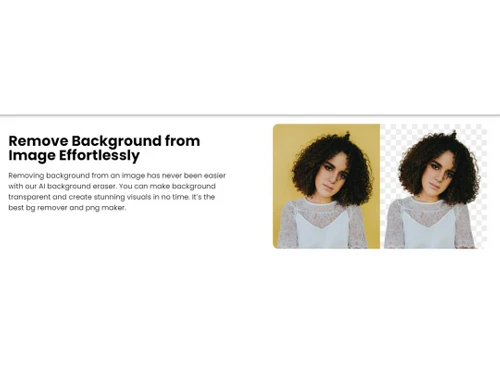
  • icon_check Background Remover
    Remove unwanted backgrounds or objects from photos automatically with AI precision.
  • icon_check Artificial Intelligence
    Let AI handle editing tasks smartly and save your time with auto-enhancements.
  • icon_check Photo Enhancement
    Improve photo clarity, fix blurs, and boost image quality with one simple click.
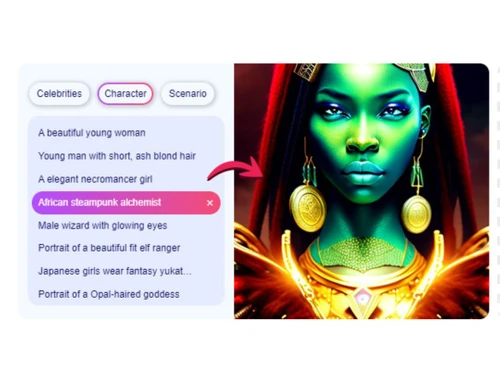
  • icon_check AI Art Generators
    Create stunning digital art automatically by turning photos into unique AI masterpieces.
  • icon_check API Integration
    Add photo editing features to your apps or websites for smoother, faster editing.
  • icon_check AI Restore Tools
    Fix old or damaged photos with AI that brings back color, clarity, and detail.
  • icon_check Video Background
    Eliminates backgrounds from video footage automatically without the need for a green screen, delivering clean, high-def results.
  • icon_check Face Cutout Technology
    Automatically detects and crops human faces from any image, making it perfect for creating custom stickers, memes, or avatars.
  • icon_check AI Art Generator
    Uses advanced text-to-image AI to create unique digital artwork and illustrations based on your specific descriptive prompts.
  • icon_check Passport Photo Maker
    Creates professional, compliant ID and passport photos by automatically adjusting the background and size for any country.
  • icon_check Video Enhancer
    Upscales video resolution up to 4K quality, reducing motion blur and artifacts to give your footage a professional appearance.
  • icon_check E-commerce Product Pro
    Streamlines online selling by creating consistent, high-quality product images with white backgrounds and smart shadows fast.
Cutout Pro Demo Video play icon

Get Cutout Pro Demo

Watch the demo video to explore key features, real workflows, and how the software fits your business needs.

Understand
Key Features
Personal
Demo Insights
Interactive
Demo Support

Cutout Pro Specifications

Supported Platforms
Ubuntu Ubuntu Windows Windows MacOS MacOS Linux Linux
Devices
Desktop Desktop Mobile Mobile Tablet Tablet iPad iPad
Deployment
Cloud-Based Cloud-Based
Suitable For
All Industries
Business Specific
All Businesses
Business Size
Small Business Medium Business Enterprises
Customer Support
Email Communities
Language
English
Integration
API Integration
Training Resources
Videos
AI Features
AI Integrated

Explore the Best Alternative Solutions Similar to Your Business Size and Needs

Cutout Pro Reviews

4.8

Out of 5

img

Overall Rating

Based on
2 Verified Reviews

Rating Breakdown

  • Features 4.8
  • Value for Money 4.8
  • Ease of Use 4.6
  • Customer Support 5

92% Recommend this Product

Add Review

Cutout Pro Video Reviews

youtubeVideoId

4.9

“Cutout Pro Review | Best AI Design Tool | Remove.bg Alternative”

Review by: Growth Hacking Ninja

youtubeVideoId

4.8

“Cutout Pro Review Free Ai Image Generator Tool NO LOGIN”

Review by: DigitalNerdBee

Compare Cutout Pro With other Photo Editing Software

Products
Ratings
Pricing
Device Supported
Deployment
Supported Platforms
  • img

    Cutout Pro

  • 4.8

  • ₹ 246.50 excl. GST

  • Desktop

    Mobile

  • Web based

    On Premises

  • Windows

    Mac OS

  • img

    Adobe Photoshop

  • 4.5

  • Price On Request

  • Desktop

    Mobile

  • Web based

    On Premises

  • Windows

    Mac OS

  • img

    Karizma Album

  • 4.4

  • ₹ 3500

  • Desktop

    Mobile

  • Web based

    On Premises

  • Windows

    Mac OS

  • img

    Affinity Photo

  • 4.2

  • ₹ 619

  • Desktop

    Mobile

  • Web based

    On Premises

  • Windows

    Mac OS

  • img

    Luminar Neo

  • 4.7

  • ₹ 4999

  • Desktop

    Mobile

  • Web based

    On Premises

  • Windows

    Mac OS

  • img

    darktable

  • 4.0

  • Price On Request

  • Desktop

    Mobile

  • Web based

    On Premises

  • Windows

    Mac OS

  • img

    Lensa AI

  • 4.1

  • Price On Request

  • Desktop

    Mobile

  • Web based

    On Premises

  • Windows

    Mac OS

  • img

    AfterShot Pro 3

  • 4.5

  • ₹ 5966

  • Desktop

    Mobile

  • Web based

    On Premises

  • Windows

    Mac OS

  • img

    Evoto AI

  • 4.6

  • Price On Request

  • Desktop

    Mobile

  • Web based

    On Premises

  • Windows

    Mac OS

  • img

    FastStone

  • 4.3

  • Price On Request

  • Desktop

    Mobile

  • Web based

    On Premises

  • Windows

    Mac OS

(2) Product(s) selected

Cutout Pro Alternatives

See All Cutout Pro Alternatives

Available

Price on Request

Starting Price:

$36 /Year

Starting Price:

$35 /Lifetime

Starting Price:

$10 /Month

Starting Price:

$8 /Month

Starting Price:

$15 /Month

Starting Price:

$810 /Year
Articles for Cutout Pro

See All Related Articles

How much does Cutout.Pro cost?

Cutout.Pro price starts from INR 247 for 80 credits per month at Techjockey.com.

How does Cutout.Pro work?

Cutout Pro uses smart AI to automatically edit photos, remove backgrounds, enhance quality, and create visual content easily.

Is Cutout.Pro free?

Yes, Cutout Pro offers some free tools, but advanced features and high-resolution downloads may require a paid plan.

Who uses Cutout.Pro?

It is used by content creators, businesses, designers, and casual users who want quick and easy photo editing solutions.

Can Cutout.Pro be used on mobile?

Yes, it works on phones through a browser and also offers mobile apps for editing photos on the go.

How Does Cutout Pro Work?

Cutout Pro utilizes advanced artificial intelligence and computer vision to automate photo editing. Its Image Background Removal tool, AI Restore Tools, and AI Art Generators enhance images, remove backgrounds, and generate art, simplifying complex editing tasks with precision and efficiency.

Cutout Pro Questions

Q:

How do I delete my account from Cutout.Pro?

Dinesh Sharma Jan 15, 2026
A:

Log in, go to your profile or settings, and find the option to delete your account permanently.

Sachin jalan Jan 16, 2026
Q:

How do I remove a person from a photo in cutout pro?

sarfaraz ahmed Jan 8, 2026
A:

Upload your photo, use the Remove Objects tool, and mark the person to erase them quickly with AI magic.

Dependra Jan 9, 2026
Q:

Can I use Cutout.Pro without design skills?

Kerstin Schreiner Dec 24, 2025
A:

Yes, Cutout Pro is made for beginners. AI handles all the hard work while you click and create.

ramesh sippy Dec 28, 2025

20,000+ Software Listed

Best Price Guranteed

Free Expert Consultation

2M+ Happy Customers

Terms and Condtions

close

Users with registered businesses can purchase goods from merchants on the platform to satisfy their business needs. Users are not permitted to utilize any products acquired through the platform for resale, advertising, business, or further distribution.

For each purchase made, users will receive a Tax Invoice (or 'GST invoice') that includes specific details such as:

  • the GSTIN of the user associated with their registered business, and

  • the specified Entity Name for their business.

It should be noted that not all products are eligible for GST Invoice. Only the products displayed by participating sellers with the 'GST-based Invoice Available' callout on the product description page would qualify.

Certain goods and services are not eligible to get a GST Invoice, including items with VAS, i.e., Value Added Services (e.g., Total Mobile Protection/Assured Buyback) and those involving an exchange offer at the time of purchase.

Users must ensure the accuracy of the GSTIN, and business entity name provided for the GST Invoice. Requests for corrections into GST Invoice would not be accommodated by Techjockey.com or any Seller, and any issues arising from user-provided information are the sole responsibility of users.

Techjockey.com is not liable for the GST Invoice or any associated input tax credit. To efficiently claim an input tax credit, users should select the registered place of business address as per the GST authority's data and follow the provisions of the GST Act and rules.

To claim an input tax credit, the delivery and billing addresses must match. Furthermore, input tax credits will not be granted if the delivery address and GSTIN on the invoice are from different states. In case of incorrect GST details provided during the order placement, the order will be canceled automatically.