linkedin
Lensa AI logo
Lensa-realistic
Lensa-filters
Lensa-exposure

Lensa AI

Brand: Prisma Labs

  • 4.1

  • 3 Ratings

An AI-powered photo editing software that helps users enhance images, remove unwanted elements, apply filters, and create unique AI-generated avatars from selfies.

See More

Have you used Lensa AI before?

Share your insights for better experience

Add a Review
Starting Price
$36

View plans

100% Genuine
Products
Best Price
Guaranteed
Safe & Secure
Payment
  • Description

  • Pricing

  • Features

  • Specification

  • Review

  • FAQ

Starting at $36

Lensa AI Software Overview

What is Lensa?

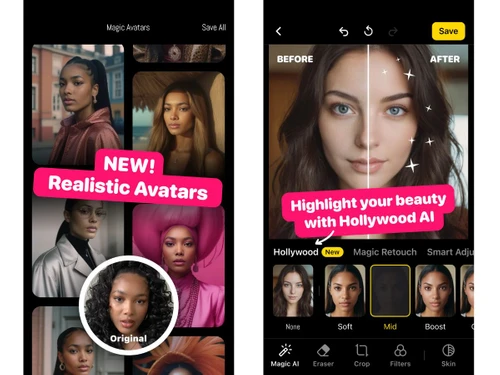
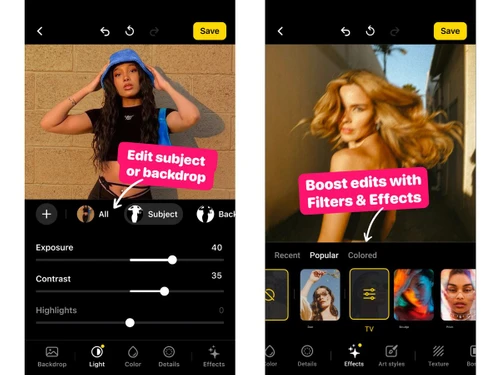
Lensa is a design solution and a photo editing software that helps users enhance and transform images with features like one-tap retouching, background removal, creative filters, and AI-generated avatars.

Why Choose Lensa?

  • Advanced AI-powered editing: Lensa uses intelligent AI technology to automatically enhance photos with professional-quality results, reducing the need for manual editing.
  • User-friendly experience: Its clean and intuitive interface makes photo editing simple, even for users with no design or editing background.
  • Creative visual effects: Features like Magic Avatars, artistic filters, and stylized presets help users create unique and visually striking images.
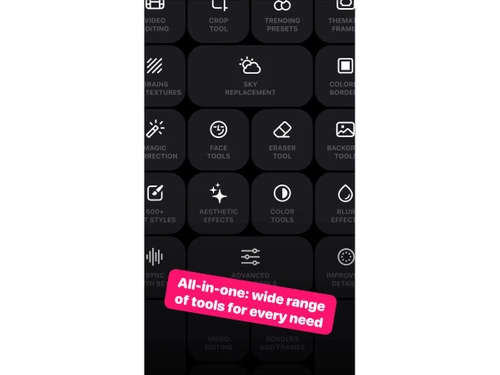
  • Comprehensive editing tools: From background removal and skin retouching to color correction and object cleanup, Lensa offers all essential photo-editing features in one app.

Benefits of Lensa

  • Professional-quality photo enhancements: Lensa's AI automatically improves lighting, colors, and clarity, giving photos a polished, studio-like look without requiring manual editing skills.
  • Time-saving automation: One-tap tools and intelligent adjustments drastically reduce the time needed to edit images, making it efficient for both casual users and professionals.
  • Unleashes creativity: With features like Magic Avatars, artistic filters, and stylized effects, Lensa allows users to experiment and produce unique, visually striking content.
  • User-friendly interface: Its intuitive design ensures that even beginners can easily navigate and apply advanced editing features without a steep learning curve.
  • Comprehensive editing tools: Offers a complete set of features, including background removal, skin retouching, color correction, and object cleanup, all in a single app.

Lensa Pricing

Lensa pricing starts at USD 36 at Techjockey.com. The pricing model is based on different parameters, including the amount of bandwidth you need, the number of servers you need, and the features you need. For further queries related to the product, you can contact our product team and learn more about the pricing and offers.

Read more

Prisma Labs Company Details

Founded Year:  2016

Prisma Labs is an AI-driven mobile technology company that develops state of the art Deep Learning solutions for Computer Vision and AR.

Director/Founders Alexey Moiseenkov, Andrey Usoltsev, Aram Hardy, Ilya Frolov, Oleg Poyaganov
Company Size 1-100 Employees

Lensa AI Pricing & Plans

Starter
Key Features
  • AI Portrait Retouching
  • Background Removal
  • Magic Avatars
  • Object Removal
  • Auto Skin Smoothing
  • Color Correction
Starting at $36
    • Licenses

      Licenses
      Licenses
    • Yearly

      Yearly
      Yearly

Key Features

  • AI Portrait Retouching

  • Background Removal

  • Magic Avatars

  • Object Removal

  • Auto Skin Smoothing

  • Color Correction

Lensa AI Features

  • icon_check AI Portrait Retouching
    Automatically enhances facial features, skin tone, and lighting to create flawless selfie portraits.
  • icon_check Background Removal
    Instantly removes or replaces photo backgrounds using AI for clean, professional-looking images.
  • icon_check Magic Avatars
    Generates creative AI-based avatars from user photos in multiple artistic styles like anime or fantasy.
  • icon_check Object Removal
    Erases unwanted elements or distractions from photos seamlessly with advanced AI-powered detection.
  • icon_check Auto Skin Smoothing
    Smoothens skin texture intelligently while retaining natural detail and preserving facial contours.
  • icon_check Color Correction
    Adjusts brightness, contrast, and saturation automatically to achieve balanced, vivid photo tones.
  • icon_check Lens Blur (Bokeh)
    Creates a DSLR-style background blur effect to focus attention on subjects with realistic depth.
  • icon_check AI Style Filters
    Applies artistic and trending filters powered by AI to transform photos into stylized visual outputs.
  • icon_check Face Enhancer
    Automatically brightens eyes, whitens teeth, and sharpens facial features for a polished appearance.
  • icon_check Makeup Simulation
    Adds natural or glam virtual makeup to portraits with precise AI blending for realistic aesthetics.
  • icon_check Batch Processing
    Allows editing multiple images simultaneously to save time and maintain visual consistency.
  • icon_check Auto Crop & Framing
    Intelligently detects the subject and adjusts framing for perfect composition and balance.
  • icon_check Lighting Adjustment
    Dynamically enhances exposure and shadow details for optimal visual clarity in portraits.
  • icon_check Background Blur Control
    Lets users fine-tune background blur intensity for artistic or portrait-style photo outcomes.
  • icon_check Social Media Export
    Exports optimized photos directly to platforms like Instagram, Facebook, and TikTok in one tap.

Lensa AI Specifications

Supported Platforms
iOS iOS Android Android
Devices
Mobile Mobile
Deployment
Cloud-Based Cloud-Based
Suitable For
All Industries
Business Specific
All Businesses
Business Size
Small Business Startups Medium Business Enterprises
Customer Support
Email Communities
Language
English
Training Resources
Videos
AI Features
AI Integrated

Lensa AI Review

4.1

Out of 5

img

Overall Rating

Based on
3 Verified Ratings

Rating Breakdown

  • Features 4.1
  • Value for Money 4
  • Ease of Use 4.6
  • Customer Support 4

80% Recommend this Product

Add Review

Techjockey Trusted Reviews from Verified Users

No reviews are currently available for Lensa AI. Discover similar Photo Editing Software reviews

  • Canva

    4.3

    Whats great - I enjoy how quickly and simply one can choose the template and begin tweaking. read more

  • Adobe Photoshop

    4.6

    Whats great - What I love most about Adobe Photoshop is its amazing editing capabilities. It's versatile, not just for photos but also for ... read more

  • Luminar Neo

    4.9

    Whats great - The interface is clean and easy to get around, so I’m not wasting time looking for tools. Sky AI, Relight AI, and portrait to... read more


Articles for Lensa AI

See All Related Articles

How much does Lensa cost?

Lensa pricing starts at USD 36 at Techjockey.com. Pricing is customised based on specific business needs.

Which operating system does Lensa support?

Lensa is available on both iOS and Android, and it also works on devices through web access for basic editing features.

How does Lensa work?

Lensa uses AI-powered technology to enhance photos, remove backgrounds, retouch skin, and generate creative effects or AI avatars from user-uploaded images.

Is Lensa suitable for small businesses?

Yes, Lensa is suitable for small businesses, especially those in social media, marketing, or content creation, as it helps produce polished visuals quickly.

Does Lensa offer a free trial or a demo?

Yes, Lensa provides a free version with limited features, and premium tools can be accessed through a paid subscription plan.

What features does Lensa offer?

Lensa offers AI-based photo enhancements, background removal, skin retouching, color correction, filters, effects, and Magic Avatar creation.

Is there a Lensa App?

Yes, Lensa has a mobile app available for iOS and Android devices for on-the-go photo editing and AI avatar creation.

Who are the potential users of Lensa?

Potential users include social media influencers, content creators, photographers, small business owners, and anyone looking to enhance or stylize images.

How secure is Lensa?

Lensa follows standard data privacy and security practices, protecting user photos and personal information with encryption and secure storage.

What is Lensa used for?

Lensa is used for photo editing, AI avatar creation, enhancing visuals, applying creative filters, and preparing images for social media or professional use.

20,000+ Software Listed

Best Price Guranteed

Free Expert Consultation

2M+ Happy Customers

Terms and Condtions

close

Users with registered businesses can purchase goods from merchants on the platform to satisfy their business needs. Users are not permitted to utilize any products acquired through the platform for resale, advertising, business, or further distribution.

For each purchase made, users will receive a Tax Invoice (or 'GST invoice') that includes specific details such as:

  • the GSTIN of the user associated with their registered business, and

  • the specified Entity Name for their business.

It should be noted that not all products are eligible for GST Invoice. Only the products displayed by participating sellers with the 'GST-based Invoice Available' callout on the product description page would qualify.

Certain goods and services are not eligible to get a GST Invoice, including items with VAS, i.e., Value Added Services (e.g., Total Mobile Protection/Assured Buyback) and those involving an exchange offer at the time of purchase.

Users must ensure the accuracy of the GSTIN, and business entity name provided for the GST Invoice. Requests for corrections into GST Invoice would not be accommodated by Techjockey.com or any Seller, and any issues arising from user-provided information are the sole responsibility of users.

Techjockey.com is not liable for the GST Invoice or any associated input tax credit. To efficiently claim an input tax credit, users should select the registered place of business address as per the GST authority's data and follow the provisions of the GST Act and rules.

To claim an input tax credit, the delivery and billing addresses must match. Furthermore, input tax credits will not be granted if the delivery address and GSTIN on the invoice are from different states. In case of incorrect GST details provided during the order placement, the order will be canceled automatically.