Description
Pricing
Features
Specification
Review
Compare
FAQs
Alternatives


 View Gallery
Brand: Bartels Media
Macro Recorder records mouse movements and keyboard actions on a computer and automatically repeats them to automate repetitive tasks. ...Read more

Get Free Expert Consultation
Let us know your business needs clearly

Verified & Trusted
Vendors

Safe & Secure
Payment

Personalized
Experts Support
$ 99.95 /Quantity
Features
 Mouse Path Smoothing OCR Capture SmartClick Automation Pixel Color Detection Window Focus Control
 See all 
We make it happen! Get your hands on the best solution based on your needs.

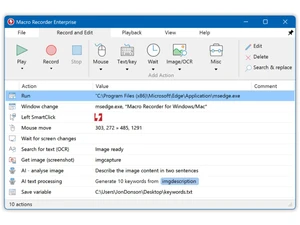
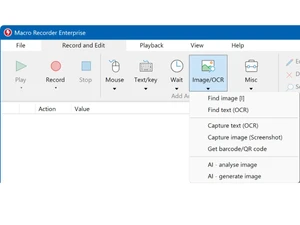
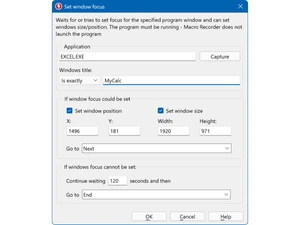
 Mouse Path Smoothing This function converts erratic manual mouse movements into smooth, curved, or linear paths to improve automation visual quality. OCR Capture The system extracts text from any defined screen region or bitmap file, storing the data into variables for further automation. SmartClick Automation This feature identifies click targets based on visual bitmap clues rather than fixed coordinates to handle shifted UI elements. Pixel Color Detection The software monitors specific pixel colors to pause playback until a webpage loads or a process completes its visual state. Window Focus Control This action detects a specific program window by its title and switches the system input focus to that application instantly. Variable Calculation The software performs mathematical operations on multiple variables to determine offsets or distances between screen objects. Macro Script Grouping Multiple macro actions can be organized into colored, collapsible groups to improve navigation within complex automation scripts. Text Output Simulation The tool can simulate human-like typing or use the clipboard to output text into any application or web-based input field. Barcode Scanning The software scans and decodes barcode or QR code information from the screen, saving the result into a script variable. Variable Explorer Tool This debugging interface provides a real-time overview of all variable contents and values during the macro execution phase. Custom Label Jumping The Goto command allows the script to jump to specific user-defined labels, enabling non-linear execution of macro actions. Web Scraping Support This feature extracts specific text content from webpages using RegEx or XPath patterns for data collection and processing.

 UAE
UAE India
India