linkedin
background
Raycast logo

Raycast

Brand: Raycast Technologies

4.1

3 Ratings

Have Questions?

Raycast is a productivity software that helps in fast app navigation, task automation, and smooth workflow integration. ...Read more

img

Get Free Expert Consultation

Let us know your business needs clearly

Advice

Verified & Trusted
Vendors

Payment

Safe & Secure
Payment

Guaranteed

Personalized
Experts Support

Starting at

$ 10.00 /Month

Features

  • check_icon Clipboard History
  • check_icon Snippet Expansion
  • check_icon Window Management
  • check_icon Extension Store
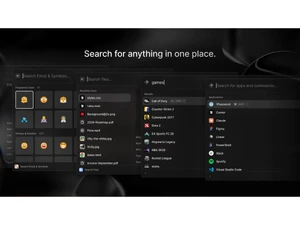
  • check_icon File Search
  • See all img

Raycast Software Pricing, Features & Reviews

What is Raycast?

Raycast is a productivity software that simplifies and helps in task automation and workflow integration. It provides a keyboard-based interface where the user can search applications, files, and give commands.

The interface is simple and powerful, supporting the speed of tasks and better workflow execution. It provides numerous productivity tools in one platform for both macOs and Windows.

Raycast provides a single platform with different productivity tools like advanced window management, clipboard history, and reusable text snippets for efficiency. Users benefit from deep integrations with GitHub, Jira, Notion, Slack, and other platforms.

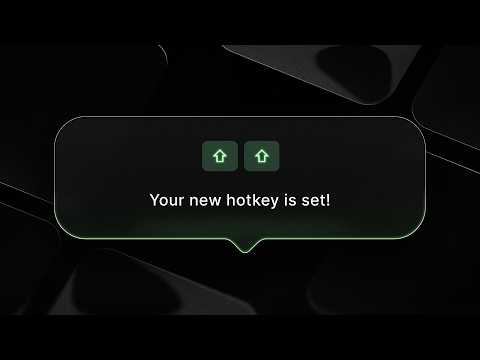
Users can search for information, assign hotkeys, plan daily activities, translate content, and make custom scripts that allow tailored automation, while the community store offers thousands of extensions to expand functionality.

The software supports navigation, project tracking, and collaboration, making it a suitable hub for productivity.

Why Choose Raycast?

  • Automation: Manage repetitive workflows by creating custom commands that trigger actions instantly, saving time and reducing manual effort.
  • Snippets: Store reusable text blocks for quick insertion, ensuring consistency in communication and speeding up writing tasks across different applications.
  • Translation: Instantly convert text between languages using integrated tools, enabling smooth communication and eliminating the need for external translation services.
  • Run scripts: Execute JavaScript, TypeScript, or shell scripts directly, automating complex tasks and integrating personalized functionality into everyday workflows.
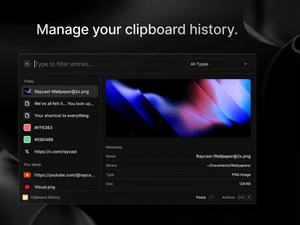
  • Clipboard history: Access previously copied items quickly, retrieve lost text or links, and manage multiple clipboard entries for efficient multitasking.

Benefits of Raycast

  • Single productivity platform: Consolidates diverse tools into one hub, minimizing context switching and boosting overall efficiency.
  • Diversified application: Supports integrations across project management, communication, and design, ensuring adaptability for varied professional environments.
  • Easy interface: Provides a clean, keyboard-first design that enhances speed, reduces friction, and improves daily workflow usability.
  • Community-driven extensions: Thousands of user-built add-ons expand functionality, offering tailored solutions for unique professional and personal needs.
  • Custom automation: Personalized commands and scripts empower users to automate repetitive tasks, saving time and reducing manual effort.

Pricing of Raycast

Raycast Price starts at USD 10 per month at Techjockey. Raycast comes with multiple pricing plans and caters to a diverse customer base. For subscription-related details and offers on premium packages, please request a call back from our product experts.

Raycast Pricing & Plans

Raycast Pro
  • Raycast AI
  • Cloud Sync
  • Translator
  • Unlimited Raycast Notes
  • Unlimited Clipboard History
  • Custom Window Management
  • Custom Themes
    • Licenses
    • Monthly
Starting at $ 10.00
Pro + Advanced AI
  • Everything in Pro
  • Advanced AI Models
    • Licenses
    • Monthly
Starting at $ 20.00
Teams Pro
  • AI and everything in Pro for your whole team
    • Users
    • Monthly
Starting at $ 15.00
Teams + Advanced AI
  • Everything in Pro for your whole team
    • Users
    • Monthly
Starting at $ 25.00

Get Raycast Demo

We make it happen! Get your hands on the best solution based on your needs.
Interacted

Raycast Features

  • icon_check Clipboard History Stores recently copied text, images, and links locally, allowing users to search and repaste previous content instantly.
  • icon_check Snippet Expansion Replaces user-defined text triggers with longer templates, supporting dynamic placeholders like dates and cursor positions.
  • icon_check Window Management Resizes and snaps application windows to specific screen sectors using keyboard commands instead of manual dragging.
  • icon_check Extension Store Provides a directory of community-built plugins to control third-party services like GitHub, Slack, and Spotify.
  • icon_check File Search Locates documents and folders across the local disk using metadata, allowing for immediate opening or file actions.
  • icon_check Calendar Agenda Displays upcoming meetings and events from synced accounts with options to join video calls with one keystroke.
  • icon_check Currency Convertor Provides real-time exchange rates for global currencies, calculating totals instantly within the primary interface.
  • icon_check Process Monitor Lists active system processes and allows users to terminate unresponsive applications without opening Activity Monitor.
  • icon_check Cloud Synchronization Synchronizes settings, snippets, and extension configurations across multiple devices using an encrypted cloud backup.
  • icon_check Root Search Indexes installed applications for rapid launching, prioritizing frequently used tools based on user behavior.
  • icon_check Team Shared Links Enables organizations to share a common library of quicklinks and snippets among all members of a specific team.

Raycast Specifications

  • Supported Platforms :
  • Device:
  • Deployment :
  • Suitable For :
  • Business Specific:
  • Business Size:
  • Customer Support:
  • Training:
  • Language:
  • AI Features:
  • Windows iOS MacOS
  • DesktopMobileiPad
  • Perpetual
  • All Industries
  • All Businesses
  • Individual, Small Business, Startups, Medium Business, Freelancers
  • Email, Communities
  • Videos
  • English
  • AI Integrated

Raycast Reviews and Ratings

banner

Would you like to review this product?

Submit Reviews

Compare Raycast With other Productivity Software

Raycastlogo

Raycast

by : Raycast Technologies

4.1

VS
SWIPER_PRODUCTS_CARD_NEW

Raycast FAQ

A Raycast pricing starts from USD 10 per month at Techjockey.
A Raycast is used by developers, designers, and professionals for faster navigation, automation, and streamlined workflows across applications.
A Raycast works as a keyboard-based launcher, enabling instant access to apps, files, commands, and integrations through a minimal interface.
A Raycast runs smoothly on macOS and is currently in beta for Windows.
A Yes, Raycast offers a free demo with core features and limited AI usage.
A Yes, Raycast integrates with GitHub, Jira, Notion, Slack, Zoom, Spotify, and thousands of community-built extensions.
A Yes, Raycast allows custom scripts in JavaScript, TypeScript, or shell, for personalized automation and workflows.
A Yes, Raycast Pro includes AI-powered commands, offering translation, summarization, and automation through multiple providers.
A Yes, Raycast supports team tiers with shared extensions, project tracking, and integrations to make better collaboration.

Raycast Alternatives

See All