linkedin
background
SaveTheVideo logo

SaveTheVideo

Brand: SaveTheVideo

4.3

3 Ratings

Have Questions?

A download manager that lets users easily download and convert videos from different websites by pasting a video link. ...Read more

img

Get Free Expert Consultation

Let us know your business needs clearly

Advice

Verified & Trusted
Vendors

Payment

Safe & Secure
Payment

Guaranteed

Personalized
Experts Support

FREE

Features

  • check_icon Download Management
  • check_icon Video Converter
  • check_icon Merge
  • check_icon Cut
  • check_icon Alternative Download
  • See all img

SaveTheVideo Software Pricing, Features & Reviews

What is SaveTheVideo?

SaveTheVideo is a download manager that lets you download and convert videos from many websites by simply pasting a link.

It works with platforms like social media, video sites, and online feeds, so you can easily save videos to your device. You don't need to install software; everything happens in your browser.

SaveTheVideo can also extract audio from videos if you only want the soundtrack. It supports different file formats and quality options so you can choose what works best for you.

The tool helps when you want offline access to videos for personal use, study, or review without the internet. It' free to use with no signup required.

SaveTheVideo is simple and user-friendly, even for beginners. It also offers extra features like trimming a video or changing its format before saving. This makes it a versatile downloader and converter in one place.

Why Choose SaveTheVideo Software?

  • Easy to use: Simple interface for all users.
  • No installation needed: Works in your browser.
  • Free to use: No cost for downloading videos.
  • Supports many sites: Works with a wide range of video platforms.
  • Paste-and-go download: Just paste a link to start.
  • Multiple formats: Save videos in different file types.
  • Extract audio: Download just the sound track if needed.
  • Choose quality: Pick video quality before saving.
  • No signup required: Use without creating an account.
  • Works on mobile: Download videos on phones and tablets.
  • Fast processing: Quickly converts and saves files.
  • Browser-based: No plugins or extensions needed.
  • Safe downloads: Secure connection for saving files.
  • Offline access: Save videos to watch without the internet.
  • Trim before download: Cut videos before saving.

Benefits of SaveTheVideo Software

  • Convert after download: Change format after saving.
  • Simple navigation: Easy buttons and steps.
  • No watermark: Videos saved without logos.
  • High-resolution support: Saves HD videos.
  • Audio format options: Download MP3 or other audio types.
  • Free conversion tool: Works as converter too.
  • No ads interrupting: Minimal ads for smoother use.
  • Works on all devices: Compatible with computers and phones.
  • Download playlists: Save multiple videos at once.
  • No extra software: Save space on your device.
  • Quick downloads: Saves time with fast processing.
  • User-friendly design: Easy for beginners.
  • Supports subtitles: Can include subtitles if available.
  • Multiple file sizes: Choose a smaller file for storage savings.

SaveTheVideo Pricing

SaveTheVideo is available for FREE at techjockey.com. The pricing model is based on different parameters, including extra features, deployment type, and the total number of users. For further queries related to the product, you can contact our product team and learn more about the pricing and offers.

SaveTheVideo Pricing & Plans

SaveTheVideo price is available on request

Looking for pricing details, customization requirements or have other queries? We are just a click away.

SaveTheVideo Features

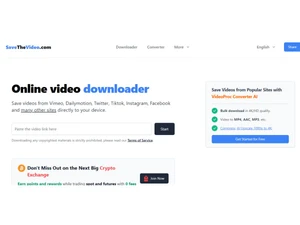
  • icon_check Download Management Download videos from supported sites such as Vimeo, Dailymotion, TikTok, Instagram, Facebook, Twitter etc.
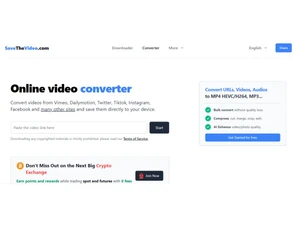
  • icon_check Video Converter Convert video files online into formats like MP4, MP3, AAC, WEBM, 3GP, OGG, M4A and others.
  • icon_check Merge Merge video and audio tracks into high-quality outputs (up to Full HD / 1080p) for unified playback.
  • icon_check Cut Cut segments of video or audio by selecting start and end times, extracting a portion you need.
  • icon_check Alternative Download Use alternate download methods when standard download links fail or are unavailable.
  • icon_check Download Subtitles Obtain video subtitles or closed captions when available, along with or separate from video.
  • icon_check Cross-Platform Compatibility Works on Windows, macOS, iOS, Android, Linux via modern browsers.
  • icon_check Supports Many Sites Works with many supported video hosting and social platforms beyond just a few names.
  • icon_check High Quality (HD/4K) Capable of downloading in 4K or Full HD quality where source allows.
  • icon_check Multiple Output Formats Supports a wide variety of media outputs (audio & video) to fit different needs.

SaveTheVideo Specifications

  • Supported Platforms :
  • Device:
  • Deployment :
  • Suitable For :
  • Business Specific:
  • Business Size:
  • Customer Support:
  • Language:
  • Ubuntu Windows MacOS Linux
  • Desktop
  • Web-Based
  • All Industries
  • All Businesses
  • Individual
  • Email, Communities
  • English

SaveTheVideo Reviews and Ratings

banner

Would you like to review this product?

Submit Reviews

Compare SaveTheVideo With other Download Manager

SaveTheVideologo

SaveTheVideo

by : SaveTheVideo

4.3

VS
SWIPER_PRODUCTS_CARD_NEW

SaveTheVideo FAQ

A SaveTheVideo is available for FREE at techjockey.com.
A No dedicated mobile app is available for SaveTheVideo software.
A SaveTheVideo is web-based and works on Ubuntu, Linux, Windows, and macOS via modern browsers.
A SaveTheVideo is completely free to use and does not require a trial.
A SaveTheVideo lets you download or convert online videos by pasting the video link into its web tool.
A Anyone who wants to save or convert online videos for offline viewing uses SaveTheVideo.
A No formal demo is needed since the tool itself is free and accessible online.
A Yes, SaveTheVideo is free to use without payment.

SaveTheVideo Alternatives

See All