linkedin
SaveTheVideo logo
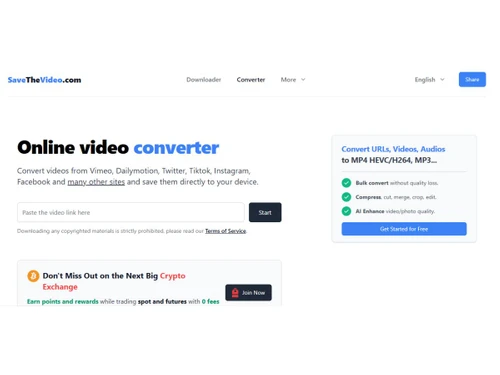
savethevideo-converter
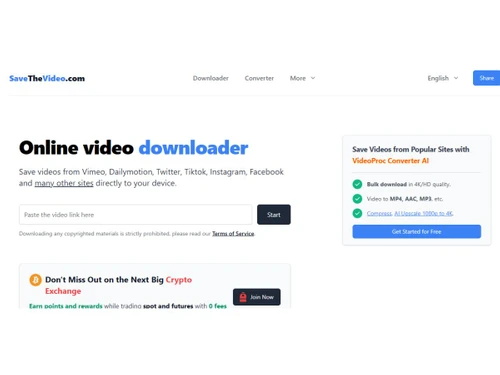
savethevideo-downloader
savethevideo-sharing

SaveTheVideo

Brand: SaveTheVideo

  • 4.3

  • 3 Ratings

SaveTheVideo for downloading, converting, and editing videos from sites like TikTok, Instagram, Facebook, and YouTube.

See More

Have you used SaveTheVideo before?

Share your insights for better experience

Add a Review

Free Forever

Get started immediately at no cost. Upgrade anytime if your business demand more.

100% Genuine
Products
Best Price
Guaranteed
Safe & Secure
Payment
  • Description

  • Pricing

  • Features

  • Specification

  • Review

  • FAQ

SaveTheVideo Software Overview

What is SaveTheVideo?

SaveTheVideo is a Download Manager that allows users to download and convert videos from platforms like TikTok, Instagram, Facebook, Vimeo, and Twitter by simply pasting the video link.

It works directly in the browser without needing any software installation and supports formats like MP4 and MP3.

The platform also offers basic editing options such as trimming and merging videos. Users should ensure they respect copyright rules when downloading content.

Why Choose SaveTheVideo Software?

  • Wide Platform Support: Download videos from popular platforms like YouTube, Instagram, TikTok, Facebook, and more.
  • Browser-Based: Works directly in your browser with no software installation needed.
  • Multiple Formats: Supports formats like MP4, MP3, AVI for wide device compatibility.
  • High Quality: Allows HD downloads while keeping original video clarity.
  • Fast Processing: Quickly downloads and converts videos without delays.
  • Free to Use: Core features are available at no cost.
  • Easy to Use: Simple interface suitable for beginners.
  • No Registration: No sign-up required, just paste the link and download.
  • Cross-Platform: Works on Windows, Mac, Linux, and mobile devices.
  • Safe & Secure: No personal data collection or unwanted software.
  • Basic Editing: Offers simple tools like trim, cut, and merge videos.

Benefits of SaveTheVideo Software

  • Audio Extraction: Easily extract audio from videos and save it as MP3, making it perfect for music clips, podcasts, or soundtracks.
  • Multiple Downloads at Once: You can download several videos simultaneously, which saves time and increases efficiency for users with multiple files.
  • Preview Before Download: The platform allows you to preview videos before downloading to ensure you're saving exactly what you need.
  • No Watermarks: All downloaded videos are free from watermarks or branding, giving you clean and professional-looking files.
  • Regular Updates: SaveTheVideo is continuously updated to support new platforms, video formats, and features, keeping it reliable and current.
  • Supports Subtitles: Where available, videos can be downloaded with embedded subtitles, ensuring accessibility and convenience.
  • Lightweight and Efficient: The tool doesn't use excessive system resources, so it runs smoothly without slowing down your computer or device.
  • Flexible Video Resolution: You can select the resolution that fits your storage capacity and quality preferences, from standard definition to high definition.
  • Reliable Customer Support: The platform offers online help and support to guide users in case of issues, ensuring a smooth and trouble-free experience.

SaveTheVideo Pricing

SaveTheVideo price is available for FREE at Techjockey.com. The pricing model is based on different parameters, including extra features, deployment type, and the total number of users. For further queries related to the product, you can contact our product team and learn more about the pricing and offers.

Read more

SaveTheVideo Pricing & Plans

This Product is Available Free Forever.

Start instantly with no fees, no subscriptions, and no commitments.

  • Full access to basic version available
  • No credit card or sign-up required

Free Forever Plan

Get started immediately at no cost. Upgrade anytime if your business demand more.

Free Forever

SaveTheVideo Features

  • icon_check Download Management
    Download videos from supported sites such as Vimeo, Dailymotion, TikTok, Instagram, Facebook, Twitter etc.
  • icon_check Video Converter
    Convert video files online into formats like MP4, MP3, AAC, WEBM, 3GP, OGG, M4A and others.
  • icon_check Merge
    Merge video and audio tracks into high-quality outputs (up to Full HD / 1080p) for unified playback.
  • icon_check Cut
    Cut segments of video or audio by selecting start and end times, extracting a portion you need.
  • icon_check Alternative Download
    Use alternate download methods when standard download links fail or are unavailable.
  • icon_check Download Subtitles
    Obtain video subtitles or closed captions when available, along with or separate from video.
  • icon_check Cross-Platform Compatibility
    Works on Windows, macOS, iOS, Android, Linux via modern browsers.
  • icon_check Supports Many Sites
    Works with many supported video hosting and social platforms beyond just a few names.
  • icon_check High Quality (HD/4K)
    Capable of downloading in 4K or Full HD quality where source allows.
  • icon_check Multiple Output Formats
    Supports a wide variety of media outputs (audio & video) to fit different needs.

SaveTheVideo Specifications

Supported Platforms
Ubuntu Ubuntu Windows Windows MacOS MacOS Linux Linux
Devices
Desktop Desktop
Deployment
Cloud-Based Cloud-Based
Suitable For
All Industries
Business Specific
All Businesses
Customer Support
Email Communities
Language
English

SaveTheVideo Review

4.3

Out of 5

img

Overall Rating

Based on
3 Verified Ratings

Rating Breakdown

  • Features 4.8
  • Value for Money 4
  • Ease of Use 4.3
  • Customer Support 4.5

80% Recommend this Product

Add Review

Techjockey Trusted Reviews from Verified Users

No reviews are currently available for SaveTheVideo. Discover similar Download Manager reviews

  • Internet Download Manager

    4.6

    Whats great - The biggest advantage of IDM is its ability to speed up downloads. My downloads often finish much faster when using IDM than ... read more
  • JDownloader

    4.6

    Whats great - Completely free, full of features. read more

  • Ant Download Manager

    4.6

    Whats great - Stable, fast, and works on most websites. read more

How much does SaveTheVideo cost?

SaveTheVideo is available for FREE at Techjockey.com.

Is there a mobile app available for SaveTheVideo Software?

No, SaveTheVideo does not have a dedicated mobile app.

Which operating systems are compatible with SaveTheVideo Software?

SaveTheVideo is compatible with all major operating systems, including Windows, MacOS, Linux, and Ubuntu.

Does SaveTheVideo Software offer a free trial?

SaveTheVideo software is free to use without a trial.

How does SaveTheVideo Software function?

Users paste a video link into the platform, select the format, and download or convert the video instantly.

Who uses SaveTheVideo Software?

SaveTheVideo is used by individuals, content creators, and social media users who want to download or convert online videos.

Is a free demo available for SaveTheVideo Software?

No demo is required since the platform is free and fully functional online.

Is SaveTheVideo Software available for free?

Yes, SaveTheVideo is free for basic video download and conversion tasks.

20,000+ Software Listed

Best Price Guranteed

Free Expert Consultation

2M+ Happy Customers

Terms and Condtions

close

Users with registered businesses can purchase goods from merchants on the platform to satisfy their business needs. Users are not permitted to utilize any products acquired through the platform for resale, advertising, business, or further distribution.

For each purchase made, users will receive a Tax Invoice (or 'GST invoice') that includes specific details such as:

  • the GSTIN of the user associated with their registered business, and

  • the specified Entity Name for their business.

It should be noted that not all products are eligible for GST Invoice. Only the products displayed by participating sellers with the 'GST-based Invoice Available' callout on the product description page would qualify.

Certain goods and services are not eligible to get a GST Invoice, including items with VAS, i.e., Value Added Services (e.g., Total Mobile Protection/Assured Buyback) and those involving an exchange offer at the time of purchase.

Users must ensure the accuracy of the GSTIN, and business entity name provided for the GST Invoice. Requests for corrections into GST Invoice would not be accommodated by Techjockey.com or any Seller, and any issues arising from user-provided information are the sole responsibility of users.

Techjockey.com is not liable for the GST Invoice or any associated input tax credit. To efficiently claim an input tax credit, users should select the registered place of business address as per the GST authority's data and follow the provisions of the GST Act and rules.

To claim an input tax credit, the delivery and billing addresses must match. Furthermore, input tax credits will not be granted if the delivery address and GSTIN on the invoice are from different states. In case of incorrect GST details provided during the order placement, the order will be canceled automatically.