 USA
USA UAE
UAESmall Business
Designed for startups and growing businesses

See More


Brand: AntGROUP
Have you used Ant Download Manager before?
Share your insights for better experience
Brand: AntGROUP
Founded Year: 2014
Ant Group strives to enable all consumers and small businesses to have equal access to financial and other services through technology.
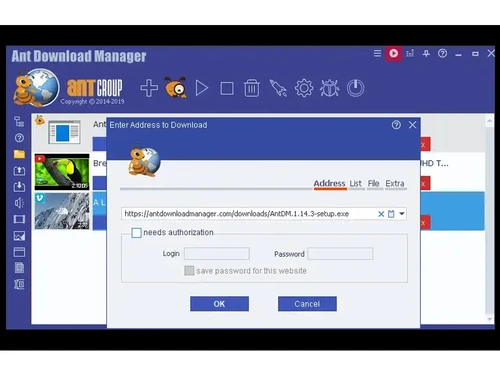
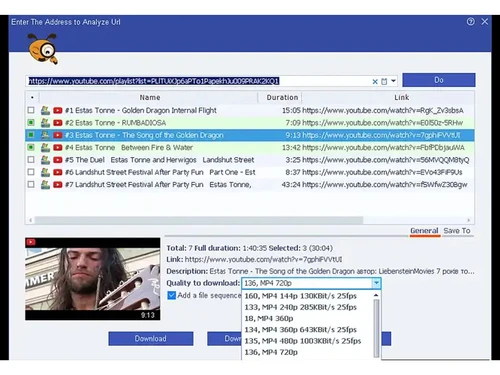
 User-Friendly Interface Fast & Effective Browser Integration Automatic File Renaming Convert & Extract Drag & Drop Support of 4K monitors Download Management Easy Access Multi Thread Support Audio Extraction Clipboard Monitoring Protocol Support Categorization Proxy Server Support
  Windows
  Desktop
  Perpetual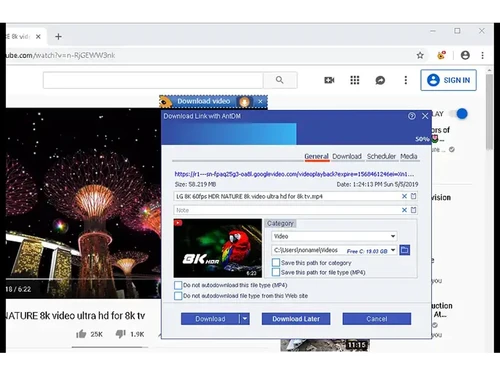
Small Business
Designed for startups and growing businesses
Medium Business
Built for business growth and flexibility
Enterprises
Designed for complex and large-scale business needs
4.5
Out of 5

Overall Rating
Based on
10 Verified Reviews
Rating Breakdown
92% Recommend this Product
Add ReviewCustomers generally appreciate Ant Download Manager for its speed, reliability, and ease of use, particularly for downloading videos from platforms like YouTube and Facebook. Many users find it to be a cost-effective alternative to more expensive tools, offering a range of features that cater to their needs. However, some common complaints include the need for more frequent updates, a less polished interface compared to premium options, and limitations in the free version, as well as the absence of torrent support.

Mar 16, 2025
Techjockey Verified
“A Reliable Download Manager”
I’ve been using Ant Download Manager for a while, and it’s a solid choice. It’s fast and reliable, but I wish they updated it more often to keep up with new technologies.
Pros
Stable, fast, and works on most websites.
Cons
Limited updates compared to other tools.
Reason to switch
IDA was slower and had more issues with large files.
Mar 7, 2025
Techjockey Verified
“Affordable and Feature-Packed”
I was looking for a budget-friendly download manager, and this one delivers. It has almost everything I need, though it doesn’t feel as polished as some high-end tools.
Pros
Has the most premium features but at a lower cost.
Cons
Not as polished as some expensive alternatives.
Reason to switch
EagleGet had too many ads and pop-ups.
Mar 1, 2025
Techjockey Verified
“Works Well with YouTube and Social Media”
I use it to save videos from YouTube and Facebook, and it works great. However, if you want to download high-quality videos, you need the paid version.
Pros
Downloads videos from YouTube, Facebook, and more.
Cons
Some high-quality video downloads require the paid version.
Reason to switch
4K Video Downloader had too many restrictions on the free version.

Ant Download Manager
₹ 1208.52 excl. GST
Desktop
Mobile
Web based
On Premises
Windows
Mac OS

SaveFrom Net
Price On Request
Desktop
Mobile
Web based
On Premises
Windows
Mac OS

Internet Download Manager
₹ 1940
Desktop
Mobile
Web based
On Premises
Windows
Mac OS

YTD Video Downloader
Price On Request
Desktop
Mobile
Web based
On Premises
Windows
Mac OS

VideoHunter
Price On Request
Desktop
Mobile
Web based
On Premises
Windows
Mac OS

CatchVideo
Price On Request
Desktop
Mobile
Web based
On Premises
Windows
Mac OS

Ninja Download Manager
Price On Request
Desktop
Mobile
Web based
On Premises
Windows
Mac OS

SaveTheVideo
Price On Request
Desktop
Mobile
Web based
On Premises
Windows
Mac OS

9xbuddy
Price On Request
Desktop
Mobile
Web based
On Premises
Windows
Mac OS

Free Download Manager
Price On Request
Desktop
Mobile
Web based
On Premises
Windows
Mac OS

Motrix
Price On Request
Desktop
Mobile
Web based
On Premises
Windows
Mac OS
(0) Product(s) selected
Available
Price on Request
Available
Price on Request
Available
Price on Request
Available
Price on Request
Available
Price on Request
Available
Price on Request

Available
Price on Request

Available
Price on Request

Starting Price:
$5 /Month
Starting Price:
$16 /Month

Starting Price:
$20 /Quantity
It captures download links from browsers and uses multi-threaded technology to download files faster and more reliably.
Ant Download Manager is used by students, professionals, and everyday users who want faster, more reliable downloads and better file management.
The price of Ant Download Manager starts from INR 1,610 at Techjockey.
Yes, it can detect and download videos from many supported websites.
Yes, the software allows users to pause and resume downloads without losing progress.
Yes, it offers a free version with basic features and a paid version with advanced capabilities.
It integrates with popular browsers such as Chrome, Firefox, and others.
Yes, users can download multiple files at the same time.
Yes, it has a simple interface suitable for both beginners and experienced users.
20,000+ Software Listed
Best Price Guranteed
Free Expert Consultation
2M+ Happy Customers
Terms and Condtions

Users with registered businesses can purchase goods from merchants on the platform to satisfy their business needs. Users are not permitted to utilize any products acquired through the platform for resale, advertising, business, or further distribution.
For each purchase made, users will receive a Tax Invoice (or 'GST invoice') that includes specific details such as:
the GSTIN of the user associated with their registered business, and
the specified Entity Name for their business.
It should be noted that not all products are eligible for GST Invoice. Only the products displayed by participating sellers with the 'GST-based Invoice Available' callout on the product description page would qualify.
Certain goods and services are not eligible to get a GST Invoice, including items with VAS, i.e., Value Added Services (e.g., Total Mobile Protection/Assured Buyback) and those involving an exchange offer at the time of purchase.
Users must ensure the accuracy of the GSTIN, and business entity name provided for the GST Invoice. Requests for corrections into GST Invoice would not be accommodated by Techjockey.com or any Seller, and any issues arising from user-provided information are the sole responsibility of users.
Techjockey.com is not liable for the GST Invoice or any associated input tax credit. To efficiently claim an input tax credit, users should select the registered place of business address as per the GST authority's data and follow the provisions of the GST Act and rules.
To claim an input tax credit, the delivery and billing addresses must match. Furthermore, input tax credits will not be granted if the delivery address and GSTIN on the invoice are from different states. In case of incorrect GST details provided during the order placement, the order will be canceled automatically.



