 USA
USA UAE
UAESmall Business
Designed for startups and growing businesses

See More


Brand: KnockoutSoft
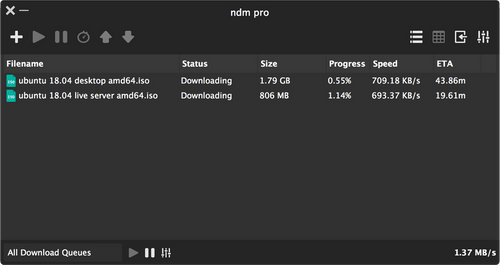
Ninja Download Manager is a powerful and user-friendly download manager software that makes downloading files fast, secure, and efficient. Designed to enhance the downloading experience, this tool offers advanced features like speed control, scheduling, and clipboard monitoring.
See MoreHave you used Ninja Download Manager before?
Share your insights for better experience
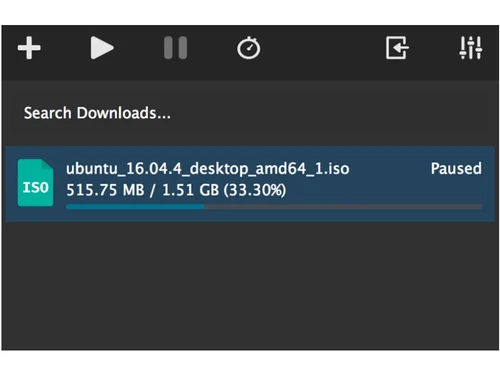
 Multi-Connection UI Pause & Resume Download Scheduler Sequential Writing Clipboard Monitoring Password Manager Fast Download Pause & Resume Downloads Add Now, Download Later Drag & Drop Add Multiple Download Schedule Download Speed Control Password Management Clipboard Monitor
  Windows
  MacOS
MacOS  Desktop
  Perpetual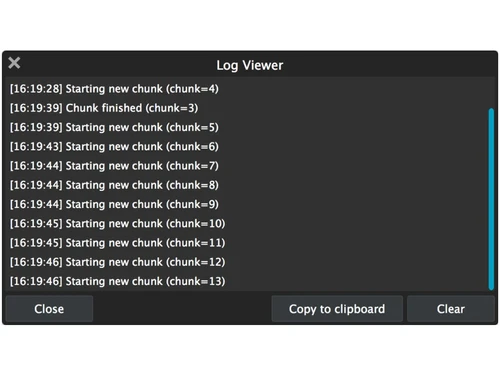
Small Business
Designed for startups and growing businesses
Medium Business
Built for business growth and flexibility
Enterprises
Designed for complex and large-scale business needs
4.5
Out of 5

Overall Rating
Based on
5 Verified Ratings
Rating Breakdown
96% Recommend this Product
Add ReviewTechjockey Trusted Reviews from Verified Users
No reviews are currently available for Ninja Download Manager. Discover similar Download Manager reviews

Internet Download Manager
Whats great - The biggest advantage of IDM is its ability to speed up downloads. My downloads often finish much faster when using IDM than ... read more

JDownloader
Whats great - Completely free, full of features. read more

Ant Download Manager
Whats great - Stable, fast, and works on most websites. read more

Ninja Download Manager
Price On Request
Desktop
Mobile
Web based
On Premises
Windows
Mac OS
Internet Download Manager
₹ 1940
Desktop
Mobile
Web based
On Premises
Windows
Mac OS

SaveFrom Net
Price On Request
Desktop
Mobile
Web based
On Premises
Windows
Mac OS

YTD Video Downloader
Price On Request
Desktop
Mobile
Web based
On Premises
Windows
Mac OS

VideoHunter
Price On Request
Desktop
Mobile
Web based
On Premises
Windows
Mac OS

CatchVideo
Price On Request
Desktop
Mobile
Web based
On Premises
Windows
Mac OS
Ant Download Manager
₹ 1209
Desktop
Mobile
Web based
On Premises
Windows
Mac OS

SaveTheVideo
Price On Request
Desktop
Mobile
Web based
On Premises
Windows
Mac OS

9xbuddy
Price On Request
Desktop
Mobile
Web based
On Premises
Windows
Mac OS

Free Download Manager
Price On Request
Desktop
Mobile
Web based
On Premises
Windows
Mac OS

Motrix
Price On Request
Desktop
Mobile
Web based
On Premises
Windows
Mac OS
(2) Product(s) selected
Available
Price on Request
Available
Price on Request
Available
Price on Request
Available
Price on Request
Available
Price on Request
Available
Price on Request

Available
Price on Request

Available
Price on Request

Available
Price on Request
Starting Price:
$16 /Month

Starting Price:
$5 /Month
Yes, Ninja Download Manager accelerates downloads by splitting files into smaller parts and downloading them simultaneously. This method drastically reduces the time needed for downloading large files.
The software integrates seamlessly with major browsers like Chrome, Firefox, and Edge, ensuring users can initiate downloads directly from their preferred browser.
Yes, you can schedule downloads to start at specific times. This is especially useful for managing large files during off-peak hours.
If your internet connection is interrupted or you need to stop a download temporarily, the pause and resume feature allows you to pick up where you left off without restarting the entire download.
Yes, it efficiently handles multiple downloads simultaneously without affecting system performance or download speeds.
Absolutely. Its advanced features, such as scheduling, password management, and secure file handling, make it ideal for businesses with heavy download requirements.
Clipboard monitoring detects copied URLs automatically and adds them to the download queue, saving you the hassle of manual input.
Yes, Ninja Download Manager offers speed control settings, allowing you to adjust download speeds to ensure other internet activities are not impacted.
Yes, you can easily drag and drop files into the software to add them to the download queue.
Yes, the software includes password management and ensures secure downloads, making it reliable for sensitive or private files.
20,000+ Software Listed
Best Price Guranteed
Free Expert Consultation
2M+ Happy Customers
Terms and Condtions

Users with registered businesses can purchase goods from merchants on the platform to satisfy their business needs. Users are not permitted to utilize any products acquired through the platform for resale, advertising, business, or further distribution.
For each purchase made, users will receive a Tax Invoice (or 'GST invoice') that includes specific details such as:
the GSTIN of the user associated with their registered business, and
the specified Entity Name for their business.
It should be noted that not all products are eligible for GST Invoice. Only the products displayed by participating sellers with the 'GST-based Invoice Available' callout on the product description page would qualify.
Certain goods and services are not eligible to get a GST Invoice, including items with VAS, i.e., Value Added Services (e.g., Total Mobile Protection/Assured Buyback) and those involving an exchange offer at the time of purchase.
Users must ensure the accuracy of the GSTIN, and business entity name provided for the GST Invoice. Requests for corrections into GST Invoice would not be accommodated by Techjockey.com or any Seller, and any issues arising from user-provided information are the sole responsibility of users.
Techjockey.com is not liable for the GST Invoice or any associated input tax credit. To efficiently claim an input tax credit, users should select the registered place of business address as per the GST authority's data and follow the provisions of the GST Act and rules.
To claim an input tax credit, the delivery and billing addresses must match. Furthermore, input tax credits will not be granted if the delivery address and GSTIN on the invoice are from different states. In case of incorrect GST details provided during the order placement, the order will be canceled automatically.



