 USA
USA UAE
UAESmall Business
Designed for startups and growing businesses


See More





Brand: NDM Neat Download Manager
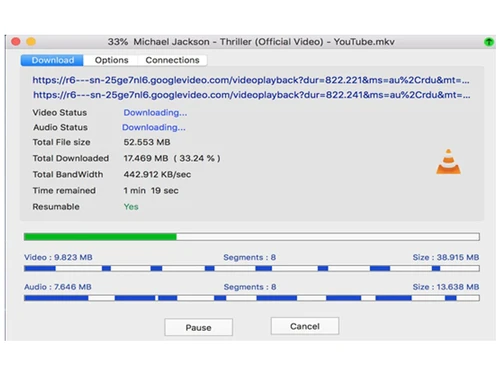
Neat Download Manager is a lightweight and powerful download manager for Mac & Windows. Additionally, it comes with a media player and a scheduler. You can download files from various websites, including YouTube and Facebook.
See MoreHave you used Neat Download Manager before?
Share your insights for better experience
This Product is Available Free Forever.
Start instantly with no fees, no subscriptions, and no commitments.
Free Forever Plan
Get started immediately at no cost. Upgrade anytime if your business demand more.
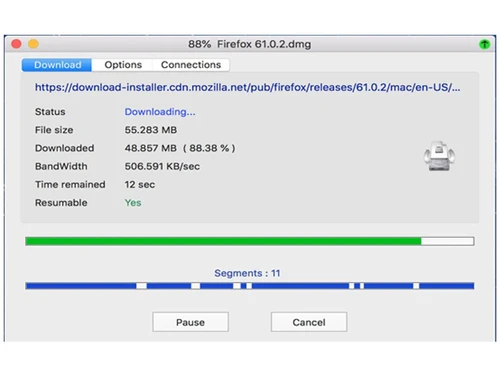
Free Forever Dynamic Segmentation Algorithm Speed Up your Downloads Supports HTTP, HTTPS and FTP Protocols. Download Status Supports HTTP Proxy and SOCKS Protocol Supports HTTP Authentication and Proxy Authenticat Pause/Resume Capabilities Browser Extension

Watch the demo video to explore key features, real workflows, and how the software fits your business needs.
 Windows
  MacOS
MacOS  Desktop
  Cloud-Based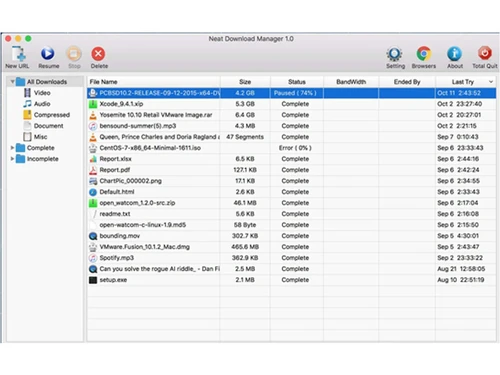
Small Business
Designed for startups and growing businesses
Medium Business
Built for business growth and flexibility
Enterprises
Designed for complex and large-scale business needs
4.4
Out of 5

Overall Rating
Based on
10 Verified Reviews
Rating Breakdown
90% Recommend this Product
Add ReviewUsers generally praise Neat Download Manager for its simplicity, effectiveness, and reliability, particularly for large files and slow internet connections. The ability to pause and resume downloads is highlighted as a valuable feature. However, many reviewers express a desire for more customization options and advanced features, such as scheduling downloads and support for certain streaming sites. Additionally, the lack of a Mac version and some limitations in detecting downloads are noted as drawbacks. Overall, the sentiment is positive, especially among those seeking a straightforward, ad-free solution.

Mar 16, 2025
Techjockey Verified
“A Hidden Gem Among Download Managers”
I hadn’t heard of Neat Download Manager before, but I’m glad I found it! It’s so simple and effective. The only downside is that it’s mainly for Windows users.
Pros
Super easy to use and works well.
Cons
Doesn’t have an official Mac version.
Reason to switch
Motrix didn’t work well with my browser.
Mar 15, 2025
Techjockey Verified
“Works Well but Needs More Customization”
I like how easy it is to use, but I wish it had more settings for speed control and file management. It’s a great basic downloader, though.
Pros
Simple, fast, and does the job.
Cons
Lacks customization options for advanced users.
Reason to switch
DA had too many pop-ups and was annoying to use.
Mar 1, 2025
Techjockey Verified
“No More Broken Downloads!”
My internet is slow, and before using this, my downloads would fail halfway. Now, I don’t have to worry about restarting from zero. It just keeps going!
Pros
Downloads don’t fail even with slow internet.
Cons
Doesn’t support all streaming sites.
Reason to switch
FlashGet was outdated and didn’t work well on modern sites.

Neat Download Manager
FREE
Desktop
Mobile
Web based
On Premises
Windows
Mac OS

Internet Download Manager
₹ 1940
Desktop
Mobile
Web based
On Premises
Windows
Mac OS

SaveFrom Net
Price On Request
Desktop
Mobile
Web based
On Premises
Windows
Mac OS

YTD Video Downloader
Price On Request
Desktop
Mobile
Web based
On Premises
Windows
Mac OS

VideoHunter
Price On Request
Desktop
Mobile
Web based
On Premises
Windows
Mac OS

CatchVideo
Price On Request
Desktop
Mobile
Web based
On Premises
Windows
Mac OS

Ninja Download Manager
Price On Request
Desktop
Mobile
Web based
On Premises
Windows
Mac OS

Ant Download Manager
₹ 1209
Desktop
Mobile
Web based
On Premises
Windows
Mac OS

SaveTheVideo
Price On Request
Desktop
Mobile
Web based
On Premises
Windows
Mac OS

9xbuddy
Price On Request
Desktop
Mobile
Web based
On Premises
Windows
Mac OS

Free Download Manager
Price On Request
Desktop
Mobile
Web based
On Premises
Windows
Mac OS
(0) Product(s) selected
Available
Price on Request
Available
Price on Request
Available
Price on Request
Starting Price:
$19 /Year
Available
Price on Request
Available
Price on Request

Available
Price on Request

Available
Price on Request

Available
Price on Request
Starting Price:
$16 /Month

Starting Price:
$5 /Month
20,000+ Software Listed
Best Price Guranteed
Free Expert Consultation
2M+ Happy Customers
Terms and Condtions

Users with registered businesses can purchase goods from merchants on the platform to satisfy their business needs. Users are not permitted to utilize any products acquired through the platform for resale, advertising, business, or further distribution.
For each purchase made, users will receive a Tax Invoice (or 'GST invoice') that includes specific details such as:
the GSTIN of the user associated with their registered business, and
the specified Entity Name for their business.
It should be noted that not all products are eligible for GST Invoice. Only the products displayed by participating sellers with the 'GST-based Invoice Available' callout on the product description page would qualify.
Certain goods and services are not eligible to get a GST Invoice, including items with VAS, i.e., Value Added Services (e.g., Total Mobile Protection/Assured Buyback) and those involving an exchange offer at the time of purchase.
Users must ensure the accuracy of the GSTIN, and business entity name provided for the GST Invoice. Requests for corrections into GST Invoice would not be accommodated by Techjockey.com or any Seller, and any issues arising from user-provided information are the sole responsibility of users.
Techjockey.com is not liable for the GST Invoice or any associated input tax credit. To efficiently claim an input tax credit, users should select the registered place of business address as per the GST authority's data and follow the provisions of the GST Act and rules.
To claim an input tax credit, the delivery and billing addresses must match. Furthermore, input tax credits will not be granted if the delivery address and GSTIN on the invoice are from different states. In case of incorrect GST details provided during the order placement, the order will be canceled automatically.



