Description
Pricing
Features
Specification
Review
Compare
FAQs
Alternatives


 View Gallery
Brand: Antibody Software Limited
WizTree is a Windows disk space analysis software that quickly scans drives and shows the largest files and folders visually. ...Read more

Get Free Expert Consultation
Let us know your business needs clearly

Verified & Trusted
Vendors

Safe & Secure
Payment

Personalized
Experts Support
$ 25.00 /Quantity
Features
 Disk Space Analysis Treemap Visualization Master File Table Scanning File Size Ranking Search Functionality
 See all 
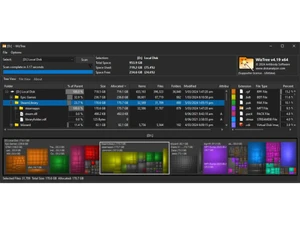
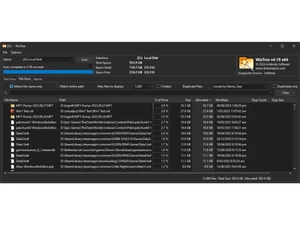

 Disk Space Analysis Scans drives at ultra-high speed to identify how space is used, helping users instantly find the largest files and folders. Treemap Visualization Displays a color-coded treemap of file sizes to visually compare folders and quickly understand disk usage patterns. Master File Table Scanning Reads the NTFS Master File Table directly, delivering lightning-fast disk scans much quicker than traditional methods. File Size Ranking Sorts all files by size to show the largest items on your drive, making cleanup and space recovery easier and faster. Search Functionality Includes fast search filters that instantly locate files by name, extension, size, or attributes across all scanned data. Duplicate File Finder Identifies duplicate files using size and checksum comparisons to help remove redundant data and free up space. Export Reporting Tools Allows exporting disk analysis results to CSV or other formats for audits, documentation, and further data processing. Real-Time Updates Automatically refreshes data when file system changes occur so displayed information stays accurate and up to date. Multiple Drive Support Scans internal drives, external disks, SSDs, HDDs, USBs, and network shares for complete storage visibility. Context Menu Integration Adds right-click shortcuts for quick file actions like opening folders, deleting items, or viewing properties instantly. Custom Filter Offers configurable filters to show or hide files based on size, type, age, or attributes for targeted analysis. Portable Application Mode Runs without installation, making it easy to carry on USB drives for technicians and users managing multiple systems. File Type Categorization Groups files by extension or type to reveal which categories, like videos or backups, occupy the most disk capacity. Folder Size Breakdown Provides instant calculations of folder sizes so users can see which directories consume the most disk storage.
 | Brand Name | Antibody Software Limited |
| Information | Antibody Software has produced some of the Internet's most popular software applications, such as WizTree, Bulk Image Downloader and WizFile. |
| Founded Year | 2007 |
| Director/Founders | Jean dominic De Chasteigner Dumee |
| Company Size | 1-100 Employees |

 UAE
UAE India
India