linkedin
Cadmatic logo
play CADMATIC™ eShare for Marine Industry- Project Creation
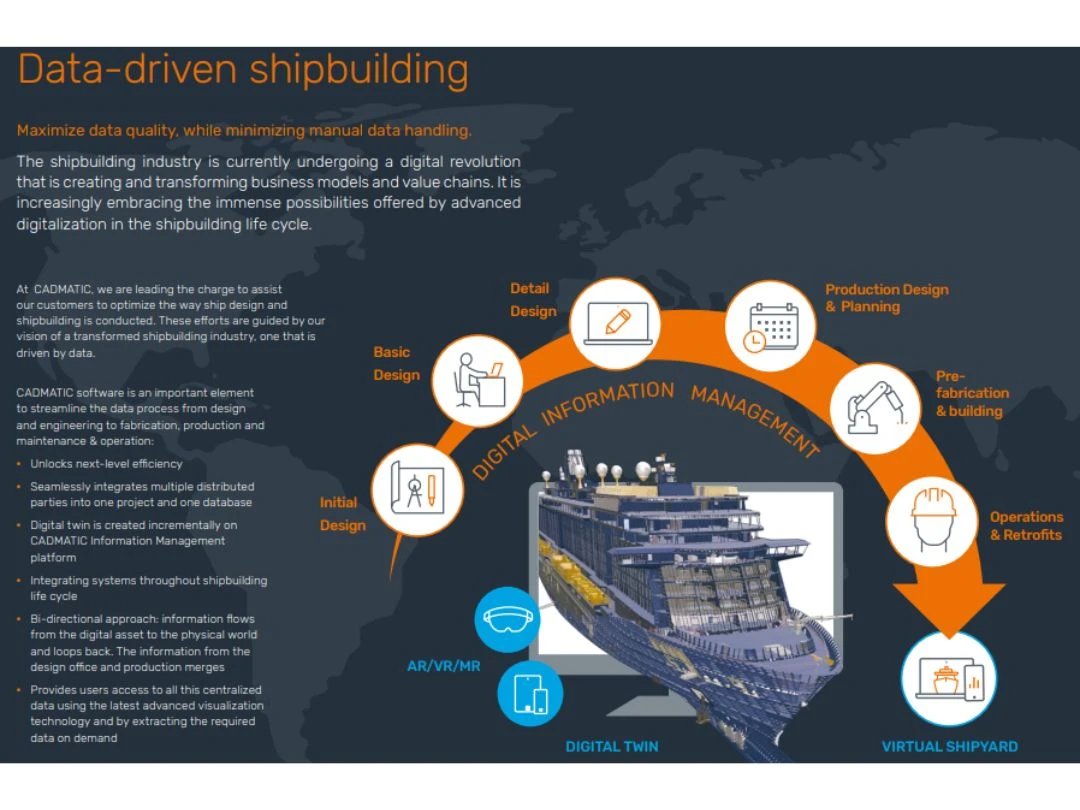
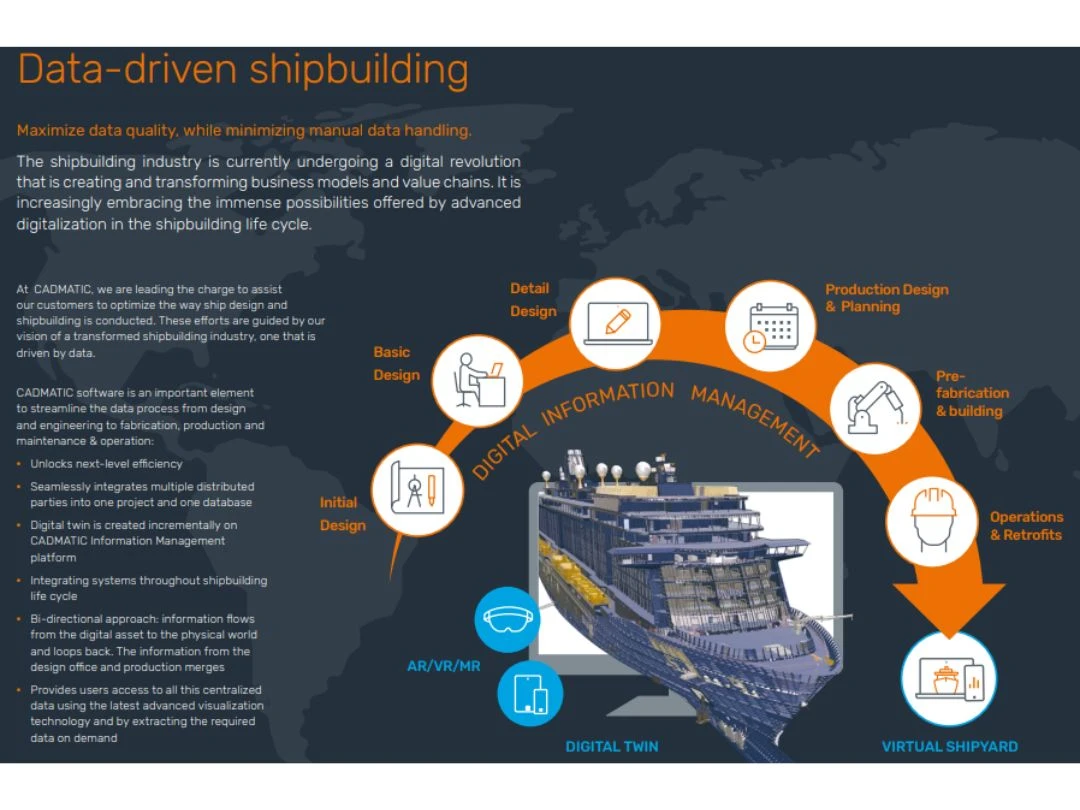
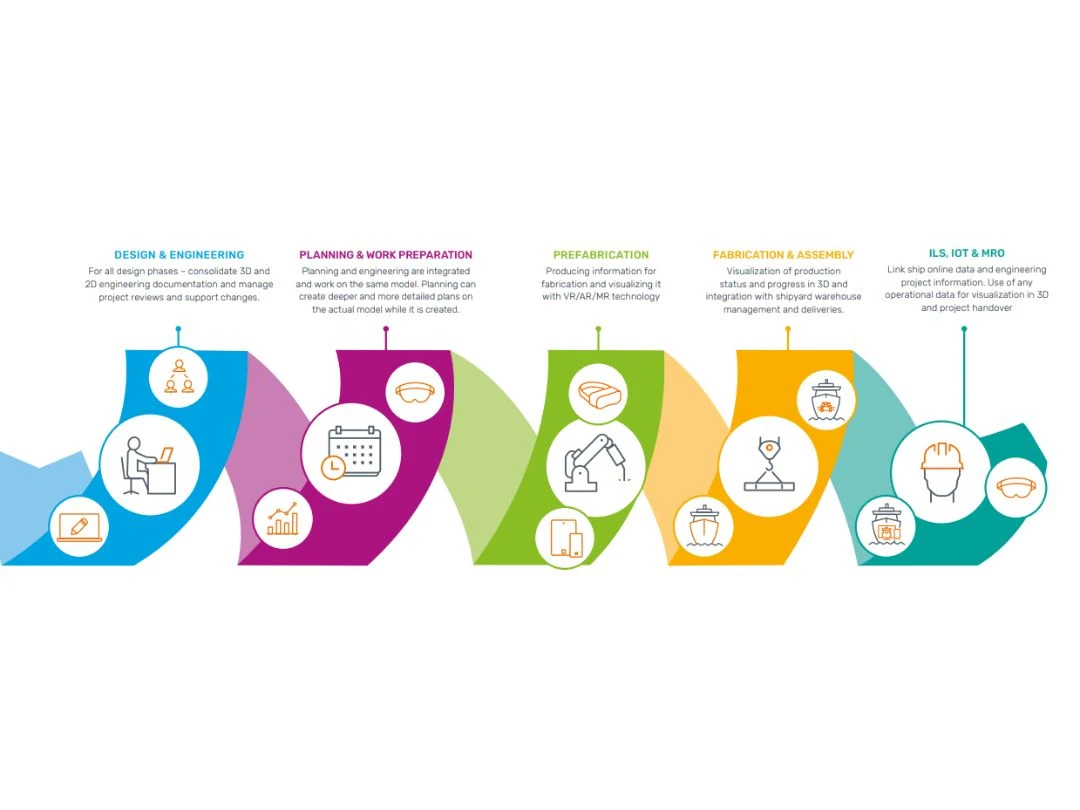
Cadmatic-Data-driven shipbuilding
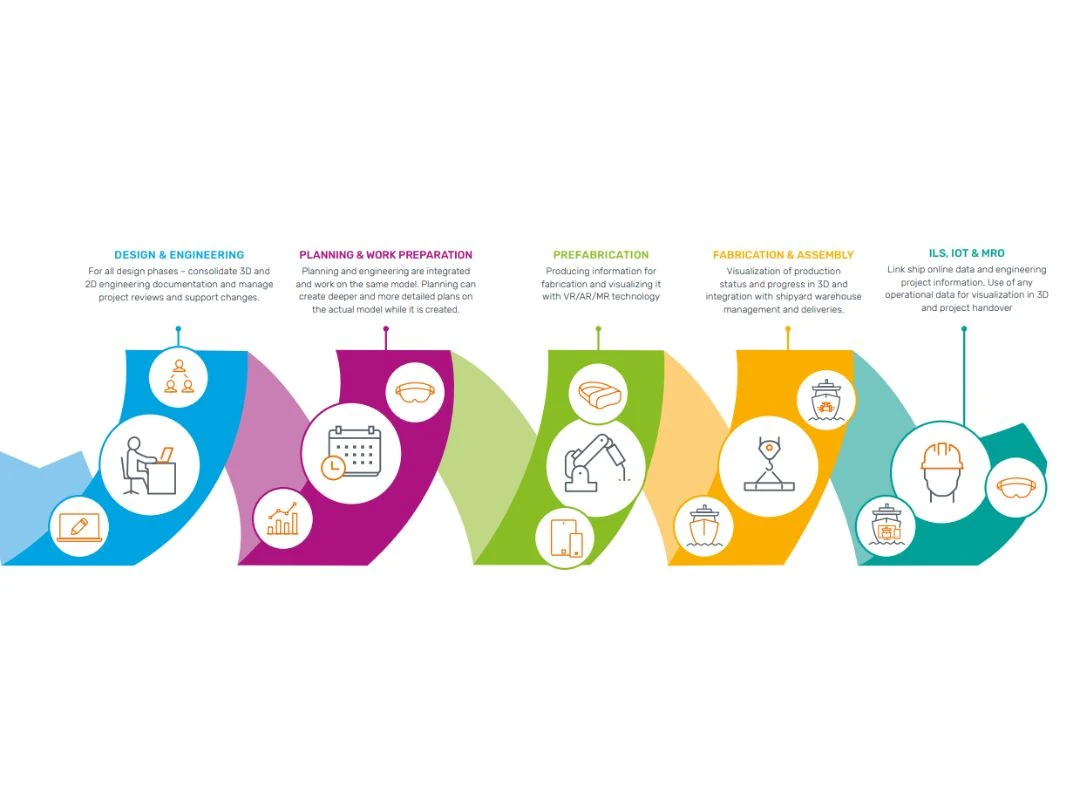
Cadmatic Design & Engineering

Cadmatic

Brand: Cadmatic

  • No Ratings & Reviews

Cadmatic 3D Design software will turn your visions into reality, thereby creating complex 3D designs with precision.

See More

Have you used Cadmatic before?

Share your insights for better experience

Add a Review

Price Available on Request

Questions about pricing or customization? We’re here to help, just a click away.

100% Genuine
Products
Best Price
Guaranteed
Safe & Secure
Payment
  • Description

  • Pricing

  • Features

  • Specification

  • Review

  • Compare

  • Alternatives

  • FAQ

Cadmatic Software Overview

What is Cadmatic Software?

Cadmatic offers a comprehensive solution for engineering projects with its 3D design and information management software. This all-in-one software eases electrical, instrumentation, and automation engineering needs and streamlines design & documentation processes. The software enhances the team's efficiency, saves time, and elevates project quality.

It simplifies project generation and reuse of design components and promotes efficient design completion. Its user-friendly interface supports intelligent data management to easily access and control project data. The software enhances real-time collaboration because of the multi-user capabilities of the database. Integration with other Cadmatic design applications and a rich symbol library adds versatility to project design. Centralized data management enables data updates across the project, saving valuable time. Cadmatic seamlessly integrates with BIM modelling and documentation for a unified workflow.

Cadmatic offers a holistic approach to project management with quick checks and edits. Cadmatic offers scalable 3D plant design tools that adapt to projects of any size or complexity. These tools automate project documentation and support easy data exchange. Specification and component libraries empower designers to focus on design rather than material selection, enhancing productivity. It also empowers engineering teams to manage projects, reduce manual tasks, and collaborate seamlessly to produce high-quality projects.

Why Choose Cadmatic System?

  • Hull Viewer:Streamline 3D hull model inspection for efficient project management and overview.
  • Shell Plate Development:Create 3D shell plates with extreme precision and generate accurate production data.
  • Plate Nesting:Optimize plate material usage and reduce waste with CADMATIC's Plate Nesting module.
  • Outfitting Production:Generate data for outfitting production, including layouts, isometrics, and CNC exports.
  • Laser Scans Integration:Seamlessly use laser-scanned data in 3D production models for marine projects.
  • 3D Plant Design:Focus on equipment layouts, pipe routing, and project finalization while our software handles collisions, asset storage, and component compatibility checks.
  • Structural Modeling:Easily create repeatable structural units like platforms and walkways with customizable standards and automatically extract construction data.
  • Piping Design:Ensure accurate and error-free piping layouts by identifying suitable connection points and using standard library components.

Benefits of Cadmatic 3D Design Solution

  • It offers comprehensive support for electrical implementation and automation design.
  • It will simplify collaboration with Multi-User and Database Capabilities.
  • The software will help you to optimize Workflow Agility Across Projects of Any Scale.
  • Ensure Precision Data and Quality Assurance.
  • It offers seamless Integration with Other Cadmatic Design Applications.
  • Efficient Centralized Data Management.
  • You can boost Efficiency by Generating and Reusing Options.

Pricing of Cadmatic 3D Design Tool in UAE

Cadmatic 3D design tool pricing is available on request at Techjockey UAE.

The pricing model is based on different parameters, including extra features, deployment type, and total users. For further queries related to the product, you can contact our product team and learn more about the pricing and offers.

Read more

Cadmatic Company Details

Founded Year:  1982

We are passionate about empowering engineers to build a brighter future and a better world. Our mission is to make the design, engineering, construction and operation of ships, industrial plants and buildings better, faster and easier.

Director/Founders Cadmatic
Company Size 101-500 Employees

Cadmatic Pricing & Plans

Looking for The Right Pricing?

Share your requirements and get a plan built around your business.

  • Define your business needs
  • Get customised pricing
  • Choose features that fit your workflow

Price Available on Request

Get personalised Cadmatic pricing that fits your needs. Our team will connect with you.

Cadmatic Features

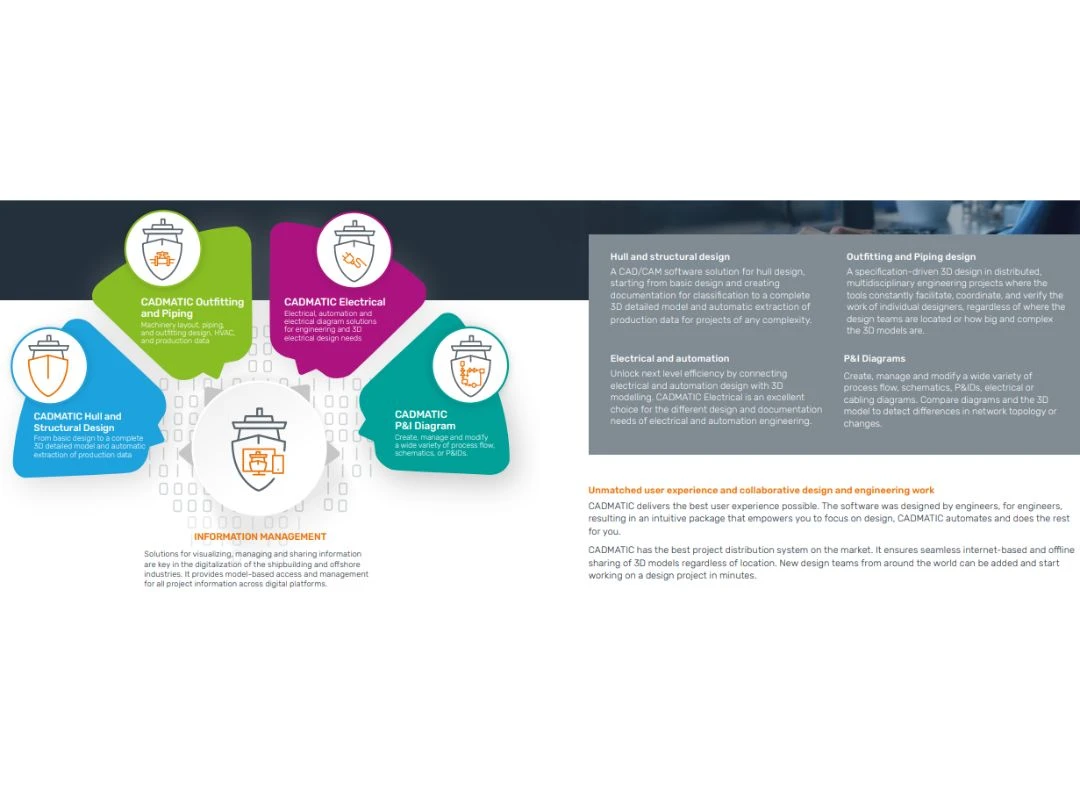
  • icon_check Hull & Structural design
    Hull design software generates 3D models and seamlessly extracts precise production data for construction components.
  • icon_check Outfitting & piping design
    Experience a seamlessly integrated database-driven design solution for P&IDs, 3D modelling, pre-outfitting, and data management.
  • icon_check Electrical & automation
    Get complete solutions for marine design needs like instrumentation, automation engineering & switchboard layout design.
  • icon_check Information management
    The software supports digital transformation using advanced information visualization, sharing, and management solutions.
  • icon_check Early design/predesign information
    The software stores previous iterations of all your designs and stores them in the centralized database for easy access.
  • icon_check User-friendly attributes
    The dashboard of the software offers user-friendly features, which makes it easier to operate the design software.
  • icon_check Operations & maintenance
    The software keeps track of all the tasks efficiently so the users can look at the design and maintenance.
  • icon_check BIM & 3D
    The software offers numerous ways to store the BIM and 3D design information to share with the team for collaboration.
  • icon_check Efficient data base system
    The software provides a centralized data system that is easier to track and maintain irrespective of the number of users.
  • icon_check Import/export functions
    The software offers many add-ons called eXChangers to change the file format and make it shareable everywhere.
Cadmatic Demo Video play icon

Get Cadmatic Demo

Watch the demo video to explore key features, real workflows, and how the software fits your business needs.

Understand
Key Features
Personal
Demo Insights
Interactive
Demo Support

Cadmatic Specifications

Supported Platforms
Ubuntu Ubuntu Windows Windows MacOS MacOS Linux Linux
Devices
Desktop Desktop Mobile Mobile Tablet Tablet iPad iPad
Deployment
Cloud-Based Cloud-Based
Suitable For
All Industries
Business Specific
All Businesses
Business Size
Small Business Startups Medium Business Enterprises
Customer Support
Phone Email Communities
Language
English Deutsche Italiano 日本人 한국어 普通话
Training Resources
In Person Live Online Webinars Documentation Videos

Explore the Best Alternative Solutions Similar to Your Business Size and Needs

Enterprises

Designed for complex and large-scale business needs

See More

Cadmatic Review

Techjockey Trusted Reviews from Verified Users

No reviews are currently available for Cadmatic. Discover similar 3D Design Software reviews

  • KeenTools Face Builder

    3.4

    Whats great - i don't think so there is any pros in this and also the price is high. read more
  • Autodesk 3DS Max

    4.3

    Whats great - Received my order very quickly. The product worked initially, I then had some issues, but Techjockey were very quick with the... read more
  • Autodesk Maya

    4.8

    Whats great - Autodesk Maya is the best tool to convert your ideas into reality. You have a lot of possibilies with this software. If you w... read more
Compare Cadmatic With other 3D Design Software

Products
Ratings
Pricing
Device Supported
Deployment
Supported Platforms
  • img

    Cadmatic

  • Price On Request

  • Desktop

    Mobile

  • Web based

    On Premises

  • Windows

    Mac OS

  • img

    Pacdora

  • 4.2

  • Price On Request

  • Desktop

    Mobile

  • Web based

    On Premises

  • Windows

    Mac OS

  • img

    Bambu Studio

  • 4.3

  • Price On Request

  • Desktop

    Mobile

  • Web based

    On Premises

  • Windows

    Mac OS

  • img

    Spline

  • 4.1

  • Price On Request

  • Desktop

    Mobile

  • Web based

    On Premises

  • Windows

    Mac OS

  • img

    MeshLab

  • 4.2

  • Price On Request

  • Desktop

    Mobile

  • Web based

    On Premises

  • Windows

    Mac OS

  • img

    Marmoset Toolbag

  • Price On Request

  • Desktop

    Mobile

  • Web based

    On Premises

  • Windows

    Mac OS

  • img

    FreeCAD

  • 3.9

  • Price On Request

  • Desktop

    Mobile

  • Web based

    On Premises

  • Windows

    Mac OS

  • img

    Coohom

  • 4.4

  • Price On Request

  • Desktop

    Mobile

  • Web based

    On Premises

  • Windows

    Mac OS

  • img

    Clara io

  • Price On Request

  • Desktop

    Mobile

  • Web based

    On Premises

  • Windows

    Mac OS

  • img

    Kaedim

  • 4.6

  • Price On Request

  • Desktop

    Mobile

  • Web based

    On Premises

  • Windows

    Mac OS

  • img

    Enscape

  • 4.4

  • Price On Request

  • Desktop

    Mobile

  • Web based

    On Premises

  • Windows

    Mac OS

(2) Product(s) selected

Cadmatic Alternatives

See All Cadmatic Alternatives

Starting Price:

$18.00 /Month

Available

Price on Request

Available

Price on Request

Starting Price:

$10.00 /Month

Available

Price on Request

Starting Price:

$109.00 /Month

Available

Price on Request

Which operating system does the Cadmatic Software Support?

Cadmatic software is compatible with Windows and macOS device systems.

Is there any Cadmatic 3D Design App?

Cadmatic 3D design app is not available on Android and iOS devices.

What is the deployment type of the Cadmatic System?

Cadmatic system supports cloud-based deployment.

How much does the Cadmatic 3D Design Software Cost?

Cadmatic 3D Design software pricing is available on request at techjockey UAE.

Who are the potential users of the Cadmatic 3D Design System?

Cadmatic is ideal for engineers, architects, and professionals involved in marine, plant, and construction projects. It empowers these experts to streamline design and information management tasks efficiently.

Is there any free trial or demo for Cadmatic?

Cadmatic software demo is available for free with techjockey UAE.

Is the Cadmatic 3D Design Software Free?

Cadmatic system does not offer a free trial.

How can you download the Cadmatic?

Cadmatic software installation is not required, as it is cloud-based. Just open the Setup Wizard to get started.

How does Cadmatic 3D Design Software work?

Cadmatic is a versatile 3D design and information management software tailored for marine, plant, and construction projects. It streamlines complex engineering and design tasks, facilitating efficient project management and collaboration while ensuring precision and accuracy in the final designs.

Terms and Condtions

close

Users with registered businesses can purchase goods from merchants on the platform to satisfy their business needs. Users are not permitted to utilize any products acquired through the platform for resale, advertising, business, or further distribution.

For each purchase made, users will receive a Tax Invoice (or 'GST invoice') that includes specific details such as:

  • the GSTIN of the user associated with their registered business, and

  • the specified Entity Name for their business.

It should be noted that not all products are eligible for GST Invoice. Only the products displayed by participating sellers with the 'GST-based Invoice Available' callout on the product description page would qualify.

Certain goods and services are not eligible to get a GST Invoice, including items with VAS, i.e., Value Added Services (e.g., Total Mobile Protection/Assured Buyback) and those involving an exchange offer at the time of purchase.

Users must ensure the accuracy of the GSTIN, and business entity name provided for the GST Invoice. Requests for corrections into GST Invoice would not be accommodated by Techjockey.com or any Seller, and any issues arising from user-provided information are the sole responsibility of users.

Techjockey.com is not liable for the GST Invoice or any associated input tax credit. To efficiently claim an input tax credit, users should select the registered place of business address as per the GST authority's data and follow the provisions of the GST Act and rules.

To claim an input tax credit, the delivery and billing addresses must match. Furthermore, input tax credits will not be granted if the delivery address and GSTIN on the invoice are from different states. In case of incorrect GST details provided during the order placement, the order will be canceled automatically.

20,000+ Software Listed 20,000+ Software Listed

Best Price Guaranteed Unbiased Comparison

Free Expert Consultation Read Authentic Reviews

2M+ Happy Customers 500,000+ Monthly Users