linkedin
Koyfin logo
play Market Dashboards
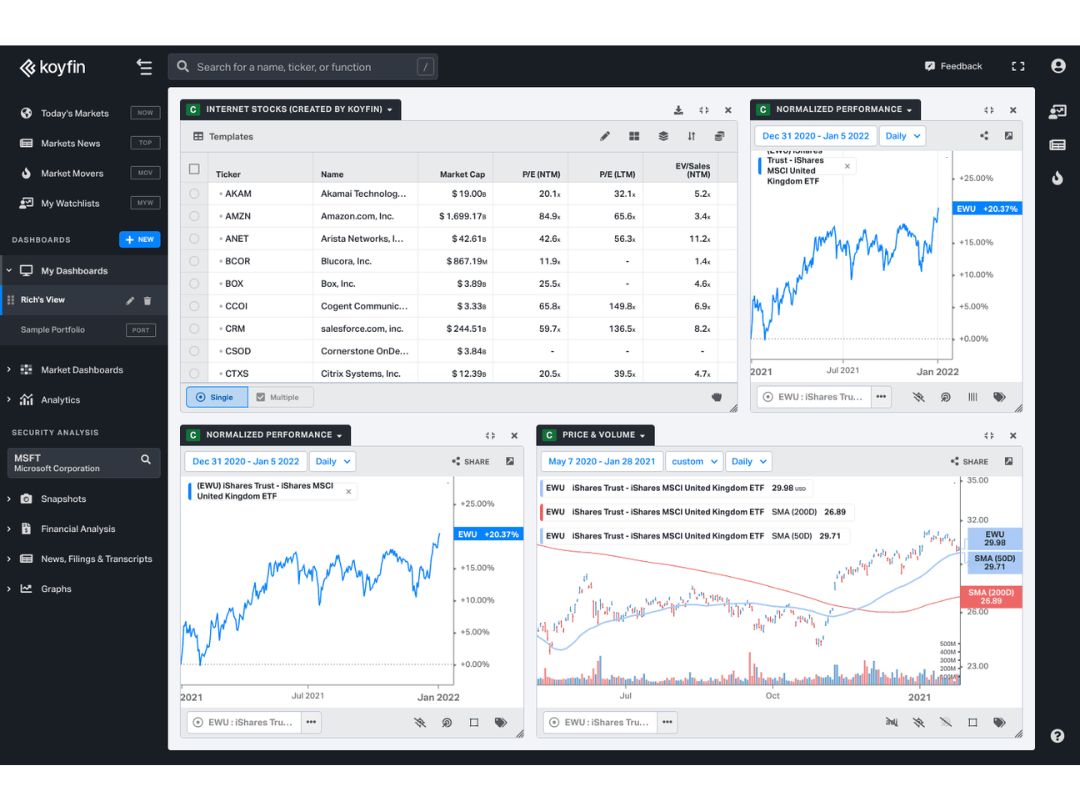
koyfin-dashboard
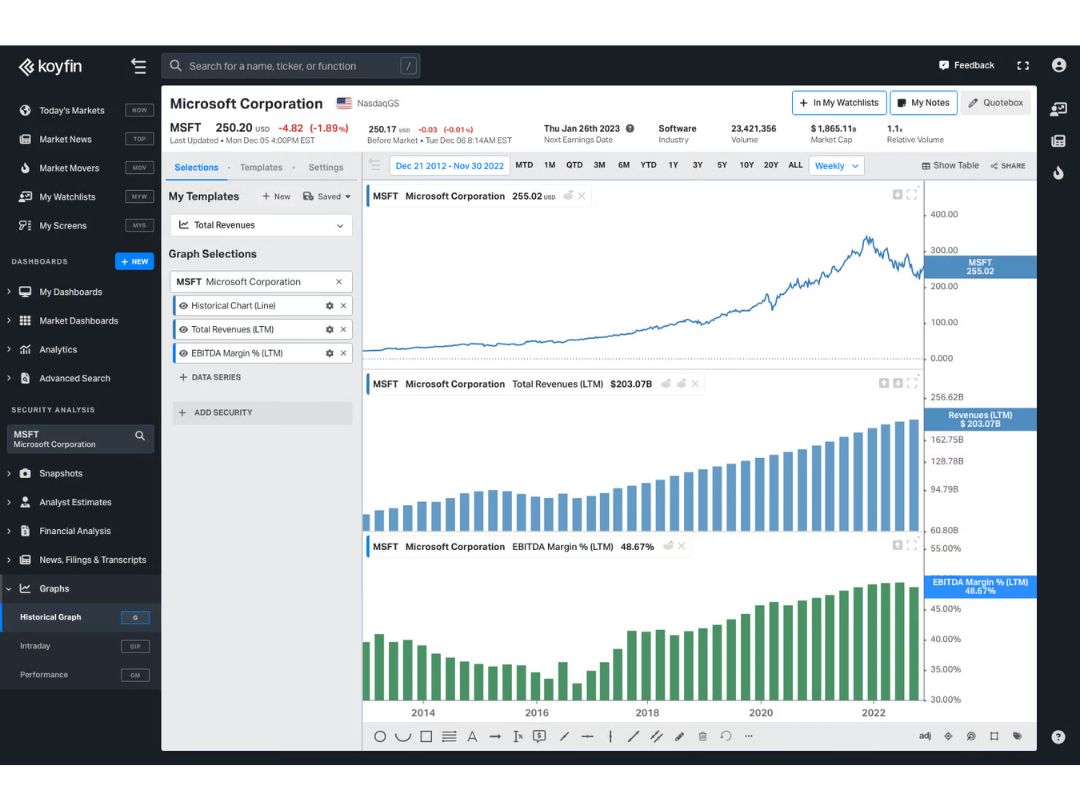
koyfin-graphs

Koyfin

Brand: Koyfin

  • 4.7

  • 1 Rating & 1 Review

Koyfin is a stock market and investment analytics platform built for financial advisors, analysts, and individual investors. It offers live market data, customizable dashboards, and advanced visual tools all in one place.

See More

Have you used Koyfin before?

Share your insights for better experience

Add a Review
Starting Price
$49

View plans

100% Genuine
Products
Best Price
Guaranteed
Safe & Secure
Payment
  • Description

  • Pricing

  • Features

  • Specification

  • Review

  • Compare

  • Alternatives

  • FAQ

Starting at $49.00

Koyfin Software Overview

What is Koyfin?

Koyfin is an all-in-one market research and analytics platform that helps investors make smarter decisions. It combines real-time financial data with customizable tools for screening, charting, and analysis. If youre managing client portfolios or your personal investments, Koyfin brings everything you need into a single, user-friendly platform.

This stock market software simplifies the research process by eliminating the need for expensive, complex tools like Bloomberg or FactSet, while still offering deep global coverage and powerful insights.

Why Choose Koyfin?

  • Live Global Market Data: With this stock software, you can get real-time data on stocks, indices, ETFs, mutual funds, government yields, commodities, and more across 40+ countries.
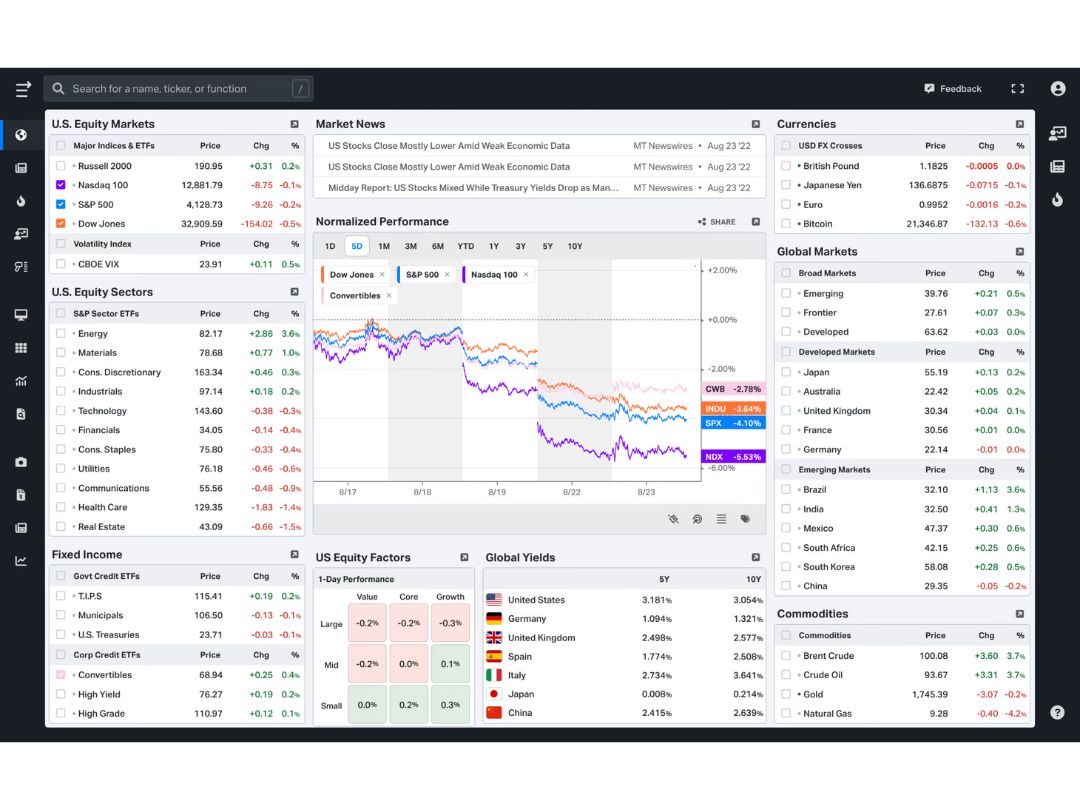
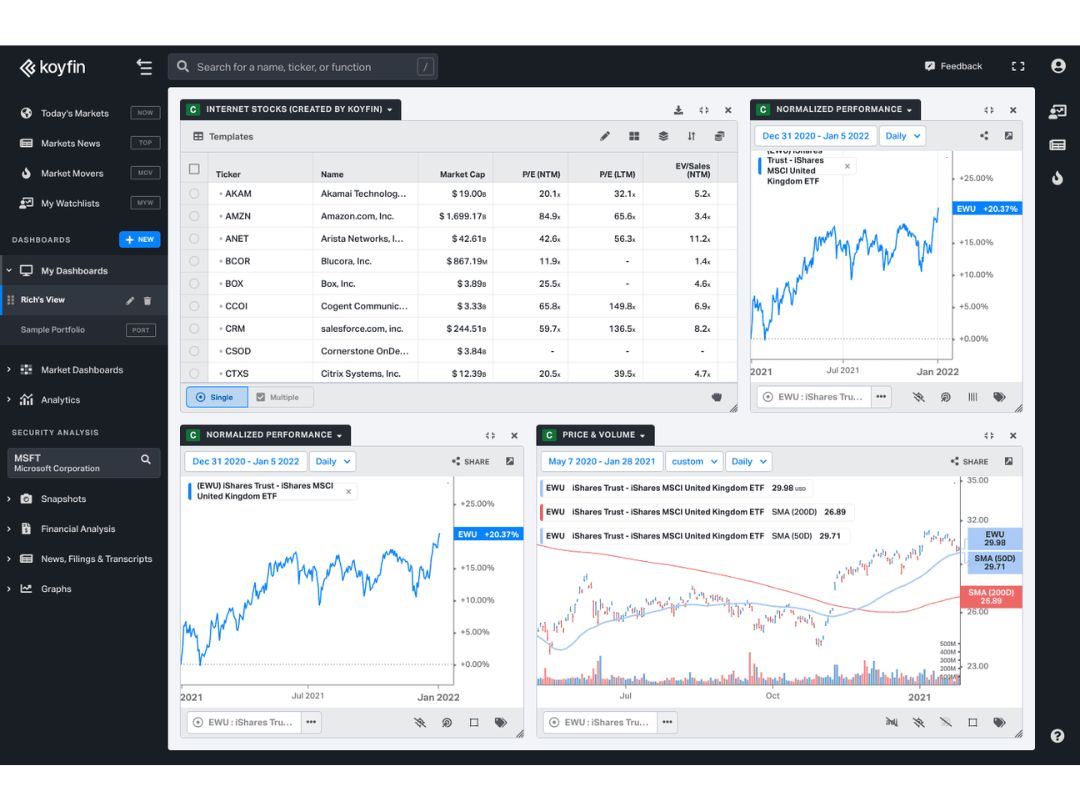
  • Customizable Dashboards: You can build fully personalized dashboards and watchlists to track what matters to you. Tailor layout, visuals, and themes to suit your investing style.
  • Advanced Graphing & Visuals: Koyfin transforms complex data into digestible charts. Koyfin's sleek interface lets you create comparative graphs, historical analyses, and trend visuals effortlessly.
  • Equity Screener with 5,900+ Filters: Scan over 100,000 global securities using thousands of filter combinations. Quickly find opportunities across different markets and asset classes.
  • Macro Dashboards for Big-Picture Views: Explore Koyfin's pre-built dashboards that provide curated, contextual insights into the global economic and financial landscape.
  • Financial Analysis Tools: Access earnings estimates, valuation metrics, company financials, and analyst ratings.
  • News & Transcripts: Track real-time market news and review company transcripts. Search earnings calls by keyword and monitor sentiment shifts as they happen.
  • Cryptocurrency Insights: Koyfin also provides insight on cryptocurrencies. From Bitcoin to altcoins, you can get the latest crypto data and visualizations.

Koyfin Software Pricing

Koyfin software price starts at $49 at techjockey.

The pricing model is based on different parameters, including extra features, deployment type, and the total number of users. For further queries related to the product, you can contact our product team and learn more about the pricing and offers.

Read more

Koyfin Company Details

Founded Year:  2016

Koyfin is a financial data and analytics platform for researching stocks and understanding market trends.

Director/Founders Rich Meatto, Rob Koyfman
Company Size 1-100 Employees

Koyfin Pricing & Plans

Plus
Starting at $49
    • Licenses

      Licenses
      Licenses
    • Monthly

      Monthly
      Monthly

Key Features

  • Global equities, fundamentals & valuation

  • Global bonds, yield curves & FX

  • Advanced charting

  • Market dashboards

  • Economic calendar

  • Market movers

  • Scatter plot (x,y)

  • Analyst price targets-Global

Pro
Starting at $110
    • Licenses

      Licenses
      Licenses
    • Monthly

      Monthly
      Monthly

Key Features

  • Global equities, fundamentals & valuation

  • Global bonds, yield curves & FX

  • Model portfolios

  • Advanced charting

  • Market dashboards

  • Economic calendar

  • Market movers

  • Scatter plot (x,y)

  • Analyst price targets-Global

Advisor Pro
Starting at $349
    • Licenses

      Licenses
      Licenses
    • Monthly

      Monthly
      Monthly

Key Features

  • Global equities, fundamentals & valuation

  • Global bonds, yield curves & FX

  • Model portfolios

  • Portfolio Sleeves

  • Advanced charting

  • Market dashboards

  • Economic calendar

  • Market movers

  • Scatter plot (x,y)

  • Analyst price targets-Global

Koyfin Features

Core Features

  • icon_check Portfolio Management
    Track and analyze investment holdings, returns, and asset allocation in real time.
  • icon_check Market Data
    Real-time and historical stock price feeds, trade volume, and market indices for analysis.
  • icon_check Watchlist
    A customizable list for monitoring preferred stocks, providing real-time updates on price and volume.
  • icon_check Charting Tools
    Visual tools for analyzing stock trends and patterns using technical indicators and price movements.
  • icon_check Stock Screener
    Filters stocks based on specific criteria like market cap, P/E ratio, or price movement.
  • icon_check Order Control
    Tools to manage, modify, and cancel buy or sell orders efficiently on the trading platform.
  • icon_check Order Execution
    Automated system to process buy/sell orders directly via the broker and stock exchange.

Order Execution

  • icon_check Limit Order
    An order to buy/sell at a specific price or better, ensuring price control but not guaranteed execution.
  • icon_check Market Order
    Buy/sell immediately at the current market price, ensuring execution but no price control.
  • icon_check Stop (Loss) Order
    Automatically sells stock when it drops to a pre-set price to minimize losses.
  • icon_check Stop Limit Orders
    Combines a stop-loss order with a limit order to sell/buy once a set price is triggered.
  • icon_check Trailing Stop Order
    Automatically adjusts stop price as the market price moves in favor of the position.

Research and Analysis

  • icon_check Sentiment Analysis
    Evaluates market sentiment from news and social media to gauge stock trends.
  • icon_check Analyst Ratings
    Displays professional analyst opinions on stocks, including buy, hold, or sell recommendations.
  • icon_check Multi-Timeframe Analysis
    Analyzes price trends across different timeframes for better decision-making.
  • icon_check Advanced Order Flow Analysis
    Tracks and analyzes buying and selling activity across the market.

Technical Analysis

  • icon_check Trendlines
    Visual representation of stock price trends over time to predict future movements.
  • icon_check Technical Indicators
    Tools like RSI and MACD for analyzing stock price momentum and direction.
  • icon_check Custom Indicators
    Create and apply personalized technical indicators for unique trading strategies.
  • icon_check Smart drawing tools
    Customizable tools to draw patterns like support, resistance, and Fibonacci retracements.
  • icon_check Automated Technical Patterns Detection
    Automatically identifies patterns like head and shoulders or flags.

Fundamental Analysis

  • icon_check Balance Sheet
    Shows a company's assets, liabilities, and shareholders’ equity for financial health analysis.
  • icon_check Income Statement
    Displays a company’s revenue, expenses, and profitability over a specific period.
  • icon_check Industry Analysis
    Compares stock performance against industry benchmarks for relative valuation.
  • icon_check Financial Ratios
    Key metrics like P/E and P/B ratios to evaluate stock value relative to financial performance.
  • icon_check Cash Flow Statements
    Tracks cash inflows and outflows to assess company liquidity and operational efficiency.
  • icon_check Earnings Forecasts
    Predicts future earnings based on historical data and market conditions.
  • icon_check Company Valuation Models
    Estimates a company’s value based on DCF, NPV, and other valuation methods.

Backtesting and Optimization

  • icon_check Paper Trading
    Practice trading without risking real capital using simulated environments.
  • icon_check Historical Data Simulation
    Tests trading strategies against past data to assess their effectiveness.
  • icon_check Strategy Tester
    Evaluates the performance of trading strategies before deploying them in live markets.
  • icon_check Strategy Optimization
    Fine-tunes trading strategies by adjusting parameters for improved performance.
  • icon_check Monte Carlo Simulation
    Uses probabilistic models to forecast trading outcomes in uncertain conditions.

Risk Management

  • icon_check Performance Analytics
    Tracks portfolio and trade performance through returns, drawdowns, and risk measures.
  • icon_check Maximum Drawdown Analysis
    Measures the largest peak-to-trough decline in a portfolio's value.
  • icon_check Risk Calculator
    Estimates potential profit/loss scenarios based on trade size and risk percentage.
  • icon_check Position Sizing Calculator
    Determines the appropriate trade size based on risk tolerance and market conditions.
  • icon_check Diversification Analysis
    Analyzes portfolio risk by evaluating asset allocation and exposure to different sectors.
  • icon_check Stop-Loss Automation
    Automatically implements stop-loss rules to limit potential trading losses.

Trading Options

  • icon_check Paper Trading
    Practice trading without risking real capital using simulated environments.
  • icon_check Swing Trading
    A strategy that captures shortto medium-term gains from price swings.
  • icon_check Intraday Trading
    Buy and sell stocks within the same trading day to capitalize on short-term movements.
  • icon_check Derivative Trading
    Trade derivatives like options, futures, and swaps based on underlying assets.
  • icon_check Algorithm Trading
    Executes trades based on pre-set algorithms without manual intervention.
  • icon_check Options Trading
    Allows the buying/selling of call and put options for speculative or hedging purposes.
  • icon_check Futures Trading
    Trade contracts to buy or sell assets at a future date at predetermined prices.
  • icon_check Forex Trading
    Enables trading in currency pairs based on fluctuations in the foreign exchange market.
  • icon_check Crypto Trading
    Buy/sell cryptocurrencies like Bitcoin and Ethereum on dedicated platforms.
  • icon_check Automatic Trading
    Uses automated systems to execute trades according to predefined criteria.
  • icon_check Rotational Trading
    Alternates investments between sectors, asset classes, or strategies based on market trends.
  • icon_check Spread Trading
    Speculative trading of the price difference between two assets.

Reporting & Analytics

  • icon_check Dashboards
    Visual displays of key metrics like portfolio performance, risk levels, and trade history.
  • icon_check Portfolio Tracking
    Real-time tracking of your investments, including value, returns, and allocations.
  • icon_check Customizable Reports
    Tailored reports to analyze performance, tax implications, or investment behavior.
  • icon_check Risk Analytics
    Analyzes portfolio risks by measuring volatility, drawdowns, and exposure.
  • icon_check Trade Performance Attribution
    Breaks down the source of trading gains or losses for better analysis.

Account Management

  • icon_check Audit Trail
    Tracks and logs user activity to maintain compliance and security.
  • icon_check Multi-Factor Authentication (MFA)
    Adds a second layer of security to protect accounts from unauthorized access.
  • icon_check User Access Management
    Controls who can execute trades, view reports, or manage funds based on assigned privileges.
  • icon_check Customizable User Interface
    Allows users to personalize the layout and appearance of the platform.
  • icon_check Account Summary Reports
    Provides detailed summaries of account balances, holdings, and transactions.

Integrations

  • icon_check Third Party Integration
    Supports tools like research platforms, analytics software, and financial news services.
  • icon_check Market Data Integration
    Links the platform to real-time market data feeds for timely trading decisions.
  • icon_check Social Media Integration
    Connects with social platforms to track sentiment, discussions, and trends.
  • icon_check API Integration
    Connects with external APIs for custom trading, data feeds, or system automation.
  • icon_check Multi-Language Support
    Provides the ability to use the software in various languages for global accessibility.
  • icon_check Brokerage Integration
    Connects to brokerage accounts for seamless trading and order execution.
  • icon_check Cloud Data Integration
    Stores and accesses trading data through cloud services for scalability.

Alerts & Notifications

  • icon_check Price Alert
    Notifies users when stock prices reach a specific target or threshold.
  • icon_check Push Notifications
    Sends updates directly to mobile devices for timely decisions.
  • icon_check Real-Time Market Updates
    Sends alerts on price changes, market movements, and breaking news.
  • icon_check News Alert
    Delivers important financial news related to specific stocks or sectors.
  • icon_check Volume Alerts
    Signals abnormal trading volume, indicating potential market movements.
  • icon_check Sentiment Alerts
    Notifies users of changes in market sentiment based on social or news analysis.
Koyfin Demo Video play icon

Get Koyfin Demo

Watch the demo video to explore key features, real workflows, and how the software fits your business needs.

Understand
Key Features
Personal
Demo Insights
Interactive
Demo Support

Koyfin Specifications

Supported Platforms
Ubuntu Ubuntu Windows Windows iOS iOS Android Android MacOS MacOS Linux Linux
Devices
Desktop Desktop Mobile Mobile Tablet Tablet iPad iPad
Deployment
Cloud-Based Cloud-Based
Suitable For
Stock Market
Business Specific
All Businesses
Business Size
Small Business Startups Medium Business Enterprises SMBs SMEs MSMBs MSMEs Freelancers
Customer Support
Email Communities
Language
English
Training Resources
Videos

Explore the Best Alternative Solutions Similar to Your Business Size and Needs

Koyfin Review

4.7

Out of 5

img

Overall Rating

Based on
1 Verified Review

Rating Breakdown

  • Features 5
  • Value for Money 4.5
  • Ease of Use 4.5
  • Customer Support 5

90% Recommend this Product

Add Review

Koyfin Video Review

youtubeVideoId

4.8

“Koyfin Review: Best Charting Software for The Stock Market”

Review by: Modest Money

Compare Koyfin With other Stock Market Software

Products
Ratings
Pricing
Device Supported
Deployment
Supported Platforms
  • img

    Koyfin

  • 4.7

  • $ 49.00 excl. GST

  • Desktop

    Mobile

  • Web based

    On Premises

  • Windows

    Mac OS

  • img

    TradingView

  • 4.5

  • Price On Request

  • Desktop

    Mobile

  • Web based

    On Premises

  • Windows

    Mac OS

  • img

    MultiCharts

  • 4.2

  • Price On Request

  • Desktop

    Mobile

  • Web based

    On Premises

  • Windows

    Mac OS

  • img

    TrendSpider

  • 4.2

  • Price On Request

  • Desktop

    Mobile

  • Web based

    On Premises

  • Windows

    Mac OS

  • img

    ProRealTime

  • 4.1

  • Price On Request

  • Desktop

    Mobile

  • Web based

    On Premises

  • Windows

    Mac OS

  • img

    GoCharting

  • 4.2

  • Price On Request

  • Desktop

    Mobile

  • Web based

    On Premises

  • Windows

    Mac OS

  • img

    Benzinga Pro

  • 4.2

  • Price On Request

  • Desktop

    Mobile

  • Web based

    On Premises

  • Windows

    Mac OS

  • img

    Trade Ideas

  • 4.5

  • Price On Request

  • Desktop

    Mobile

  • Web based

    On Premises

  • Windows

    Mac OS

  • img

    StockGro

  • 4.4

  • Price On Request

  • Desktop

    Mobile

  • Web based

    On Premises

  • Windows

    Mac OS

  • img

    Esignal

  • 4.3

  • Price On Request

  • Desktop

    Mobile

  • Web based

    On Premises

  • Windows

    Mac OS

  • img

    StockCharts

  • 4.1

  • Price On Request

  • Desktop

    Mobile

  • Web based

    On Premises

  • Windows

    Mac OS

(0) Product(s) selected

Koyfin Alternatives

See All Koyfin Alternatives

Starting Price:

$20.00 /Month

Available

Price on Request

Starting Price:

$67.00 /Month

Available

Price on Request

How much does Koyfin Stock Market Software cost?

Koyfin software price starts at $49 at techjockey

Does Koyfin offer a free trial?

Yes. Koyfin offers a free plan to help you explore the platform. You can upgrade anytime to access advanced tools and data.

How does Koyfin Stock Market Software work?

Koyfin centralizes real-time market data, charting tools, and financial analytics in one platform. You can research stocks, track your portfolio, set alerts, and build custom dashboards-all without needing multiple tools.

Is Koyfin good for beginners?

Yes. Koyfin is easy to use and offers helpful resources, making it a great choice for beginners as well as experienced investors.

Does Koyfin support global market coverage?

Yes. Koyfin provides live data from over 40 countries, covering stocks, ETFs, mutual funds, currencies, commodities, and more.

Is Koyfin useful for cryptocurrency analysis?

Yes. Koyfin includes crypto market data and lets you track prices, trends, and related news alongside traditional assets.

Can I customize my Koyfin dashboard?

Absolutely. You can personalize dashboards, layouts, colors, and data views to match your workflow.

Does Koyfin support financial advisors and teams?

Yes. Koyfin is designed for both individual investors and professionals like advisors, research teams, and CIOs.

Is my data secure on Koyfin?

Yes. Koyfin stock market software uses enterprise-grade encryption and secure servers to protect your account and financial data.

Terms and Condtions

close

Users with registered businesses can purchase goods from merchants on the platform to satisfy their business needs. Users are not permitted to utilize any products acquired through the platform for resale, advertising, business, or further distribution.

For each purchase made, users will receive a Tax Invoice (or 'GST invoice') that includes specific details such as:

  • the GSTIN of the user associated with their registered business, and

  • the specified Entity Name for their business.

It should be noted that not all products are eligible for GST Invoice. Only the products displayed by participating sellers with the 'GST-based Invoice Available' callout on the product description page would qualify.

Certain goods and services are not eligible to get a GST Invoice, including items with VAS, i.e., Value Added Services (e.g., Total Mobile Protection/Assured Buyback) and those involving an exchange offer at the time of purchase.

Users must ensure the accuracy of the GSTIN, and business entity name provided for the GST Invoice. Requests for corrections into GST Invoice would not be accommodated by Techjockey.com or any Seller, and any issues arising from user-provided information are the sole responsibility of users.

Techjockey.com is not liable for the GST Invoice or any associated input tax credit. To efficiently claim an input tax credit, users should select the registered place of business address as per the GST authority's data and follow the provisions of the GST Act and rules.

To claim an input tax credit, the delivery and billing addresses must match. Furthermore, input tax credits will not be granted if the delivery address and GSTIN on the invoice are from different states. In case of incorrect GST details provided during the order placement, the order will be canceled automatically.

20,000+ Software Listed 20,000+ Software Listed

Best Price Guaranteed Unbiased Comparison

Free Expert Consultation Read Authentic Reviews

2M+ Happy Customers 500,000+ Monthly Users