linkedin
PDF Candy logo
play PDF Candy Desktop: Overview, Tips and Tricks - PDF Candy Demo

PDF Candy

Brand: PDF Candy

  • 4.6

  • 4 Ratings

  • PDF Candy provides tools for converting, merging, compressing, editing, and securing PDF files, making it a versatile solution for all PDF needs.
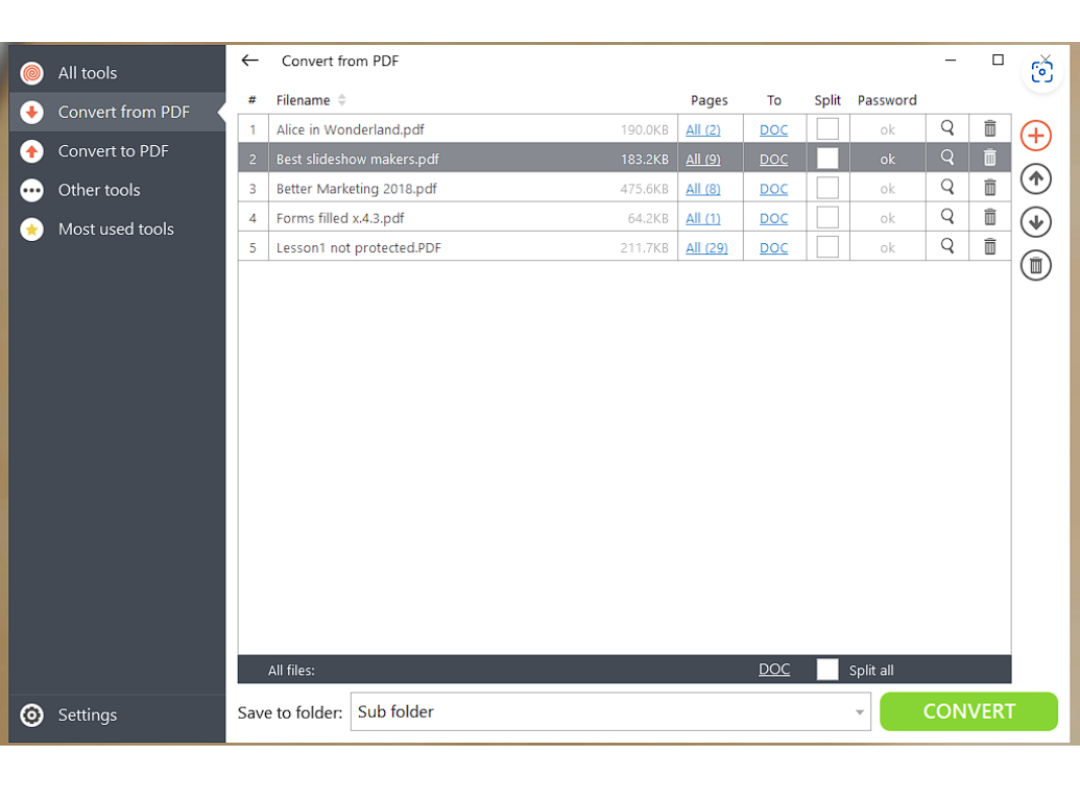
  • Easily convert PDFs to and from formats like Word, Excel, JPG, and PNG, including OCR for editable text from scanned documents.
  • Features a simple interface suitable for all users, with encrypted uploads and automatic file deletion to ensure privacy and security.
  • Access PDF Candy on the web, Windows, macOS, and mobile platforms, with both free and premium versions available to suit different user needs.
See More

Have you used PDF Candy before?

Share your insights for better experience

Add a Review
Starting Price
$6

View plans

100% Genuine
Products
Best Price
Guaranteed
Safe & Secure
Payment
  • Description

  • Pricing

  • Features

  • Specification

  • Review

  • Compare

  • Alternatives

  • FAQ

Starting at $6.00

PDF Candy Software Overview

What is PDF Candy?

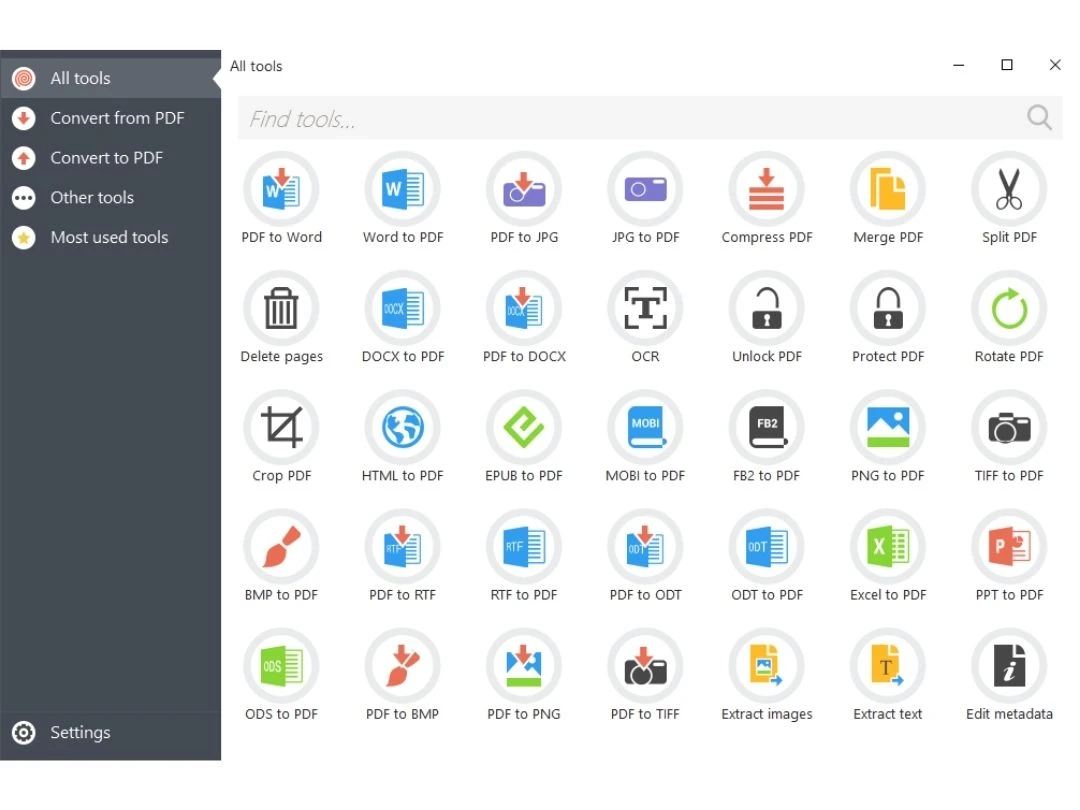
PDF Candy is a PDF Software that provides a comprehensive set of PDF processing tools for working with PDF files. Users can convert PDFs to and from various formats, edit their content, and merge or split documents. The platform also offers features like adding watermarks, compressing files, and extracting images from PDFs.

The utility software operates through a user-friendly web interface, making it accessible from any device with internet connectivity. Its versatility makes it a convenient solution for individuals or businesses needing diverse PDF management capabilities without the need for software installation. The service may offer both free and premium plans, catering to different user needs.

Why Choose PDF Candy Utility Software?

  • Comprehensive PDF Tools: Access diverse tools for conversion, editing, merging, and splitting, providing a unified solution for various PDF tasks.
  • User-Friendly Interface: An intuitive interface ensures accessibility for users with varying technical expertise.
  • Online Accessibility: Operate as an online service, allowing PDF work directly from web browsers without software installation.
  • Versatility in PDF Management: Perform conversion, editing, watermarking, and compression for a range of PDF management needs.
  • Cost-Effective Options: Choose from free and premium plans, tailoring selections based on needs and budget.
  • Regular Updates: Undergo regular updates to provide users with the latest features, improvements, and security enhancements.

Functionalities of PDF Candy Utility Software

  • Rotate PDF Pages: Easily adjust the orientation of individual pages or the entire PDF document.
  • Page Numbering: Add or customize page numbers within PDF files for better organization.
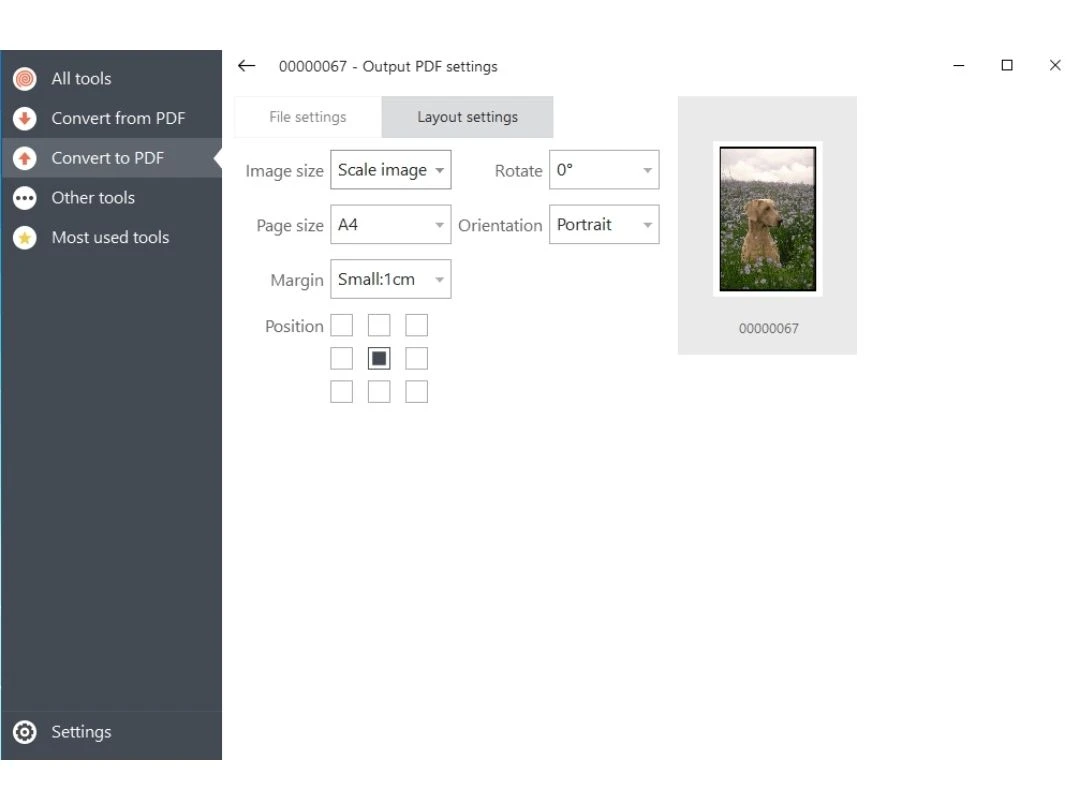
  • Image to PDF Conversion: Convert image files to PDF format, seamlessly integrating graphics into documents.
  • OCR (Optical Character Recognition): Recognize and edit text in scanned documents for enhanced searchability.
  • Password Recovery: Recover passwords for protected PDF files, ensuring authorized access.
  • PDF to Excel Conversion: Convert PDF tables and data into Excel spreadsheets for convenient manipulation.
  • Digital Signature: Add digital signatures to PDF documents for authentication and security.
  • Header and Footer Addition: Include headers and footers to PDF pages for branding or informational purposes.
  • Remove Background: Modify or eliminate the background of PDF documents for improved visual clarity.
  • Document Metadata Editing: Edit metadata, including authorship details, title, and keywords associated with the PDF.

Benefits of PDF Candy Utility Software

  • Flexible Compression Options: Access versatile tools for adjusting PDF file sizes to specific requirements.
  • Multiple Language Support: The software supports multiple languages, ensuring accessibility and user-friendliness globally.
  • Secure Redaction Tools: Utilize secure features for permanently removing sensitive information from PDF documents.
  • PDF to Image Conversion: Convert PDFs to image formats, facilitating the extraction of visuals for various purposes.
  • Advanced Editing Capabilities: Benefit from advanced editing options, including modifying text, images, and other elements within PDFs.
  • Batch Watermarking: Apply watermarks to multiple pages or documents simultaneously with batch watermarking tools.
  • Interactive Form Handling: Support for interactive form elements enhances the functionality of fillable PDF forms.
  • Selective Page Extraction: Choose specific pages for extraction, streamlining the process of content extraction from PDFs.
  • Cloud Storage Integration: Seamlessly save, access, and share PDF documents across platforms with integrated cloud storage support.

Pricing of PDF Candy

PDF Candy price starts at $6 at techjockey.

The pricing model is based on different parameters, including extra features, deployment type, and the total number of users. For further queries related to the product, you can contact our product team and learn more about the pricing and offers.

Read more

PDF Candy Company Details

Founded Year:  2021

Candy Digital is an rapid-growth NFT (Digital Collectables) company that allows fans to buy, sell, and trade officially licensed non-fungible tokens (also known as NFTs, Digital Assets, Digital Collectables).

Director/Founders Michael G. Rubin
Company Size 1-100 Employees

PDF Candy Pricing & Plans

Web Monthly
Starting at $6
    • Licenses

      Licenses
      Licenses
    • Monthly

      Monthly
      Monthly

Key Features

  • Access to PDF Candy Web

  • Increase file size per task up to 500 MB

  • High priority processing (No queue)

  • No hourly limits

Desktop + Web Yearly
Starting at $48 $216 SAVE UPTO 78% OFF
    • Licenses

      Licenses
      Licenses
    • Yearly

      Yearly
      Yearly

Key Features

  • Access to PDF Candy Web

  • No hourly limits

  • Increase file size per task up to 500 MB

  • High priority processing (No queue)

  • Video Candy WEB

  • Image Candy WEB

Desktop + Web Lifetime
Starting at $99
    • Licenses (Lifetime)

      Licenses (Lifetime)
      Licenses (Lifetime)

Key Features

  • Access to PDF Candy Web

  • Access to PDF Candy Desktop

PDF Candy Features

  • icon_check PDF Editor
    Access a comprehensive PDF editor for various modifications to documents.
  • icon_check User friendly interface
    Benefit from a user-friendly platform, ensuring simplicity for users with different technical levels.
  • icon_check PDF to Editable Word Files
    Convert PDFs into editable Word files, enabling smooth text manipulation and formatting.
  • icon_check Privacy
    Prioritize user privacy with secure handling of sensitive information in PDF documents.
  • icon_check Batch Processing
    Support batch processing for applying edits or conversions to multiple PDF files at once.
  • icon_check OCR (Text Recognition)
    Utilize OCR capabilities for recognizing text in scanned documents, making them editable and searchable.
  • icon_check No Internet Connection Needed
    Operate offline without requiring an internet connection, enhancing accessibility for users.
PDF Candy Demo Video play icon

Get PDF Candy Demo

Watch the demo video to explore key features, real workflows, and how the software fits your business needs.

Understand
Key Features
Personal
Demo Insights
Interactive
Demo Support

PDF Candy Specifications

Supported Platforms
Ubuntu Ubuntu Windows Windows MacOS MacOS Linux Linux
Devices
Desktop Desktop Mobile Mobile
Deployment
Cloud-Based Cloud-Based Perpetual Perpetual
Suitable For
All Industries
Business Specific
All Businesses
Business Size
Small Business Startups Medium Business Enterprises SMBs SMEs MSMBs MSMEs
Customer Support
Email Communities
Language
English
Training Resources
Documentation Videos
AI Features
AI Integrated

Explore the Best Alternative Solutions Similar to Your Business Size and Needs

Enterprises

Designed for complex and large-scale business needs

Sejda PDF

4.8

XODO

4.4

UPDF

4.4

See More

PDF Candy Review

4.6

Out of 5

img

Overall Rating

Based on
4 Verified Ratings

Rating Breakdown

  • Features 4.5
  • Value for Money 4.6
  • Ease of Use 4.5
  • Customer Support 5
Add Review

Techjockey Trusted Reviews from Verified Users

No reviews are currently available for PDF Candy. Discover similar PDF Software reviews
  • Nuance Power PDF

    4.4

    Whats great - Robust editing tools and secure document handling. read more
  • Kofax Power PDF

    4.3

    Whats great - Robust editing tools and secure document handling. read more

  • Sejda PDF

    4.8

    Whats great - This platform is so user-friendly. The best part is that it keeps the original formatting and allows you to edit in a way tha... read more
Compare PDF Candy With other PDF Software

Products
Ratings
Pricing
Device Supported
Deployment
Supported Platforms
  • img

    PDF Candy

  • 4.6

  • $ 6.00 excl. GST

  • Desktop

    Mobile

  • Web based

    On Premises

  • Windows

    Mac OS

  • img

    PDF Expert

  • 4.4

  • Price On Request

  • Desktop

    Mobile

  • Web based

    On Premises

  • Windows

    Mac OS

  • img

    Zoho PDF Editor

  • 4.3

  • Price On Request

  • Desktop

    Mobile

  • Web based

    On Premises

  • Windows

    Mac OS

  • img

    PDFCreator

  • 4.3

  • Price On Request

  • Desktop

    Mobile

  • Web based

    On Premises

  • Windows

    Mac OS

  • img

    Gravity PDF

  • 4.3

  • Price On Request

  • Desktop

    Mobile

  • Web based

    On Premises

  • Windows

    Mac OS

  • img

    LightPDF

  • 4.5

  • Price On Request

  • Desktop

    Mobile

  • Web based

    On Premises

  • Windows

    Mac OS

  • img

    Sejda PDF

  • 4.8

  • Price On Request

  • Desktop

    Mobile

  • Web based

    On Premises

  • Windows

    Mac OS

  • img

    CutePDF

  • 4.4

  • Price On Request

  • Desktop

    Mobile

  • Web based

    On Premises

  • Windows

    Mac OS

  • img

    Kofax Power PDF

  • 4.3

  • Price On Request

  • Desktop

    Mobile

  • Web based

    On Premises

  • Windows

    Mac OS

  • img

    EaseUS PDF Editor

  • 4.4

  • Price On Request

  • Desktop

    Mobile

  • Web based

    On Premises

  • Windows

    Mac OS

  • img

    PDFSimpli

  • 4.5

  • Price On Request

  • Desktop

    Mobile

  • Web based

    On Premises

  • Windows

    Mac OS

(0) Product(s) selected

PDF Candy Alternatives

See All PDF Candy Alternatives

Starting Price:

₹25.83 /year

Starting Price:

AUD199.00 /Year

Starting Price:

$19.99 /Month

Starting Price:

$66.65 /Year

Starting Price:

$20.00 /Month
Available

Price on Request

Starting Price:

$49.00 /Lifetime
Starting Price:

$7.00 /Month

Which operating system does PDF Candy Utility Software Support?

PDF Candy Utility Software is compatible with Windows and MacOS.

Is there any PDF Candy Utility Software App?

PDF Candy Utility Software app is not available for Android and iOS app users.

What is the deployment type of PDF Candy Utility Software?

PDF Candy Utility Software supports web-based deployment.

How much does PDF Candy Utility Software Cost?

PDF Candy price starts at $6 at techjockey.com.

Who are the potential users of PDF Candy Utility Software?

PDF Candy Utility Software is typically used in all industries for editing PDFs, converting them to editable Word files, supporting batch processing and providing offline functionality.

Is there any free trial or demo for PDF Candy Utility Software?

Yes, PDF Candy Utility Software free demo is available at techjockey.com.

Is PDF Candy Utility Software Free?

PDF Candy Utility Software offers a free trial. However, the premium plan with advanced features is available at techjockey.com with exciting deals.

How can you download PDF Candy Utility Software?

PDF Candy Utility Software installation is not required, as it is web-based. Just open the Setup Wizard to get started.

How does PDF Candy Utility Software Work?

PDF Candy works by offering a user-friendly platform for editing PDFs, converting to Word, ensuring privacy, supporting batch processing, using OCR, and providing offline functionality.

Terms and Condtions

close

Users with registered businesses can purchase goods from merchants on the platform to satisfy their business needs. Users are not permitted to utilize any products acquired through the platform for resale, advertising, business, or further distribution.

For each purchase made, users will receive a Tax Invoice (or 'GST invoice') that includes specific details such as:

  • the GSTIN of the user associated with their registered business, and

  • the specified Entity Name for their business.

It should be noted that not all products are eligible for GST Invoice. Only the products displayed by participating sellers with the 'GST-based Invoice Available' callout on the product description page would qualify.

Certain goods and services are not eligible to get a GST Invoice, including items with VAS, i.e., Value Added Services (e.g., Total Mobile Protection/Assured Buyback) and those involving an exchange offer at the time of purchase.

Users must ensure the accuracy of the GSTIN, and business entity name provided for the GST Invoice. Requests for corrections into GST Invoice would not be accommodated by Techjockey.com or any Seller, and any issues arising from user-provided information are the sole responsibility of users.

Techjockey.com is not liable for the GST Invoice or any associated input tax credit. To efficiently claim an input tax credit, users should select the registered place of business address as per the GST authority's data and follow the provisions of the GST Act and rules.

To claim an input tax credit, the delivery and billing addresses must match. Furthermore, input tax credits will not be granted if the delivery address and GSTIN on the invoice are from different states. In case of incorrect GST details provided during the order placement, the order will be canceled automatically.

20,000+ Software Listed 20,000+ Software Listed

Best Price Guaranteed Unbiased Comparison

Free Expert Consultation Read Authentic Reviews

2M+ Happy Customers 500,000+ Monthly Users