January 21, 2026
Today, artificial intelligence (AI) controls over everything, even programming workflows. For, with tools like OpenAI Codex and GitHub Copilot, developers have found new ways to write code and slay at that.
But how do these two AI assistants compare? As in, which one of them is more beneficial for developers to put to use? If you are struggling to get an answer for the same just like the rest of us, keep reading, as we settle this Codex vs Copilot confusion here once and for all.
OpenAI Codex is an AI Code generator that turns simple English instructions into computer code. Though a descendant of GPT-3, it is trained mainly for coding tasks. For the very same reason, it knows a host of programming languages like Python, JavaScript, Ruby, and TypeScript.
Unlike traditional coding tools, Codex can understand plain language about what a developer wants to make and give code that fits those needs. It can write functions, automate repetitive tasks, fix errors, or even change code from one programming language to another.
While still accessible through OpenAI’s API, Codex has now been integrated into ChatGPT, CLI tools, and IDE extensions. This allows developers and companies to use GPT-5-Codex in their apps or services for custom coding help, making it great for building new tools, chatbots, or automation systems that need smart code creation.

ChatGPT
Starting Price
$ 20.00
GitHub Copilot is a coding assistant launched as a collaboration between GitHub and OpenAI. It uses OpenAI Codex as its AI engine but provides a ready-made, user-friendly experience embedded directly into popular code editors such as Visual Studio Code.
With Copilot added, developers get instant code ideas while typing. These ideas include autocomplete lines, full functions, and even multi-line code based on the current code and comments. Its aim is to help coders work faster, avoid mistakes, and type less.
Unlike Codex’s API setup, Copilot works right away as a plugin, without requiring any extra setup. It also supports many languages and frameworks, making it useful for a lot of coding jobs.

GitHub Copilot
Starting Price
$ 10.00
The table below breaks down the key differences between OpenAI Codex and GitHub Copilot to help developers quickly identify which AI coding assistant best fits their workflow, use case, and development goals.
| Aspect | OpenAI Codex | GitHub Copilot |
|---|---|---|
| Primary Purpose | API-based AI engine for building custom code generation and automation tools | IDE-embedded assistant designed to speed up daily coding tasks |
| Target Users | Developers building applications, platforms, or developer tools | Individual developers and teams writing code inside editors |
| Integration Method | Accessed via API and integrated into apps, services, or workflows | Installed as a plugin in IDEs like Visual Studio Code |
| Interaction Style | Responds to explicit prompts and instructions | Provides real-time, inline code suggestions while typing |
| Setup Complexity | Requires API keys, configuration, and development effort | Works instantly after installation with minimal setup |
| Flexibility | Highly customizable for varied use cases such as automation, translation, and tooling | Limited customization focused on editor preferences |
| Pricing Model | Usage-based pricing calculated per token processed | Fixed subscription pricing for individuals or teams |
| Language Support | Supports multiple languages including Python, JavaScript, Ruby, and TypeScript | Supports similar languages, optimized for popular frameworks and editors |
| Best Use Case | Building AI-powered coding features into products or services | Improving developer productivity during everyday coding |
While their names are often linked, it is imperative we learn how Codex and Copilot differ from each other to understand the two tools better.
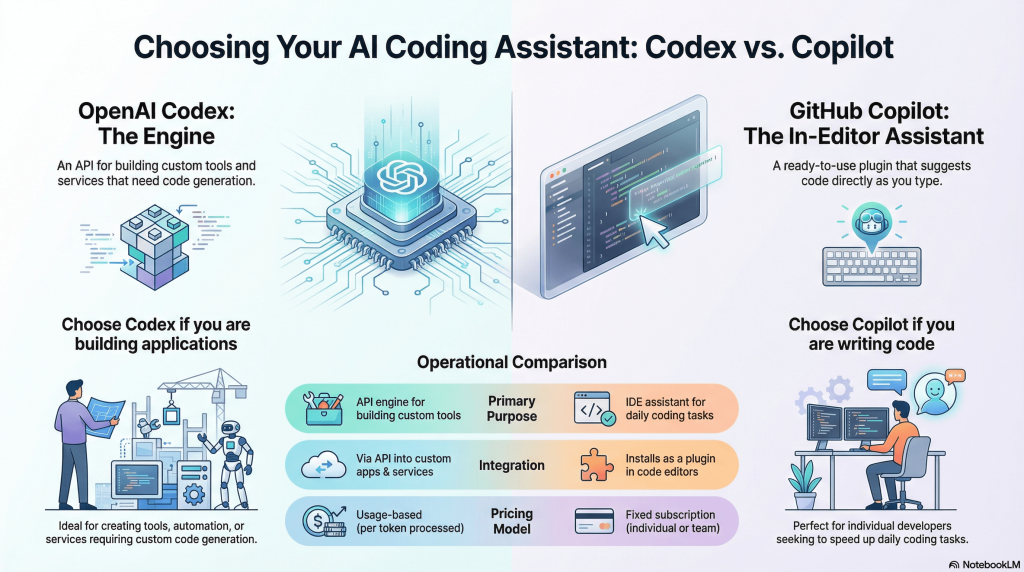
OpenAI Codex is an API-first AI, built to work inside other apps. Developers use Codex to make services that create or understand code from plain language prompts. GitHub Copilot, however, is a ready tool for programmers. It works inside code editors to make manual coding faster.
Codex requires programming knowledge to access via API keys and then integrate into tools or workflows. This makes it suitable for developers building coding-related products. Copilot, conversely, installs as an extension in IDEs, providing instant coding help without additional setup, perfect for daily programming tasks.
Codex responds to explicit requests, returning code snippets or scripts based on input text or data. Copilot, on the contrary, works interactively, continuously offering suggestions while a developer writes code, anticipating needs in real time.
Codex offers great flexibility since users decide how to use the API, whether for code generation, code completion, or language translation. Copilot, contrarily, focuses on convenience. It streamlines writing by embedding AI suggestions within the existing workflow of an IDE.
Codex is billed per API usage, based on the volume of tokens processed. This model suits products with variable demand. Copilot, however, charges a fixed subscription fee to individual developers or teams.
Both Codex and Copilot support similar languages since Copilot runs on Codex, including Python, JavaScript, Ruby, Go, Java, and more. But Copilot’s tips may sometimes focus more on popular languages and common coding habits in supported editors.
Codex users can choose how AI-made code fits into their apps, adjust inputs, and filter outputs in detail. Copilot’s changes, however, are limited to editor settings and feedback options to improve its tips.
Copilot emphasizes ease of use and speed, giving developers confidence with instant suggestions based on their editing context. Codex, however, requires more time investment, as it often powers back-end systems rather than end-user experiences.
When deciding between Copilot vs Codex, think about what you need from an AI coding helper. If you are a developer or team wanting code tips inside your editor with no extra setup, GitHub Copilot is the best pick.
However, if you build developer tools, applications, or services that require automated code generation or translation in varied workflows, then OpenAI Codex offers unmatched flexibility.
Both tools leverage the same foundational AI but serve different audiences and purposes. Viewing GitHub Copilot vs OpenAI Codex isn’t about which is better, it is more about matching the tool to your setup and needs.
Conclusion
Knowing the aforementioned differences between Codex vs Copilot can help programmers and teams choose the right assistant for their coding needs. For, in the end, the choice lies in your hands and nobody else’s. And we will leave it to you to decide.
Is it then the right time to ask ‘which one of them is it for you’ or not?


Explore Topics

Consult with Our Techjockey Expert
Connect for fast and scalable software delivery, corporation plans, advanced security, and much more.
Compare Popular Software
Generative AI vs Machine Learning: A Complete Comparison
January 25, 2026

How brands benefit from Generative AI for Marketing?
December 30, 2025

7 Best Enterprise Generative AI Tools For Your Business
December 10, 2025

How To Choose The Best AI Governance Tool?
November 27, 2025


Get the latest Techjockey US Blog Updates!
Subscribe to get the first notified about tech updates directly in your inbox.

 Previous