linkedin
PDFsam Basic logo
play How To Use PDFsam Basic To Merge and Split PDF Files, Plus More

PDFsam Basic

Brand: Sober Lemur

  • 4.2

  • 3 Ratings

Simplify your PDF tasks with PDFsam Basic—easily split, merge, rotate, and extract files for all your personal and professional needs.

See More

Have you used PDFsam Basic before?

Share your insights for better experience

Add a Review

Free Forever

Get started immediately at no cost. Upgrade anytime if your business demand more.

100% Genuine
Products
Best Price
Guaranteed
Safe & Secure
Payment
  • Description

  • Pricing

  • Features

  • Specification

  • Review

  • Compare

  • Alternatives

  • FAQ

PDFsam Basic Software Overview

What is PDFsam Basic Software?

PDFsam Basic is a versatile PDF software designed for easy and efficient file manipulation. With this tool, you can effortlessly split, merge, rotate, and extract content from your PDF files, catering to both personal and professional tasks. The user-friendly interface ensures that you can perform these operations with absolute ease, making PDF management a cakewalk.

One notable advantage of PDFsam Basic is its commitment to data security. Unlike some alternatives, you don't need to upload your PDF files to a third-party service. This ensures that your sensitive documents remain securely on your computer throughout the entire process. Also, the software excels at producing high-quality resolution PDF files, ensuring that the output meets the standards of professional document management.

Key Functionalities of PDFsam Basic

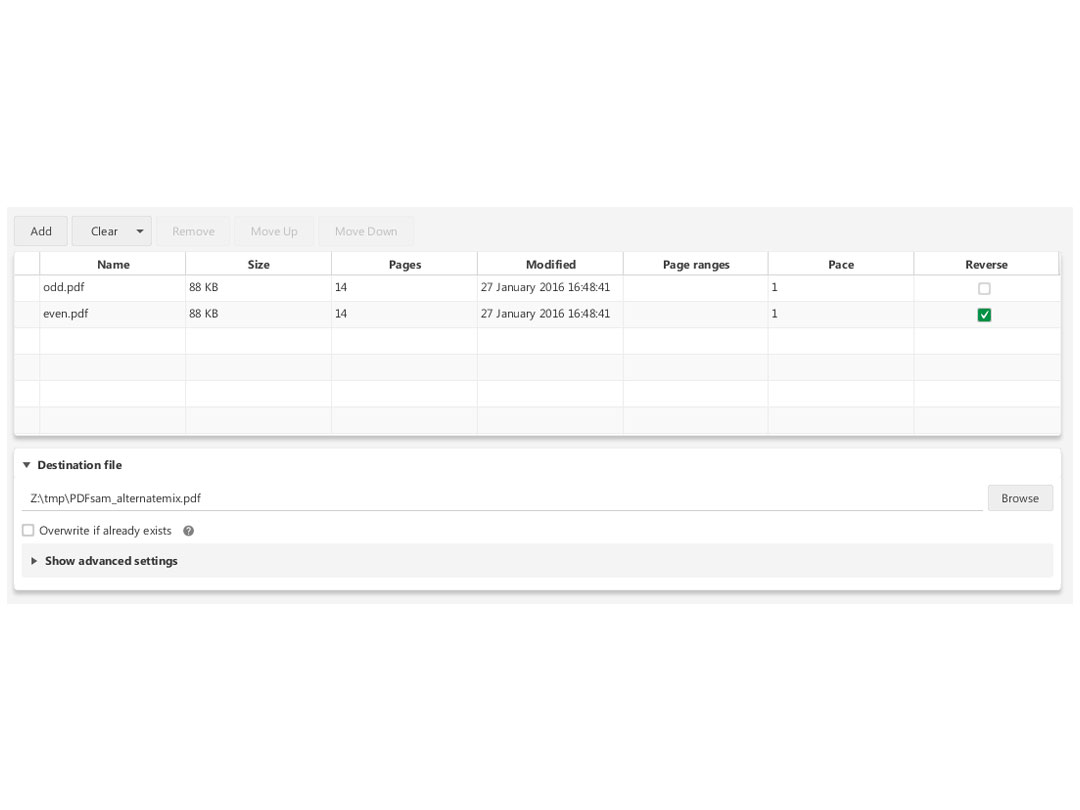
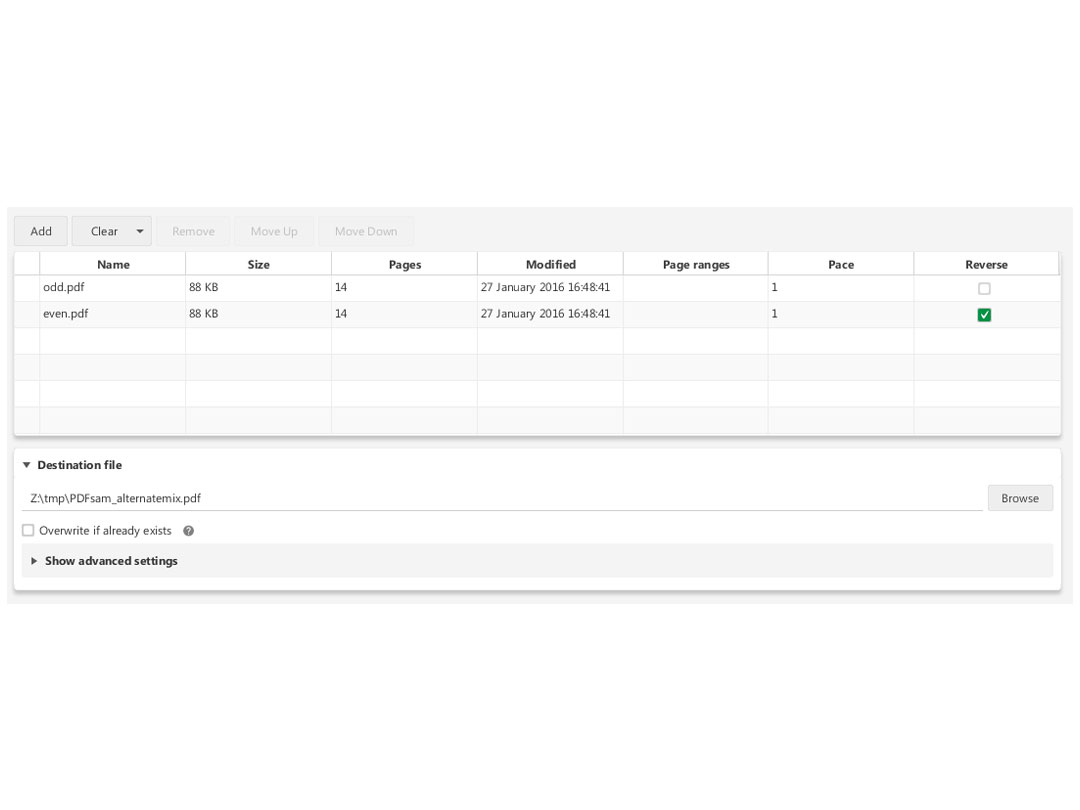
  • Drag and Drop Files: Easily initiate PDFsam Basic by dragging and dropping the files you want to merge, mix, or split.
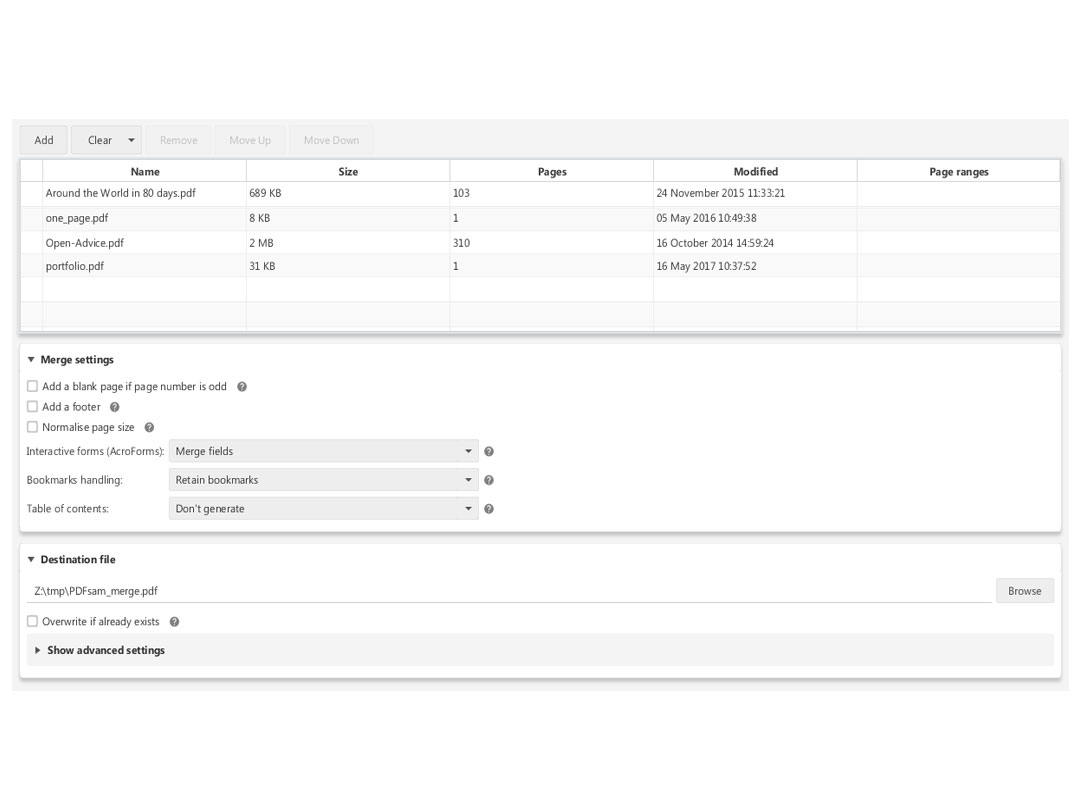
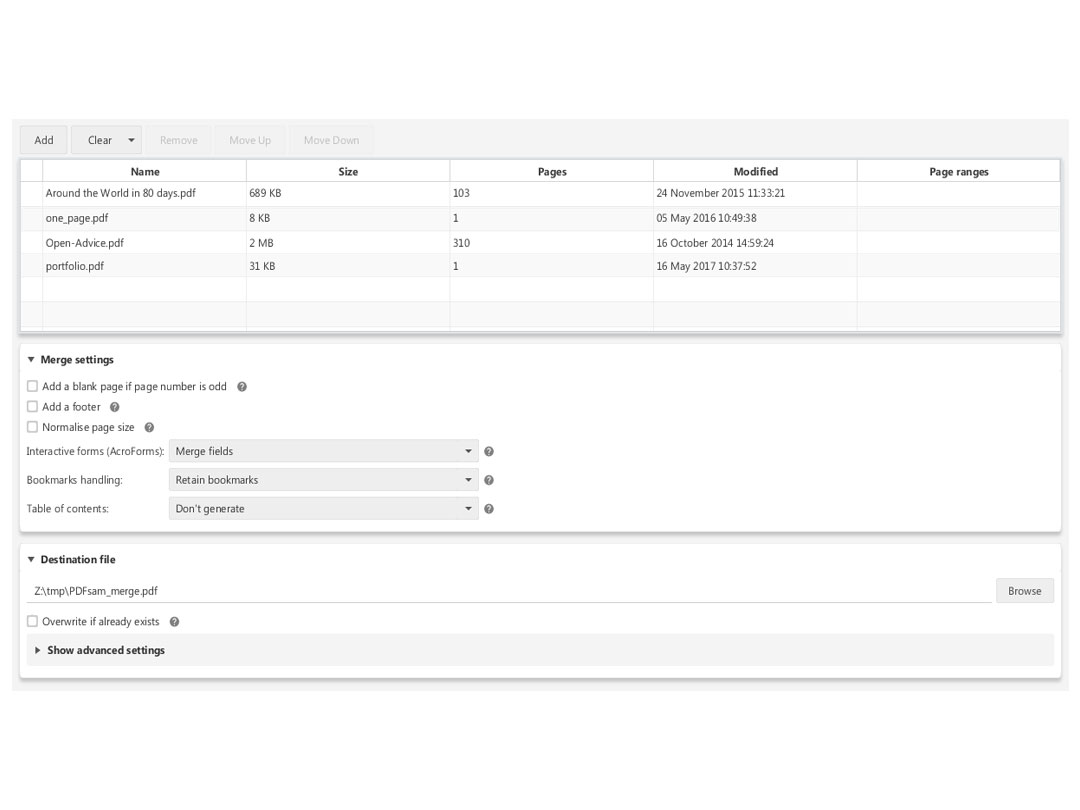
  • Arrange Files Effortlessly: Click the add button and use intuitive move up and down buttons or right-click options to arrange files in the desired order.
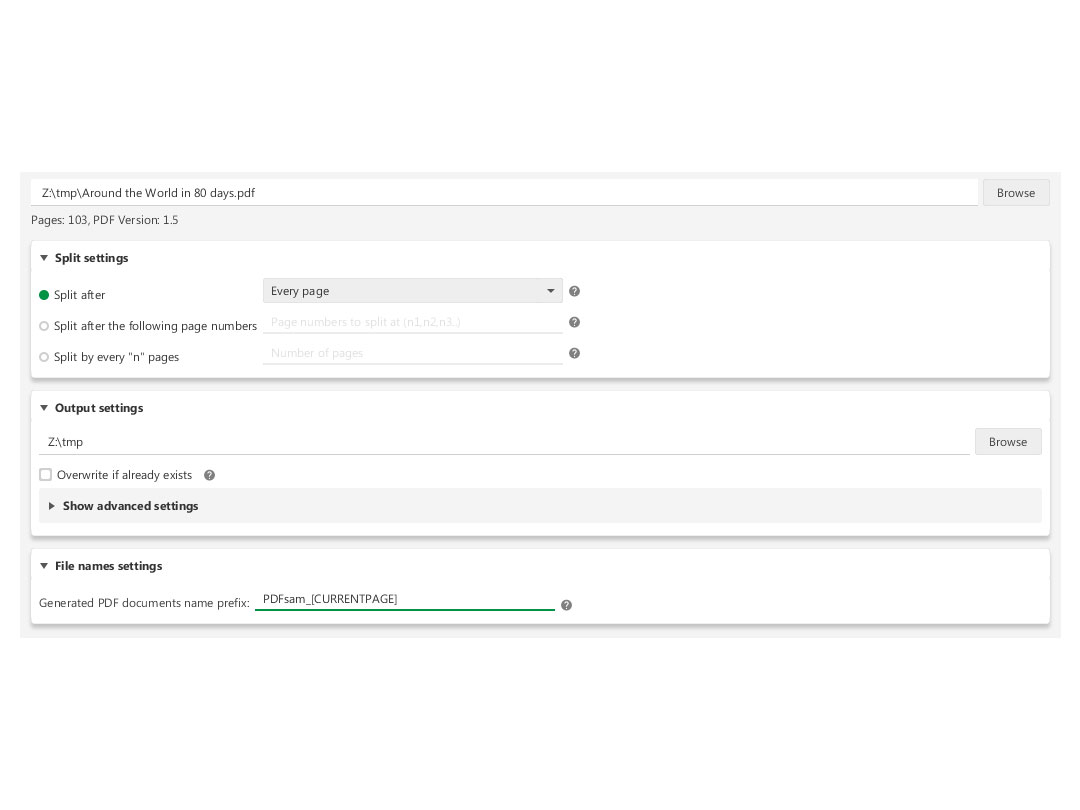
  • Split by Page Number: Utilize the split by page number feature to precisely divide your PDF file into specific pages.
  • Split by Size: Take advantage of the split by size feature to break down your PDF into smaller files of a specified size.
  • Choose Save Location: Select the location where you want your customized files to be saved, ensuring easy accessibility.
  • Create Accessible File Names: Customize file names for easy identification and organization.
  • Simple Saving Process: After customizing options, click 'run' to initiate the saving process effortlessly.

Why Choose PDFsam Basic?

  • User-Friendly Operation: PDFsam Basic stands out for its simplicity, making it easy for anyone to split, merge, or combine PDF files quickly.
  • Safety Assurance: The software ensures a safe PDF management experience, prioritizing the security and privacy of your files.
  • Customizable Page Sizes: Enjoy the flexibility to customize page sizes, ensuring consistency in the downloaded PDF files according to your preferences.
  • Smooth Handling of Large Files: PDFsam Basic excels at handling large files seamlessly, without the hassle of crashes or lags.
  • Reliable Performance: As a free and open-source PDF software, PDFsam Basic consistently delivers reliable performances, making it a dependable choice for your PDF management needs.

Benefits of PDFsam Basic

  • Merge Various Elements: PDFsam Basic excels at merging not just documents but also bookmarks and interactive forms, providing a comprehensive solution.
  • Versatile Splitting and Extraction: Enjoy the flexibility to split, extract pages, and rotate your PDF files with ease, enhancing document customization.
  • Cross-Platform Compatibility: Whether you're using Windows, Mac, or Linux, PDFsam Basic ensures compatibility across different operating systems for seamless use.
  • No Installation Hassle: The software eliminates the need for installation; as long as you have Java, you can swiftly use PDFsam Basic without any additional setup.
  • Efficient Presentation Creation: PDFsam Basic offers a quick and straightforward method to assemble and organize content for compelling presentations, saving a lot of time and effort.

Pricing of PDFsam Basic Software

PDFsam Basic is available for free in the United States on techjockey.

Read more

Sober Lemur Company Details

Founded Year:  2023

PDFsam Basic is a PDF software that can easily split your PDF files, mix, merge, rotate and even extract them for personal or professional tasks.

Director/Founders Sober Lemur
Company Size 1-100 Employees

PDFsam Basic Pricing & Plans

This Product is Available Free Forever.

Start instantly with no fees, no subscriptions, and no commitments.

  • Full access to basic version available
  • No credit card or sign-up required

Free Forever Plan

Get started immediately at no cost. Upgrade anytime if your business demand more.

Free Forever

PDFsam Basic Features

  • icon_check Merge/Append Files
    Combine and append multiple files effortlessly with PDFsam Basic's Merge/Append Files feature.
  • icon_check Bookmarks
    Seamlessly integrate bookmarks into your PDFs using PDFsam Basic's Bookmarks feature.
  • icon_check AcroForms
    PDFsam Basic supports AcroForms, ensuring compatibility with interactive forms within your PDF documents.
  • icon_check PDF split
    Using page numbers and bookmark locations, divide your PDFs into separate pages of specific sizes.
  • icon_check PDF mix
    To make reviewing numerous PDF files easier, combine them into a single file.
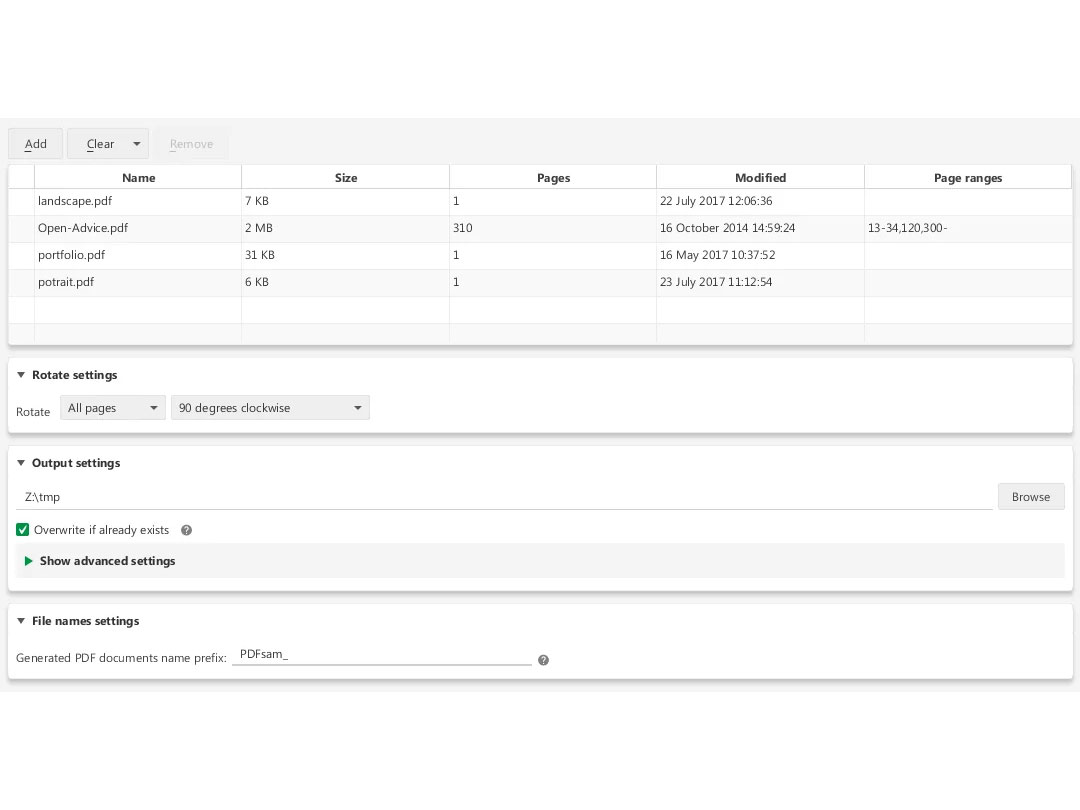
  • icon_check Rotate PDF
    Rotate a single page, the complete document, or several files in bulk.
  • icon_check Extract pages
    Extract specific pages from your PDF documents seamlessly with this feature.
PDFsam Basic Demo Video play icon

Get PDFsam Basic Demo

Watch the demo video to explore key features, real workflows, and how the software fits your business needs.

Understand
Key Features
Personal
Demo Insights
Interactive
Demo Support

PDFsam Basic Specifications

Supported Platforms
Windows Windows MacOS MacOS
Devices
Desktop Desktop Mobile Mobile
Deployment
Cloud-Based Cloud-Based
Suitable For
All Industries
Business Specific
All Businesses
Business Size
Small Business Startups Medium Business Enterprises SMBs SMEs MSMEs
Customer Support
Email Communities
Language
English
Training Resources
Documentation Videos

Explore the Best Alternative Solutions Similar to Your Business Size and Needs

Enterprises

Designed for complex and large-scale business needs

Sejda PDF

4.8

XODO

4.4

UPDF

4.4

See More

PDFsam Basic Review

4.2

Out of 5

img

Overall Rating

Based on
3 Verified Ratings

Rating Breakdown

  • Features 4.8
  • Value for Money 3.8
  • Ease of Use 3.6
  • Customer Support 4.5

86% Recommend this Product

Add Review

Techjockey Trusted Reviews from Verified Users

No reviews are currently available for PDFsam Basic. Discover similar PDF Software reviews
  • Nuance Power PDF

    4.4

    Whats great - Robust editing tools and secure document handling. read more
  • Kofax Power PDF

    4.3

    Whats great - Robust editing tools and secure document handling. read more
  • Sejda PDF

    4.8

    Whats great - This platform is so user-friendly. The best part is that it keeps the original formatting and allows you to edit in a way tha... read more

Compare PDFsam Basic With other PDF Software

Products
Ratings
Pricing
Device Supported
Deployment
Supported Platforms
  • img

    PDFsam Basic

  • 4.2

  • FREE

  • Desktop

    Mobile

  • Web based

    On Premises

  • Windows

    Mac OS

  • img

    PDF Expert

  • 4.4

  • Price On Request

  • Desktop

    Mobile

  • Web based

    On Premises

  • Windows

    Mac OS

  • img

    Zoho PDF Editor

  • 4.3

  • Price On Request

  • Desktop

    Mobile

  • Web based

    On Premises

  • Windows

    Mac OS

  • img

    PDFCreator

  • 4.3

  • Price On Request

  • Desktop

    Mobile

  • Web based

    On Premises

  • Windows

    Mac OS

  • img

    Gravity PDF

  • 4.3

  • Price On Request

  • Desktop

    Mobile

  • Web based

    On Premises

  • Windows

    Mac OS

  • img

    LightPDF

  • 4.5

  • Price On Request

  • Desktop

    Mobile

  • Web based

    On Premises

  • Windows

    Mac OS

  • img

    Sejda PDF

  • 4.8

  • Price On Request

  • Desktop

    Mobile

  • Web based

    On Premises

  • Windows

    Mac OS

  • img

    CutePDF

  • 4.4

  • Price On Request

  • Desktop

    Mobile

  • Web based

    On Premises

  • Windows

    Mac OS

  • img

    Kofax Power PDF

  • 4.3

  • Price On Request

  • Desktop

    Mobile

  • Web based

    On Premises

  • Windows

    Mac OS

  • img

    EaseUS PDF Editor

  • 4.4

  • Price On Request

  • Desktop

    Mobile

  • Web based

    On Premises

  • Windows

    Mac OS

  • img

    PDFSimpli

  • 4.5

  • Price On Request

  • Desktop

    Mobile

  • Web based

    On Premises

  • Windows

    Mac OS

(0) Product(s) selected

PDFsam Basic Alternatives

See All PDFsam Basic Alternatives

Starting Price:

₹25.83 /year

Starting Price:

AUD199.00 /Year

Starting Price:

$19.99 /Month

Starting Price:

$66.65 /Year

Starting Price:

$20.00 /Month
Available

Price on Request

Starting Price:

$49.00 /Lifetime
Starting Price:

$6.00 /Month
Starting Price:

$7.00 /Month

Which operating system does PDFsam Basic Software Support?

PDFsam Basic software is compatible with Windows and MacOS systems.

Is there any PDFsam Basic App?

Yes, PDFsam Basic's app is available for iOS mobile devices.

What is the deployment type of PDFsam Basic System?

PDFsam Basic system supports web-based deployment.

How much does PDFsam Basic Software Cost?

PDFsam Basic is available for free in the United States on techjockey.com.

Who are the potential users of PDFsam Basic?

PDFsam Basic Software is typically used in all businesses and industries.

Is there any free trial or demo for PDFsam Basic Solution?

Yes, PDFsam Basic solution free demo is available at techjockey.com.

Is PDFsam Basic Software Free?

PDFsam Basic Software offers a free trial. However, the premium plan with advanced features is available at techjockey.com with exciting deals.

How can you download PDFsam Basic?

PDFsam Basic software installation is not required, as it is web-based. Just open the Setup Wizard to get started.

How does PDFsam Basic Work?

Simplify your PDF tasks with PDFsam Basic—easily split, merge, rotate, and extract files for all your personal and professional needs.

Terms and Condtions

close

Users with registered businesses can purchase goods from merchants on the platform to satisfy their business needs. Users are not permitted to utilize any products acquired through the platform for resale, advertising, business, or further distribution.

For each purchase made, users will receive a Tax Invoice (or 'GST invoice') that includes specific details such as:

  • the GSTIN of the user associated with their registered business, and

  • the specified Entity Name for their business.

It should be noted that not all products are eligible for GST Invoice. Only the products displayed by participating sellers with the 'GST-based Invoice Available' callout on the product description page would qualify.

Certain goods and services are not eligible to get a GST Invoice, including items with VAS, i.e., Value Added Services (e.g., Total Mobile Protection/Assured Buyback) and those involving an exchange offer at the time of purchase.

Users must ensure the accuracy of the GSTIN, and business entity name provided for the GST Invoice. Requests for corrections into GST Invoice would not be accommodated by Techjockey.com or any Seller, and any issues arising from user-provided information are the sole responsibility of users.

Techjockey.com is not liable for the GST Invoice or any associated input tax credit. To efficiently claim an input tax credit, users should select the registered place of business address as per the GST authority's data and follow the provisions of the GST Act and rules.

To claim an input tax credit, the delivery and billing addresses must match. Furthermore, input tax credits will not be granted if the delivery address and GSTIN on the invoice are from different states. In case of incorrect GST details provided during the order placement, the order will be canceled automatically.

20,000+ Software Listed 20,000+ Software Listed

Best Price Guaranteed Unbiased Comparison

Free Expert Consultation Read Authentic Reviews

2M+ Happy Customers 500,000+ Monthly Users