linkedin
background
Tableau logo

Tableau

Brand: Salesforce

4.1

5 Ratings

Have Questions?

Tableau is used for data visualization and analytics, enabling users to create interactive and insightful dashboards from various data sources without requiring extensive programming skills. It offers intuitive drag-and-drop features and powerful analytics capabilities for businesses to gain valuable insights from their data. ...Read more

img

Get Free Expert Consultation

Let us know your business needs clearly

Advice

Verified & Trusted
Vendors

Payment

Safe & Secure
Payment

Guaranteed

Personalized
Experts Support

Price On Request

Features

  • check_icon Data Visualizations
  • check_icon Dashboard Authoring
  • check_icon Drag and Drop Functionality
  • check_icon Data Connection
  • check_icon Data Extraction
  • See all img

Tableau Software Pricing, Features & Reviews

What is Tableau?

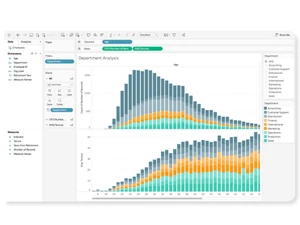
Tableau is a dashboard software designed for data visualization and analytics, empowering users to transform raw data into interactive and visually appealing dashboards. With its intuitive drag-and-drop interface and robust analytics features, Tableau enables users to explore and analyze data from multiple sources effortlessly.

This data analytics software supports a wide range of data formats and offers powerful visualization options, including charts, graphs, maps, and more. Tableau facilitates insightful decision-making by allowing users to uncover patterns, trends, and relationships within their data quickly. It caters to various industries and business functions, providing a flexible and scalable solution for organizations of all sizes. Additionally, Tableau offers seamless integration with other data tools and platforms, enhancing workflow efficiency and collaboration.

Why Choose Tableau Dashboard Software?

  • Powerful Data Visualization: It offers advanced data visualization capabilities, allowing users to create interactive and visually compelling dashboards that help in gaining insights from complex datasets.
  • Ease of Use: With its intuitive drag-and-drop interface and user-friendly design, It makes it easy for users of all skill levels to create insightful visualizations without the need for extensive technical expertise or coding knowledge.
  • Data Integration: It seamlessly integrates with a wide range of data sources, including databases, spreadsheets, cloud services, and big data platforms, enabling users to access and analyze data from multiple sources in one place.
  • Robust Analytics: It provides powerful analytics features, including advanced calculations, forecasting, and statistical analysis, allowing users to perform in-depth analysis and uncover hidden patterns and trends in their data.
  • Scalability: It is highly scalable and can be deployed across organizations of all sizes, from small businesses to large enterprises, allowing for seamless growth and expansion as data needs evolve.
  • Community and Support: It has a vibrant user community and extensive support resources, including forums, tutorials, and training programs, providing users with access to valuable knowledge and assistance to maximize the software's potential.

Benefits of Tableau Software

  • Real-Time Data Analysis: It allows users to analyze and visualize data in real-time, enabling timely decision-making and responsiveness to changing business conditions.
  • Mobile Accessibility: With its mobile app, users can access and interact with dashboards on-the-go, ensuring that critical insights are available anytime, anywhere.
  • Customizable Dashboards: It offers extensive customization options for dashboards, allowing users to tailor visualizations to their specific needs and preferences.
  • Interactive Exploration: Users can interact with visualizations, drilling down into data details, filtering information, and exploring different perspectives to uncover deeper insights.
  • Data Security: It provides robust data security features, including encryption, access controls, and user authentication, ensuring that sensitive data remains protected.
  • Integration with Existing Systems: It seamlessly integrates with existing systems and workflows, allowing users to leverage their existing data infrastructure and maximize return on investment.
  • Predictive Analytics: It includes advanced predictive analytics capabilities, enabling users to forecast trends, identify opportunities, and make data-driven predictions for future outcomes.

Pricing Of Tableau

Tableau pricing is available on request at techjockey.com.

The pricing model is based on different parameters, including extra features, deployment type, and the total number of users. For further queries related to the product, you can contact our product team and learn more about the pricing and offers.

Tableau Pricing & Plans

Tableau price is available on request

Looking for pricing details, customization requirements or have other queries? We are just a click away.

Get Tableau Demo

We make it happen! Get your hands on the best solution based on your needs.
Interacted

Tableau Features

  • icon_check Data Visualizations Create charts, graphs, and maps from connected data sources to reveal patterns, trends, and outliers clearly.
  • icon_check Dashboard Authoring Combine multiple visualizations into a single interactive dashboard for monitoring metrics and business performance.
  • icon_check Drag and Drop Functionality Build views by dragging fields onto shelves, letting users create analyses without writing code or SQL.
  • icon_check Data Connection Connect to spreadsheets, databases, cloud services, and files to analyze data from many sources in one workspace.
  • icon_check Data Extraction Use in-memory extracts to improve performance, support offline analysis, and reduce load on source systems.
  • icon_check Calculated Fields Create custom metrics and logic with formulas that transform raw fields into analysis-ready measures and dimensions.
  • icon_check Parameters Let users define values dynamically to switch metrics, control thresholds, or update calculations during analysis.
  • icon_check Geospatial Mapping Plot geographic data on maps to analyze location-based patterns, regions, territories, and spatial trends.
  • icon_check Business Forecasting Project future values from historical data using built-in forecasting methods inside visual analysis.
  • icon_check Data Blending Combine fields from multiple data sources in one analysis when data is not stored in a single table.
  • icon_check Data Preparation Clean, reshape, and combine data before analysis to improve consistency, completeness, and usability.
  • icon_check Row Level Security Restrict data visibility by user or group so each viewer only sees records they are authorized to access.

Tableau Specifications

  • Supported Platforms :
  • Device:
  • Deployment :
  • Suitable For :
  • Business Specific:
  • Business Size:
  • Customer Support:
  • Integration:
  • Training:
  • Language:
  • AI Features:
  • Ubuntu Windows iOS Android MacOS Linux
  • DesktopMobileTabletiPad
  • Web-Based, Perpetual
  • All Industries
  • All Businesses
  • Small Business, Startups, Medium Business, Enterprises, SMBs, SMEs, MSMBs, MSMEs
  • Email, Communities
  • API Integration
  • Webinars, Documentation, Videos
  • English
  • AI Integrated

Tableau Reviews and Ratings

banner

Would you like to review this product?

Submit Reviews

Salesforce Company Details

Brand Name Salesforce
Information We're Salesforce, the customer company. CRM + Data + AI + Trust.
Founded Year 1999
Director/Founders Adam Evans, Halsey Minor, Marc Benioff, Max Comparetto, Parker Harris
Company Size 1000+ Employees
Other Products Salesforce CRM, Pardot, Salesforce Field Service, Agentforce Net Zero

Tableau FAQ

A Tableau Software is compatible with Ubuntu, Windows, Linux, iOS, Android and MacOS devices.
A Yes, Tableau Software app is available for Android and iOS app users.
A Tableau Dashboard Software supports web-based deployment.
A Tableau pricing is available on request at techjockey.com.
A Tableau Software is typically used by Manufacturing, Education, Healthcare, Retail, Tours and Travels , Insurance, Governments, Banking for data visualization and analytics.
A Free demo of Tableau is available at techjockey.com.
A Tableau Software is not available for free. You can connect with our product experts to know more about the pricing plans.
A Tableau Software does not offer a free trial.
A Tableau Software installation is not required, as it is web-based. Just open the Setup Wizard to get started.
A Tableau software works by enabling users to connect to various data sources, create visualizations, and analyze data to gain insights and make informed decisions.

Tableau Alternatives

See All