linkedin
Dynamics 365 Business Central logo
play Microsoft Dynamics 365 Business Central overview
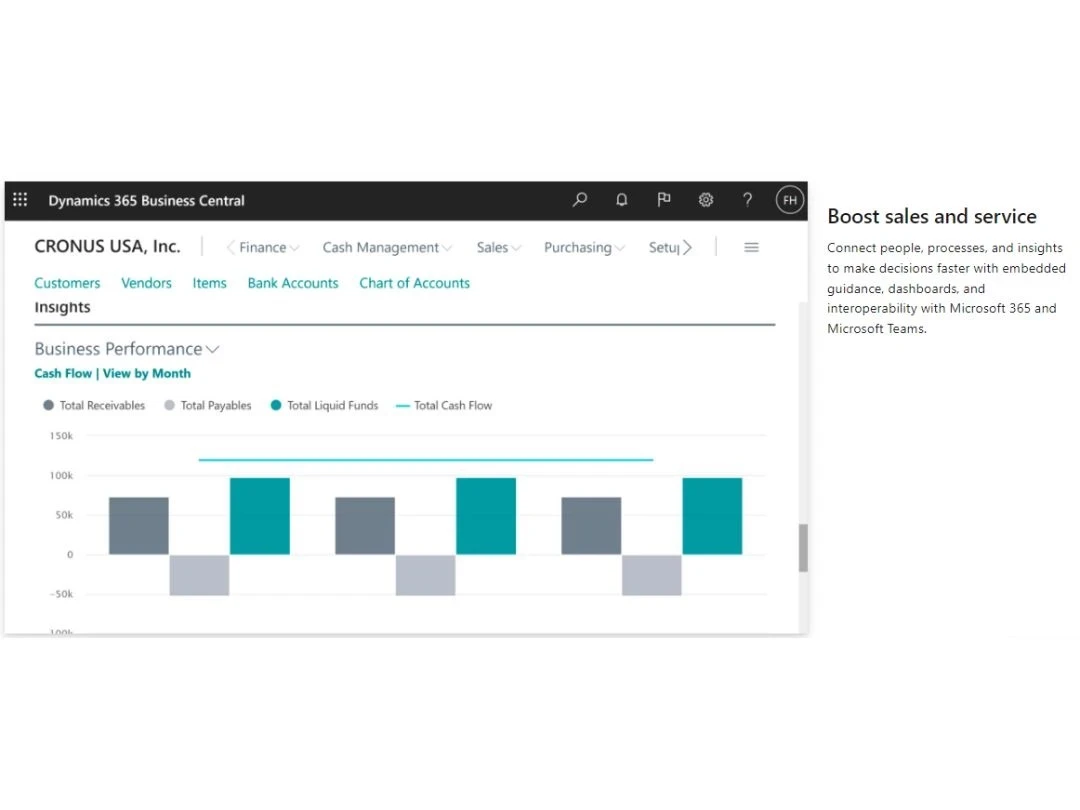
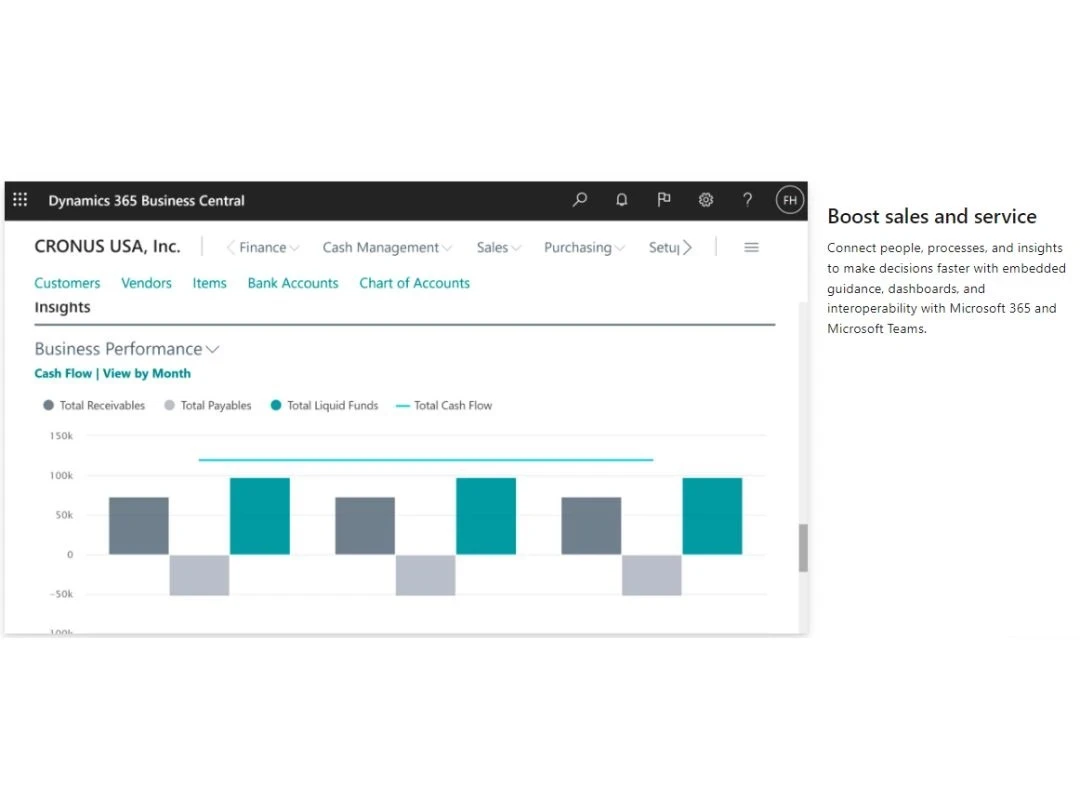
Dynamics 365 Business Central-Boost sales & service
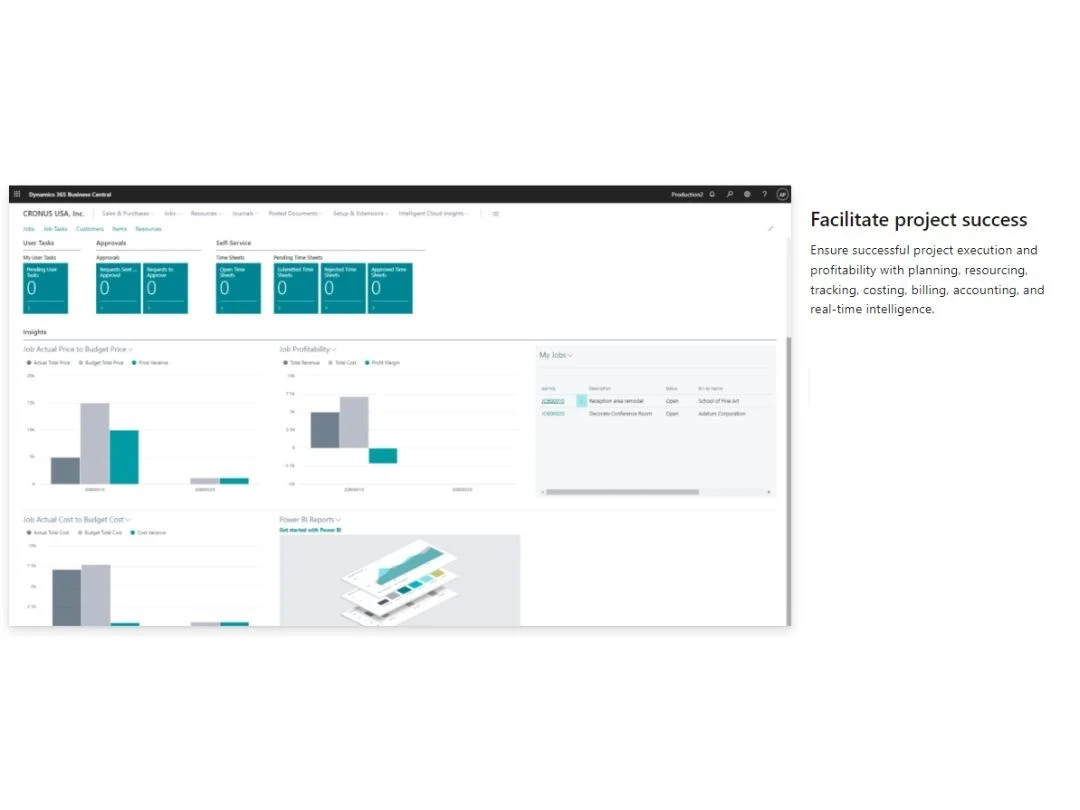
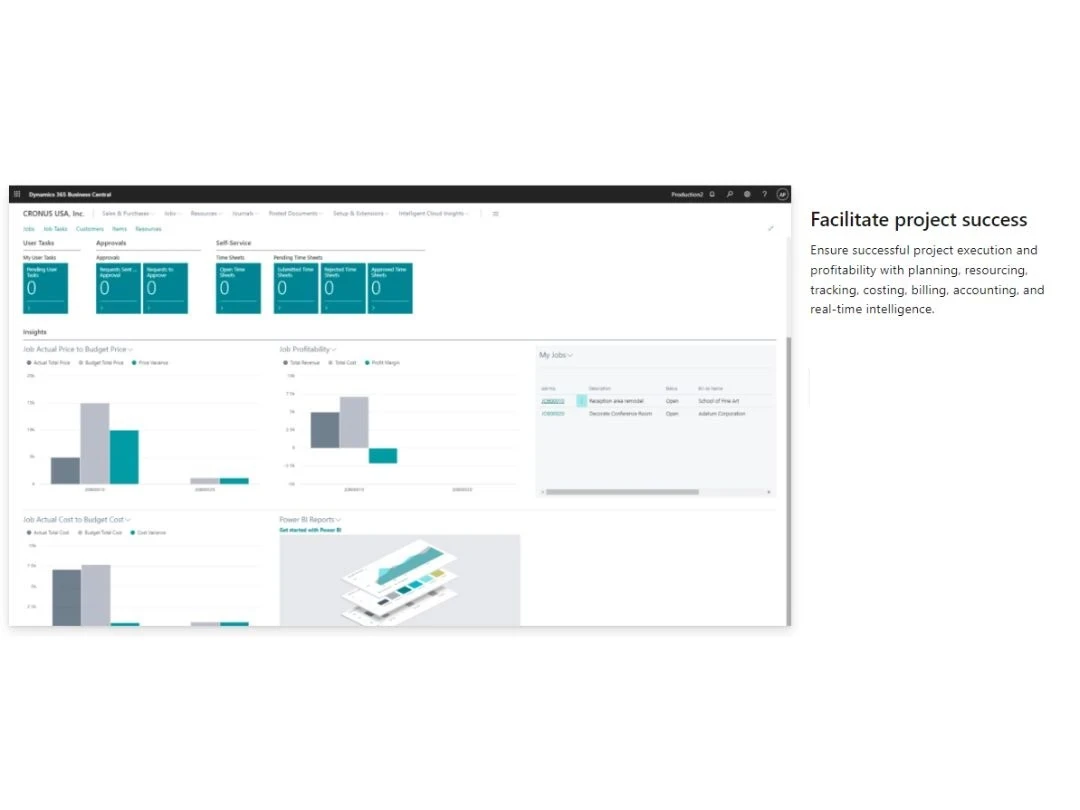
Dynamics 365 Business Central-Facilitate project success

Dynamics 365 Business Central

Brand: Microsoft Corporation

  • 4.4

  • 21 Ratings & 21 Reviews

Microsoft Dynamics 365 Central is a comprehensive business management platform. It brings different business operations to the cloud and ensures better collaboration among teams. Microsoft Business central dynamics provides smart insights to help employees achieve higher productivity and achieve project deadlines. This cloud solution also assists in inventory and supply chain management, ensuring...

See More

Have you used Dynamics 365 Business Central before?

Share your insights for better experience

Add a Review

Price Available on Request

Questions about pricing or customization? We’re here to help, just a click away.

100% Genuine
Products
Best Price
Guaranteed
Safe & Secure
Payment
  • Description

  • Pricing

  • Features

  • Specification

  • Review

  • Compare

  • Alternatives

  • FAQ

Dynamics 365 Business Central Software Overview

What is Microsoft Dynamics 365 Business Central?

Microsoft Dynamics 365 Central is a comprehensive business management platform. It brings different business operations to the cloud and ensures better collaboration among teams. Microsoft Business central dynamics provides smart insights to help employees achieve higher productivity and achieve project deadlines. This cloud solution also assists in inventory and supply chain management, ensuring higher profitability.

Many SMBs have moved to the cloud with Microsoft Dynamics 365 Business Central to benefits from data connectivity and business intelligence. The interoperability with Office 365 and MS Teams helps different departments be on the same page and explore limitless possibilities.

Why Use Microsoft Dynamics 365 Business Central?

  • Operational flexibility: This business management solution is an extendable solution that can be tailored according to the business needs.
  • Optimal performance: It ensures fast reporting & cycle times and role-based workspaces for improving productivity.
  • Actionable insights: This platform supports inbuilt business intelligence for performing data visualizations in real-time and forecasting sales performance.

Benefits of Microsoft Dynamics 365 Business Central

  • Flexible deployment for moving to the cloud and adapting to any business environment
  • Business insights & embedded guidance that connect people & processes for faster decisions
  • Higher sales and better customer service as you can manage the entire process through Microsoft Outlook
  • Timely project completion with real-time intelligence, costing, billing, accounting & tracking
  • Increased financial visibility & performance with performance metrics in real-time
  • Complete business visibility for optimized supply chain and inventory management

Key Financial Management Capabilities of Dynamics 365 Business Central

  • Power BI reports, charts, and refreshable Excel data for managing general ledger
  • Dimensions for analyzing ledger and prioritizing the default values
  • Multiple currency support for receivables, payables, payments, and transactions
  • Enhanced calculation capabilities for importing budget information into Excel
  • Account schedules for comparing historical and current budget figures
  • Option for consolidating data from business central tenet & pulling it
  • Intercompany posting for looking after the accounts of more than one company
  • Cash flow forecasts for forecasting a company’s liquidity
  • Fixed assets tracking, maintenance, and allocation
  • Cost accounting for defining the hierarchy of cost objects and cost centers
  • Deferral templates for managing deferring expenses and revenues
  • XBRL (Extensible Business Reporting Language) format for exporting documents

Key Cash Management Capabilities of Dynamics 365 Business Central

  • Easy to manage multiple bank accounts and cater to diverse business needs
  • Electronic payment & direct debit for preparing vendor proposals
  • Quick payment processing and reconciliation of bank transactions
  • Bank account reconciliation for opening an account’s ledger entries

Key Sales & Marketing Capabilities of Microsoft Dynamics 365 Business Central

  • Contact, campaign, and document management capabilities
  • Microsoft exchange server for email logging
  • Opportunity management for tracking sales opportunities
  • Integration between Microsoft Central and Sales for streamlining lead to cash processes
  • Sales line pricing, discount, invoice, and order management
  • Microsoft Booking for managing bulk invoices
  • Helps create sales return orders

Key Purchase and Payable Management Capabilities of Dynamics 365 Business Central

  • Paste, print, and set up purchase invoices and manage purchase & blanket orders
  • Purchase line and invoice discounting
  • Vendor catalog items for registering non-stock items

Key Inventory Management Capabilities of Dynamics 365 Business Central

  • Basic inventory for setting up stock items and specifying their properties
  • Item tracking by assigning lot and aerial serial numbers
  • Management of inventory & stock-keeping units in multiple locations
  • Item cross-references for storing customer, vendor, and manufacturer information
  • Item substitutions for linking items & showing suggested alternatives
  • Defining purchase & sales budget at the item, vendor, and customer level
  • Analysis reports for product portfolio management
  • Cycle counting system for verifying inventory records

Key Supply Management Capabilities of Dynamics 365 Business Central

  • Supply planning for material requirements for balancing supply and demands
  • Demand forecasts for components and products
  • Sales & inventory forecasting for detailed insights into potential sales
  • Order promising ensures accurate order shipments
  • Order planning for all types of demands

Key Project & Service Management Capabilities of Dynamics 365 Business Central

  • Tracking prices & resources for registering and allocating resources
  • Capacity management for checking usage statistics
  • Managing the alternative cost of resource groups and resources
  • Flexible timesheets
  • Planning & dispatching of work orders for handling work status
  • Setting up of service contracts for maintaining contract renewals and histories
  • Recording of all service items with Trendscape analysis feature
  • Registering post-sales issues for looking after service orders
  • Setting up price groups for monitoring the service prices

Key Warehouse Management Capabilities of Dynamics 365 Business Central

  • Bin for organizing warehouses and defining their layout
  • Inventory pick and put away for preparing pick lists
  • Warehouse receipts for a multi-order environment
  • Key Manufacturing Management Capabilities of Dynamics 365 Business Central
  • Assembly management for specifying a list of sellable items
  • Standard cost worksheet for establishing accurate inventory costs
  • Bill of materials for calculating standard costs
  • Basic capacity planning for work centers in a manufacturing unit
  • Easy to add as capacities the machine centers
  • Version management for manufacturing bills of routings and materials
  • Finite loading of capacity-constraint resources

Key Relationship Management Capabilities of Dynamics 365 Business Central

  • Powerful AI-powered insights into customers behavioral, transactional, and demographic patterns
  • Enhanced customer profiles with direct customer reviews, feedback, and survey data.
  • Audience Insight and Engagement Insight using digital analytics
  • Consent enabled tracking compliant to government regulation
  • Automated alerts and Customizable workflows for seamless customer experience
  • System requirement for Dynamics 365 Business Central

Dynamic 365 Business Central Recommended System Requirement

Dynamic 365 Business Central Recommended System Requirement  

Operating System 

Windows 10 10240.0 or later, Xbox 

Architecture 

x86, ARM, x64 

RAM 

4 GB or Higher 

Graphics 

Intel HD (any) 

Touch, Mouse, keyboard, or Camera 

Integrated 

What Is The Difference Between Dynamics 365 Business Central Essentials And Dynamics 365 Business Central Premium?

Here’s a quick summary of the difference between Microsoft Dynamics 365 Business Central Essentials & Premium.


Dynamics 365 Business Central Essentials vs Dynamics 365 Business Central Premium
Dynamics 365 Business Central Essentials Dynamics 365 Business Central Premium
  • Unlimited users 
  • Unlimited number of companies 
  • Extensibility & customization 
  • Multi-environment 
  • Finance management 
  • Sales & marketing 
  • Sales & delivery 
  • Purchasing & payables 
  • Inventory management 
  • Supply planning & availability 
  • Project management 
  • Warehouse management 
  • All functionalities of Dynamics 365 Business Central Essentials 
  • Manufacturing management 
  • Service management 


How Does Microsoft Dynamics 365 Business Central Work?

The latest version of Microsoft Dynamics 365 Business Central is primarily used for warehouse, finance, purchase, and sales management. It has an intuitive interface and is simple to use. Microsoft Dynamics 365 Business Central can be easily integrated with your existing systems to ensure a smooth workflow. For more information, you can also refer to user manuals and take online Microsoft Dynamics 365 Business Central demo at Techjockey.com.

How to Use Microsoft Dynamics 365 Business Central?

Get started with Microsoft Dynamics 365 Business Central in 5 simple steps:

  • Step 1: Buy Microsoft Dynamics 365 Business Central installation key from techjockey UAE.
  • Step 2: Install Microsoft Dynamics 365 Business Central on your device (on-premise)/ Directly login through the official website (web-based)
  • Step 3: Sign up & create your account
  • Step 4: Add users & assign permissions
  • Step 5: Get started with Microsoft Dynamics 365 Business Central

What is the Price of Microsoft Dynamics 365 Business Central?

The Dynamics 365 Business Central price is available on request at techjockey UAE.

The price may vary based on factors like customization, additional features required, number of users, and the deployment type. For subscription-related details and offers on premium packages, please request a call back from our product experts.

Read more

Microsoft Corporation Company Details

Founded Year:  1975

Microsoft Corporation is an American multinational technology company with headquarters in Redmond, Washington.

Director/Founders Paul Allen , Bill Gates
Company Size 1000+ Employees

Dynamics 365 Business Central Pricing & Plans

Looking for The Right Pricing?

Share your requirements and get a plan built around your business.

  • Define your business needs
  • Get customised pricing
  • Choose features that fit your workflow

Price Available on Request

Get personalised Dynamics 365 Business Central pricing that fits your needs. Our team will connect with you.

Dynamics 365 Business Central Features

Financial/Accounts Management

  • icon_check Tax Management
    Automates tax calculations, compliance, and reporting, ensuring accuracy and adherence to regulations.
  • icon_check Fixed Asset Management
    Track, manage, and depreciate assets.
  • icon_check General Ledger
    Unified accounting hub with real-time updates.
  • icon_check Bank Reconciliation
    Matches ERP records with bank statements to ensure financial accuracy and detect discrepancies.
  • icon_check Budgeting And Forecasting
    Planning financials based on historical and predictive data.
  • icon_check Accounts Payable & Accounts Receivable
    Invoice tracking and payment processing.
  • icon_check Multi-Currency Support
    Handling transactions in various currencies.
  • icon_check Revenue Recognition and Subscription Billing
    Automates revenue recognition and manages recurring billing in compliance with ASC 606.

Human Resource Management (HRM)

  • icon_check Payroll Management
    Automatic calculations for salaries, benefits, and deductions.
  • icon_check Learning Management
    Training programs and skill assessments.
  • icon_check Performance Management
    Employee appraisals, KPI tracking, and reviews.
  • icon_check Time and Attendance
    Tracking work hours and attendance schedules.
  • icon_check Employee Information Management
    Centralized database for employee data.
  • icon_check Recruitment and Onboarding
    Tools for hiring, job postings, and new hire integration.

Supply Chain Management

  • icon_check Demand Planning
    Forecasting tools to predict inventory needs.
  • icon_check Inventory Management
    Real-time tracking of stock levels and warehouse locations.
  • icon_check Supplier Relationship Management
    Monitoring supplier performance and communications.
  • icon_check Procurement and Purchasing
    Supplier management and purchase order automation.
  • icon_check Logistics and Distribution
    Shipment tracking and delivery scheduling.
  • icon_check Transportation Management
    Manages logistics, shipment tracking, and carrier performance for efficient delivery.
  • icon_check Route Planning
    Optimizes delivery routes to minimize costs and ensure timely deliveries.
  • icon_check Warehouse Management (WMS)
    Enables real-time inventory tracking with barcode, bin, and warehouse process automation.

Manufacturing

  • icon_check Bill Of Materials (BOM)
    Manage components and materials for product creation.
  • icon_check Production Planning and Scheduling
    Resource allocation and timeline planning.
  • icon_check Material Requirement Planning (MRP)
    Plans material needs based on demand, inventory, and lead times to prevent shortages.
  • icon_check Work Order Management
    Scheduling and tracking production tasks.
  • icon_check Quality Control Management
    Tools for tracking and enforcing production standards.
  • icon_check Shop Floor Management
    Integration with IoT for real-time production data.
  • icon_check Maintenance Management
    Tracks and schedules maintenance tasks to ensure equipment reliability and reduce downtime.
  • icon_check Field Service Management
    Schedules, tracks, and manages service teams and work orders in the field.
  • icon_check Production Lifecycle Management
    Manages product development from design to delivery with version and change control.

Customer Relationship Management (CRM)

  • icon_check Contact Management
    Centralized database for customer interactions.
  • icon_check Marketing Automation
    Tools for email, SMS, and social media campaigns.
  • icon_check Sales Pipeline Management
    Tracking leads, opportunities, and deals.
  • icon_check Lead Management
    Captures, tracks, and nurtures leads to improve sales conversions and pipeline efficiency.
  • icon_check Audience Segmentation
    Insights into customer behavior and preferences.

Project Management

  • icon_check Time Tracking
    Recording billable and non-billable hours.
  • icon_check Collaboration Tools
    Shared workspaces, chat, and document sharing.
  • icon_check Resource Management
    Allocation of team members and tools.
  • icon_check Task Scheduling
    Gantt charts and timelines for projects.
  • icon_check Cost Management
    Monitoring expenses and staying within budget.

Reporting and Analytics

  • icon_check Sales Reports
    Analyzes sales trends, revenue, and top performers to guide strategy.
  • icon_check Dashboards
    Real-time performance insights with KPIs.
  • icon_check Financial Reports
    Provides insights into financial health with balance sheets, income, and cash flow statements.
  • icon_check Business Intelligence
    Advanced analytics, dashboards, and KPIs for strategic insights and trend forecasting.
  • icon_check Custom Reports
    Tailored reports for various business needs.
  • icon_check Regulatory Compliance Reports
    Ensure adherence to industry standards.
  • icon_check Real Time Reports
    Delivers live data and metrics for faster, informed decision-making.
  • icon_check Predictive Analytics
    Tools to forecast trends and outcomes.

Integrations

  • icon_check Customer Support
    Integration with helpdesk and ticketing systems.
  • icon_check API Integration
    Connects ERP with third-party tools for seamless data exchange and process automation.
  • icon_check Third Party Integration
    Seamless integration with third-party applications.
  • icon_check Ecommerce Integration
    Syncs ERP with e-commerce platforms for real-time order, inventory, and customer data updates.
  • icon_check Payment Gateway Integration
    Support for various payment methods.

Security and Compliance

  • icon_check Disaster Recovery
    Backup and recovery options for business continuity.
  • icon_check Data Encryption
    Protect sensitive information.
  • icon_check Audit Management
    Plan, execute and track audits within organisation
  • icon_check Role-Based Access Control (RBAC)
    Granular permissions for users.
  • icon_check Regulatory Compliance Management
    Manages adherence to global and regional standards like GDPR, SOX, HIPAA, and industry-specific regulations.

Administrative Features

  • icon_check Workflow Automation
    Customizable triggers for repetitive tasks.
  • icon_check Data Import/Export
    Transfers data efficiently using standard formats like CSV and Excel.
  • icon_check Admin Panel
    Central hub for user, system, and workflow management with real-time control.
  • icon_check User Access Management
    Controls user permissions and access for enhanced security.
  • icon_check Workflow Approval
    Automates approval processes with role-based actions to streamline tasks.
  • icon_check Centralized Database
    Stores all business data in one system, eliminating silos and ensuring accuracy.

Alerts & Notifications

  • icon_check Email and SMS Notifications
    Automates alerts for approvals, reminders, and updates via email/SMS.
  • icon_check Security Alerts
    Notifies of suspicious activities like unauthorized logins to protect data.
  • icon_check Custom Event Alerts
    Triggers alerts for specific events like overdue payments or inventory shortages.
  • icon_check Non-Compliance Issues
    Flags and resolves regulatory or policy breaches for compliance adherence.

Others

  • icon_check Multi-Language Support
    Enables users to operate in their preferred language, ideal for global teams.
  • icon_check Localization
    Language, tax codes, and regulations for different regions.
Dynamics 365 Business Central Demo Video play icon

Get Dynamics 365 Business Central Demo

Watch the demo video to explore key features, real workflows, and how the software fits your business needs.

Understand
Key Features
Personal
Demo Insights
Interactive
Demo Support

Dynamics 365 Business Central Specifications

Supported Platforms
Windows Windows iOS iOS Android Android MacOS MacOS
Devices
Desktop Desktop Mobile Mobile Tablet Tablet iPad iPad
Deployment
Cloud-Based Cloud-Based
Suitable For
All Industries
Business Specific
All Businesses
Business Size
Small Business Startups Medium Business Enterprises
Customer Support
Phone Email Communities
Language
English
Training Resources
Documentation Videos

Explore the Best Alternative Solutions Similar to Your Business Size and Needs

Enterprises

Designed for complex and large-scale business needs

Odoo ERP

4.7

Focus X

4.2

B-ERP

5

See More

Dynamics 365 Business Central Reviews

4.4

Out of 5

img

Overall Rating

Based on
21 Verified Reviews

Rating Breakdown

  • Features 4.3
  • Value for Money 4.4
  • Ease of Use 4.4
  • Customer Support 4.5

90% Recommend this Product

Add Review
AI Generated Summary Based on Real Reviews

Users generally appreciate Dynamics 365 Business Central for its user-friendly interface, cloud accessibility, and ability to streamline various business processes, particularly in accounting and data management. Many find it beneficial for improving operational efficiency and gaining insights into customer needs. However, some users report limitations such as missing essential reports, challenges in adding new users, and occasional system freezes. Overall, the sentiment leans positive, with many recommending the software for its cost-effectiveness and comprehensive features.

Pros

  • "Simple to use Full functionality is a cost-effective choice because it is a software as a service."

    Amit TelangAug 24, 2022

  • "The system's improved features and integration strategy take care of all functions, including sales, purchases, finance, services, advanced warehousing, and manufacturing."

    Deepak Kumar Keshri Feb 9, 2022

  • "Microsoft Dynamics 365 is the perfect tool for managing client relationships provides us with valuable insights."

    David RiceJan 31, 2022

Cons

  • "Does not have a customer service module or a method for manufacturing."

    Amit TelangAug 24, 2022

  • "Since we are discussing teleworking today, it is problematic that our company's version 365 is unavailable in West Africa. This prevents our users from connecting anywhere."

    Nikita SarodeApr 13, 2022

  • "I disliked how hard it is to add people to our system. This programme hasn't always been a success with users."

    Armaan KarimAug 25, 2021

Bruno Carlo Ravaglioli

Director

User since: 6-12 months

4.7

Reviewed on: Jun 14, 2021

Techjockey Verified

“Dynamics 365 Business Central allows us to spend less time on administration and more on conservation.”

It's also easy to share and find information about our activities whenever we need it. Dynamics 365 Business Central represents a great advancement.

Pros

Our budget is very tight. It's hard to get approvals to increase those funds. We need cost-effective and flexible systems. WWF Italia made immediate savings after adopting Business Central.

Cons

nothing to dislike here,

Kashish Johari

Chief Financial Officer

Industry: Retail User since: < 6 months

4.7

Reviewed on: Nov 16, 2021

Techjockey Verified

“Good software to extract data”

Pros

The capacity to use Excel to mass input data into the system and to extract data.

Cons

NO CONS

Robin Nadar

Chief Technology Officer

Industry: Retail User since: < 6 months

3.5

Reviewed on: Jul 19, 2021

Techjockey Verified

“Simply said, Business Central makes sense!”

Pros

Simply said, Business Central makes sense! It is cloud-based, accessible from anywhere, has an excellent user experience, and thanks to its API, it can be quickly, simply, and extensively changed.

Cons

Although I'm still getting used to the platform, it looks to be missing several essential reports, or maybe I've just not found them yet.

See All Dynamics 365 Reviews

Compare Dynamics 365 Business Central With other ERP Software

Products
Ratings
Pricing
Device Supported
Deployment
Supported Platforms
  • img

    Dynamics 365 Business Central

  • 4.4

  • Price On Request

  • Desktop

    Mobile

  • Web based

    On Premises

  • Windows

    Mac OS

  • img

    Axolon ERP

  • 5

  • Price On Request

  • Desktop

    Mobile

  • Web based

    On Premises

  • Windows

    Mac OS

  • img

    FactsERP

  • 4.1

  • Price On Request

  • Desktop

    Mobile

  • Web based

    On Premises

  • Windows

    Mac OS

  • img

    Percipere

  • 4.1

  • Price On Request

  • Desktop

    Mobile

  • Web based

    On Premises

  • Windows

    Mac OS

  • img

    B-ERP

  • 5

  • Price On Request

  • Desktop

    Mobile

  • Web based

    On Premises

  • Windows

    Mac OS

  • img

    Sage 100

  • 4.1

  • Price On Request

  • Desktop

    Mobile

  • Web based

    On Premises

  • Windows

    Mac OS

  • img

    ZunderFlow

  • 4.2

  • Price On Request

  • Desktop

    Mobile

  • Web based

    On Premises

  • Windows

    Mac OS

  • img

    Odoo ERP

  • 4.7

  • Price On Request

  • Desktop

    Mobile

  • Web based

    On Premises

  • Windows

    Mac OS

(2) Product(s) selected

Dynamics 365 Business Central Alternatives

See All Dynamics 365 Business Central Alternatives

Available

Price on Request

Starting Price:

$295.00 /Month

Available

Price on Request

Available

Price on Request

Available

Price on Request
Available

Price on Request

Available

Price on Request
Available

Price on Request
Which operating system does Microsoft Dynamics 365 Business Central support?

Microsoft Dynamics 365 Business Central is compatible with Windows and Mac operating system.

Is there any Microsoft Dynamics 365 Business Central app?

Microsoft Dynamics 365 Business Central app is available for iOS and Android.

What is the deployment type of Microsoft Dynamics 365 Business Central?

Microsoft Dynamics 365 Business Central supports cloud-based deployment type.

How much does Microsoft Dynamics 365 Business Central Cost?

Dynamics 365 Business Central price is available on request at techjockey.com.

Who are the potential users of Microsoft Dynamics 365 Business Central?

Microsoft Dynamics 365 Business Central business management software is typically used in SMBs.

Is there any free trial or demo for Microsoft Dynamics 365 Business Central?

Microsoft Dynamics 365 Business Central demo is available for free with techjockey.com.

Is Microsoft Dynamics 365 Business Central free?

Microsoft Dynamics 365 Business Central business management software offers a free trial. However, the premium plan with advanced features starts at Rs. 5191.

How can you download Microsoft Dynamics 365 Business Central?

For Microsoft Dynamics 365 Business Central installation is not required, as it is web-based. Just open the Setup Wizard to get started.

How does Microsoft Dynamics 365 Business Central work?

Microsoft Dynamics 365 Business Central helps with finance, sales and warehouse management. It's a complete solution for looking after purchases, payables, projects and inventories.

What is Microsoft Business Central used for?

Microsoft Business Central is a comprehensive business intelligence platform that helps businesses manage their finances, customers, operations, human resources, and much more.

What is included in dynamics 365 Business Central?

Dynamics 365 Business Central is a comprehensive suite of software and processes that helps businesses of all sizes automate their business processes. It includes Sales, Marketing, Service, Finance, Supply chain, Commerce, and HR systems.

Is Microsoft Dynamics the same as Business Central?

Yes, Microsoft Dynamics is the same as Business Central. The full product name is called Microsoft Dynamics 365 Business Central.

Why is d365 Business Central important?

D365 Business Central allows businesses to integrate, streamline and automate all the core business processes like Finance, Sales, Marketing, CRM, HR, etc.

How many modules are there in Dynamics 365?

There are 7 significant Modules in Microsoft Dynamics 365. They are Sales, Marketing, Service, Finance, Supply chain, Commerce, and HR module.

Is Microsoft Dynamics 365 an ERP?

Microsoft Dynamics 365 is not a comprehensive ERP system but a line of ERP that integrates all primary business processes with CRM.

Is Dynamics 365 better than SAP?

SAP is an entirely different ERP business system that integrates all the functions of large businesses. At the same time, Dynamics 365 is a comprehensive cloud-based business platform that streamlines all the core business features and CRM. Dynamics 365 is better for small and medium-sized businesses with a focused approach and limited needs.

Is Microsoft Dynamics an ERP or CRM?

Microsoft Dynamics 365 is a line of ERP with comprehensive CRM capabilities. It helps businesses to manage all their finance, sales, marketing, and CRM processes.

What is the difference between Dynamics 365 and Office 365?

Dynamics 365 is a cloud-based integrated business platform that helps companies manage their processes, data, teams, and their customer relationships from one place. At the same time, Office 365 is a suite of applications that provides users with a single platform to work on documents, spreadsheets, presentations, and more.

Is Microsoft Dynamics 365 PaaS or SaaS?

Microsoft Dynamics 365 is a software-as-a-service as businesses can use different applications remotely over the internet.

Terms and Condtions

close

Users with registered businesses can purchase goods from merchants on the platform to satisfy their business needs. Users are not permitted to utilize any products acquired through the platform for resale, advertising, business, or further distribution.

For each purchase made, users will receive a Tax Invoice (or 'GST invoice') that includes specific details such as:

  • the GSTIN of the user associated with their registered business, and

  • the specified Entity Name for their business.

It should be noted that not all products are eligible for GST Invoice. Only the products displayed by participating sellers with the 'GST-based Invoice Available' callout on the product description page would qualify.

Certain goods and services are not eligible to get a GST Invoice, including items with VAS, i.e., Value Added Services (e.g., Total Mobile Protection/Assured Buyback) and those involving an exchange offer at the time of purchase.

Users must ensure the accuracy of the GSTIN, and business entity name provided for the GST Invoice. Requests for corrections into GST Invoice would not be accommodated by Techjockey.com or any Seller, and any issues arising from user-provided information are the sole responsibility of users.

Techjockey.com is not liable for the GST Invoice or any associated input tax credit. To efficiently claim an input tax credit, users should select the registered place of business address as per the GST authority's data and follow the provisions of the GST Act and rules.

To claim an input tax credit, the delivery and billing addresses must match. Furthermore, input tax credits will not be granted if the delivery address and GSTIN on the invoice are from different states. In case of incorrect GST details provided during the order placement, the order will be canceled automatically.

20,000+ Software Listed 20,000+ Software Listed

Best Price Guaranteed Unbiased Comparison

Free Expert Consultation Read Authentic Reviews

2M+ Happy Customers 500,000+ Monthly Users