USA
USA India
IndiaSmall Business
Designed for startups and growing businesses

See More





Brand: Gruveo
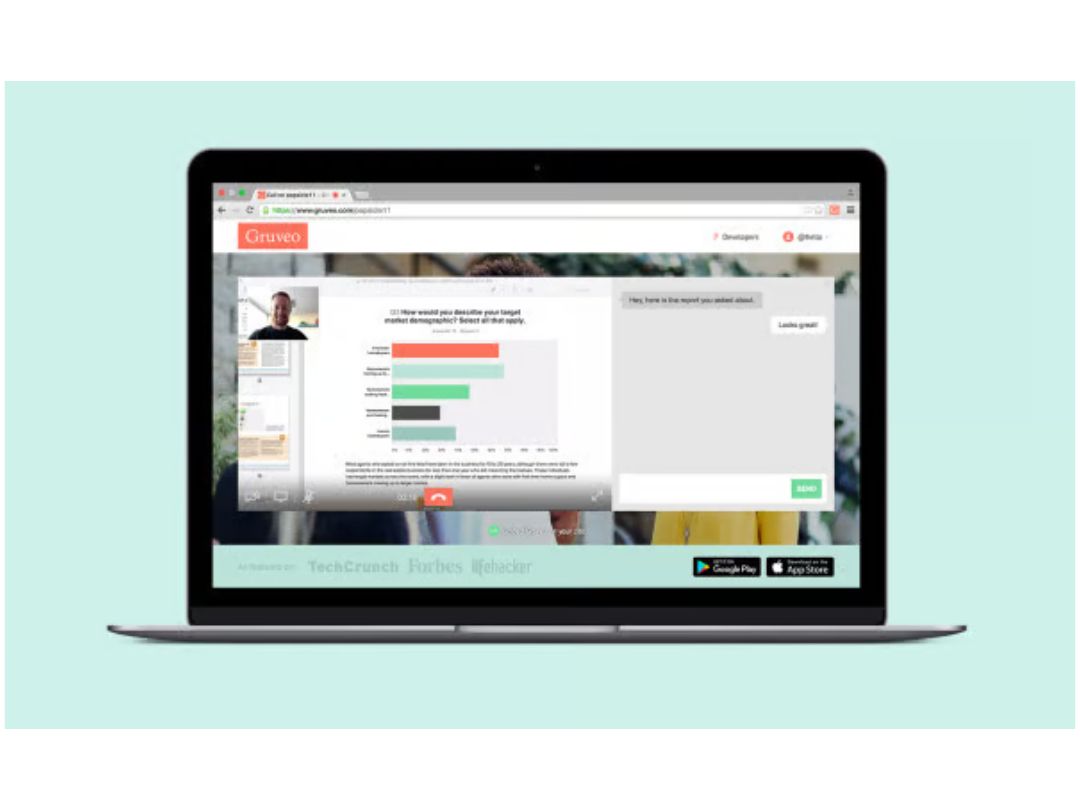
Gruveo is a video conferencing platform that enables instant, secure video calls with unique call links, requiring no downloads or registrations, suitable for personal and professional use.
See MoreHave you used Gruveo before?
Share your insights for better experience
 Custom Branding HD Call Recording Screen Sharing Text Mail Extended Caller Info Instant Text Chat Call Waiting Video and Audio calling Call Security Multiple Links Multiple Team Members

Watch the demo video to explore key features, real workflows, and how the software fits your business needs.
 Ubuntu
  Windows
  iOS
iOS  Android MacOS
  Desktop
  Mobile
  Tablet
  iPad
iPad  Cloud-Based

Small Business
Designed for startups and growing businesses
Medium Business
Built for business growth and flexibility
Enterprises
Designed for complex and large-scale business needs
4.5
Out of 5

Overall Rating
Based on
3 Verified Reviews
Rating Breakdown
80% Recommend this Product
Add ReviewUsers generally appreciate Gruveo for its effective group calling and in-call text features, which enhance communication and aid in managing customer interactions. The ability to conduct video calls has been highlighted as a valuable tool for improving sales processes. However, some users have noted limitations such as difficulties in identifying participants during audio calls, transient audio issues, and limited storage capacity. Additionally, the app's compatibility with browsers has been a concern for some users. Overall, Gruveo is well-received but has areas that could benefit from improvement.

Jul 25, 2019
Techjockey Verified
“I can organize calls in separate rooms with Gruveo”
Pros
One of the best features that I found in Gruveo is its group calling facility and call waiting features. Moreover, I can organize calls in separate call rooms, which are disposable and get incoming calls from my customers on the Gruveo link itself. These features are really helpful for managing my day-to-day customer calls!
Cons
There isn’t any easy way to identify the participants in an audio-only call. Additionally, there are a lot of transient issues and the audio goes in and out at times. These are the areas of improvement I suppose for the otherwise wonderful app.
Jun 19, 2019
Techjockey Verified
“In-call text sending feature is quite helpful”
Pros
The recording feature of this rich video calling is really helpful, and it helps send important files or documents or texts to the customers through chat so that they don’t need to wait long for a response. Gruveo comes with an in-call text sending feature that facilitates effective communication.
Cons
While using the Gruveo app, I found that it comes with very little storage; 5 GB to be precise. Moreover, it doesn’t run on all browsers either. Other than that, the application is great!
Feb 26, 2019
Techjockey Verified
“The best app for increasing sales via video-calling”
Pros
With Gruveo, I can talk to my leads through face-to-face video calls to effectively improve the sales process as that helps me to gauge the customer behaviour and their needs. I can also solve their queries better and it increases my chances of converting them into customers. Also, Gruveo’s HD call recording feature is quite helpful.
Cons
Sometimes, the ringer is on even when I am not connected, which is quite displeasing. I hope the issue gets rectified.

Gruveo
$ 29.00 excl. GST
Desktop
Mobile
Web based
On Premises
Windows
Mac OS

Tencent RTC
Price On Request
Desktop
Mobile
Web based
On Premises
Windows
Mac OS

Pexip
Price On Request
Desktop
Mobile
Web based
On Premises
Windows
Mac OS

Shindig
Price On Request
Desktop
Mobile
Web based
On Premises
Windows
Mac OS
Vidyo
Price On Request
Desktop
Mobile
Web based
On Premises
Windows
Mac OS
Evercast
Price On Request
Desktop
Mobile
Web based
On Premises
Windows
Mac OS

Google Meet
Price On Request
Desktop
Mobile
Web based
On Premises
Windows
Mac OS

iMind
Price On Request
Desktop
Mobile
Web based
On Premises
Windows
Mac OS
Interactio
Price On Request
Desktop
Mobile
Web based
On Premises
Windows
Mac OS

VideoMeet
Price On Request
Desktop
Mobile
Web based
On Premises
Windows
Mac OS

Jitsi
Price On Request
Desktop
Mobile
Web based
On Premises
Windows
Mac OS
(2) Product(s) selected
Available
Price on Request
Starting Price:
$99.00 /Month
Available
Price on Request
Starting Price:
$125.00 /Month
Available
Price on Request

Available
Price on Request

Starting Price:
$14.50 /License/Month

Available
Price on Request

Available
Price on Request

Available
Price on Request

Starting Price:
$99.00 /Month
Gruveo Video Conferencing Software is compatible with Windows, iOS, Android and MacOS.
Yes, Gruveo Video Conferencing Software app is available for Android and iOS app users.
Gruveo Video Conferencing Software supports web-based deployment.
Gruveo price details are available on request at techjockey.com.
Gruveo Video Conferencing Software is typically used in all industries for facilitating video and audio calls, screen sharing, and text communication.
Yes, Gruveo Video Conferencing Software free demo is available at techjockey.com.
Gruveo Video Conferencing Software offers a free trial. However, the premium plan with advanced features is available at techjockey.com with exciting deals.
Gruveo Video Conferencing Software installation is not required, as it is web-based. Just open the Setup Wizard to get started.
Gruveo works by providing users with unique call links that enable instant and secure video and audio calls, screen sharing, and text communication without the need for downloads or complex setups.
Terms and Condtions

Users with registered businesses can purchase goods from merchants on the platform to satisfy their business needs. Users are not permitted to utilize any products acquired through the platform for resale, advertising, business, or further distribution.
For each purchase made, users will receive a Tax Invoice (or 'GST invoice') that includes specific details such as:
the GSTIN of the user associated with their registered business, and
the specified Entity Name for their business.
It should be noted that not all products are eligible for GST Invoice. Only the products displayed by participating sellers with the 'GST-based Invoice Available' callout on the product description page would qualify.
Certain goods and services are not eligible to get a GST Invoice, including items with VAS, i.e., Value Added Services (e.g., Total Mobile Protection/Assured Buyback) and those involving an exchange offer at the time of purchase.
Users must ensure the accuracy of the GSTIN, and business entity name provided for the GST Invoice. Requests for corrections into GST Invoice would not be accommodated by Techjockey.com or any Seller, and any issues arising from user-provided information are the sole responsibility of users.
Techjockey.com is not liable for the GST Invoice or any associated input tax credit. To efficiently claim an input tax credit, users should select the registered place of business address as per the GST authority's data and follow the provisions of the GST Act and rules.
To claim an input tax credit, the delivery and billing addresses must match. Furthermore, input tax credits will not be granted if the delivery address and GSTIN on the invoice are from different states. In case of incorrect GST details provided during the order placement, the order will be canceled automatically.
 20,000+ Software Listed
 Unbiased Comparison
 Read Authentic Reviews
 500,000+ Monthly Users