linkedin
Whereby logo
play Welcome to Whereby. Where better meetings happen.

Whereby

Brand: Whereby

  • 4.6

  • 4 Ratings

Browser-based video meeting software for web conferencing, webinars, collaboration and screen sharing with remote teams.

See More

Have you used Whereby before?

Share your insights for better experience

Add a Review
Starting Price
$9

View plans

100% Genuine
Products
Best Price
Guaranteed
Safe & Secure
Payment
  • Description

  • Pricing

  • Features

  • Specification

  • Review

  • Compare

  • Alternatives

  • FAQ

Starting at $8.99

Whereby Software Overview

What is Whereby

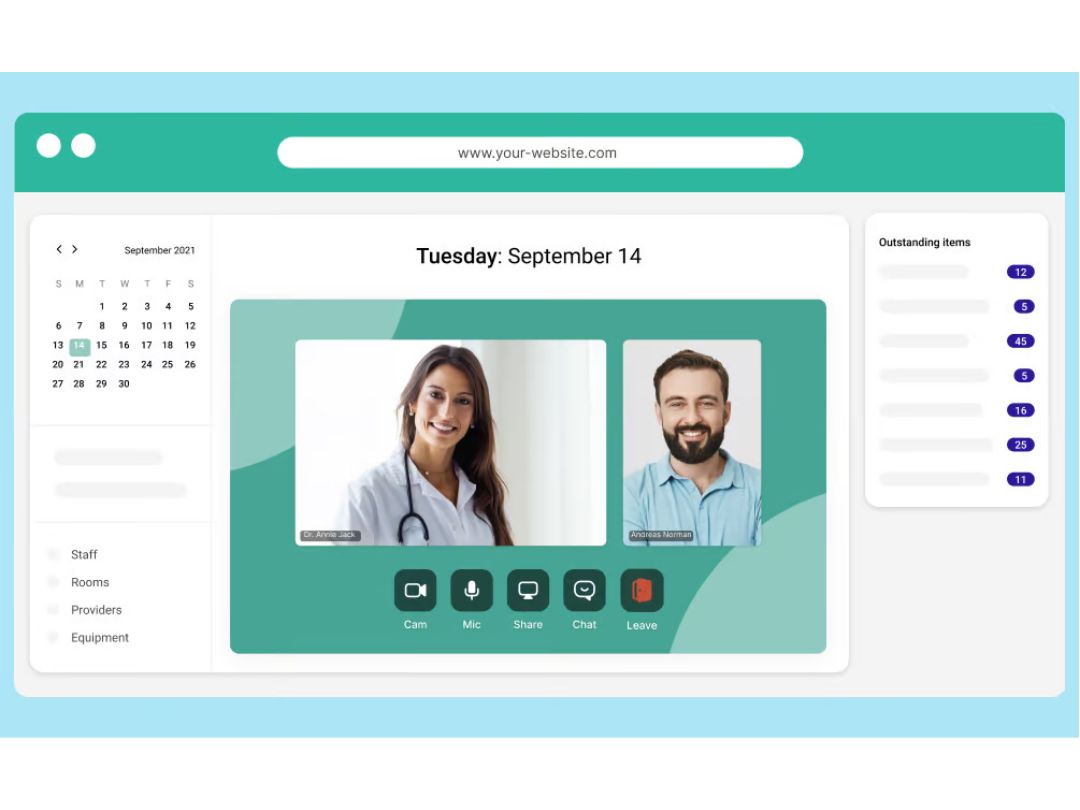
Whereby delivers intuitive real-time communication that can enhance productivity for modern teams. Offering web browser-based access across devices, it powers instant and seamless video meetings and chat.

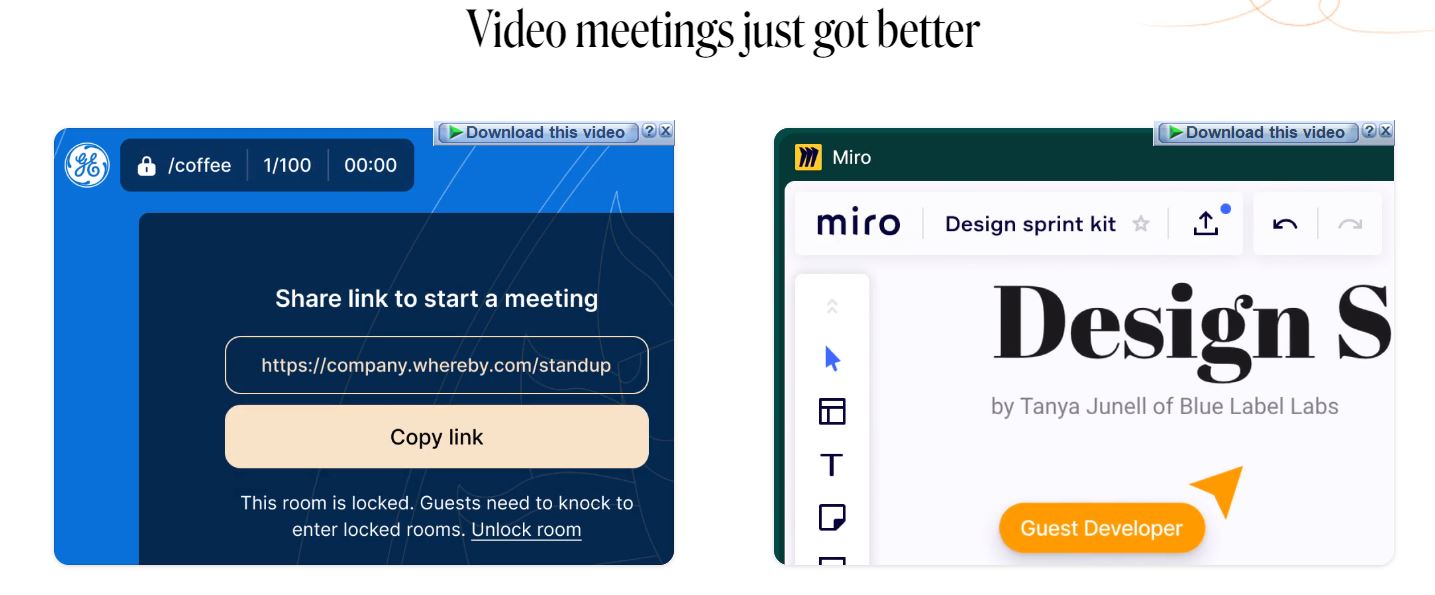
Key features include easy meeting room setups, customizable URLs for joining via any device, screen/application sharing capabilities, accompanying chat spaces and support for upto 12 video feeds per meeting. The tool can integrate with productivity software like Slack, Dropbox, Google & Outlook calendars enabling enhanced workflows.

Key Functionalities of Whereby

  • Browser-based Experience - Join meetings effortlessly from any device through website URLs with no required logins, downloads or installations encumbering participants.
  • Room Links - Create instant virtual spaces for meetings and share via customized room links rather than forcing external calendar invites or scheduling.
  • Screen Sharing - Present presentations, documents or full desktops quickly across all users within room sessions through intuitive one-click controls.
  • Virtual Backgrounds - Mask real environments to reduce distractions using custom images or video backgrounds with blur effects on webcam video inputs.
  • Whiteboard Integration - Sketch ideas visually leveraging collaborative whiteboard integrations synced across room participants.

Why Choose Whereby

  • Browser-based Lightweight Access: Join meetings instantly from links without installation eliminating backend provisioning meetings spontaneously today.
  • Virtual Background Effects: Appear more polished by visually customizing environments masking real surroundings when privacy matters with clients.
  • Easy URL Sharing: Simply share preconfigured URL links for anyone to join securing sessions without constantly provisioning logins manually each time.
  • Screen Share Focus Mode: Guide audiences attention highlighting mouse movements while freezing surrounding screen areas limiting distracting notifications.
  • Team Chat History: Reference threaded conversations history for cues on past decisions aiding memory while collaborating with fluctuating startup teammates.
  • Custom Branding: Display consistent company logos and theme colors matching internal video conference room hardware conveying organizational stability.
  • Voice Optimization: Consistently clear audio maximizing intelligibility courtesy echo cancellation and noise reduction algorithms perfected for flexibility.

Benefits of Whereby

  • Browser based ease of use: Join full-featured video meetings instantly without needing software installations for convenience.
  • Custom meeting URLs: Boost branding by assigning customized and easy to remember meeting URLs aligned consistently with domain name.
  • Remote desktop sharing: Optimize technical support and design reviews by sharing desktop screens effortlessly via Whereby.
  • Virtual backgrounds: Maintain environment or brand consistency choosing custom backgrounds to display during calls.
  • Collaborative whiteboard: Facilitate engaging discussions leveraging Whereby's infinite digital whiteboard with annotation tools.
  • Recording transcripts: Retain key discussion points easily accessing text transcripts generated automatically from meeting recordings.

Pricing of Whereby

Whereby pricing starts at $9.99 at techjockey.

The pricing model is based on different parameters, including extra features, deployment type, and the total number of users. For further queries related to the product, you can contact our product team and learn more about the pricing and offers.

Read more

Whereby Company Details

Founded Year:  2017

Whereby (formerly appear.in) is a collaboration tool for easy video meetings. No downloads, no logins.

Director/Founders Ingrid Ødegaard, Svein Willassen
Company Size 1-100 Employees

Whereby Pricing & Plans

Whereby Meetings-Pro
Starting at $8.99
    • 3.5" Chassis with up to 8 Hot Plug Hard Drives

      3.5" Chassis with up to 8 Hot Plug Hard Drives
      3.5" Chassis with up to 8 Hot Plug Hard Drives
    • Quantity

      Quantity
      Quantity

Key Features

  • Noise Reduction

  • Custom Branding

  • Rooms-3

  • Meeting capacity-100 participants

  • Collaboration tools

  • Screen sharing

  • Hybrid meetings

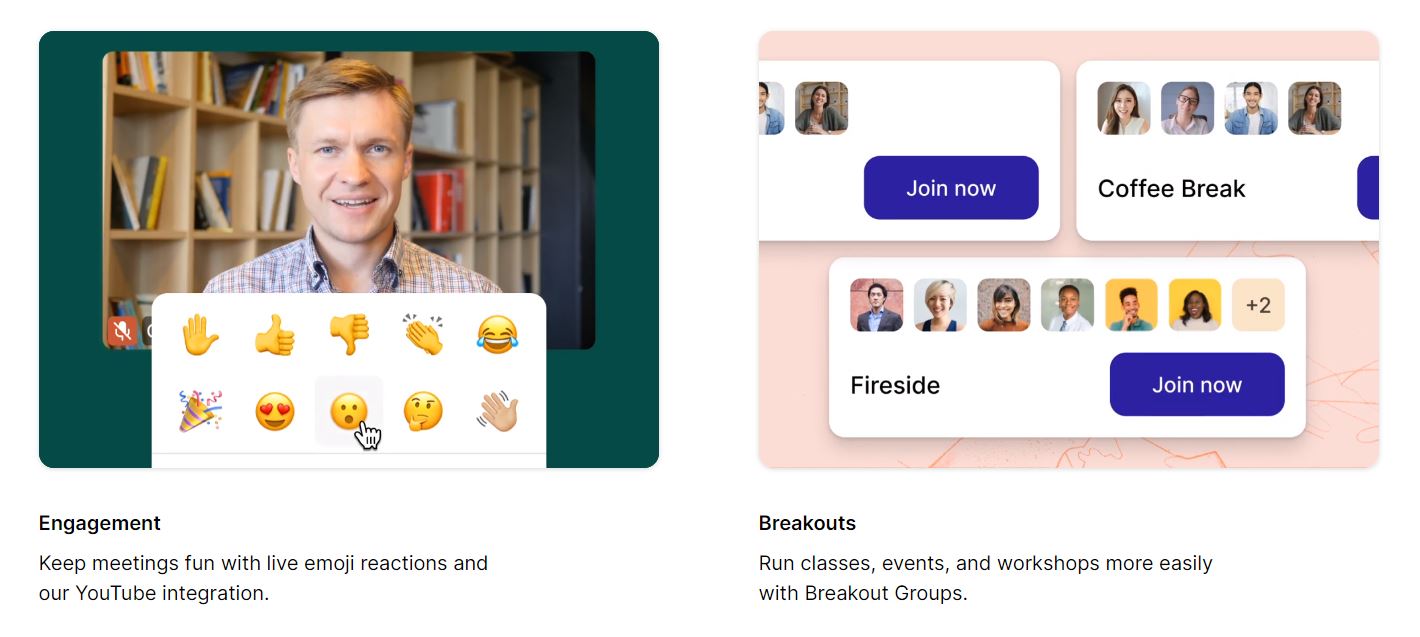
  • Breakout Groups

Whereby Meetings-Business
Starting at $11.99
    • 3.5" Chassis with up to 8 Hot Plug Hard Drives

      3.5" Chassis with up to 8 Hot Plug Hard Drives
      3.5" Chassis with up to 8 Hot Plug Hard Drives
    • Quantity

      Quantity
      Quantity

Key Features

  • Rooms-Unlimited

  • Meeting capacity-200 participants

  • Collaboration tools

  • Screen sharing

  • Hybrid meetings

  • Breakout Groups

  • Noise Reduction

  • Custom Branding

Whereby Features

  • icon_check Online Meetings
    Users can conduct online meetings from anywhere in the world without any hassle.
  • icon_check Audio / Video Conferencing
    Users can create virtual rooms and enjoy high-quality audio and video conferencing.
  • icon_check Screen Sharing
    Users can share their screens with team members in real-time and collaborate effectively.
  • icon_check Mobile Access
    Users can access Whereby from any device and use the mobile app for iOS.
  • icon_check Lock Rooms
    Users can protect their meeting rooms with passwords and control who can enter.
  • icon_check YouTube Integration
    Users can access YouTube from their meeting rooms and watch videos together.
  • icon_check Multi User
    Users can operate Whereby with multiple users and admins and manage large teams easily.
  • icon_check Secure
    Users can enjoy secure video and audio meetings with encryption and privacy features.
  • icon_check Meeting Recording
    Users can record, download, and share their meetings with others.
  • icon_check Chat
    Users can chat with each other via text and communicate without disrupting the meeting.
  • icon_check Company Branding
    Users can customize their meeting rooms with their own logo, color, and URL.
  • icon_check Priority Support
    Users can get fast and reliable support from the Whereby team.
Whereby Demo Video play icon

Get Whereby Demo

Watch the demo video to explore key features, real workflows, and how the software fits your business needs.

Understand
Key Features
Personal
Demo Insights
Interactive
Demo Support

Whereby Specifications

Supported Platforms
Ubuntu Ubuntu Windows Windows Android Android MacOS MacOS Linux Linux
Devices
Desktop Desktop Mobile Mobile Tablet Tablet iPad iPad
Deployment
Cloud-Based Cloud-Based
Suitable For
All Industries
Business Specific
All Businesses
Business Size
Small Business Startups Medium Business Enterprises
Customer Support
Email Communities
Language
English
Integration
API Integration
Training Resources
Webinars Documentation Videos

Explore the Best Alternative Solutions Similar to Your Business Size and Needs

Enterprises

Designed for complex and large-scale business needs

Pexip

4.2

Jitsi

4.4

See More

Whereby Review

4.6

Out of 5

img

Overall Rating

Based on
4 Verified Ratings

Rating Breakdown

  • Features 4.7
  • Value for Money 4.6
  • Ease of Use 4.7
  • Customer Support 4.5
Add Review

Be the First to Review

This product has no reviews yet. Be the first to leave your feedback.

Add Review

Compare Whereby With other Video Conferencing Software

Products
Ratings
Pricing
Device Supported
Deployment
Supported Platforms
  • img

    Whereby

  • 4.6

  • $ 8.99 excl. GST

  • Desktop

    Mobile

  • Web based

    On Premises

  • Windows

    Mac OS

  • img

    Tencent RTC

  • 4.0

  • Price On Request

  • Desktop

    Mobile

  • Web based

    On Premises

  • Windows

    Mac OS

  • img

    Pexip

  • 4.2

  • Price On Request

  • Desktop

    Mobile

  • Web based

    On Premises

  • Windows

    Mac OS

  • img

    Shindig

  • 4.5

  • Price On Request

  • Desktop

    Mobile

  • Web based

    On Premises

  • Windows

    Mac OS

  • img

    Vidyo

  • 4.4

  • Price On Request

  • Desktop

    Mobile

  • Web based

    On Premises

  • Windows

    Mac OS

  • img

    Evercast

  • 4.6

  • Price On Request

  • Desktop

    Mobile

  • Web based

    On Premises

  • Windows

    Mac OS

  • img

    Google Meet

  • 4.3

  • Price On Request

  • Desktop

    Mobile

  • Web based

    On Premises

  • Windows

    Mac OS

  • img

    iMind

  • 4.4

  • Price On Request

  • Desktop

    Mobile

  • Web based

    On Premises

  • Windows

    Mac OS

  • img

    Interactio

  • 4.5

  • Price On Request

  • Desktop

    Mobile

  • Web based

    On Premises

  • Windows

    Mac OS

  • img

    VideoMeet

  • 4.5

  • Price On Request

  • Desktop

    Mobile

  • Web based

    On Premises

  • Windows

    Mac OS

  • img

    Jitsi

  • 4.4

  • Price On Request

  • Desktop

    Mobile

  • Web based

    On Premises

  • Windows

    Mac OS

(2) Product(s) selected

Whereby Alternatives

See All Whereby Alternatives

Starting Price:

$99.00 /Month

Starting Price:

$125.00 /Month

Available

Price on Request

Starting Price:

$29.00 /Month

Starting Price:

$14.50 /License/Month

Available

Price on Request

Available

Price on Request

Starting Price:

$99.00 /Month

Which operating systems does Whereby support?

Whereby supports cross-platform access, compatible with Windows, macOS, Linux, Android and iOS operating systems across desktop and mobile.

Is there a Whereby mobile app?

Yes, Whereby provides dedicated mobile apps for both iOS and Android smartphone and tablet devices for on-the-go video meetings.

What is the deployment type of Whereby?

As a SaaS platform, Whereby is fully cloud-hosted allowing instant access from browsers and apps with no downloads, plugins or hardware requirements.

Who are the potential users of Whereby?

Whereby appeals to startups, SMBs, remote teams, sales professionals and anyone needing an easy way to conduct unlimited video meetings without complexity.

Is there any free trial for Whereby?

Yes, Whereby offers a 7-day free trial with access to all Pro plan features to experience the benefits before deciding whether to upgrade from the free tier.

Is Whereby software free?

The standard version of Whereby is free, supporting video meetings with up to 4 participants at once making it viable for smaller use cases.

How can you download Whereby?

Being a cloud SaaS platform, there is no traditional download available. Users simply access Whereby through its website or mobile apps.

How does Whereby work?

It facilitates browser-based video conferences using peer-to-peer connections optimized for speed, reliability and ease of use while keeping quality consistent even on lower bandwidths.

Terms and Condtions

close

Users with registered businesses can purchase goods from merchants on the platform to satisfy their business needs. Users are not permitted to utilize any products acquired through the platform for resale, advertising, business, or further distribution.

For each purchase made, users will receive a Tax Invoice (or 'GST invoice') that includes specific details such as:

  • the GSTIN of the user associated with their registered business, and

  • the specified Entity Name for their business.

It should be noted that not all products are eligible for GST Invoice. Only the products displayed by participating sellers with the 'GST-based Invoice Available' callout on the product description page would qualify.

Certain goods and services are not eligible to get a GST Invoice, including items with VAS, i.e., Value Added Services (e.g., Total Mobile Protection/Assured Buyback) and those involving an exchange offer at the time of purchase.

Users must ensure the accuracy of the GSTIN, and business entity name provided for the GST Invoice. Requests for corrections into GST Invoice would not be accommodated by Techjockey.com or any Seller, and any issues arising from user-provided information are the sole responsibility of users.

Techjockey.com is not liable for the GST Invoice or any associated input tax credit. To efficiently claim an input tax credit, users should select the registered place of business address as per the GST authority's data and follow the provisions of the GST Act and rules.

To claim an input tax credit, the delivery and billing addresses must match. Furthermore, input tax credits will not be granted if the delivery address and GSTIN on the invoice are from different states. In case of incorrect GST details provided during the order placement, the order will be canceled automatically.

20,000+ Software Listed 20,000+ Software Listed

Best Price Guaranteed Unbiased Comparison

Free Expert Consultation Read Authentic Reviews

2M+ Happy Customers 500,000+ Monthly Users